

Comparing strings has always been hard when we don't have great data quality. If we need exact matches, SQL Server works great. However, we often expect users to enter values without typos and know what values they want to find. Or at least know part of the string. However, matching with wildcards or partial strings has performance implications that can slow down our systems.
In SQL Server 2025, we have several new functions that help with fuzzy string matching. These new functions are: EDIT_DISTANCE(), EDIT_DISTANCE_SIMILARITY)(, JARO_WINKLER_DISTANCE)(, and JARO_WINKLER_SIMILARITY(). This article will examine the first two functions and explain how they work. The next article will cover the Jaro-Winkler functions. I hope someone will expand upon this overview with specific articles that help developers solve specific problems (or maybe I will).
This is part of a series on how the T-SQL language is evolving in SQL Server 2025.
Note: Some of these changes are already available in the various Azure SQL products.
Past Solutions
There have been tools in SQL Server that try to help us perform this in an automated way. We've had SOUNDEX() and DIFFERENCE() for years, but these were fairly rudimentary ways of looking for "close" matches for strings. Here at SQL Server Central, we've had these articles published over the years.
- Fuzzy-String Search: Find misspelled information with T-SQL
- Fuzzy Search
- Roll Your Own Fuzzy Match / Grouping (Jaro Winkler) - T-SQL
- Sound Matching and a Phonetic Toolkit
- Soundex - Experiments with SQL CLR
- Soundex - Experiments with SQLCLR Part 2
- Soundex - Experiments with SQLCLR Part 3
These all have dealt with various solutions that will allow you to match strings that are likely misspelled, typo'd, or otherwise similar to the value for which a user is querying. There are implementations of various algorithms, such as the Levenshtein distance computing algorithm or the Jaro–Winkler distance.
With SQL Server 2025, we have more options built into the T-SQL language, which don't require someone to implement an algorithm themselves. Let's look at each of these in turn.
Preview Features
All of the fuzzy string matching functions described here are in preview, as of the SQL Server 2025 RTM. To enable these, you need to set a database scoped configuration that allows them to run. You can do this as shown below with this code:
ALTER DATABASE SCOPED CONFIGURATION
SET PREVIEW_FEATURES = ON;
When you do this, you can run the functions, as shown here:
ALTER DATABASE SCOPED CONFIGURATION SET preview_features = on
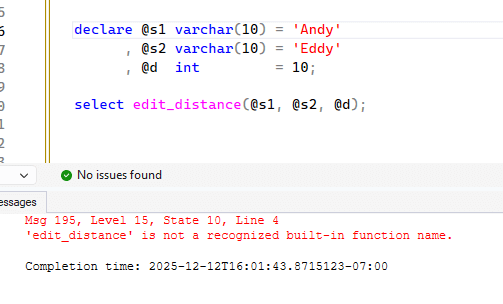
If you don't enable this config, you get an error when attempting to run a function.
I don't know when these functions will come out of preview, but if they are when you read this, please let me know so I can update the article.
EDIT_DISTANCE()
EDIT_DISTANCE() is a function that implements the Damerau-Levenshtein algorithm. This is the minimum number of edits required to transform one string into another. In other words, to change "Andy" into "Eddy", two edits are required. A to E and N to D. You can see this in the image above where I ran this function.
The syntax is are follows:
edit_distance( <char_expression_1>, <char_expression_2>, [<max_distance>])
where the character expressions are the two you want the edit distance between. The maximum_distance is an integer that defaults be the actual number of transformations needed. This is also the behavior if the value is negative. If the value is positive, then the function returns the actual distance or the maximum value itself. The docs say this might return a value greater than the maximum value. I haven't seen this in testing, but I supposed the inconsistency might be part of why this is in preview.
If any input is null, the result is null. Otherwise we get a return value from 0 to the number of transformations.
Let's setup a table with some values in it to experiment with this function. Here is a table that creates a number of names.
create table Names
(
    NameID int not null identity(1, 1)
  , NameVal varchar(100)
)
GO
INSERT INTO dbo.Names
(
    NameVal
)
VALUES
('James')
, ('Mary')
, ('Robert')
, ('Patricia')
, ('John')
, ('Jennifer')
, ('Michael')
, ('Linda')
, ('William')
, ('Elizabeth')
, ('David')
, ('Barbara')
, ('Richard')
, ('Susan')
, ('Joseph')
, ('Jessica')
, ('Thomas')
, ('Sarah')
, ('Charles')
, ('Karen')
go
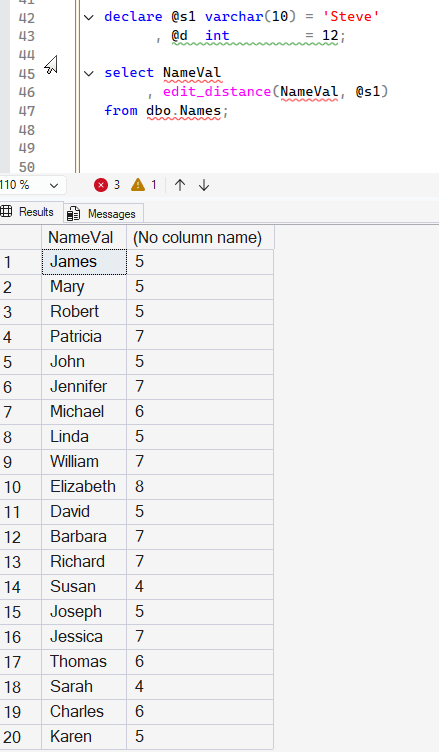
Let's get the edit distance from these names to another name. I'll choose "Steve" as the comparison and get the results with this code:
declare @s1 varchar(10) = 'Steve'
      , @d  int         = 12;

select NameVal
     , edit_distance(NameVal, @s1)
from dbo.Names;
The results are shown below. Note that this is comparing the particular characters in order. Both "James" and "Steve" have "S" and "e", but they are in different places. As a result, to change one name into the other, 5 replacements are required. Susan, however, only requires 4 edits as the first letter is the same.
Let's create a second table with some other data:
create table Words
(
    Wordid int not null identity(1, 1)
  , Word varchar(20)
);
go
insert dbo.Words
(
    Word
)
values
('Color')
, ('Colour')
, ('while')
, ('Whilst')
, ('colour');
go
These are various spellings of words in English and American English. Note there are case differences. If we run the parameter "color" in the function, we get interesting results. Note that the matching word with the correct case has a distance of 0. The matching word with a case difference has an edit of 1.
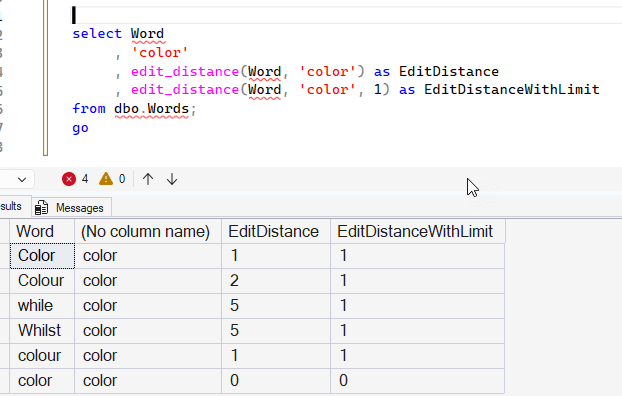
I assume that "Colour" has 2 edits that are a "C" to a "c" and removing the "u" from the word. While and Whilst have 5, since we're changing every character, though it does seem a little strange that changing a 6 character word to a 5 character word doesn't require 6 edits. However, it's 5 (w->c. h->o, delete i, s-> o, t->r)
The most interesting thing to me is that the EDIT_DISTANCE return when I specify a maximum value of 1 returns 1 each time. The docs say this for that parameter:
The maximum distance that should be computed. maximum_distance is an integer. If greater than or equal to zero, then the function returns the actual distance value or a distance value that is greater than maxiumum_distance value. If the actual distance is greater than maximum_distance, then the function might return a value greater than or equal to maximum_distance. If the parameter isn't specified or if maximum_distance is negative, then the function returns the actual number of transformations needed. If the value is NULL, then the function returns NULL.
I think this is a doc bug of some sort, as I'd expect that I would get the actual distance rather than a 1 in each case. Or get something that helps me determine this isn't within the distance. Very strange. This does appear to short-circuit the resources used as a bit of testing shows me that providing a maximum_distance seems to run quicker.
However, this function can still be useful. Let me add a WHERE clause to find those words which are a close match to a word. Suppose the user entered "colr" as a misspelling. Can I find things that are close? I can.
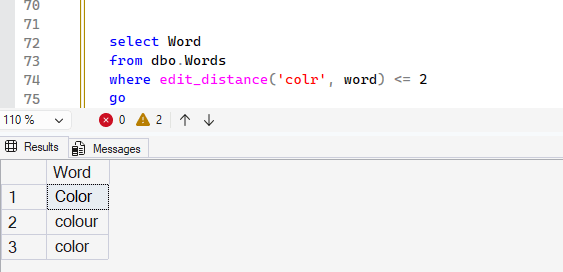
I might not use a scalar here, like 2, but rather a number of matches based on the length of the word. Perhaps I let the user have 2 errors for short words, but for a word like "mississippi" they could have 3 or 4 errors.
EDIT_DISTANCE_SIMILARITY
The other function I want to cover in this article is EDIT_DISTANCE_SIMILARITY(). This is a function that again implements the Damerau-Levenshtein algorithm, but returns a calculation that gives you a calculation of a percentage of difference. The formula is shown here (from MS Docs):
(1 – (edit_distance / greatest(len(string1), len(string2)))) * 100
This takes the distance from EDIT_DISTANCE and then divides that by the larger of the two string lengths. This is multiplied by 100 and then subtracted from 1. Let's add this to our previous query and see some results. Here is the code:
DECLARE @s VARCHAR(10) = 'colr';
SELECT Word,
       @s AS WordToMatch,
       EDIT_DISTANCE_SIMILARITY(word, @s) AS DistanceSimilarity,
       EDIT_DISTANCE(word, @s) AS Distance,
       LEN(word) AS WordLen,
       LEN(@s) AS StringLen
FROM dbo.Words;
GO
The results are shown below. Note that "color" to "colr" is a similarity of 60. This is taking the distance of 2 and dividing that by 5, which is the longer string expression. This gives us .4, and subtracting that from 1 gives us 0.6. This is 60%, and the multiplication gives us the 60% match.
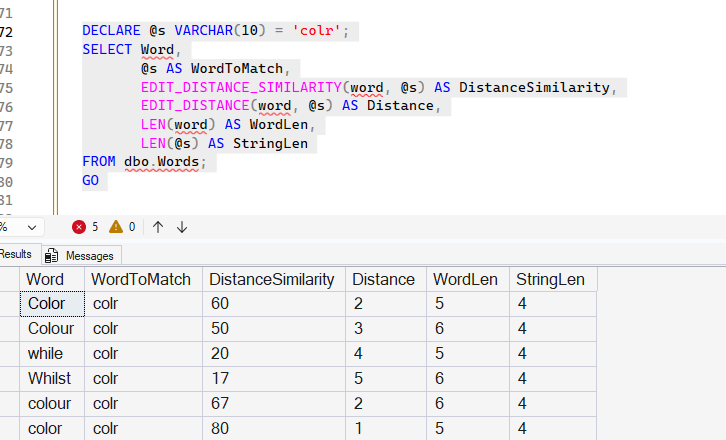
You can calculate the others, but this gets around the use of a scalar in edit_distance to determine how closely things match. That was the note I had at the end of the last section, but this function does a better job of letting you filter the possible matches.
The syntax for this function is similar to EDIT_DISTANCE(), but only has two parameters for the character expressions. It looks like this:
edit_distance( <char_expression_1>, <char_expression_2>)
The return value is an integer, which is the percentage match, based on the algorithm
A few more examples that might help illustrate this. I'll use my Names table, but I'll add a few names to the list.
INSERT INTO dbo.Names
(
    NameVal
)
VALUES
('Steve')
, ('Steven')
, ('Stephen')
, ('Esteban')
, ('steve')
, ('steven')
, ('stephen')
GO
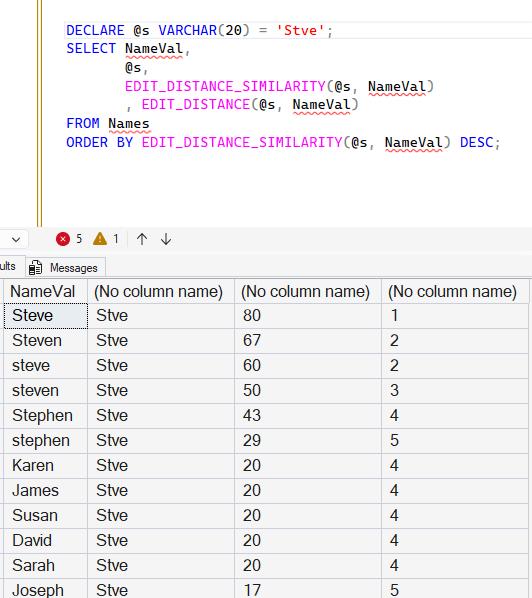
Now let's query for "Stve", which is a common mistake I'll make when typing too fast. If I do this, I see a similarity that varies quite a bit. I'll sort these by the percentage match descending. Notice that "Steve" is the best match, with "Steven" second. "steve" is only a 67% match with this algorithm. This is because the larger string value in each case is the NameVal, and one is larger than the other. Matching shorter to longer strings can cause this issue.
I've included the EDIT_DISTANCE() to make this easier to calculate.
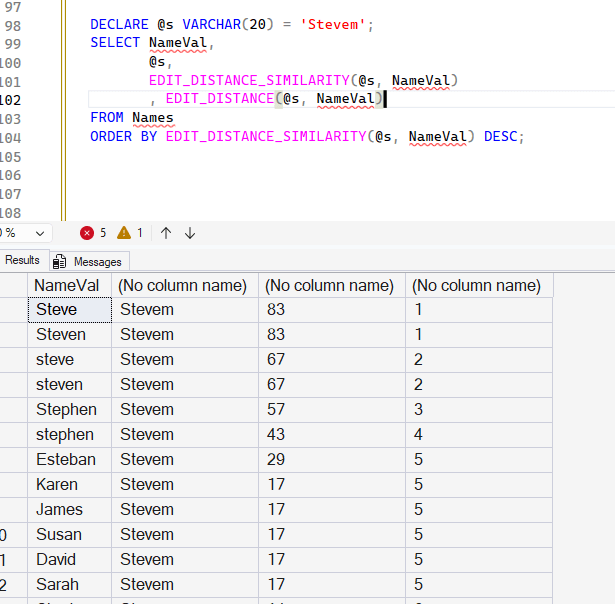
If we look at a different match, with a bigger misspelling, I get different results. In this case, I still get a different level of matching between "Steve" and "steve" because of a similar string length issue.
I'll include the code below for the queries, so you can test them yourself. I've included two additional queries where I coalesce the expressions to upper case. Lower works as well, and I'll discuss those below.
DECLARE @s VARCHAR(20) = 'Stve';
SELECT NameVal,
       @s,
       EDIT_DISTANCE_SIMILARITY(@s, NameVal)
       , EDIT_DISTANCE(@s, NameVal)
FROM Names
ORDER BY EDIT_DISTANCE_SIMILARITY(@s, NameVal) DESC;
GO
DECLARE @s VARCHAR(20) = 'Stevem';
SELECT NameVal,
       @s,
       EDIT_DISTANCE_SIMILARITY(@s, NameVal)
       , EDIT_DISTANCE(@s, NameVal)
FROM Names
ORDER BY EDIT_DISTANCE_SIMILARITY(@s, NameVal) DESC;
GO
DECLARE @s VARCHAR(20) = 'Stve';
SELECT NameVal,
       @s,
       EDIT_DISTANCE_SIMILARITY(UPPER(@s), UPPER(NameVal)) DistanceSimilarity
       , EDIT_DISTANCE(UPPER(@s), UPPER(NameVal)) AS Distance
FROM Names
ORDER BY EDIT_DISTANCE_SIMILARITY(UPPER(@s), UPPER(NameVal)) DESC;
GO
DECLARE @s VARCHAR(20) = 'Stevem';
SELECT NameVal,
       @s,
       EDIT_DISTANCE_SIMILARITY(UPPER(@s), UPPER(NameVal)) DistanceSimilarity
       , EDIT_DISTANCE(UPPER(@s), UPPER(NameVal)) AS Distance
FROM Names
ORDER BY EDIT_DISTANCE_SIMILARITY(UPPER(@s), UPPER(NameVal)) DESC;
GO
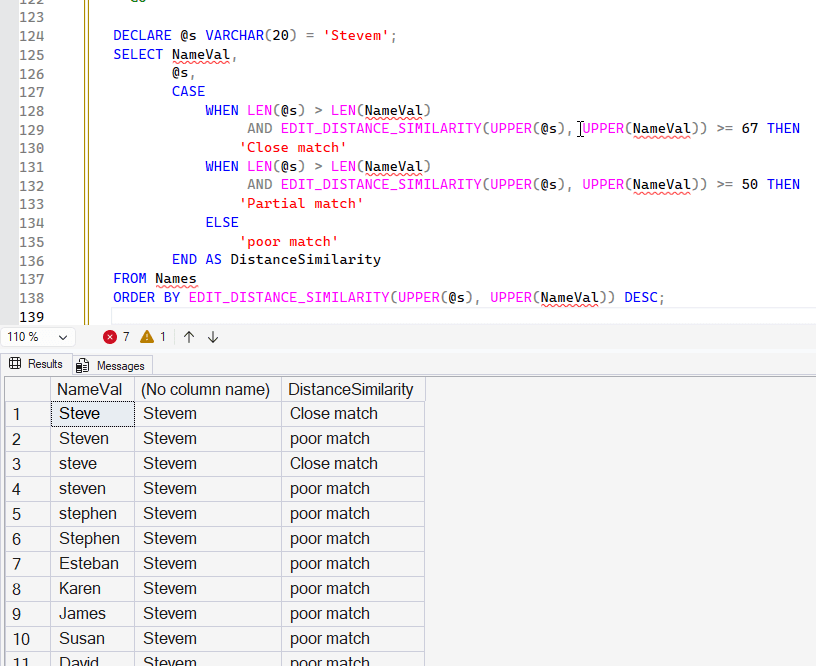
When I run the last two queries, I get mirror images of the results from a shorter to a longer string, because of the GREATEST() function in the formula. The results are shown here, and notice that the close matches "Steve", Steve", and "steven" are the same with longer to shorter. Shorter to longer has a spread for these values from 80-67.
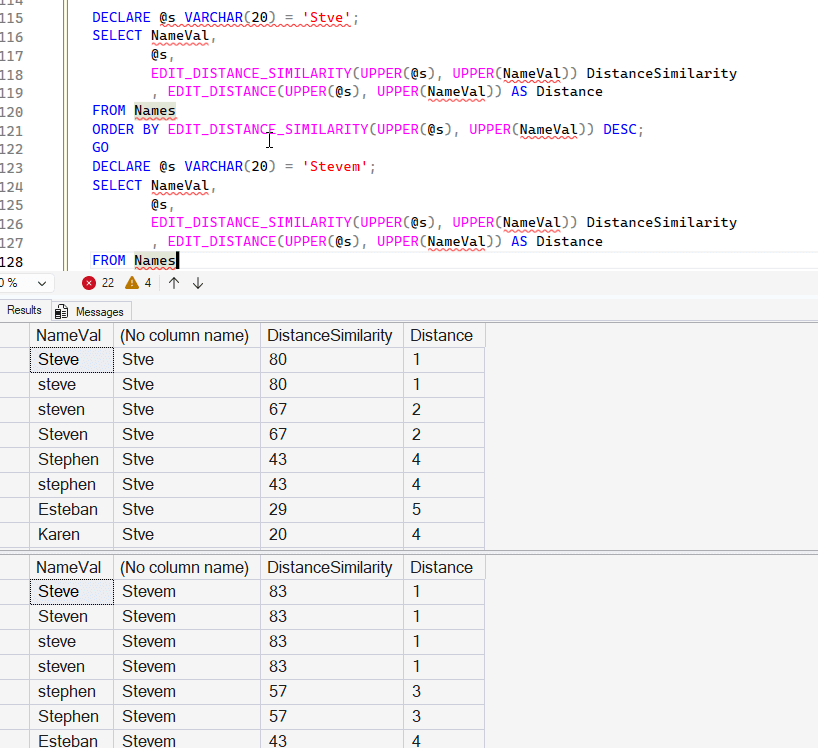
In the shorter-longer case (Stve to Steve), we find that Stephen shows a 43% match, while in the longer case, it's a 57% match. That's interesting, as a number I might use for matches would be 50%, at least as a guess. Looking at data matters here, as I might want to allow different levels of matching. For example, perhaps I would want to write something like this:
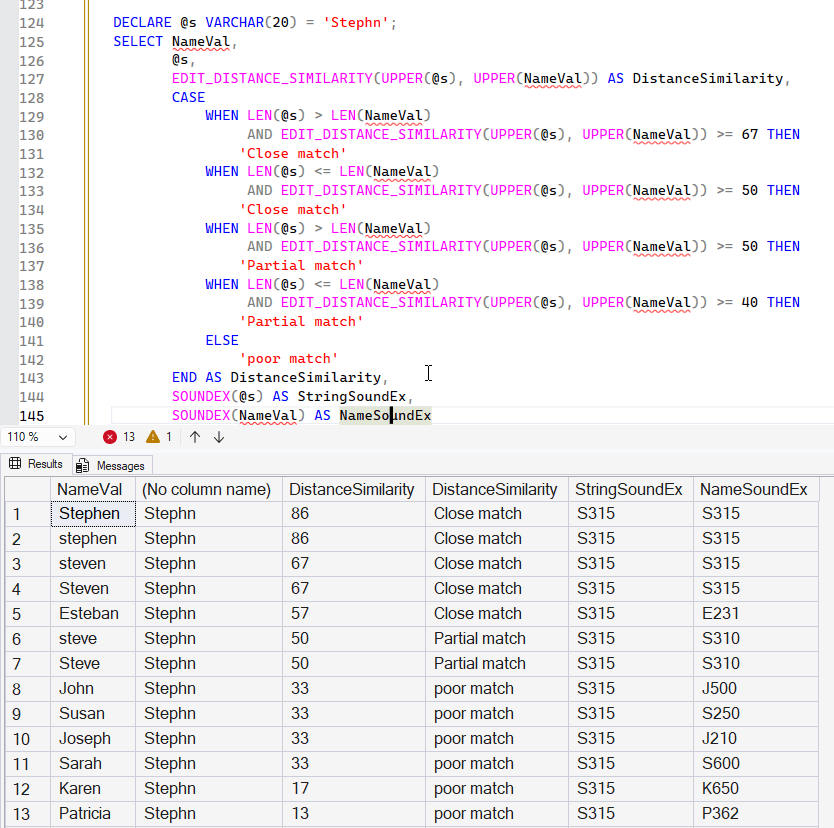
DECLARE @s VARCHAR(20) = 'Stephn';
SELECT NameVal,
       @s,
       EDIT_DISTANCE_SIMILARITY(UPPER(@s), UPPER(NameVal)),
       CASE
           WHEN LEN(@s) > LEN(NameVal)
                AND EDIT_DISTANCE_SIMILARITY(UPPER(@s), UPPER(NameVal)) >= 67 THEN
               'Close match'
           WHEN LEN(@s) <= LEN(NameVal)
                AND EDIT_DISTANCE_SIMILARITY(UPPER(@s), UPPER(NameVal)) >= 50 THEN
               'Close match'
           WHEN LEN(@s) > LEN(NameVal)
                AND EDIT_DISTANCE_SIMILARITY(UPPER(@s), UPPER(NameVal)) >= 50 THEN
               'Partial match'
           WHEN LEN(@s) <= LEN(NameVal)
                AND EDIT_DISTANCE_SIMILARITY(UPPER(@s), UPPER(NameVal)) >= 40 THEN
               'Partial match'
           ELSE
               'poor match'
       END AS DistanceSimilarity
FROM Names
ORDER BY EDIT_DISTANCE_SIMILARITY(UPPER(@s), UPPER(NameVal)) DESC;
This gives me better results, as I'm adjusting the matchings based on the lengths. You can see below that the variations of Steve give me close or partial matches. Non-Steve names are poor matches.
Obviously this is very data dependent, and you could end up with complex query statements, but you do have some tools here to experiment with and test with your data values. I would make sure that you log the values being compared and continuously run tests on what might be considered a close, partial, and poor match. In asking Claude what made sense, I got this as a set of percentages for fuzzy matching
- 90-100%: Exact or near-exact matches - typos, minor misspellings
- 80-89%: Strong matches - acceptable for most matching scenarios
- 70-79%: Moderate matches - may need human review
- Below 70%: Weak matches - usually too dissimilar
You might use this or alter this based on your situation.
Comparison with SOUNDEX
SOUNDEX converts things to upper case, so it works pretty closely to my final experiment. Here are the results of the last query with SOUNDEX values included. I won't add a calculation of matches with SOUNDEX, but the last two columns are very similar in the close match values and close in the partial matches. The exception being the row with "Esteban".
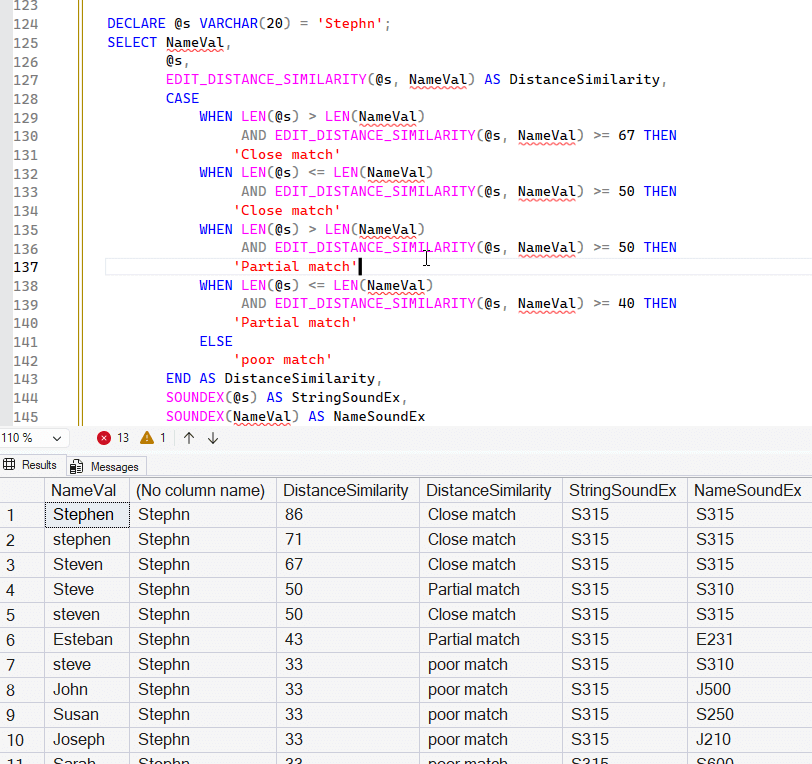
As a comparison, I'll remove the UPPER() clauses and you can see how this works. SOUNDEX looks pretty good still
Summary
There are new functions in SQL Server 2025 (and Azure SQL) to help you determine whether two string expressions are close in matching. This article looked at EDIT_DISTANCE() and EDIT_DISTANCE_SIMILARITY() first, which use the Damerau-Levenshtein algorithm to determine distance and the percentage similarity. We saw how we can get distances returned, as well as a percentage of that distance. Both functions are dependent on case, so you might get results that you do not expect. If you case about case, that's great.
The percentage similarity depends on string length, so testing is needed to determine how to weight the results.
There was a short section that shows how SOUNDEX() compares, and this doesn't seem to be a lot different, though there might be nuances that help you better determine whether there is a fuzzy match or now. There definitely is the ability to get more granular on matching though depending on the changes and if CASE matters, this might not be what you need.
Fuzzy string matching is hard, and there isn't a great solution. I think AI does a better job here than any programmed code with functions, but we will see over time.
In the next article, we will look at the Jaro Winkler functions.
