

In the last article, we examined fuzzy string matching in SQL Server 2025 with a few new functions. We know comparing strings has always been hard when we don't have great data quality. If we need exact matches, SQL Server works great. However, we often expect users to enter values without typos and know what values they want to find. Or at least know part of the string.
In SQL Server 2025, we have several new functions that help with fuzzy string matching. The last article looked at the distance functions, EDIT_DISTANCE() and EDIT_DISTANCE_SIMILARITY(). In this article, we will examine two other functions, JARO_WINKLER_DISTANCE() and JARO_WINKLER_SIMILARITY(). As with the other functions, these are in preview (as of Jan 2026), so be wary of using them in production. You also have to enable these functions as a part of a database scoped configuration. We covered that in the first article.
This is part of a series on how the T-SQL language is evolving in SQL Server 2025.
Note: Some of these changes are already available in the various Azure SQL products.
Jaro-Winkler
The Jaro-Winkler distance is another way of measuring edits to strings. This algorithm differs from the Damerau-Levenshtein algorithm in that it looks at matching characters to determine a distance. The Damerau-Levenshtein looks at the number of edits to change one string to the other.
I won't get into the details of how the calculation is made, but there are two functions based on this calculation in SQL Server 2025: JARO_WINKLER_DISTANCE() and JARO_WINKLER_SIMILARITY(). We will examine both of these in practice and see how they help us determine which fuzzzy matches are closest to the character expression we are trying to match.
JARO_WINKLER_DISTANCE
The first function is JARO_WINKLER_DISTANCE(), which calculates an edit distance between two strings. Preference is given to strings that match from the beginning for a set prefix length. We can't control that distance, nor is it documented.
The syntax is similar to other fuzzy string match functions in that we pass in the two character expressions.
JARO_WINKLER_DISTANCE( character_expression1, character_expression2)
There are not optional parameters. Both expressions must be varchar(n) or nvarchar(n). No max types allowed here. These can be constants, variables, or columns and the return type is a float value of the match.
A low value is a higher match. This seems a little counterintuitive to me, but it does make sense. This is the distance, so a low value is a close distance.
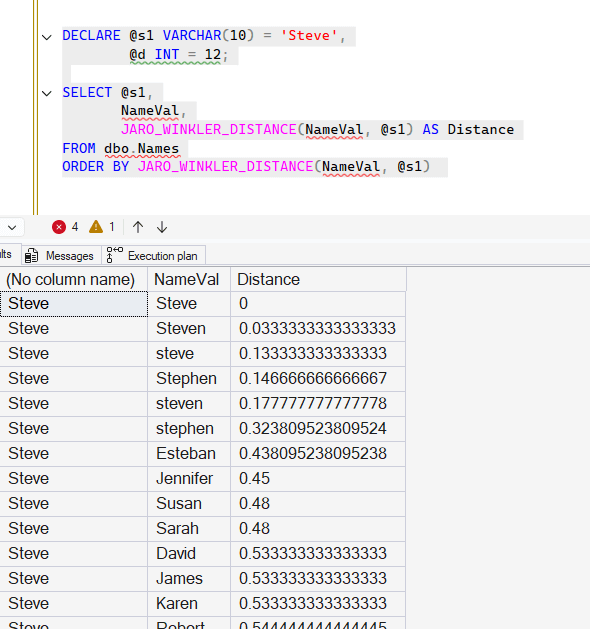
Let's look at a few examples. In the last article, we created two tables, Names and Words. Let's use those again. I'll calculate the distance from a name to other names. Notice that I sort ascending here.
DECLARE @s1 VARCHAR(10) = 'Steve',
        @d INT = 12;

SELECT @s1,
       NameVal,
       JARO_WINKLER_DISTANCE(NameVal, @s1) AS Distance
FROM dbo.Names
ORDER BY JARO_WINKLER_DISTANCE(NameVal, @s1)
The results show that an exact match ("Steve" to "Steve") has a distance of 0. Most of the variants are matching under .2, except for "stephen", which matches at 0.32. Non Steve names match above 0.4.
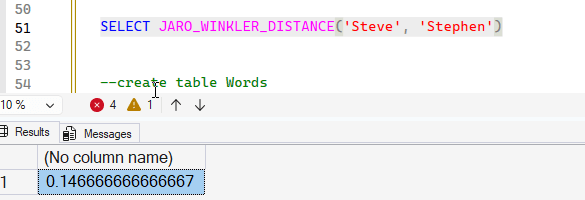
As we saw in the previous article, case can matter. In this example, let's take the "stephen" value above and make it mixed case to more closely match our first string. Notice that the match now comes down to 0.146. We'll also test a constant value in the function.
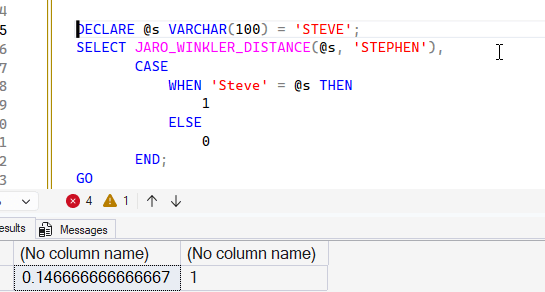
I'll also show here that I have a case insensitive database. Notice the code below shows the distance is the same with upper case strings, and I have a mixed variable and constant in the function. I also use a CASE to show that comparing two strings with different cases compare to the same values.
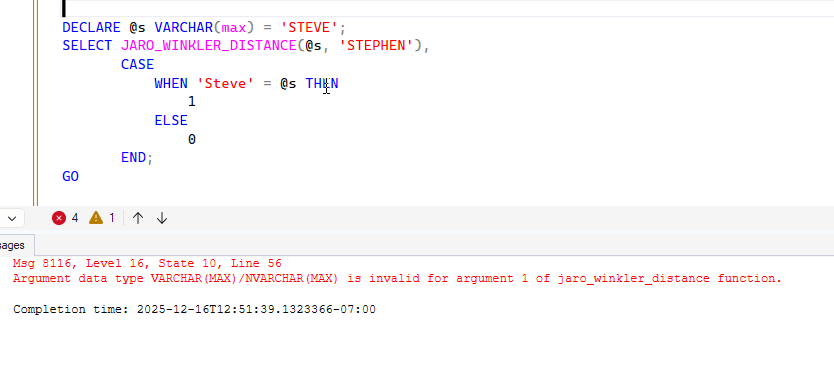
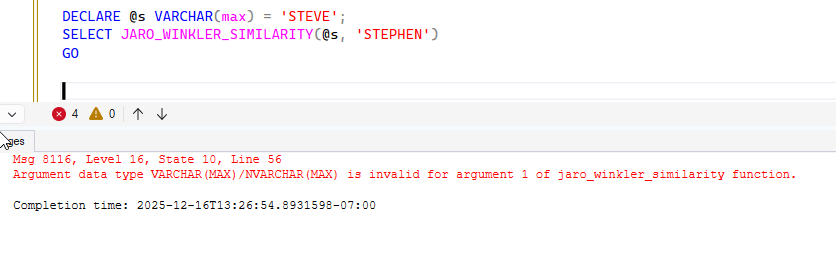
Notice that if I send in a max type, I get an error.
If I do some checks for the words, I see similar results. In this case, I'll add a calculation that better helps me determine the distance. I'll subtract the result from 1 and multiple by 100. Here is the code:
DECLARE @s VARCHAR(10) = 'colr';
SELECT Word,
       @s AS WordToMatch,
       JARO_WINKLER_DISTANCE(word, @s) AS DistanceSimilarity,
       (1 - JARO_WINKLER_DISTANCE(word, @s)) * 100 AS DistanceCalc
FROM dbo.Words;
GO
The results show that Color and Colour match closely to colr with high seventies match.
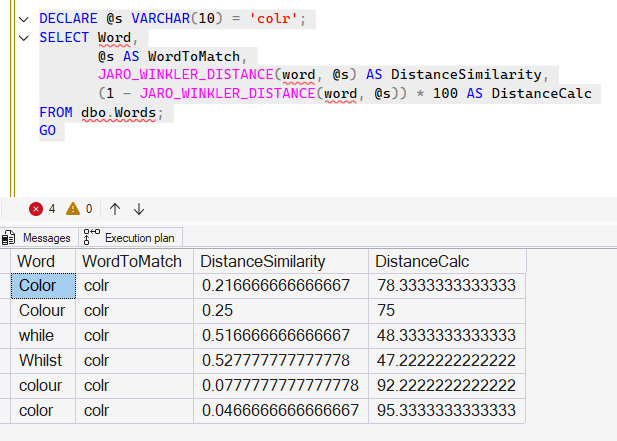
That helps me to see that those items which are very close in case and spelling match highly.
Let's move on to the other funciton.
JARO_WINKLER_SIMILARITY
The JARO_WINKLER_SIMILARTY() function seems to do what I did above, by calculating a similarity value. As with the previous function, this takes two character expressions and returns an int that is a similarity value. The syntax is shown below, and as above, the expressions cannot be max types.
JARO_WINKLER_SIMILARITY( character_expression1, character_expression2)
I'll test max expressions below to show the limits of the inputs.
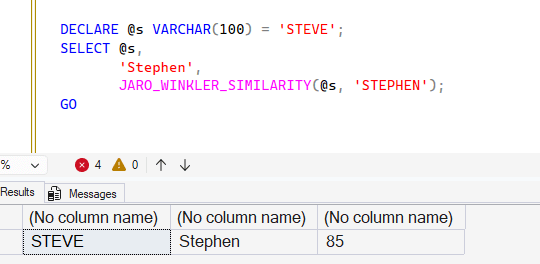
I can mix constants, variables, and columns in the function. The first two are shown below, with the match being an 85.
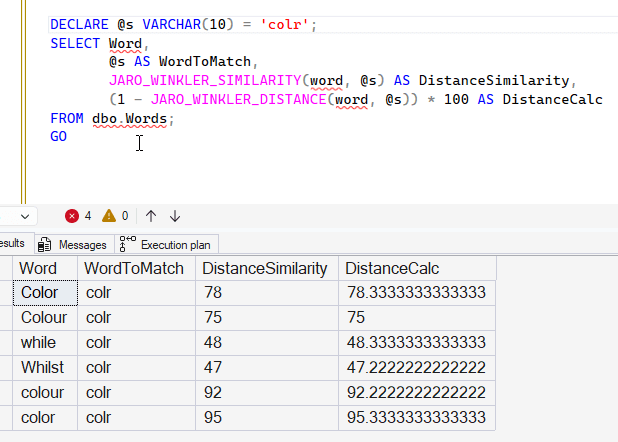
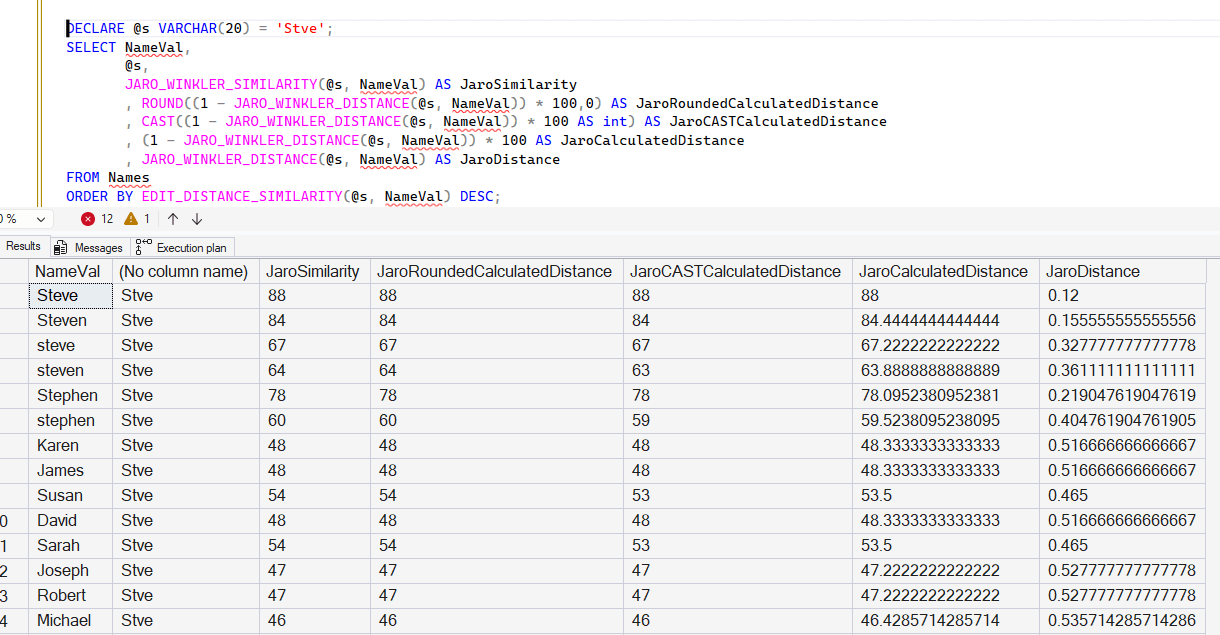
If I take the last query from the JARO_WINKLER_DISTANCE function and compare my calculation to this function, they are essentially the same. You can see this below:
If I use my Names table and perform the same comparison, this appear to be a ROUND() of the calculation to no decimals. Notice the middle three columns are the same in most cases, but the CAST doesn't round appropriately in line 4 and 6.
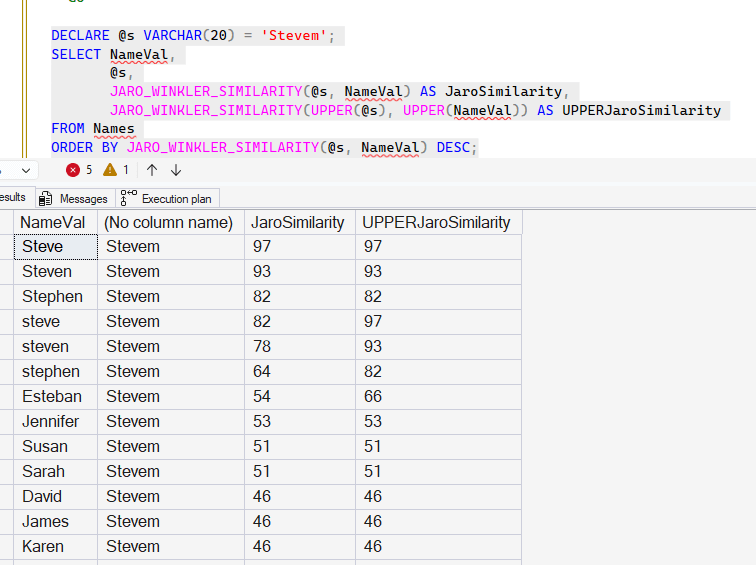
The similarity calculations here have similar issues with case, as the more differences in case, the more there is a difference. If I use the UPPER() function, then notice in the last column how the similarity scores are higher from this code:
DECLARE @s VARCHAR(20) = 'Stevem';
SELECT NameVal,
       @s,
       JARO_WINKLER_SIMILARITY(@s, NameVal) AS JaroSimilarity,
       JARO_WINKLER_SIMILARITY(UPPER(@s), UPPER(NameVal)) AS UPPERJaroSimilarity
FROM Names
ORDER BY JARO_WINKLER_SIMILARITY(@s, NameVal) DESC;
Notice line 4 goes from 82 to 97. Line 5 from 78 to 93. Most of the non-close matches stay the same.
Adding in these functions will affect performance, but depending on how often you might use fuzzy matching, this might be worth the extra compute cycles.
Comparing the Similarity
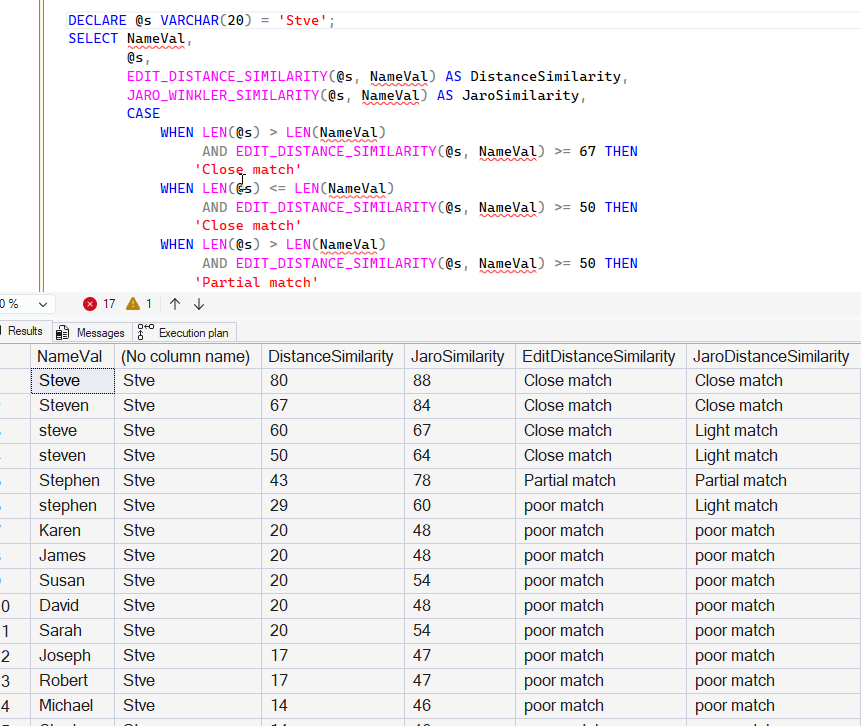
I'll use a query from the previous article and add in the Jaro-Winkler similarity as a comparison. In this case, we'll output a match value at the end. Here is the code, where I've used the code that looks at the string length for the edit distance functions. I've added the Jaro-Winkler similarity function result, as well as a high level of confidence used in an additional CASE statement. I'm setting 4 levels of matching, and ignoring string length.
DECLARE @s VARCHAR(20) = 'Stevem';
SELECT NameVal,
       @s,
       EDIT_DISTANCE_SIMILARITY(@s, NameVal) AS DistanceSimilarity,
       JARO_WINKLER_SIMILARITY(@s, NameVal) AS JaroSimilarity,
       CASE
           WHEN LEN(@s) > LEN(NameVal)
                AND EDIT_DISTANCE_SIMILARITY(@s, NameVal) >= 67 THEN
               'Close match'
           WHEN LEN(@s) <= LEN(NameVal)
                AND EDIT_DISTANCE_SIMILARITY(@s, NameVal) >= 50 THEN
               'Close match'
           WHEN LEN(@s) > LEN(NameVal)
                AND EDIT_DISTANCE_SIMILARITY(@s, NameVal) >= 50 THEN
               'Partial match'
           WHEN LEN(@s) <= LEN(NameVal)
                AND EDIT_DISTANCE_SIMILARITY(@s, NameVal) >= 40 THEN
               'Partial match'
           ELSE
               'poor match'
       END AS EditDistanceSimilarity,
       CASE
           WHEN JARO_WINKLER_SIMILARITY(@s, NameVal) >= 90 THEN
               'Great match'
           WHEN JARO_WINKLER_SIMILARITY(@s, NameVal) >= 80 THEN
               'Close match'
           WHEN JARO_WINKLER_SIMILARITY(@s, NameVal) >= 70 THEN
               'Partial match'
           WHEN JARO_WINKLER_SIMILARITY(@s, NameVal) >= 60 THEN
               'Light match'
           ELSE
               'poor match'
       END AS JaroDistanceSimilarity
FROM Names
ORDER BY EDIT_DISTANCE_SIMILARITY(@s, NameVal) DESC;
Here are the results for a short string. The longer strings with case changes, lines 3 and 4, show light matches, though they should be higher. The rest of the results seem to be good, though "steven" shows a light match for Jaro and a poor match previously with edit_distance_similarity().
With a longer string, we have these results. These look better to me. The interesting one is the Esteban (line 7) gets a poor match, but barely. Maybe we wouldn't consider that a match at all. Again, "stephen" gets a low match.
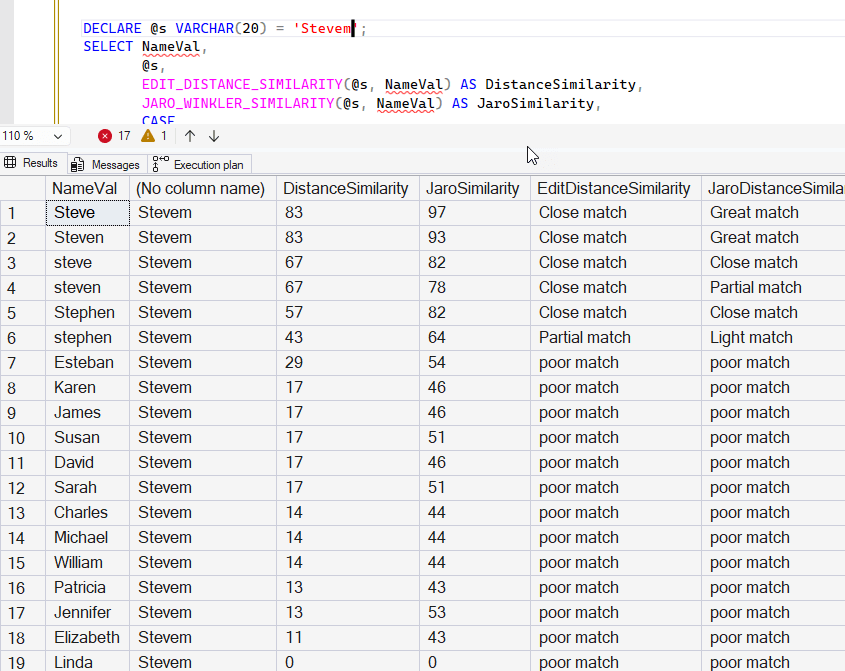
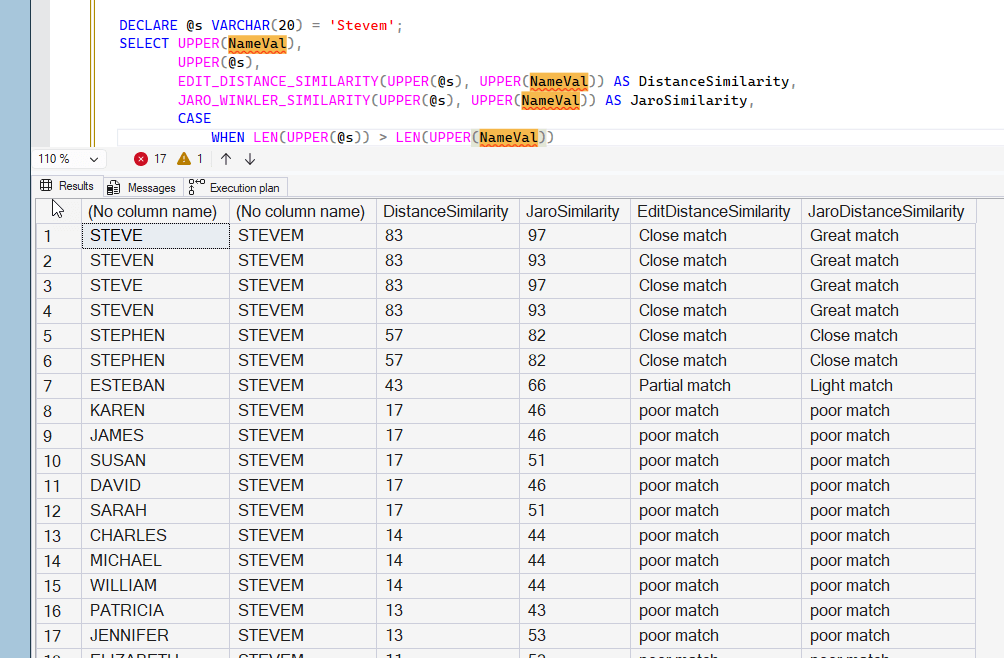
If we use the UPPER() function, then the JARO_WINKLER_SIMILARITY seems to work well. This is the same query as above, but using UPPER() around all the parameter values.
Summary
In this article, we looked at the other two fuzzy matching string functions, JARO_WINKLER_DISTANCE() and JARO_WINKLER_SIMILARITY(). These calculate a distance in a different way, and return a float value for the distance from the former function. The latter calculates a percentage of the distance as close to perfection, but returns a integer value.
These seem to work a bit better than the EDIT_DISTANCE() functions, though with fairly limited testing. I would conduct a much more comprehensive comparison of the types of data I was working with before choosing one of these.
These are preview functions, and they depend on the case of your data, so it's possible that they might change in the coming year to work differently, so you might only set up experiments and tests on these and not deploy them in production systems for now.
