

Introduction
In Part 1 of this series, we explored how CROSS APPLY can be used to retrieve related rows based on values from the current row of the outer table. One important characteristic of CROSS APPLY is that it returns only rows where the correlated query produces a result.
Sometimes, however, we need to return every row from the outer table, even when no matching rows exist. For example, a report may need to list all customers, including those who have never placed an order. This is where OUTER APPLY becomes useful. It works much like CROSS APPLY, but instead of excluding rows with no matches, it preserves them and returns NULL values for the columns from the inner query.
In this article, we'll build on the concepts introduced in Part 1 and explore how OUTER APPLY can be used to solve common reporting scenarios where unmatched rows need to be included.
Understanding the Core Concept of OUTER APPLY
OUTER APPLY works much like CROSS APPLY. Both operators allow the query on the right side to reference values from the current row of the outer table. The difference is what happens when the correlated query returns no rows. With CROSS APPLY, the outer row is excluded from the results. With OUTER APPLY, the outer row is still returned, and the columns from the inner query contain NULL values.
This behavior makes OUTER APPLY useful for reporting scenarios where every row from the outer table must be included, even when related data does not exist.
Sample Data
This article uses the same sample tables introduced in Part 1. If you have not completed Part 1, execute the setup script from that article before running the examples below. The examples continue using the Customers, Orders, and Products tables to demonstrate how OUTER APPLY behaves when matching rows exist and when they do not.
Problem Statement: Including Customers Without Orders
Suppose we want to retrieve every customer together with their most recent order. Unlike the previous article, this time the report must also include customers who have never placed an order. This is a common requirement in reporting systems. For example, a business may want to review all registered customers, including those who have not yet made a purchase.
The Customers table is the outer table in this query. For each customer row, the query inside OUTER APPLY searches the Orders table for rows where o.CustomerID matches c.CustomerID. The ORDER BY clause sorts each customer’s orders by OrderDate and then OrderID, both in descending order. TOP (1) then returns one row: the most recent order for that customer.
Because this is OUTER APPLY, a customer is still returned when the inner query finds no order. In that case, the columns returned from the inner query are NULL.
The following query returns every customer together with their most recent order.
SELECT
    c.CustomerID,
    c.CustomerName,
    o.OrderID,
    o.OrderDate,
    o.ProductID,
    o.Quantity
FROM Customers c
OUTER APPLY
(
    SELECT TOP (1)
           OrderID,
           CustomerID,
           ProductID,
           OrderDate,
           Quantity
    FROM Orders o
    WHERE o.CustomerID = c.CustomerID
    ORDER BY
        o.OrderDate DESC,
        o.OrderID DESC
) o;
Before reviewing the result, we can predict what the query should return from the sample data. Liam Wilson (CustomerID = 1) has two orders dated 2026-01-05: OrderID = 2 and OrderID = 6. Because OrderID is the secondary descending sort column, the query should return OrderID = 6. Olivia Taylor (CustomerID = 2) has one order, OrderID = 3. Noah Anderson (CustomerID = 3) has two orders, and OrderID = 5 is the most recent because its order date is 2026-01-12. Charlotte Brown (CustomerID = 4) has no rows in the Orders table, so her order-related columns should be NULL.
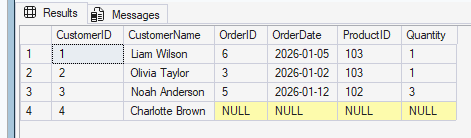
The result confirms this behavior. All four customers are returned. Liam Wilson is shown with OrderID = 6, while Charlotte Brown is included with NULL values for OrderID, OrderDate, ProductID, and Quantity.
Real-World Scenario: Displaying Optional Order Information
In many reports, every customer must be listed, even if some customers have not yet placed an order. Rather than excluding those customers, it is often more useful to display the available order information when it exists and leave the remaining columns as NULL.
In this version, the outer query again reads every row from Customers. The query inside OUTER APPLY searches Orders for rows where o.CustomerID matches the current customer and returns only OrderDate. TOP (1) returns one row after the descending ORDER BY clause places the most recent order first. Since OUTER APPLY preserves the outer row, customers without orders remain in the report.
The following query returns every customer together with the date of their most recent order.
SELECT
    c.CustomerID,
    c.CustomerName,
    o.OrderDate AS LatestOrderDate
FROM Customers c
OUTER APPLY
(
    SELECT TOP (1)
           OrderDate
    FROM Orders o
    WHERE o.CustomerID = c.CustomerID
    ORDER BY
        o.OrderDate DESC,
        o.OrderID DESC
) o;
From the sample data, the expected dates are 2026-01-05 for Liam Wilson, 2026-01-02 for Olivia Taylor, and 2026-01-12 for Noah Anderson. Charlotte Brown has no order, so LatestOrderDate should be NULL.
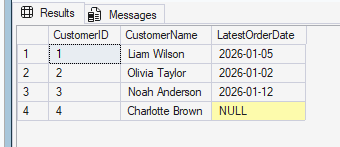
The result shows those expected dates and still includes Charlotte Brown. Her LatestOrderDate is NULL, which proves that OUTER APPLY preserved her customer row even though the inner query returned no order.
Conclusion
OUTER APPLY extends the behavior of CROSS APPLY by returning every row from the outer table, even when the correlated query produces no matching results.
In this article, we used OUTER APPLY to retrieve the latest order for every customer and to build reports that include customers even when related order information does not exist. These are common reporting scenarios where preserving unmatched rows is important.
Understanding when to use CROSS APPLY and when to use OUTER APPLY makes it easier to choose the right operator for correlated queries and produce clearer, more maintainable SQL code.