

Introduction
When developers first learn SQL aggregation, they usually start with the GROUP BY clause. It works well for summary reports because it combines multiple rows into a single result for each group. For example, you can calculate total sales per region or average salary per department.
The limitation of GROUP BY appears when you need both the summarized information and the original rows at the same time. In reporting systems and dashboards, it is very common to display each transaction alongside totals, averages, rankings, or running calculations related to that transaction.
This is where SQL Server window functions become useful. By using the OVER() clause together with PARTITION BY, SQL Server can perform calculations across related rows without removing the original data from the result set.
In this article, we will explore how PARTITION BY works, how it differs from GROUP BY, and how window functions can be used in practical SQL Server queries.
Creating a Sample Dataset
To demonstrate the concepts clearly, we will use a simple Sales table that represents transactions across multiple regions.
CREATE TABLE Sales
(
    SaleID INT,
    SaleDate DATE,
    CustomerName VARCHAR(100),
    Region VARCHAR(50),
    SaleAmount DECIMAL(10,2)
);

INSERT INTO Sales VALUES
(1, '2024-01-01', 'Ali', 'North', 500.00),
(2, '2024-01-02', 'Sara', 'South', 700.00),
(3, '2024-01-03', 'John', 'North', 300.00),
(4, '2024-01-04', 'Ayesha', 'East', 900.00),
(5, '2024-01-05', 'David', 'South', 400.00),
(6, '2024-01-06', 'Maria', 'North', 800.00),
(7, '2024-01-07', 'Ahmed', 'East', 600.00);
This table simulates a basic sales system where each row represents an individual sales transaction.
Viewing the Raw Data
Before working with aggregations or window functions, it helps to first examine the raw dataset.
SELECT
    SaleID,
    CustomerName,
    Region,
    SaleAmount
FROM Sales;
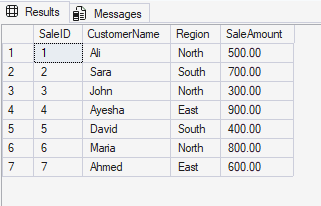
This query simply returns all rows from the table exactly as they are stored. Each row contains details about a single sale, including the customer, region, and transaction amount.
Looking at the original data first makes it easier to understand how SQL Server transforms the result set when aggregation and window functions are introduced.
Understanding GROUP BY
Before learning about PARTITION BY, it is important to understand how GROUP BY works because both features organize data into groups, although they produce very different results. The GROUP BY clause combines rows into a single row for each group. Aggregate functions such as SUM(), COUNT(), and AVG() are then used to calculate summary values for those groups.
SELECT
    Region,
    SUM(SaleAmount) AS TotalSales
FROM Sales
GROUP BY Region;
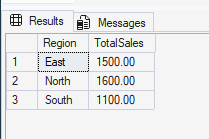
In this example, SQL Server groups all rows according to the Region column. Once the rows are grouped, the SUM() function calculates the total sales amount for each region.
Notice that the result now contains only one row per region. Columns such as SaleID and CustomerName are no longer available because the original rows have been collapsed into summary rows.
This behavior makes GROUP BY very useful for summary reports. However, it becomes limiting when you also need to keep the original transaction-level detail.
Understanding PARTITION BY and OVER()
Unlike GROUP BY, the PARTITION BY clause does not reduce the number of rows returned. Instead, it is used inside the OVER() clause of a window function. A window function performs calculations across a set of related rows while still preserving each individual row in the result set. The PARTITION BY clause defines how those rows are logically grouped for the calculation.
The following query calculates total sales per region while still keeping every transaction visible.
SELECT
    SaleID,
    CustomerName,
    Region,
    SaleAmount,
    SUM(SaleAmount) OVER (
        PARTITION BY Region
    ) AS TotalSalesPerRegion
FROM Sales;
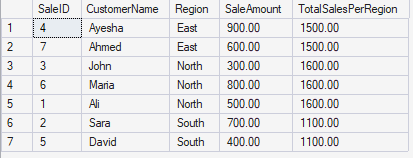
Here, SQL Server divides the data into partitions based on the Region column. The SUM() function is then calculated independently within each partition. Unlike GROUP BY, the original rows are not removed. Instead, the calculated total is returned alongside every row belonging to the same region.
For example, every row in the North region will display 1600 as the regional total while still preserving the individual transaction details. This is the key advantage of window functions: they allow SQL Server to combine row-level detail with aggregated calculations in the same result set. The order of rows in the output may appear different depending on how SQL Server executes or displays the results, but the calculations remain consistent within each partition.
GROUP BY vs PARTITION BY
Although GROUP BY and PARTITION BY both work with grouped data, they serve different purposes.
| Feature | GROUP BY | PARTITION BY |
| Rows Returned | Reduced | All rows retained |
| Output Type | Summary only | Detail + aggregated values |
| Row-Level Detail | Removed | Preserved |
| Common Usage | Summary reports | Analytical queries |
Use GROUP BY when only summarized information is needed.
Use PARTITION BY when calculations are required while still preserving the original rows.
Using Multiple Window Aggregations
One of the biggest advantages of window functions is that multiple calculations can be added to the same query without losing detail. The following query calculates several metrics for each region, including the total number of transactions, average sale amount, and the minimum and maximum sales values.
SELECT
    SaleID,
    CustomerName,
    Region,
    SaleAmount,
    COUNT(*) OVER (
        PARTITION BY Region
    ) AS TotalTransactions,

    AVG(SaleAmount) OVER (
        PARTITION BY Region
    ) AS AvgSale,

    MIN(SaleAmount) OVER (
        PARTITION BY Region
    ) AS MinSale,

    MAX(SaleAmount) OVER (
        PARTITION BY Region
    ) AS MaxSale
FROM Sales;
Instead of producing a separate summary row, SQL Server adds these calculations to every transaction within the same region. For example, all rows belonging to the South region will display the same transaction count, average sale value, and minimum and maximum sale amounts.
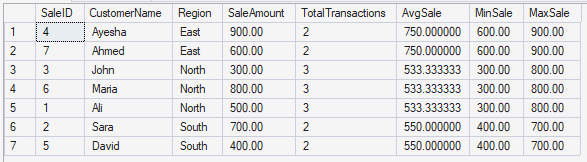
This approach is especially useful in dashboards and analytical reports where both detailed records and summary metrics need to appear together.
Numbering Rows Within Each Group
Window functions can also assign sequential numbers within each partition by using ROW_NUMBER(). In this query, SQL Server first partitions the rows by region. Inside each region, the rows are sorted by SaleAmount in descending order. The ROW_NUMBER() function then assigns a sequential number starting from 1 within each partition.
SELECT
    SaleID,
    CustomerName,
    Region,
    SaleAmount,
    ROW_NUMBER() OVER (
        PARTITION BY Region
        ORDER BY SaleAmount DESC
    ) AS RowNumInRegion
FROM Sales;
You can see each region has a set of numbers starting from 1.
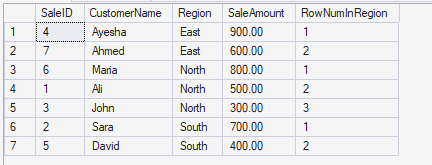
This technique is commonly used when identifying top-performing sales, ranking employees, or selecting the highest-value rows within a category.
It is important to understand that ROW_NUMBER() always generates unique numbers, even when values are tied. If multiple rows should share the same ranking value, SQL Server also provides the RANK() and DENSE_RANK() functions.
Running Total Example
A common use case for window functions is calculating cumulative totals over time. In the following example, the running total restarts for each region and grows as new sales rows are processed. SQL Server first partitions the rows according to region and then orders each partition by SaleDate. The running total begins with the first transaction in the partition and continuously adds values until the current row is reached.
SELECT
    SaleID,
    CustomerName,
    Region,
    SaleAmount,
    SUM(SaleAmount) OVER (
        PARTITION BY Region
        ORDER BY SaleDate
        ROWS BETWEEN UNBOUNDED PRECEDING
        AND CURRENT ROW
    ) AS RunningTotal
FROM Sales;
For example, if the North region contains sales of 500, 300, and 800, the running totals would become 500, 800, and finally 1600.
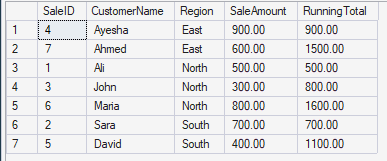
Running totals are widely used in financial reporting, trend analysis, and performance tracking systems.
Moving Average Example
Window functions are also useful for calculating moving averages, which help smooth short-term fluctuations in data and make trends easier to analyze. In this example, SQL Server calculates the average using the current row together with the following row inside the same region.
SELECT
    SaleID,
    CustomerName,
    Region,
    SaleAmount,
    AVG(SaleAmount) OVER (
        PARTITION BY Region
        ORDER BY SaleDate
        ROWS BETWEEN CURRENT ROW
        AND 1 FOLLOWING
    ) AS MovingAverage
FROM Sales;
Because the calculation operates within each partition independently, the moving average automatically resets whenever the region changes.
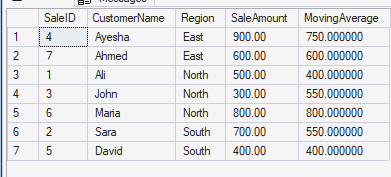
Moving averages are commonly used in forecasting, sales analysis, and business intelligence reporting.
Best Practices
When working with PARTITION BY, it is important to choose meaningful partition columns such as region, department, or category. Calculations that depend on sequence, such as running totals and rankings, should include an ORDER BY clause inside the OVER() statement.
The ORDER BY clause inside OVER() is important because it determines the sequence in which SQL Server processes rows for cumulative calculations. It is also a good idea to test window functions on smaller datasets first and use clear column aliases to improve readability. For larger analytical workloads, proper indexing can also improve query performance.
Conclusion
The PARTITION BY clause is an essential part of SQL Server window functions and is always used within the OVER() clause.
Unlike GROUP BY, which summarizes and reduces rows, PARTITION BY allows calculations to be performed across related rows while preserving the original dataset.
This makes window functions especially valuable in reporting systems, dashboards, analytical queries, and trend analysis where both detailed records and summarized insights are required at the same time.
By understanding how PARTITION BY works together with window functions such as SUM(), AVG(), and ROW_NUMBER(), you can write more flexible and powerful SQL Server queries for business scenarios.