CROSS APPLY Fundamentals: Part 1
-
Comments posted to this topic are about the item CROSS APPLY Fundamentals: Part 1
-
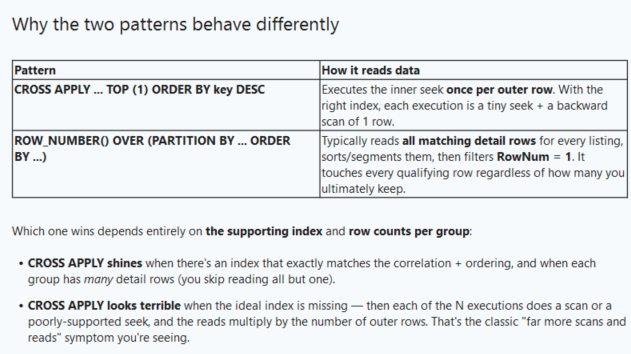
Curious of when others use CROSS APPLY vs ROW_NUMBER() to get the top N. Of course, many things may come into play when determining which to use and we need to determine what is best for our own use case. When testing in my environment, CROSS APPLY had double the scans and reads on my detail table (names obfuscated):
-- CROSS APPLY:

Table 'CoreTable'. Scan count 3, logical reads 6098, physical reads 0, page server reads 0, read-ahead reads 1226, page server read-ahead reads 0, lob logical reads 138823, lob physical reads 7, lob page server reads 0, lob read-ahead reads 442389, lob page server read-ahead reads 0.
Table 'CoreTable'. Segment reads 234, segment skipped 53.
Table 'Worktable'. Scan count 4, logical reads 10, physical reads 0, page server reads 0, read-ahead reads 0, page server read-ahead reads 0, lob logical reads 0, lob physical reads 0, lob page server reads 0, lob read-ahead reads 0, lob page server read-ahead reads 0.
Table 'DetailTable'. Scan count 28, logical reads 252958, physical reads 0, page server reads 0, read-ahead reads 121546, page server read-ahead reads 0, lob logical reads 4938481, lob physical reads 2730, lob page server reads 0, lob read-ahead reads 15867171, lob page server read-ahead reads 0.
Table 'DetailTable'. Segment reads 1610, segment skipped 0.
Table 'Worktable'. Scan count 0, logical reads 0, physical reads 0, page server reads 0, read-ahead reads 0, page server read-ahead reads 0, lob logical reads 0, lob physical reads 0, lob page server reads 0, lob read-ahead reads 0, lob page server read-ahead reads 0.

-- Using ROW_NUMBER:

Table 'CoreTable'. Scan count 3, logical reads 6098, physical reads 0, page server reads 0, read-ahead reads 0, page server read-ahead reads 0, lob logical reads 138772, lob physical reads 2, lob page server reads 0, lob read-ahead reads 442240, lob page server read-ahead reads 0.
Table 'CoreTable'. Segment reads 234, segment skipped 53.
Table 'DetailTable'. Scan count 15, logical reads 126479, physical reads 0, page server reads 0, read-ahead reads 0, page server read-ahead reads 0, lob logical reads 3574586, lob physical reads 2643, lob page server reads 0, lob read-ahead reads 10419262, lob page server read-ahead reads 0.
Table 'DetailTable'. Segment reads 805, segment skipped 0.
Table 'Worktable'. Scan count 0, logical reads 0, physical reads 0, page server reads 0, read-ahead reads 0, page server read-ahead reads 0, lob logical reads 0, lob physical reads 0, lob page server reads 0, lob read-ahead reads 0, lob page server read-ahead reads 0.
My knee jerk reaction would have been to use:
; WITH CustomerOrders AS
(SELECT
    c.CustomerID,
    c.CustomerName,
    o.OrderID,
    o.OrderDate,
    o.ProductID,
    o.Quantity,
    RowNum = ROW_NUMBER() OVER (PARTITION BY c.CustomerID ORDER BY o.OrderDate DESC, o.OrderID DESC)
FROM Customers c
INNER JOIN Orders o
    ON c.CustomerID = o.CustomerID
)

SELECT
    CustomerID,
    CustomerName,
    OrderID,
    OrderDate,
    ProductID,
    Quantity
FROM CustomerOrders
WHERE RowNum = 1;
My "CoreTable" has 135818076 rows.
My "DetailTable" has 752725863 rows.
-
Got an assist from Claude which helped:

-
CROSS APPLY as illustrated here will perform so much better if you give the 'TOP' query a covering index on the Orders table.
----------------------------------------------------
-
Besides using it to call functions (e.g. CROSS APPLY GENERATE_SERIES() or STRING_SPLIT() or your own ones), I often use it to calculate intermediate results instead of repeating the code multiple times.
So instead of this common but ugly statement with tons of repeating calculations in the code:
SELECT CASE WHEN op.net_price * op.amount * op.tax_rate) < 0
            THEN 'return'
            WHEN op.net_price * op.amount * op.tax_rate) < 100
            THEN 'small order'
            ELSE 'big order'
       END                                           AS category
     , SUM(op.net_price   * op.amount              ) AS net_total
     , SUM(op.net_price   * op.amount * op.tax_rate) AS gross_total
  FROM dbo.order_positions AS op
 GROUP BY CASE WHEN op.net_price * op.amount * op.tax_rate) < 0
               THEN 'return'
               WHEN op.net_price * op.amount * op.tax_rate) < 100
               THEN 'small order'
               ELSE 'big order'
          END
 HAVING SUM(op.net_price   * op.amount * op.tax_rate) <> 0
 ORDER BY CASE WHEN op.net_price * op.amount * op.tax_rate) < 0
               THEN 'return'
               WHEN op.net_price * op.amount * op.tax_rate) < 100
               THEN 'small order'
               ELSE 'big order'
          END
I "lay off" all the calculations into sub:
SELECT c3.category
     , SUM(c2.net_total)                          AS net_total
     , SUM(c2.gross_total)                        AS gross_total
  FROM dbo.order_positions AS op
 CROSS APPLY (SELECT op.net_price   * op.tax_rate AS gross_price) AS c1 -- calc_1
 CROSS APPLY (SELECT c1.gross_price * op.amount   AS gross_total
                   , op.net_price   * op.amount   AS net_total
             ) AS c2 -- calc_2
 CROSS APPLY (SELECT CASE WHEN c2.gross_total < 0
                          THEN 'return'
                          WHEN c2.gross_total < 100
                          THEN 'small order'
                          ELSE 'big order'
                     END                          AS category
             ) AS c3 -- calc_3
 GROUP BY c3.category
 HAVING c2.gross_total <> 0
 ORDER BY c2.gross_total
It has neither positive nor negative performance impacts laying of the intermediate results to CROSS-APPLY-"subqueryies", but it prevents a ton of bugs on the long term when you simply can't forget to find / change every single occurence of the redundant code.
God is real, unless declared integer.
- Thomas Franz wrote:
It has neither positive nor negative performance impacts laying of the intermediate results to CROSS-APPLY-"subqueryies", but it prevents a ton of bugs on the long term when you simply can't forget to find / change every single occurence of the redundant code.
Beautifully done but I'll have to say that "It Depends". I used to be a big fan of using CROSS APPLY to "DRY" out my code. I have found that it can actually make the performance worse than just using the same formula over and over in the SELECT List and other places in a query (which yours looks like it wouldn't do to begin with but I had to mention it).
And, sorry, I don't happen to have an example for that and I don't know if it always happens but be aware that it can happen and on big stuff, the difference can be significant as when I first ran into it.
And nice "River Formating" you've done on that code.
--Jeff Moden
RBAR is pronounced "ree-bar" and is a "Modenism" for Row-By-Agonizing-Row.
First step towards the paradigm shift of writing Set Based code:
________Stop thinking about what you want to do to a ROW... think, instead, of what you want to do to a COLUMN.Change is inevitable... Change for the better is not.
Helpful Links:
How to post code problems
How to Post Performance Problems
Create a Tally Function (fnTally) -
One of main problems of the SQL code parser is, that it doesn't save intermediate results for columns that are calculated per CROSS APPLY (or in a CTE or a VIEW or a subquery) but resolves / recalculate it at every occurence, making the "real" executed code again that ugly / difficult as in the first example.
I have some inline table functions that I use to normalize input and that are very complicated and when I use their results multiple times in a statement, it can become slow (one or two times I already got this error message, that the compile gives up, because my statment is too complicated, although there was nothing real special except using the result of one of the normalization functions in another large inline table functions with a lot of cases etc. (where the input gets parsed, converted etc.).
The only current way to prevent this behaviour is to use #temp tables, but I'd like an option (or general behaviour) to force the compiler to simply add an compute scalar operator, for every CROSS APPLY, so that it doesn't have to calculate something 50 times in nested functions.
PS: regarding my formating: My very first job as developer was around 2003 in a company that used COBOL on an AS/400 and they had very strict formation options, since it made code much more readable. I left the company after 3 month, but this was something I fully agree and kept since then.
God is real, unless declared integer.
Viewing 7 posts - 1 through 7 (of 7 total)
You must be logged in to reply to this topic. Login to reply