

SQL Server 2022 introduced several useful additions, including the BIT_COUNT() function. Although binary data and bitmasks are not part of everyday SQL development for many developers, they are commonly used to store permissions, feature flags, status indicators, and other sets of Boolean values.
Before BIT_COUNT(), counting the number of enabled bits often required custom logic or bitwise calculations. While these approaches worked, they could make queries harder to read and maintain. BIT_COUNT() simplifies this task by providing a built-in way to count enabled bits directly within SQL Server.
The function is simple, but it has several practical uses. It can help with filtering, reporting, validation, and other scenarios that involve bitmask-based data. This article explores how BIT_COUNT() works and demonstrates several practical examples of using it with bitmask values in SQL Server.
What is BIT_COUNT()?
BIT_COUNT() returns the number of bits set to 1 in a value. In simple terms, it counts how many enabled bits exist in the binary representation of a number.
For example, the value 10 is represented as 1010 in binary form. Because two bits are set to 1, BIT_COUNT() returns 2.
SELECT BIT_COUNT(10) AS BitCount;
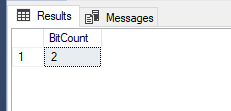
Although the binary representation is not displayed in the result, SQL Server performs the conversion internally and returns the number of enabled bits.
Now that we have seen a simple example of BIT_COUNT(), it is helpful to understand how individual bits are represented inside a number. This foundation will make the later bitmask examples easier to follow.
Understanding Bits (1, 2, 4, 8)
To understand how BIT_COUNT() works with bitmasks, it helps to first understand how individual bits are represented inside a number. In a bitmask system, each bit position represents a power of two. The first bit represents the value 1, the second bit represents 2, the third bit represents 4, and the fourth bit represents 8. Each of these values represents a single enabled bit. For example, the value 1 is represented as 0001 in binary, 2 is 0010, 4 is 0100, and 8 is 1000.
Because each value uses a different bit position, multiple flags can be combined into a single number. For example, the value 5 is represented as 0101. This means the bits for 1 and 4 are enabled. Similarly, the value 3 is represented as 0011, meaning the bits for 1 and 2 are enabled.
This is the basic idea behind bitmasking. Instead of storing multiple true or false values in separate columns, a single integer can store several flags by combining these values. BIT_COUNT() works with these combined values by counting how many bits are enabled. It does not identify which specific flags are enabled; it only returns the total number of bits set to 1.
Simple Values
Before working with tables and real-world scenarios, it is useful to see how BIT_COUNT() behaves with different numeric values. The function counts how many bits are set to 1 in the binary representation of a value.
For example:
- BIT_COUNT(0) returns 0 because no bits are enabled.
- BIT_COUNT(1) returns 1 because one bit is enabled.
- BIT_COUNT(7) returns 3 because 7 is represented as 111 in binary.
- BIT_COUNT(255) returns 8 because all eight bits are set to 1.
The following query evaluates these values:
SELECT
    BIT_COUNT(0)   AS ZeroValue,
    BIT_COUNT(1)   AS OneValue,
    BIT_COUNT(7)   AS SevenValue,
    BIT_COUNT(255) AS MaxByte;
The query checks each value and returns how many bits are set to 1.
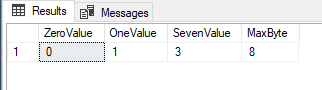
The result confirms that BIT_COUNT() returns the total number of enabled bits within each value. These examples show that BIT_COUNT() works consistently regardless of the size of the value being evaluated.
While these simple values explain how the function behaves, BIT_COUNT() becomes more useful when applied to real data stored in tables. The next example demonstrates how it can be used with permission values stored for multiple users.
Using BIT_COUNT() with a Table
To see how BIT_COUNT() works in a practical scenario, consider a table that stores user permissions as an integer. Each value represents a combination of enabled flags stored using a bitmask. The following statements create a table named UserFlags and insert a few sample records:
CREATE TABLE UserFlags (
    UserID INT,
    Permissions INT
);

INSERT INTO UserFlags VALUES
(1, 3),
(2, 5),
(3, 7);
The permission values represent different combinations of enabled flags:
- 3 represents Read + Write
- 5 represents Read + Delete
- 7 represents Read + Write + Delete
Because multiple flags can be stored inside a single integer, bitmasks provide a compact way to store Boolean values.
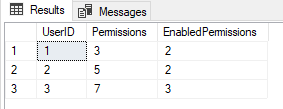
Now we can use BIT_COUNT() to determine how many permissions are enabled for each user:
SELECT
    UserID,
    Permissions,
    BIT_COUNT(Permissions) AS EnabledPermissions
FROM UserFlags;
The query returns the original permission value together with the number of enabled bits. This example shows how BIT_COUNT() can quickly summarize bitmask values without manually counting enabled flags. It is useful when the goal is to know how many flags are active, such as in reporting or validation scenarios.
In some situations, the number of enabled flags is important. For example, suppose a business rule requires exactly three flags to be enabled before a record is considered valid. The following query returns only the rows that satisfy this requirement:
SELECT *
FROM UserFlags
WHERE BIT_COUNT(Permissions) = 3;
The query counts the enabled bits in each Permissions value and returns only rows where the count equals 3. In the sample data, only User 3 is returned because the value 7 contains three enabled bits.
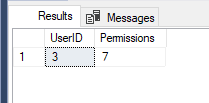
This approach can be useful when a business rule depends on the number of active flags rather than the specific flags themselves.
Working with Binary Data
So far, the examples in this article have used integer values. However, BIT_COUNT() can also be used with binary data.
The following example counts the number of enabled bits in a hexadecimal value.
SELECT BIT_COUNT(CAST(0x0F AS VARBINARY(1))) AS Result;
The value 0x0F is represented as 00001111 in binary form. Because four bits are set to 1, BIT_COUNT() returns 4.
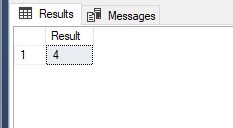
This example shows that BIT_COUNT() works with both integer and binary values, making it useful when working with hexadecimal or other binary data formats.
Counting Specific Flags Only
In some situations, you may not want to count every enabled flag. Instead, you may need to focus on a specific subset of values. This can be achieved by combining a bitwise AND (&) operation with BIT_COUNT().
In this example, the value 5 represents the flags 1 and 4. The expression Permissions & 5 preserves only those selected bits before BIT_COUNT() performs the count.
SELECT
    UserID,
    BIT_COUNT(Permissions & 5) AS SelectedFlags
FROM UserFlags;
For example, User 2 has a Permissions value of 5. Since both selected flags are enabled, BIT_COUNT() returns 2.
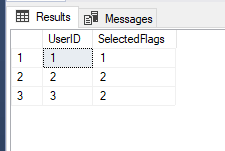
This technique can be useful when analyzing a specific subset of flags within a larger bitmask.
Edge Cases to Be Aware Of
One common issue occurs when BIT_COUNT() is used with an untyped NULL value.
SELECT BIT_COUNT(NULL);

SQL Server returns an error because NULL does not have an associated data type. To evaluate the expression successfully, the NULL value must be cast to a supported data type.
SELECT BIT_COUNT(CAST(NULL AS INT)) AS Result;
After the value is cast to INT, SQL Server can evaluate the expression and returns NULL.
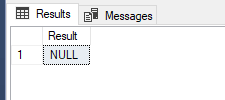
This behavior is consistent with many SQL Server functions that return NULL when the input value is NULL.
Performance Considerations
BIT_COUNT() is a built-in SQL Server function and is generally efficient for counting enabled bits. The query returns only rows where more than two bits are enabled.
SELECT
    UserID,
    Permissions,
    BIT_COUNT(Permissions) AS BitCount
FROM UserFlags
WHERE BIT_COUNT(Permissions) > 2;
In the sample data, only the row with a permission value of 7 satisfies this condition.
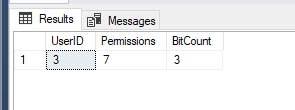
As with any function used in filtering, performance should be tested against real workloads and larger datasets. The impact will depend on factors such as table size, indexing, and overall query design. For most reporting and validation scenarios, BIT_COUNT() provides a simple and readable way to work with bitmask data.
When NOT to Use BIT_COUNT
BIT_COUNT() is useful when working with bitmask-based designs, but it is not the right solution for every scenario. If permissions or flags are already stored in separate columns, there is usually no need to use BIT_COUNT(). The values can be queried and filtered directly without additional calculations. For example, a table that stores permissions as individual BIT columns is often easier to read and understand than a bitmask-based design.
Bitmasks can reduce storage requirements, but they also add complexity. Developers must understand how the values are encoded and how bitwise operations work. BIT_COUNT() is most useful when multiple flags are intentionally stored within a single value and the goal is to count how many of those flags are enabled.
Final Thoughts
BIT_COUNT() is a useful addition to SQL Server 2022 for working with bitmask-based data.
In this article, we explored how BIT_COUNT() can be used to count enabled flags, filter records, analyze subsets of flags, and validate bitmask values. By providing a built-in way to count enabled bits, it removes the need for many of the custom techniques that were often required in earlier versions of SQL Server.
BIT_COUNT() is most useful in systems that store multiple flags within a single value. While it is not a replacement for a well-designed schema, it can simplify queries and make bitmask-based data easier to work with.
Understanding when and how to use BIT_COUNT() can help developers write clearer queries when working with permissions, feature flags, and other flag-based data in SQL Server 2022 and later versions.