
How to Set Up Microsoft Fabric Database Mirroring for Azure Cosmos DB
This article shows how to configure database mirroring from CosmosDB to Microsoft Fabric.
This article shows how to configure database mirroring from CosmosDB to Microsoft Fabric.

In this article, we look at how to build a slicer visual in Power BI and how to create a custom sort order for the slicer values.

I was in a social media discussion the other day where someone said “Perfection isn’t real, but progress is.” This started me thinking, is there really no perfection? Can you not actually create a piece of software that is perfect? Of course you can. As long as your requirements are perfect, and the code does […]
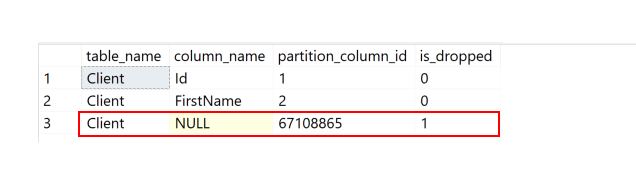
How easily can we find tables with dropped columns that need cleanup?
Microsoft Azure offers Azure Elastic Job agent as a managed service, enabling efficient scheduling of T-SQL workloads on Azure SQL Databases. Learn how to configure the service in this article.

Steve sees that poor database design is the reality of the world and we have to work around that.

In part 2 of this series, I showed an example implementation of distributing a long-running workload in parallel, in order to finish faster. In reality, though, this involves more than just restoring databases. And I have significant skew to deal with: one database that is many times larger than all the rest and has a higher growth rate.
Once Windows Server Failover Clusters have been set up, we can set up Availability Groups in SQL Server. This article will focus on setting up Basic Always-On Availability Groups in SQL Server Standard Edition.
This facilitates High Availability in SQL Server Standard, with three levels of availability and failover:
Asynchronous commit with manual or forced failover,
Synchronous commit with manual or forced failover,
Synchronous commit with automatic failover.
Over the years Power BI has evolved into a complex and varied ecosystem of tools and solutions, which in its turn demands several supporting roles: there are, of course, developers, data engineers and data scientists, but there is need for one more, i.e. a capacity administrator.
What is an AI LLM useful for? Steve thinks a first draft is not a bad way to look at your AI results.
With Fabric Mirroring, Microsoft is promoting a nice and appealing story for operational reporting...
If you’ve been watching AI roll through the data community and thinking, “this seems...
By Arun Sirpal
Not every production incident is a database in RECOVERY_PENDING or a corrupted event (like...
Comments posted to this topic are about the item SQL Art, Part 4: Happy...
Hi All I am trying to find 'bad' characters that users might type in....
Comments posted to this topic are about the item Extreme DAX: Take your Power...
I set up a few users on my SQL Server 2022 instance.
CREATE LOGIN User1 WITH PASSWORD = 'Demo12#1'
CREATE USER User1 FOR LOGIN User1
GO
CREATE LOGIN User2 WITH PASSWORD = 'Demo12#2'
CREATE USER User2 FOR LOGIN User2
GO
CREATE LOGIN User3 WITH PASSWORD = 'Demo12#3'
CREATE USER User3 FOR LOGIN User3
GO
I then created a schema that one of them owned. Under this schema, I added a table with some data.
CREATE SCHEMA MySchema AUTHORIZATION User1
GO
CREATE TABLE Myschema.MyTable(myid INT)
GO
INSERT MySchema.MyTable
(
    myid
)
VALUES
(1), (2), (3)
GO
SELECT * FROM MySchema.MyTable
GO
I granted rights and verified that User2 could access this table.
GRANT SELECT ON Myschema.MyTable TO User2
GO
SETUSER 'USER2'
GO
SELECT * FROM MySchema.MyTable
GO
This worked. Now, I move this schema to a new user.
ALTER AUTHORIZATION ON SCHEMA::Myschema TO User3;
GO
What happens with this code?
SETUSER 'USER2'
GO
SELECT * FROM MySchema.MyTable
GO
See possible answers