Availability Group (AG)

SQLServerCentral Article

Steps for Installing AlwaysOn Availability Groups - SQL 2019

  • Article

With SQL Server 2012 Microsoft introduced the AlwaysOn Availability Group feature, and since then many changes and improvements have been made.  This article is an update to another article, and will cover the prerequisites and steps for installing AlwaysOn in your SQL Server 2019 environment. Prerequisites Before implementing your AlwaysOn Availability Group (AG), make sure […]

You rated this post out of 5. Change rating

2025-12-24 (first published: )

2,262 reads

External Article

How to Measure Replication Latency in SQL Server AlwaysOn Synchronous Availability Groups

  • Article

Synchronous replicas in SQL Server Availability Groups promise no data loss, but they don’t promise zero delay; under heavy load they can still fall behind. This article shows how to measure and track that hidden replication delay using SQL Server performance counters, so you can see how well your system keeps up during IO‑intensive operations and plan maintenance more safely.

2025-09-17

Contained Availability Groups in SQL Server 2022

  • Article

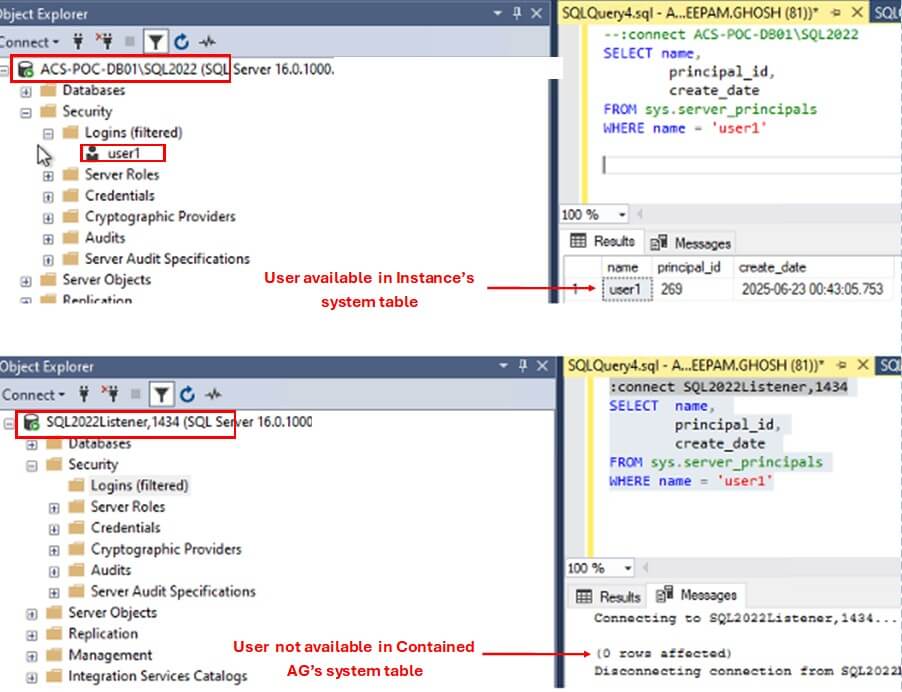
SQL Server 2022 introduced a new feature called Contained Availability Groups. It allows the Database Administrators to effectively manage the Server Level objects, such as Logins, SQL Agent jobs, etc. in an HA environment. In today's article, we will learn about this new feature of SQL Server. The Challenge of Managing Server Objects in Availability […]

You rated this post out of 5. Change rating

2025-08-20

10,987 reads

Technical Article

Enable TDE for Databases in a SQL Server AlwaysOn Availability Group

  • Article

A customer has a database that is already set up in a SQL Server Availability Group. Since this database hosts sensitive data, there is a need to encrypt the primary and all secondary replicas of the data. In this article, we will walk through how this can be done.

You rated this post out of 5. Change rating

2025-08-13

Blogs

T-SQL Tuesday #202 SQL Server Outage You’ll Never Forget: A Roundup

By

When I put together the invitation for T-SQL Tuesday #202, I wasn't sure what...

A Last Minute Trip to the EU

By

My life has some crazy travel stretches for sure. Between speaking, office visits, customer...

Part 3 of 3: Tuning DiskANN — R, Alpha, L, Beam Width, Recall and Latency

By

In Part 1, we saw how ‘Vamana’ represents vectors as nodes, connects them with...

Read the latest Blogs

Forums

BCA KCP Pasar Kebayoran Lama Telp:0821-8200-174

By layanan_Bca88

Telp/Wa 62 8218200174 Jl. Raya Kby. Lama No.174, RT.8/RW.3, Cipulir, Kec. Kebayoran Lama, Kota...

ALAMAT BCA KCU SCBD Telp/Wa:0821-8200-233

By m4rt1n4

Tlp Cs Bca 08218200233 Equity Tower, Ground Floor, Unit D & Lantai 8, Unit...

Alamat BCA KCP Mayestik Telp/Wa:0821-8200-2031

By R4nt4u

Phone Cs 08218200203 Jl. Kyai Maja No.77, RT.12/RW.3, Gunung, Kec. Kby. Baru, Kota Jakarta...

Visit the forum

Question of the Day

ORDER BY alias

There is a table tmp_tab:

CREATE TABLE tmp_tab (
id int,
val int
);
INSERT INTO tmp_tab VALUES
(1, 1),
(2, NULL),
(3, 3),
(4, 4),
(5, 5);
You want to order the rows ids by the following expression:
    ISNULL(val, id) + 1
Which of the following queries produces the expected ordering and why? (Select all correct)

See possible answers