

Introduction
Many database operations involve several related changes. For example, processing a sales order may require creating the order, adding its items, and reducing product inventory. If one step fails after the earlier steps have succeeded, the database can be left in a partially updated state. An order might exist even though the inventory change failed.
A SQL Server transaction lets these related changes be treated as one unit of work. In this article, we'll use TRY...CATCH, SET XACT_ABORT ON, and XACT_STATE() with a simple sales-order example to see how a successful transaction is committed and how a failed transaction can be rolled back safely.
Problem
Suppose a sales order requires three related changes: insert the order, add its order item, and reduce the product quantity in stock. If the first two statements succeed but the inventory update fails, we do not want the order and order item to remain in the database by themselves. That would leave the data inconsistent because the business operation was only partially completed.
We therefore need a way to treat all three statements as one unit of work, so either every change succeeds or the earlier changes are undone when a later step fails.
Solution
We can protect the entire operation by placing the related statements inside a transaction and handling errors with TRY...CATCH. BEGIN TRANSACTION starts the unit of work. If every statement succeeds, COMMIT TRANSACTION makes the changes permanent. If a run-time error handled by TRY...CATCH occurs, control moves to the CATCH block, where the transaction can be rolled back.
We'll also use SET XACT_ABORT ON so many run-time errors affect the entire transaction rather than only the failing statement. XACT_STATE() lets us check whether a transaction is still active before rolling it back. The core pattern is:
SET XACT_ABORT ON;

BEGIN TRY
    BEGIN TRANSACTION;

    -- Related data changes

    COMMIT TRANSACTION;
END TRY
BEGIN CATCH
    IF XACT_STATE() <> 0
        ROLLBACK TRANSACTION;

    THROW;
END CATCH;
This gives us one controlled process: either all related changes succeed, or the transaction is rolled back when an error occurs.
Setting Up the Sample Data
We'll use three small tables: dbo.Products, dbo.SalesOrders, and dbo.SalesOrderItems. The important part of the setup is the CHECK constraint on QuantityOnHand. It prevents inventory from becoming negative and gives us a controlled way to trigger a failure later in the article.
CREATE TABLE dbo.Products
(
    ProductID       INT PRIMARY KEY,
    ProductName     VARCHAR(100) NOT NULL,
    QuantityOnHand  INT NOT NULL,
    UnitPrice       DECIMAL(10,2) NOT NULL,

    CONSTRAINT CK_Products_QuantityOnHand
        CHECK (QuantityOnHand >= 0)
);
GO

CREATE TABLE dbo.SalesOrders
(
    OrderID       INT IDENTITY(1,1) PRIMARY KEY,
    CustomerName  VARCHAR(100) NOT NULL,
    OrderDate     DATETIME2(0) NOT NULL
);
GO

CREATE TABLE dbo.SalesOrderItems
(
    OrderItemID  INT IDENTITY(1,1) PRIMARY KEY,
    OrderID      INT NOT NULL,
    ProductID    INT NOT NULL,
    Quantity     INT NOT NULL,

    CONSTRAINT FK_SalesOrderItems_SalesOrders
        FOREIGN KEY (OrderID)
        REFERENCES dbo.SalesOrders(OrderID),

    CONSTRAINT FK_SalesOrderItems_Products
        FOREIGN KEY (ProductID)
        REFERENCES dbo.Products(ProductID),

    CONSTRAINT CK_SalesOrderItems_Quantity
        CHECK (Quantity > 0)
);
GO
Now we'll add three products:
INSERT INTO dbo.Products
(
    ProductID,
    ProductName,
    QuantityOnHand,
    UnitPrice
)
VALUES
(101, 'Wireless Mouse', 10, 19.50),
(102, 'USB-C Dock',      6, 89.00),
(103, 'HD Webcam',      12, 54.75);
GO
The USB-C Dock starts with six units in stock. Later, we'll deliberately try to reduce that quantity below zero so the CHECK constraint raises an error and we can see how the transaction responds.
Successful Multi-Step Transaction
Before looking at a failure, it helps to see the normal path when every statement succeeds. In this example, we'll create an order for two Wireless Mice. The transaction inserts the order, adds its order item, and then reduces the inventory from 10 units to 8.
SET XACT_ABORT ON;
GO

BEGIN TRY
    BEGIN TRANSACTION;

    INSERT INTO dbo.SalesOrders
    (
        CustomerName,
        OrderDate
    )
    VALUES
    (
        'Daniel Reed',
        '20261007'
    );

    DECLARE @OrderID INT = CONVERT(INT, SCOPE_IDENTITY());

    INSERT INTO dbo.SalesOrderItems
    (
        OrderID,
        ProductID,
        Quantity
    )
    VALUES
    (
        @OrderID,
        101,
        2
    );

    UPDATE dbo.Products
    SET QuantityOnHand = QuantityOnHand - 2
    WHERE ProductID = 101;

    COMMIT TRANSACTION;
END TRY
BEGIN CATCH
    IF XACT_STATE() <> 0
        ROLLBACK TRANSACTION;

    THROW;
END CATCH;
GO
The first INSERT creates the order. Because OrderID is an identity column, SCOPE_IDENTITY() captures the value SQL Server generated for that row. We store it in @OrderID so the second INSERT can create the related order item.
The UPDATE then subtracts two units from product 101. Since all three statements succeed, SQL Server reaches COMMIT TRANSACTION, making the order, order item, and inventory change permanent together.
In our test, OrderID 1 was created, one order item was added for product 101, and the Wireless Mouse quantity changed from 10 to 8. This confirms the successful path before we test what happens when a later statement fails.
Rolling Back When a Later Step Fails
Now we'll deliberately create a failure after some work has already been performed inside the transaction.
The USB-C Dock has only six units in stock, but this order requests 10. The order and order item are inserted first. The inventory update then attempts to change the quantity from 6 to -4, which violates the CK_Products_QuantityOnHand constraint.
SET XACT_ABORT ON;
GO

BEGIN TRY
    BEGIN TRANSACTION;

    INSERT INTO dbo.SalesOrders
    (
        CustomerName,
        OrderDate
    )
    VALUES
    (
        'Maria Lopez',
        '20261007'
    );

    DECLARE @OrderID INT = CONVERT(INT, SCOPE_IDENTITY());

    INSERT INTO dbo.SalesOrderItems
    (
        OrderID,
        ProductID,
        Quantity
    )
    VALUES
    (
        @OrderID,
        102,
        10
    );

    UPDATE dbo.Products
    SET QuantityOnHand = QuantityOnHand - 10
    WHERE ProductID = 102;

    COMMIT TRANSACTION;
END TRY
BEGIN CATCH
    IF XACT_STATE() <> 0
        ROLLBACK TRANSACTION;

    THROW;
END CATCH;
GO
The first two statements run successfully inside the transaction, but the inventory update fails because the CHECK constraint does not allow a negative quantity. Control moves to the CATCH block, where ROLLBACK TRANSACTION undoes the earlier inserts. THROW then returns the original SQL Server error.
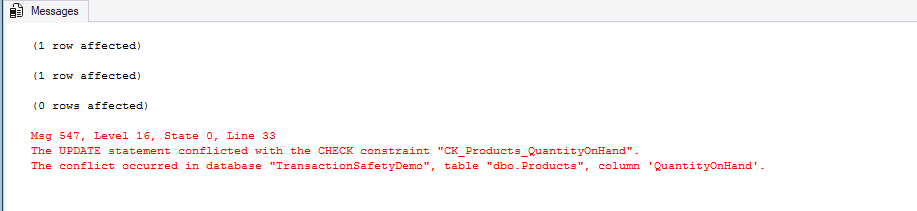
The Messages tab shows that the first two statements each affected one row before the update failed with error 547. Those messages do not mean the changes were committed; they were still part of the transaction and could therefore be rolled back.
We then verified the database state. Only Daniel Reed's earlier successful order remained, only its order item remained, and the USB-C Dock quantity was still 6.
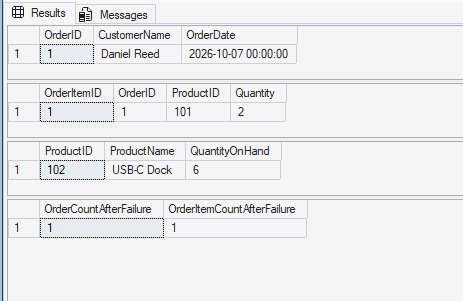
The final counts also remained at one order and one order item. This confirms that none of the rows created for Maria Lopez's failed order remained after the rollback.
Understanding XACT_STATE()
Inside a CATCH block, XACT_STATE() tells us the state of the current transaction. It returns 1 when a transaction is active and can still be committed, 0 when there is no active transaction, and -1 when a transaction is active but can no longer be committed.
For this test, we'll use SET XACT_ABORT ON and deliberately cause the same CHECK constraint failure:
SET XACT_ABORT ON;
GO

BEGIN TRY
    BEGIN TRANSACTION;

    UPDATE dbo.Products
    SET QuantityOnHand = QuantityOnHand - 10
    WHERE ProductID = 102;

    COMMIT TRANSACTION;
END TRY
BEGIN CATCH
    SELECT
        ERROR_NUMBER() AS ErrorNumber,
        ERROR_MESSAGE() AS ErrorMessage,
        XACT_STATE() AS TransactionState;

    IF XACT_STATE() <> 0
        ROLLBACK TRANSACTION;
END CATCH;
GO
The failed update tries to reduce the USB-C Dock quantity from 6 to -4. Because that violates the CHECK constraint, control moves to the CATCH block.

The result shows error 547 and a TransactionState value of -1. This means the transaction is still active but cannot be committed, so it must be rolled back.
We also verified afterward that the USB-C Dock quantity remained at 6, confirming that the failed change was not left in the table.
Practical Points to Remember
A transaction should include only the statements that belong to the same unit of work. Keeping transactions focused makes it easier to understand what should be committed or rolled back together.
SET XACT_ABORT ON changes how SQL Server handles many run-time errors and helps prevent a transaction from continuing after a serious failure. TRY...CATCH gives us a place to respond to the error, while XACT_STATE() tells us whether a transaction is still active.
Using THROW in the CATCH block is also useful because it sends the original SQL Server error back to the caller after the rollback.
The main goal is to avoid leaving a business operation only partially completed.
Conclusion
Multi-step data changes are safer when related statements are treated as one unit of work.
In our successful example, the order, order item, and inventory update were committed together. In the failed example, the inventory update violated a CHECK constraint, and the transaction rolled back the earlier inserts so no partial order remained.
TRY...CATCH gave us a place to handle the error, SET XACT_ABORT ON affected how the transaction responded to the run-time error, and XACT_STATE() showed that the failed transaction could no longer be committed.
The important lesson is to make sure a business operation either completes as intended or leaves the database unchanged.