

Introduction
Sequential numbers are commonly used in business systems to identify invoices, orders, tickets, shipments, and other records. During audits, reconciliations, or data validation, it can be useful to determine whether any numbers are missing from an expected sequence.
Finding a few gaps manually is easy, but the task becomes less practical when a table contains thousands or hundreds of thousands of records. SQL Server can automate this process by generating the expected sequence and comparing it with the values that actually exist.
In this article, we'll use invoice numbers as an example to demonstrate how to find gaps efficiently. We'll generate the expected sequence using a set-based approach, compare it with the existing invoice numbers, and then look at how the same technique can be applied to other types of sequential data.
Creating the Sample Invoice Data
To demonstrate the gap-detection technique, we'll create a simple table named Invoices. The table stores the invoice number, customer name, invoice date, and invoice amount.
The sample data contains several invoice numbers with gaps in the sequence. These gaps give us values to identify when we compare the expected sequence with the invoice numbers stored in the table.
CREATE TABLE Invoices
(
    InvoiceNumber INT PRIMARY KEY,
    CustomerName VARCHAR(50),
    InvoiceDate DATE,
    Amount DECIMAL(10,2)
);

INSERT INTO Invoices (InvoiceNumber, CustomerName, InvoiceDate, Amount)
VALUES
(1001, 'Michael Johnson', '2026-01-02', 245.00),
(1002, 'Emily Davis',     '2026-01-03', 180.00),
(1003, 'James Wilson',    '2026-01-03', 425.00),
(1005, 'Olivia Brown',    '2026-01-05', 310.00),
(1006, 'William Miller',  '2026-01-06', 150.00),
(1009, 'Sophia Anderson', '2026-01-08', 520.00);
The invoice numbers include gaps at 1004, 1007, and 1008. We'll use these gaps to demonstrate how SQL Server can identify missing values without checking the records manually.
Identifying the Gap
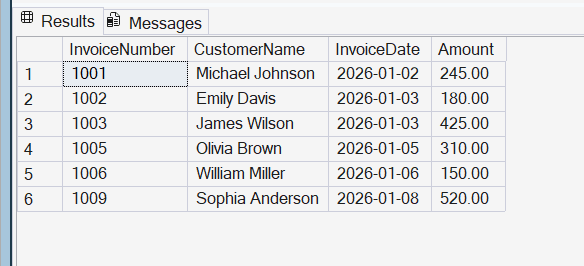
Before generating the expected sequence, let's review the invoice records in their current order. The following query displays the invoices sorted by invoice number.
SELECT *
FROM Invoices
ORDER BY InvoiceNumber;
The result shows invoice numbers 1001, 1002, 1003, 1005, 1006, and 1009. The gaps are easy to spot in this small example, but manually finding them becomes impractical when the sequence contains thousands or hundreds of thousands of values.
The key is to define the range of values that should exist and compare that expected sequence with the values stored in the table. This approach separates the problem into two parts: generating the expected values and identifying which of them have no matching record.
Generating the Expected Sequence Efficiently
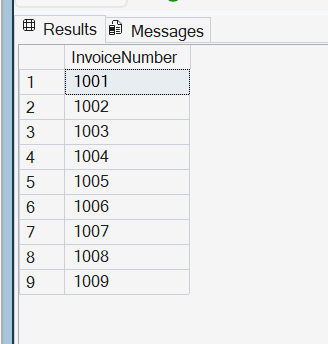
To identify gaps, we need to generate the values that should exist between the beginning and end of the sequence. SQL Server provides the GENERATE_SERIES() function for this purpose, allowing us to produce a range of numbers without inserting them one row at a time.
For this example, the expected invoice sequence starts at 1001 and ends at 1009.
SELECT value AS InvoiceNumber
FROM GENERATE_SERIES(1001, 1009);
Note: GENERATE_SERIES() is available in SQL Server 2022 and later and requires the database compatibility level to be 160 or higher. If the function is not recognized, check the compatibility level of the database before changing the script.
The query returns each integer from 1001 through 1009, including the values that are not currently present in the Invoices table. The same function can generate a much larger sequence without inserting each value into a temporary table. This example generates 100,000 numbers, demonstrating how the technique can be applied to larger ranges.
SELECT COUNT(*) AS GeneratedNumbers
FROM GENERATE_SERIES(1, 100000);
Unlike a procedural loop that inserts each number individually, GENERATE_SERIES() provides a set-based way to produce the expected sequence without first populating a temporary table. This makes the approach more suitable for generating larger ranges of sequential values.
The generated sequence can now be compared with the actual invoice numbers to identify which expected values are missing.
In a real application, the start and end values should come from the expected business range rather than being chosen arbitrarily. For example, an audit may define the first and last invoice numbers that should have been issued during a period. Using the actual minimum and maximum values can also help find gaps within the existing range, but it will not identify a missing value before the minimum or after the maximum.
Finding the Missing Values
Now that we can generate the expected invoice sequence, we can compare it with the invoice numbers stored in the Invoices table.
The following query generates the expected numbers from 1001 through 1009 and uses a LEFT JOIN to find values that do not have a matching invoice.
SELECT
    s.value AS MissingInvoiceNumber
FROM GENERATE_SERIES(1001, 1009) AS s
LEFT JOIN Invoices AS i
    ON s.value = i.InvoiceNumber
WHERE i.InvoiceNumber IS NULL
ORDER BY s.value;
If a value generated by GENERATE_SERIES() does not exist in the Invoices table, the columns from the Invoices table are returned as NULL. Filtering for those NULL values leaves only the gaps in the expected sequence.
For the sample data, the query returns:
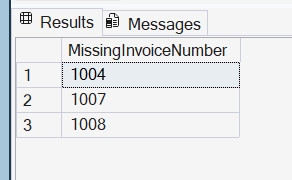
This approach separates sequence generation from gap detection: GENERATE_SERIES() produces the values that should exist, while the LEFT JOIN identifies which of those values are absent from the actual data.
Applying the Technique to Other Sequential Data
The same gap detection approach can be used anywhere a system relies on sequential values. The source table and column will change, but the basic process remains the same: define the expected range, generate the sequence, and compare it with the values that actually exist.
For example, an order system might use sequential order numbers. The same technique could identify orders that fall within an expected range but do not have corresponding records. It can also be applied to ticket numbers, shipment numbers, document numbers, or batch identifiers.
This can be useful during data validation and reconciliation when a missing value needs to be investigated. By applying the same pattern to different types of sequential data, you can reuse the gap-detection approach without manually checking each value.
Conclusion
Finding gaps in sequential data can be useful for audits, reconciliations, and data validation. Instead of manually reviewing large datasets, SQL Server can generate the expected sequence and compare it with the values that actually exist to identify gaps efficiently.
Although this article uses invoice numbers as an example, the same approach can be applied to other sequential values such as order numbers, ticket numbers, shipment numbers, document numbers, or batch identifiers. The important part is to define the expected range, generate those values efficiently, and compare them with the existing data.
A gap does not necessarily mean that a record is missing or that an error occurred. Business rules may allow numbers to be cancelled, voided, or otherwise unused. Gap detection should therefore be treated as a useful starting point for investigation rather than proof of a data problem.
