

Introduction
A backup job can complete successfully, the backup can pass RESTORE VERIFYONLY, and SQL Server can have a successful backup history entry in msdb. That still does not guarantee that the database can be recovered to the point in time the business actually needs.
Consider a simple production incident. At 10:42 AM, an application accidentally deletes important data. The DBA is asked to recover the database to 10:40 AM, just before the incident occurred. The database has a valid full backup, and transaction log backups have been running throughout the day. On the surface, the backup jobs look healthy. However, when the DBA builds the restore sequence, one of the required transaction log backups is missing. The available backups are valid, but the restore chain cannot reach the requested 10:40 AM recovery point.
This is the distinction I wanted to demonstrate with a small, reproducible lab: a successful backup does not necessarily mean that the required point-in-time recovery is possible.
In this lab, I will create a backup chain, deliberately introduce a gap, and then attempt to recover the database to a point after that gap. The goal is to see what SQL Server can and cannot recover—and why checking only whether the backup job succeeded is not enough.
The test uses SQL Server 2022 Developer Edition.
Let's have a database "RecoveryLab" with Full Recovery model and with Table Orders. I will Add some data in the Orders table.
INSERT INTO dbo.Orders
(CustomerName, Amount, OrderDate)
VALUES
(N'Amit', 1250.00, '2026-09-01 09:00:00'),
(N'Neha', 850.00, '2026-09-01 09:15:00'),
(N'Rohit',2150.00, '2026-09-01 09:30:00');
GO
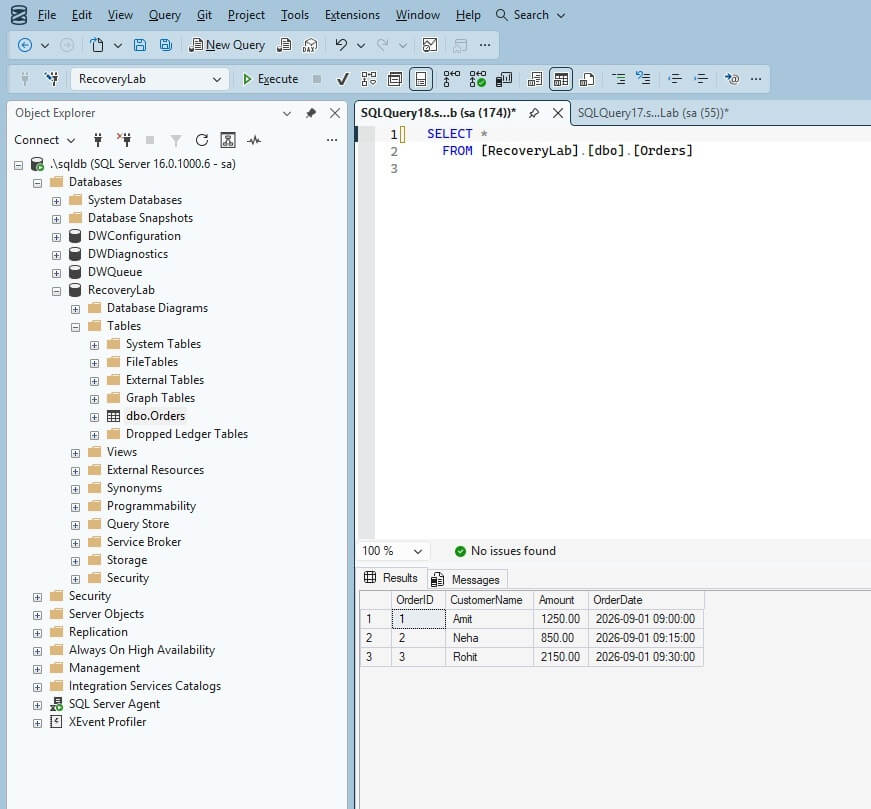
Now Let's Build the Backup chain by taking first full backup and then Log Backup.
BACKUP DATABASE RecoveryLab
TO DISK = N'C:\SQLBackups\RecoveryLab_Full.bak'
WITH INIT, CHECKSUM, STATS = 10;
GO

BACKUP LOG RecoveryLab
TO DISK = N'C:\SQLBackups\RecoveryLab_LOG001.trn'
WITH INIT, CHECKSUM, STATS = 10;
GO
Let's add more data
INSERT INTO dbo.Orders
(CustomerName, Amount, OrderDate)
VALUES
(N'Sneha', 1450.00, '2026-09-01 10:00:00');
GO
Take another log backup.
BACKUP LOG RecoveryLab
TO DISK = N'C:\SQLBackups\RecoveryLab_LOG002.trn'
WITH INIT, CHECKSUM, STATS = 10;
GO
Add one more row.
INSERT INTO dbo.Orders
(CustomerName, Amount, OrderDate)
VALUES
(N'Vikas', 1750.00, '2026-09-01 10:30:00');
GO
Take another log backup.
BACKUP LOG RecoveryLab
TO DISK = N'C:\SQLBackups\RecoveryLab_LOG003.trn'
WITH INIT, CHECKSUM, STATS = 10;
GO
At this point the table contains five rows.
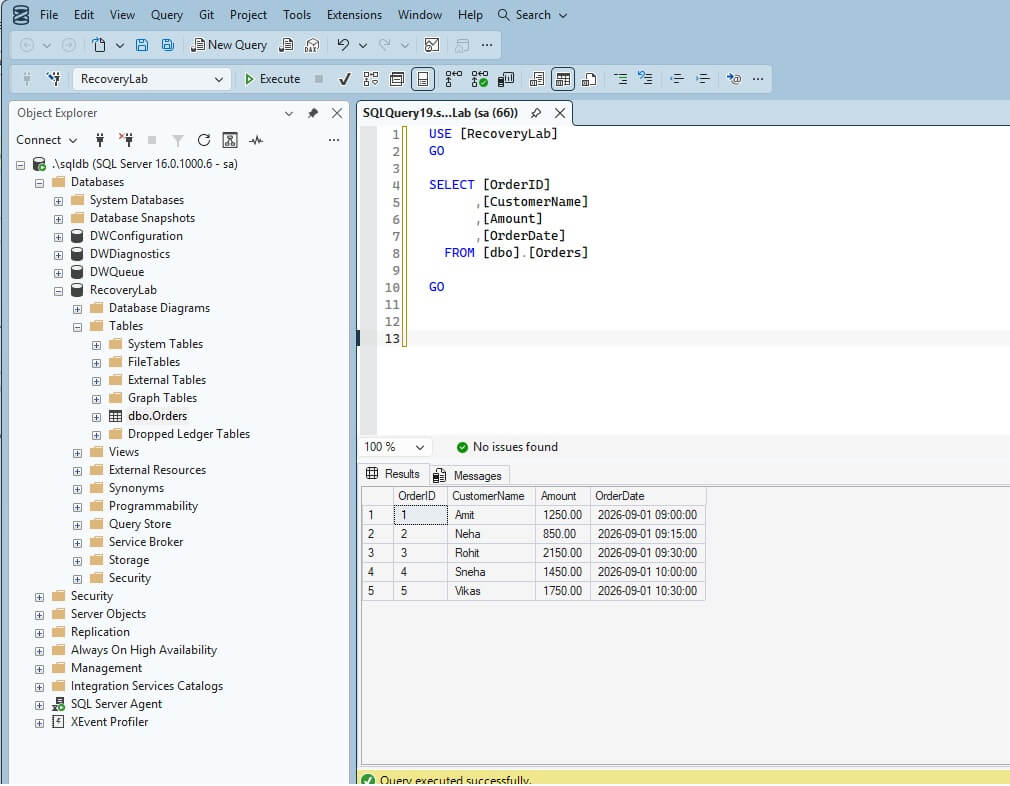
For this lab, I need a specific time to which I will later restore the database.
I will capture the current time and use it as the recovery target for the STOPAT option. The short delay simply gives us a clear gap between the recovery target and the next activity in the test.
USE RecoveryLab;
GO
DECLARE @RecoveryTarget datetime = GETDATE();
SELECT
@RecoveryTarget AS RecoveryTarget,
CONVERT(varchar(23), @RecoveryTarget, 121)
AS RecoveryTargetForSTOPAT;
WAITFOR DELAY '00:00:02';
GO
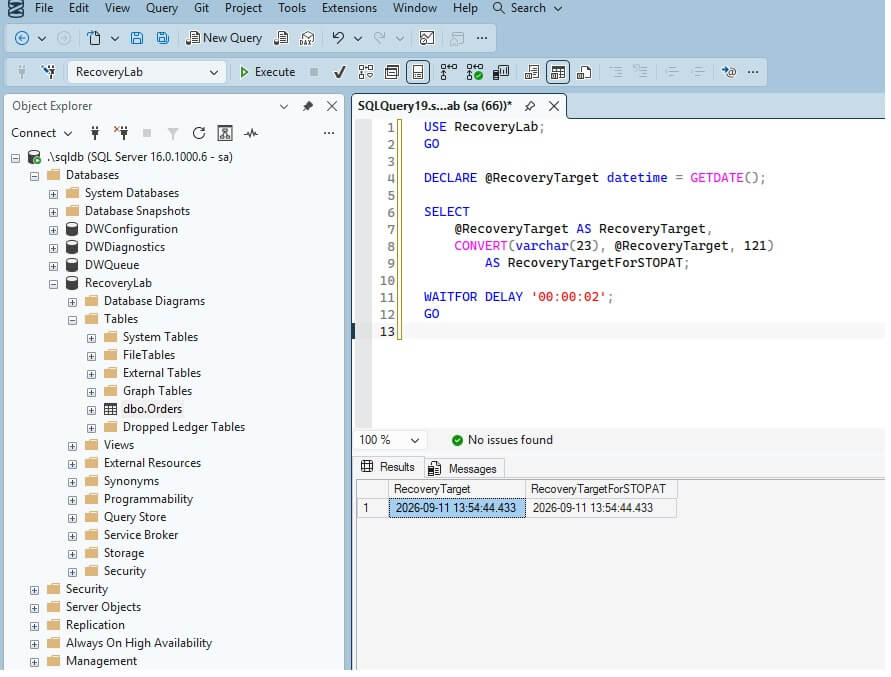
Note: GETDATE() does not create a special recovery point in SQL Server. It simply gives us a known timestamp for the point-in-time recovery test.
Now simulate the incident of deleting the Orders table.
DELETE FROM dbo.Orders;
GO
And now take the log backup.
BACKUP LOG RecoveryLab
TO DISK = N'C:\SQLBackups\RecoveryLab_LOG004.trn'
WITH INIT, CHECKSUM, STATS = 10;
GO
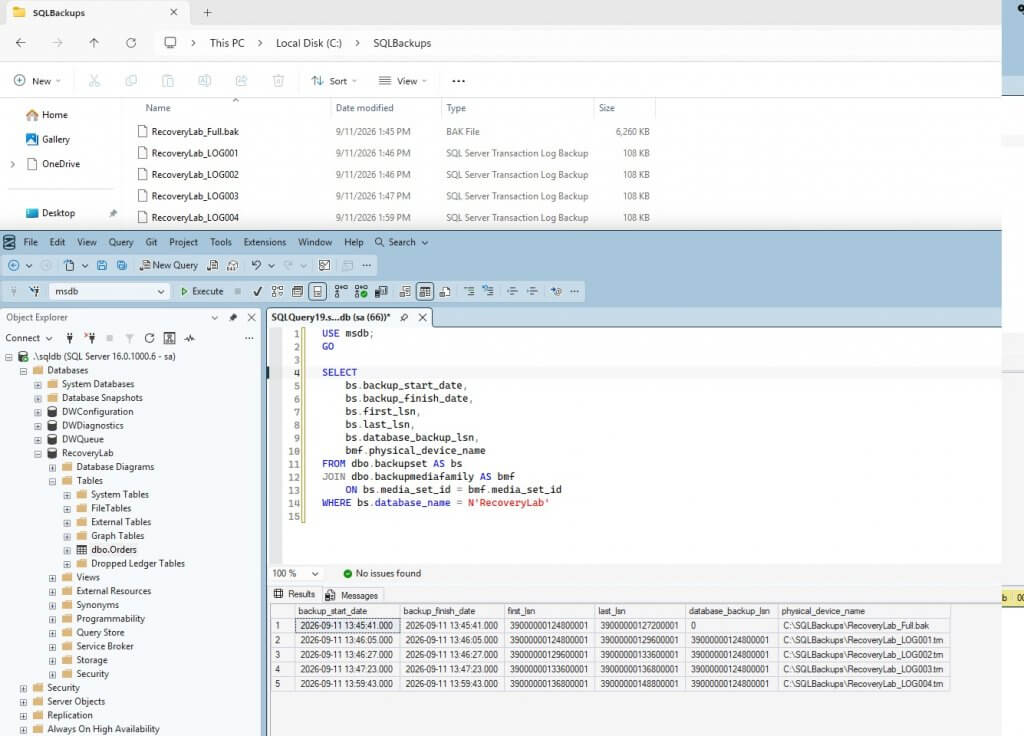
Because the target was captured after log backup LOG003 and before log backup LOG004 was taken. the target recovery point lies within the log range covered by log backup LOG004.
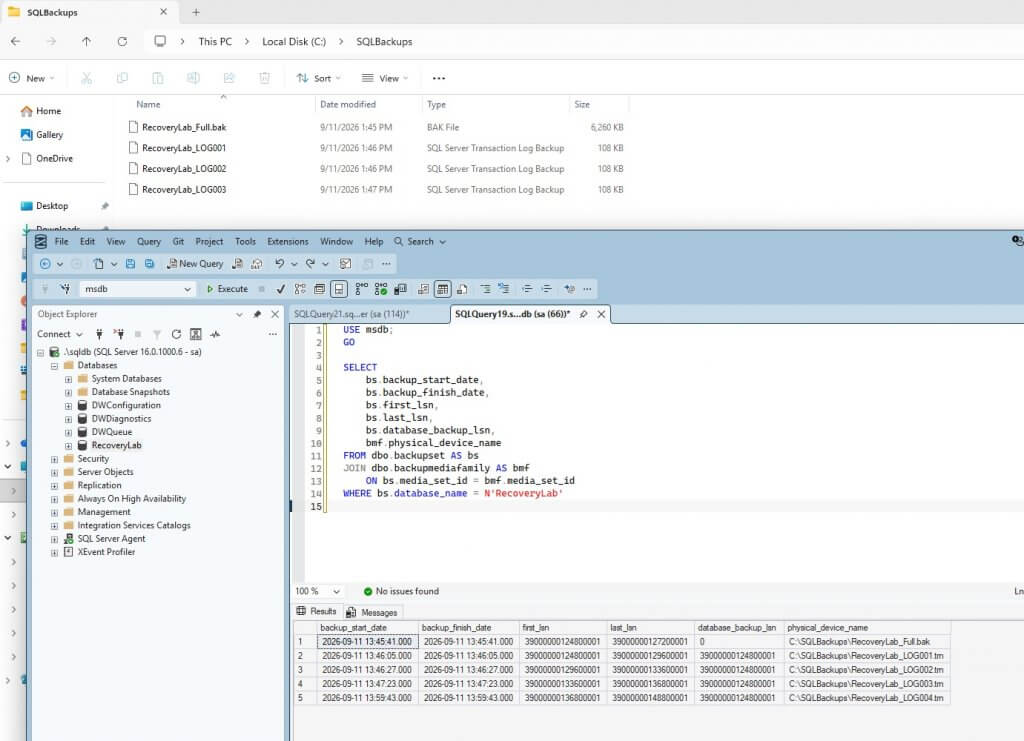
Here is the screenshot confirming all 4 log backups and 1 full backup.
Now let's start the restore process.
First, we verify all the backups. RESTORE VERIFYONLY command checks whether the backup set is complete and readable; it does not actually restore the database or prove that the entire restore chain is available
RESTORE VERIFYONLY
FROM DISK = N'C:\SQLBackups\RecoveryLab_Full.bak'
WITH CHECKSUM;
GO

RESTORE VERIFYONLY
FROM DISK = N'C:\SQLBackups\RecoveryLab_LOG001.trn'
WITH CHECKSUM;
GO

RESTORE VERIFYONLY
FROM DISK = N'C:\SQLBackups\RecoveryLab_LOG002.trn'
WITH CHECKSUM;
GO

RESTORE VERIFYONLY
FROM DISK = N'C:\SQLBackups\RecoveryLab_LOG003.trn'
WITH CHECKSUM;
GO

RESTORE VERIFYONLY
FROM DISK = N'C:\SQLBackups\RecoveryLab_LOG004.trn'
WITH CHECKSUM;
GO
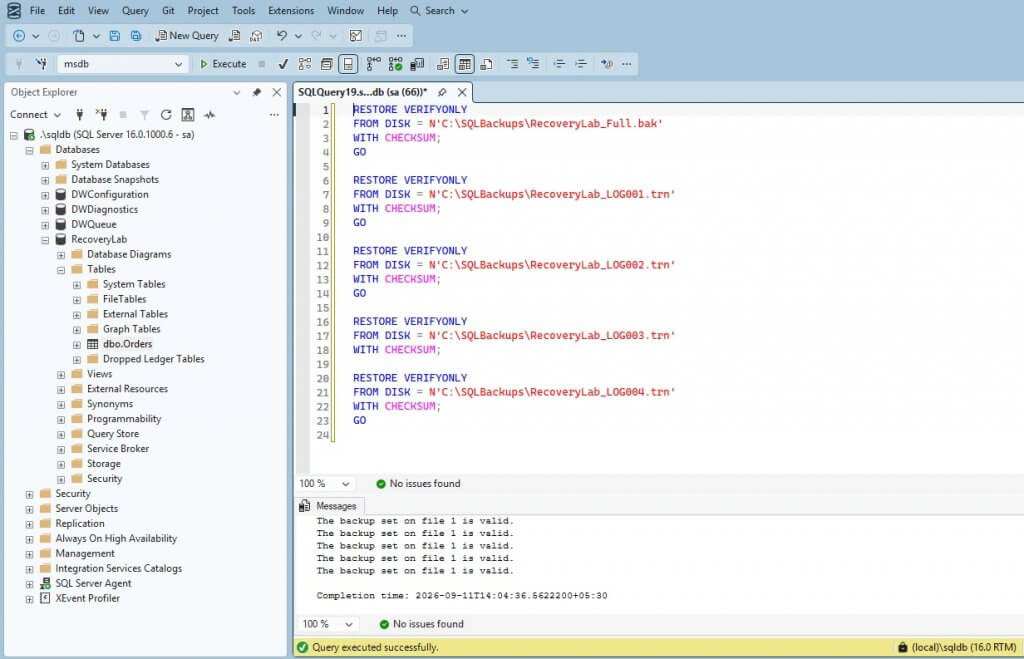
All five backup sets should verify successfully.
Now determine the logical file names
RESTORE FILELISTONLY
FROM DISK = N'C:\SQLBackups\RecoveryLab_Full.bak';
GO
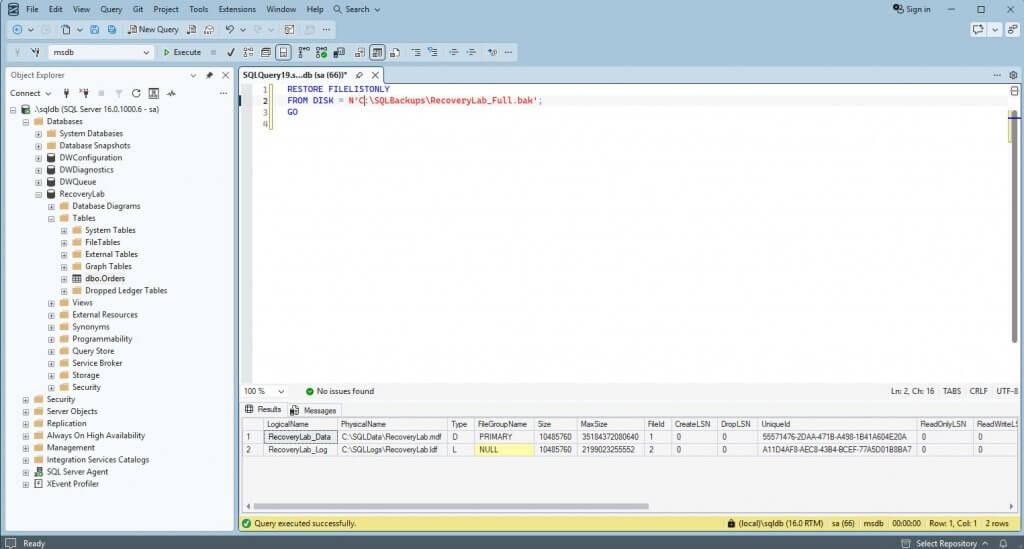
Using these Logical names, we will restore as new Database called "RecoveryLab_Restore". Database will be restored in NORECOVERY as we need to further restore the logfiles.
USE [master]
RESTORE DATABASE [RecoveryLab_restore] FROM DISK = N'C:\SQLBackups\RecoveryLab_Full.bak' WITH FILE = 1,
MOVE N'RecoveryLab_Data' TO N'C:\SQLdata\RecoveryLab_restore.mdf',
MOVE N'RecoveryLab_Log' TO N'C:\SQLLogs\RecoveryLab_restore.ldf',
NORECOVERY, NOUNLOAD, STATS = 5
GO
Now restore the log backups in order. I am using STOPAT with the Recovery point to get the data before delete happened.
RESTORE LOG RecoveryLab_Restore
FROM DISK = N'C:\SQLBackups\RecoveryLab_LOG001.trn'
WITH NORECOVERY;
GO

RESTORE LOG RecoveryLab_Restore
FROM DISK = N'C:\SQLBackups\RecoveryLab_LOG002.trn'
WITH NORECOVERY;
GO

RESTORE LOG RecoveryLab_Restore
FROM DISK = N'C:\SQLBackups\RecoveryLab_LOG003.trn'
WITH NORECOVERY;
GO

RESTORE LOG RecoveryLab_Restore
FROM DISK = N'C:\SQLBackups\RecoveryLab_LOG004.trn'
WITH
STOPAT = '2026-09-11 11:26:45.637',
RECOVERY;
GO
Let's check the recovered data.
SELECT *
FROM RecoveryLab_Restore.dbo.Orders
ORDER BY OrderID;
GO
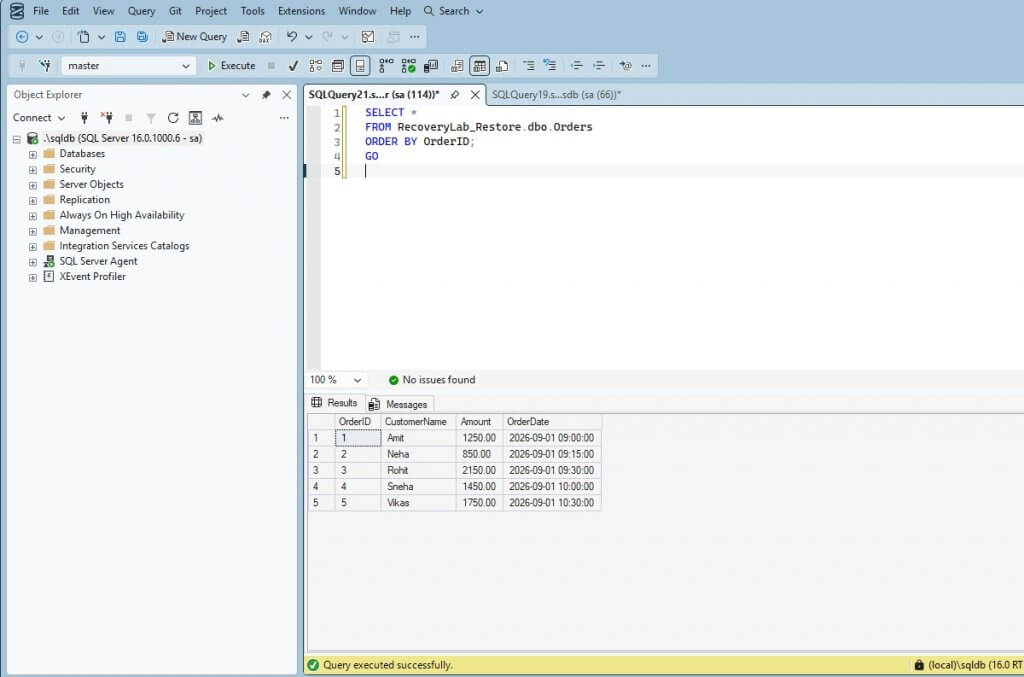
All 5 rows are available before delete happened. It means we have successfully recovered database through the recovery point.
Now I will drop the restored database and delete the file "C:\SQLBackups\RecoveryLab_LOG004.trn". I am not removing the backup history from MSDB.
I will repeat the restore using the full backup and LOG001 through LOG004. The Full Backup and log backups from LOG001 to LOG003 can be restored successfully, but they cannot advance the database to the captured recovery target. The target is later than the end of the log range covered by LOG003, so LOG004 is required.
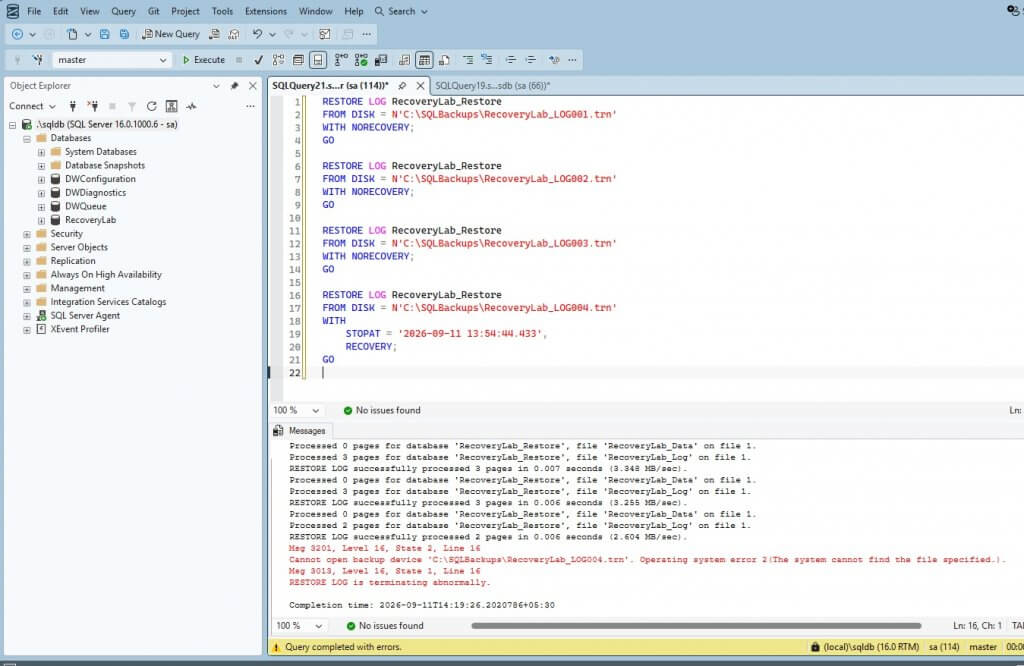
This Failed because the required physical backup file is unavailable.
Why could this not succeed? The log backups form a sequential chain. For a given point-in-time restore, every required log backup between the selected full backup and the log backup containing the target must be available and restorable in sequence. In this experiment we have
- Full backup
- LOG001
- LOG002
- LOG003
- LOG004 <-- recovery target is within this log range
Once LOG004 is unavailable, the target is unavailable.
The fact that msdb still contains the backup history does not recreate the physical backup file.
What This Demonstrates
The experiment shows five different states
| State | Result |
| Backup job completed | Yes |
| Backup passed VERIFYONLY | Yes |
| Backup history exists in msdb | Yes |
| Required physical backup available | No |
| Required point-in-time recovery possible | No |
LOG004 was successfully created and could be verified. SQL Server also retained its backup history. Deleting the physical .trn file changed the recovery capability. That is the distinction I wanted to demonstrate: a successful backup is not proof of a successful recovery.
The meaningful test is whether the complete, accessible backup chain can actually restore the database to the recovery point that is required.