

Introduction
In Part 1 of this series, we explored the fundamentals of CROSS APPLY and learned how it evaluates a correlated query for each row returned by the outer table. We also saw how it can simplify tasks such as retrieving the latest order for each customer and returning the top N rows within a group.
Reporting requirements often go beyond simply returning the latest related row. A report may also need information from another table, a calculated value, or a different way of deciding which row is important for each customer.
In this article, we'll continue using the same sample database from Part 1 to solve two practical reporting problems. First, we'll retrieve each customer's latest order together with its product details and calculated value. Then, we'll use CROSS APPLY to find the highest-value order for each customer.
Problem Statement: Returning the Latest Order with Product Details and Order Value
Suppose we want to retrieve each customer together with the details of their most recent order. The report should show the product that was purchased, its price, and the total value of the order. The order information is stored in the Orders table, while the product name and price are stored in the Products table. For each customer, the query inside CROSS APPLY searches for matching orders and joins Products using ProductID.
The expression o.Quantity * p.Price calculates the value of each order. The ORDER BY clause sorts the customer's orders by OrderDate and then OrderID, both in descending order. TOP (1) returns only the most recent order for the current customer.
The following query returns each customer's latest order together with its product details and calculated order value.
SELECT
    c.CustomerID,
    c.CustomerName,
    x.OrderID,
    x.OrderDate,
    x.ProductName,
    x.Quantity,
    x.Price,
    x.OrderValue
FROM Customers c
CROSS APPLY
(
    SELECT TOP (1)
           o.OrderID,
           o.OrderDate,
           p.ProductName,
           o.Quantity,
           p.Price,
           o.Quantity * p.Price AS OrderValue
    FROM Orders o
    INNER JOIN Products p
        ON o.ProductID = p.ProductID
    WHERE o.CustomerID = c.CustomerID
    ORDER BY
        o.OrderDate DESC,
        o.OrderID DESC
) x;
Before reviewing the result, we can predict the output from the sample data. Liam Wilson has OrderID = 6 as his latest order because two of his orders share the same date and the higher OrderID is selected by the secondary sort. The order is for one Sleeping Bag priced at 180.00, giving an order value of 180.00.
Olivia Taylor's latest order is OrderID = 3, also for one Sleeping Bag, giving an order value of 180.00. Noah Anderson's latest order is OrderID = 5, which contains three Hiking Backpacks priced at 120.00 each, giving an order value of 360.00. Charlotte Brown has no orders, so she will not appear because the correlated query returns no row for her.
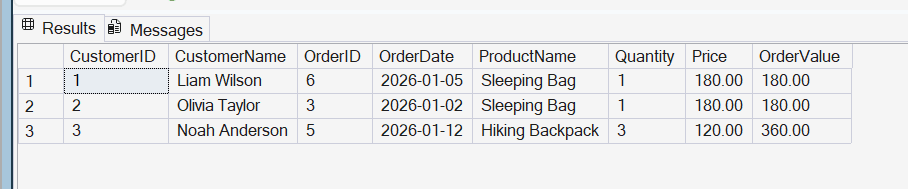
The result shows each customer together with the product and value of their latest order. Liam Wilson and Olivia Taylor each have a latest order value of 180.00, while Noah Anderson's latest order value is 360.00.
Finding the Highest-Value Order for Each Customer
The previous example selected each customer's latest order by sorting the rows by OrderDate. A different reporting requirement might be to find the order with the highest monetary value for each customer, regardless of when the order was placed. We can use the same Quantity * Price calculation to determine the value of each order. This time, however, the ORDER BY clause sorts the calculated order value in descending order. TOP (1) then returns the highest-value order for the current customer.
The following query finds the highest-value order for each customer.
SELECT
    c.CustomerID,
    c.CustomerName,
    x.OrderID,
    x.OrderDate,
    x.ProductName,
    x.Quantity,
    x.Price,
    x.OrderValue
FROM Customers c
CROSS APPLY
(
    SELECT TOP (1)
           o.OrderID,
           o.OrderDate,
           p.ProductName,
           o.Quantity,
           p.Price,
           o.Quantity * p.Price AS OrderValue
    FROM Orders o
    INNER JOIN Products p
        ON o.ProductID = p.ProductID
    WHERE o.CustomerID = c.CustomerID
    ORDER BY
        o.Quantity * p.Price DESC,
        o.OrderID DESC
) x;
Before reviewing the result, we can predict the output from the sample data. Liam Wilson's highest-value order is OrderID = 1, which contains one Camping Tent priced at 450.00. Olivia Taylor has only one order, so OrderID = 3 with an order value of 180.00 is returned. Noah Anderson's highest-value order is OrderID = 4, which contains one Camping Tent priced at 450.00. Although his later OrderID = 5 contains three Hiking Backpacks, its total value is 360.00, so OrderID = 4 is selected instead. Charlotte Brown has no orders, so she does not appear in the result.

The result confirms that the highest-value order is not always the latest order. In the previous report, Liam's latest order was OrderID = 6 and Noah's was OrderID = 5. When the rows are sorted by calculated order value instead, CROSS APPLY returns OrderID = 1 for Liam and OrderID = 4 for Noah.
Conclusion
CROSS APPLY can do much more than return related rows from another table. By changing the logic inside the correlated query, it can answer different reporting questions while keeping the query easy to read.
In this article, we used CROSS APPLY to retrieve each customer's latest order together with its product details and calculated order value. We then changed the sorting logic to return each customer's highest-value order instead.
These examples demonstrate how CROSS APPLY can combine correlated queries, joins, and calculations to solve practical reporting requirements. By changing how the correlated query selects rows, the same approach can be adapted to produce different types of business reports.
