

Support ticket systems often store compact values that make sense to an application but are less useful in a report. A priority code of 4, for example, may mean Critical, while 2 means Normal. The same report may also need to determine whether an SLA deadline has already passed. Both requirements look straightforward until the data contains missing or unexpected values. A missing deadline should not be reported as On Track, and an invalid priority code should not simply appear as a blank value.
In this article we'll use CHOOSE() to translate priority codes into readable labels and IIF() to classify SLA deadlines. We'll also look at what happens when the data contains NULL or invalid values and how to handle those cases safely.
Challenge
Suppose a support team uses the following priority codes:
PriorityCode | Meaning |
1 | Low |
2 | Normal |
| 3 | High |
| 4 | Critical |
The operations report needs to display the priority name instead of only the numeric code. It also needs to classify each ticket as Overdue or On Track based on its SLA deadline. However, not every row is clean. A ticket may have no priority assigned, an invalid priority such as 5, or no SLA deadline at all.
Those cases matter because simple CHOOSE() and IIF() expressions do not automatically identify missing or invalid data. We need to understand how the functions behave before relying on their results.
The Approach
We will use two T-SQL functions, CHOOSE() and IIF() to solve the problem. CHOOSE() is useful when a numeric position maps to a small, fixed list of values. A priority code of 1 can return Low, 2 can return Normal, and so on. IIF() works well for a simple two-way decision such as checking whether a deadline has passed. However, a comparison involving NULL evaluates to UNKNOWN rather than true or false. When the condition supplied to IIF() is false or unknown, the false value is returned.
We'll first use the functions without handling these edge cases so that we can see the problem. Then we'll correct the report.
Creating the Sample Ticket Data
The sample table contains five support tickets. Some rows are intentionally incomplete or invalid so that the reporting problems are visible. Assume the ticket data comes from an external or legacy system, so missing and out-of-range values may reach the reporting database before they are corrected.
CREATE TABLE dbo.SupportTickets
(
    TicketID INT PRIMARY KEY,
    CustomerName VARCHAR(60) NOT NULL,
    PriorityCode INT NULL,
    SLADeadline DATETIME2(0) NULL
);

INSERT INTO dbo.SupportTickets
    (TicketID, CustomerName, PriorityCode, SLADeadline)
VALUES
(1001, 'Northwind Retail', 4,    '2026-09-03T08:00:00'),
(1002, 'BluePeak Systems', 2,    '2026-09-03T15:00:00'),
(1003, 'Metro Services',   3,    NULL),
(1004, 'Apex Logistics',   5,    '2026-09-03T12:00:00'),
(1005, 'Summit Finance',   NULL, '2026-09-03T09:00:00');
GO
We'll use 2026-09-03 10:00:00 as the report time throughout the examples. Using a fixed value instead of the current server time keeps the results repeatable.
Ticket 1001 has already passed its deadline, while ticket 1002 has not. Ticket 1003 has no deadline, ticket 1004 contains an invalid priority code, and ticket 1005 has no priority assigned.
Where the Simple Expressions Go Wrong
A first attempt might use CHOOSE() directly for the priority name and IIF() for the SLA status.
DECLARE @ReportTime DATETIME2(0) = '2026-09-03T10:00:00';

SELECT
    TicketID,
    CustomerName,
    PriorityCode,
    CHOOSE
    (
        PriorityCode,
        'Low',
        'Normal',
        'High',
        'Critical'
    ) AS PriorityName,
    SLADeadline,
    IIF
    (
        SLADeadline < @ReportTime,
        'Overdue',
        'On Track'
    ) AS SLAStatus
FROM dbo.SupportTickets
ORDER BY TicketID;
GO
The expressions work correctly for the clean rows. Ticket 1001 is Critical and Overdue, while ticket 1002 is Normal and On Track. The remaining rows expose less obvious behavior.
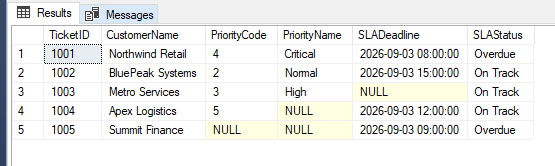
CHOOSE() uses a 1-based index. An index of 1 returns the first supplied value, 2 returns the second, and so on. If the index is outside the available choices, CHOOSE() returns NULL. Therefore, the priority code of 5 on ticket 1004 produces NULL rather than an error or an Invalid Priority label. Ticket 1005 also has no useful priority label because its code is NULL.
Ticket 1003 exposes a different issue. Its SLADeadline is NULL, so the comparison with @ReportTime evaluates to UNKNOWN. Because IIF() uses its false value when the condition is false or unknown, the ticket is reported as On Track even though no deadline exists.
Handling Missing and Invalid Values
The report needs to distinguish normal business results from missing or invalid data. For priority, we'll check whether the value is NULL first. If a priority exists, we'll verify that it falls between 1 and 4 before passing it to CHOOSE() with an IIF() wrapper around the function. For the SLA status, we'll check for a missing deadline before comparing it with the report time.
DECLARE @ReportTime DATETIME2(0) = '2026-09-03T10:00:00';

SELECT
    TicketID,
    CustomerName,
    IIF
    (
        PriorityCode IS NULL,
        'Not Assigned',
        IIF
        (
            PriorityCode BETWEEN 1 AND 4,
            CHOOSE
            (
                PriorityCode,
                'Low',
                'Normal',
                'High',
                'Critical'
            ),
            'Invalid Priority'
        )
    ) AS PriorityName,
    SLADeadline,
    IIF
    (
        SLADeadline IS NULL,
        'Deadline Not Set',
        IIF
        (
            SLADeadline < @ReportTime,
            'Overdue',
            'On Track'
        )
    ) AS SLAStatus
FROM dbo.SupportTickets
ORDER BY TicketID;
GO
Now ticket 1003 is reported as Deadline Not Set instead of On Track. Ticket 1004 is identified as Invalid Priority, while ticket 1005 is shown as Not Assigned.
The nested IIF() expressions are still manageable here because each one handles a small decision: first dealing with missing or invalid data, then applying the normal business rule.
Building the Final Triage Report
Once the classifications are reliable, they can be used in the report the support team actually needs. Suppose the triage report should show tickets that are overdue, have no SLA deadline, or contain missing or invalid priority information.
DECLARE @ReportTime DATETIME2(0) = '2026-09-03T10:00:00';

WITH TicketTriage AS
(
    SELECT
        TicketID,
        CustomerName,
        IIF
        (
            PriorityCode IS NULL,
            'Not Assigned',
            IIF
            (
                PriorityCode BETWEEN 1 AND 4,
                CHOOSE
                (
                    PriorityCode,
                    'Low',
                    'Normal',
                    'High',
                    'Critical'
                ),
                'Invalid Priority'
            )
        ) AS PriorityName,
        SLADeadline,
        IIF
        (
            SLADeadline IS NULL,
            'Deadline Not Set',
            IIF
            (
                SLADeadline < @ReportTime,
                'Overdue',
                'On Track'
            )
        ) AS SLAStatus
    FROM dbo.SupportTickets
)
SELECT
    TicketID,
    CustomerName,
    PriorityName,
    SLADeadline,
    SLAStatus
FROM TicketTriage
WHERE SLAStatus IN ('Overdue', 'Deadline Not Set')
   OR PriorityName IN ('Not Assigned', 'Invalid Priority')
ORDER BY TicketID;
GO
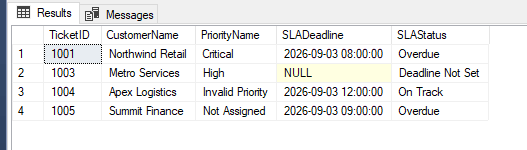
Based on the sample data, tickets 1001, 1003, 1004, and 1005 should appear in the result.
Ticket 1001 is overdue. Ticket 1003 has no deadline. Ticket 1004 contains an invalid priority code, and ticket 1005 has no assigned priority and is also overdue. Ticket 1002 is excluded because it has a valid priority and a future deadline.
A Return-Type Detail to Watch
Another important IIF() behavior appears when its two possible results use different data types. The following expression attempts to return text when no priority exists and an integer when a priority has been assigned:
SELECT
    TicketID,
    IIF
    (
        PriorityCode IS NULL,
        'Not Assigned',
        PriorityCode
    ) AS PriorityDisplay
FROM dbo.SupportTickets;
This produces a conversion error.

IIF() determines a common result type using SQL Server's data-type precedence rules. Because INT has higher precedence than VARCHAR, SQL Server attempts to convert 'Not Assigned' to an integer.
If the intended output is text, the numeric branch should be converted explicitly:
SELECT
    TicketID,
    IIF
    (
        PriorityCode IS NULL,
        'Not Assigned',
        CAST(PriorityCode AS VARCHAR(10))
    ) AS PriorityDisplay
FROM dbo.SupportTickets
ORDER BY TicketID;
Both branches can now produce text, so the expression returns the intended result. The same type-precedence rules are also important when values of different data types are supplied to CHOOSE().
When CASE Is the Clearer Choice
The nested IIF() expressions used earlier are reasonable because each classification has only a few outcomes. As more rules are added, however, nested expressions become harder to follow.
Suppose the SLA requirement later expands to four statuses: Deadline Not Set, Overdue, Due Soon, and On Track. A searched CASE expression makes those branches easier to see:
DECLARE @ReportTime DATETIME2(0) = '2026-09-03T10:00:00';

SELECT
    TicketID,
    CustomerName,
    SLADeadline,
    CASE
        WHEN SLADeadline IS NULL
            THEN 'Deadline Not Set'
        WHEN SLADeadline < @ReportTime
            THEN 'Overdue'
        WHEN SLADeadline <= DATEADD(HOUR, 2, @ReportTime)
            THEN 'Due Soon'
        ELSE 'On Track'
    END AS SLAStatus
FROM dbo.SupportTickets
ORDER BY TicketID;
GO
IIF() is shorthand for a CASE expression and inherits the same maximum nesting level of 10. That limit does not mean deeply nested IIF() expressions are a good design. Readability usually becomes a problem well before the technical limit is reached.
CHOOSE() also has a specific role. It works well when a numeric position directly maps to a short, fixed list of values. It is less suitable when the decision depends on ranges or several unrelated conditions.
If priority names are maintained as business data or change frequently, a lookup table is usually more appropriate than embedding the mapping directly in CHOOSE().
Final Thoughts
IIF() and CHOOSE() can make reporting expressions concise, but their behavior matters when the underlying data is incomplete or invalid.
In this example, a simple SLA test incorrectly treated a missing deadline as On Track because an UNKNOWN condition followed the false branch of IIF(). CHOOSE() also returned NULL when a priority code fell outside the available choices. By handling those cases explicitly, the final triage report was able to distinguish normal results from missing or invalid data.
The functions are most useful when their roles remain small and clear: IIF() for simple conditional decisions and CHOOSE() for fixed positional mappings. When the number of business rules grows, CASE usually provides a clearer way to express the logic.