

Introduction
In day-to-day SQL Server development, most queries rely on familiar operators such as INNER JOIN and LEFT JOIN. These work well when data can be matched through straightforward relationships between tables.
Some requirements are less straightforward. For example, you might need to return the most recent order for each customer or retrieve the top N rows within each group. These problems can be solved in several ways, but the resulting queries are not always easy to read.
CROSS APPLY provides another option. It allows a query on the right side of the operator to use values from the current row on the left side. This makes it useful when the data returned depends on the row currently being processed.
In this article, we'll use a simple customer and order scenario to build a practical understanding of CROSS APPLY and see how it can simplify common query patterns.
Understanding the Core Concept of APPLY
Traditional JOIN operations combine data from two sources using a relationship between them. The query on the right side of the JOIN cannot directly use values from the current row being processed on the left side.
APPLY removes this limitation. It allows the query on the right side to reference values from the current row of the outer table and return results based on that row.
This makes APPLY useful for problems such as returning the latest order for each customer or retrieving the top N rows within a group. The key idea is that the result of the inner query can change for every row processed by the outer query.
Mental Model
A useful way to think about CROSS APPLY is to imagine SQL Server taking one row from the outer table and using it to run the query inside the APPLY operator.
For example, suppose the current row from the Customers table is:
CustomerID  CustomerName
----------- ------------
1           Liam Wilson
The query inside CROSS APPLY can use CustomerID = 1 to return only rows that belong to Liam Wilson. SQL Server then applies the same logic to the next customer and continues until all rows have been processed.
This is a logical model for understanding how CROSS APPLY works. Internally, SQL Server may execute the query differently, but this approach makes it easier to understand why the results can vary from one outer row to another.
Sample Data
To demonstrate CROSS APPLY, we'll use a simple order-processing model consisting of customers, products, and orders. Customers place orders, and each order is associated with a product.
The following statements create the sample tables:
CREATE TABLE Customers
(
    CustomerID   INT PRIMARY KEY,
    CustomerName VARCHAR(100) NOT NULL
);

CREATE TABLE Products
(
    ProductID INT PRIMARY KEY,
    ProductName VARCHAR(100) NOT NULL,
    Price DECIMAL(10,2) NOT NULL
);

CREATE TABLE Orders
(
    OrderID    INT PRIMARY KEY,
    CustomerID INT NOT NULL,
    ProductID  INT NOT NULL,
    OrderDate  DATE NOT NULL,
    Quantity   INT NOT NULL,

    CONSTRAINT FK_Orders_Customers
        FOREIGN KEY (CustomerID)
        REFERENCES Customers(CustomerID),

    CONSTRAINT FK_Orders_Products
        FOREIGN KEY (ProductID)
        REFERENCES Products(ProductID)
);

INSERT INTO Customers
VALUES
    (1, 'Liam Wilson'),
    (2, 'Olivia Taylor'),
    (3, 'Noah Anderson'),
    (4, 'Charlotte Brown');

INSERT INTO Products
VALUES
    (101, 'Camping Tent', 450.00),
    (102, 'Hiking Backpack', 120.00),
    (103, 'Sleeping Bag', 180.00);

INSERT INTO Orders
VALUES
    (1, 1, 101, '2026-01-01', 1),
    (2, 1, 102, '2026-01-05', 2),
    (3, 2, 103, '2026-01-02', 1),
    (4, 3, 101, '2026-01-10', 1),
    (5, 3, 102, '2026-01-12', 3),
    (6, 1, 103, '2026-01-05', 1);
The sample data contains four customers, three products, and six orders. Liam Wilson has two orders on the same date, which will help demonstrate deterministic ordering when using TOP. Before continuing, verify that the tables contain 4 customers, 3 products, and 6 orders.
Problem Statement: Latest Order Per Customer
Suppose we want to retrieve each customer together with their most recent order. This type of requirement appears frequently in reporting and analytical systems where users need to see the latest purchase, transaction, or status associated with an entity.
Although this problem can be solved using JOINs, subqueries, or window functions, CROSS APPLY provides a direct solution by allowing the query on the right side to retrieve rows for the current customer being processed.
In the following example, the query inside CROSS APPLY searches the Orders table for the current customer and returns only the most recent order. The TOP (1) clause limits the result to a single row, while the ORDER BY clause sorts the orders from newest to oldest.
SELECT
    c.CustomerID,
    c.CustomerName,
    o.OrderID,
    o.OrderDate,
    o.ProductID,
    o.Quantity
FROM Customers c
CROSS APPLY
(
    SELECT TOP (1)
           OrderID,
           CustomerID,
           ProductID,
           OrderDate,
           Quantity
    FROM Orders o
    WHERE o.CustomerID = c.CustomerID
    ORDER BY
        o.OrderDate DESC,
        o.OrderID DESC
) o;
The query returns the most recent order for each customer who has at least one order.
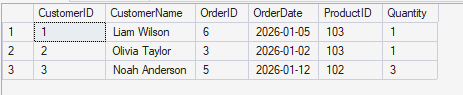
For each customer, CROSS APPLY returns the most recent order from the Orders table. The ORDER BY clause uses both OrderDate and OrderID to ensure deterministic results when multiple orders share the same date.
Notice that Charlotte Brown does not appear in the results. Because no matching orders exist for this customer, the inner query returns no rows, causing CROSS APPLY to exclude the outer row. In this respect, CROSS APPLY behaves similarly to an INNER JOIN.
Real-World Scenario: Top 2 Orders Per Customer
Retrieving the latest order is a common requirement, but sometimes we need more than one row per customer. For example, a report may need to show the two most recent orders for each customer.
With CROSS APPLY, this change is simple. Instead of returning the top row for each customer, we can return the top two rows by changing the TOP clause inside the correlated query.
The following query returns the two most recent orders for each customer.
SELECT
    c.CustomerID,
    c.CustomerName,
    o.OrderID,
    o.OrderDate,
    o.ProductID,
    o.Quantity
FROM Customers c
CROSS APPLY
(
    SELECT TOP (2)
           OrderID,
           CustomerID,
           ProductID,
           OrderDate,
           Quantity
    FROM Orders o
    WHERE o.CustomerID = c.CustomerID
    ORDER BY
        o.OrderDate DESC,
        o.OrderID DESC
) o;
The query returns up to two orders for each customer, ordered from newest to oldest.
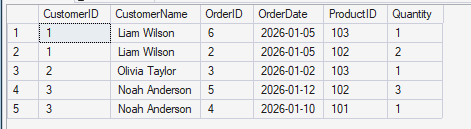
By changing TOP (1) to TOP (2), the query now returns the two most recent orders for each customer. Liam Wilson and Noah Anderson each appear twice because they have multiple qualifying orders, while Olivia Taylor appears once because only a single order exists.
The query structure remains unchanged; only the number of rows returned by the correlated query is different.
Conclusion
CROSS APPLY provides a practical way to solve problems where the rows returned depend on values from the current row of another table.
In this article, we explored how CROSS APPLY can be used to retrieve the latest order for each customer and how the same approach can be extended to return the top N rows within a group. These patterns appear frequently in reporting and analytical workloads and are often easier to express with APPLY than with alternative approaches.
The key idea is that the query inside CROSS APPLY can use values from the current outer row to produce different results for each row being processed. Once this mental model is understood, APPLY becomes a useful addition to the SQL Server developer's toolkit.
