

Foreign keys are one of the most fundamental features in SQL Server. They protect data integrity, document relationships, and allow the optimizer to make smarter decisions. Because of that, they are often treated as an unquestionable best practice.
But what is the runtime cost of foreign keys(FKs) during data modification, especially at scale?
Imagine you are designing a process that performs bulk inserts into a well-structured database. This article can help you avoid a costly design decision.
On small tables, that cost is effectively invisible. On large tables with multiple enforced foreign keys, it can become one of the dominant contributors to insert and update latency. This article demonstrates that cost in a repeatable way using execution plans and IO statistics.
The goal here is not to argue against foreign keys, but to show exactly what SQL Server does when enforcing them and why that matters for batch-heavy workloads so that the reader can make an informed architectural decision.
The Scenario
Consider a fact-style table with:
- millions of rows,
- four to five foreign keys,
- large parent tables referenced by each foreign key,
- batch inserts and updates rather than single-row OLTP operations.
This pattern is common in data warehouses, loyalty systems, transaction processing platforms, and migration utilities. It is also where foreign key enforcement stops being “free.”
What SQL Server Must Guarantee
For every insert or update that touches a foreign key column, SQL Server must validate that the referenced parent row exists. That validation is mandatory and non-negotiable.
With one foreign key, this is usually cheap. With several foreign keys, SQL Server must perform multiple existence checks per row. When those checks are executed across large parent tables and large batches, the cumulative cost becomes measurable in CPU, IO, and elapsed time.
This is not a bug. It is SQL Server doing exactly what it is designed to do.
Why Updates Are Not “Cheap”
Updates are frequently assumed to be less expensive than inserts. When foreign keys are involved, that assumption is often wrong. Any update that modifies a foreign key column requires revalidation. Even updating a subset of foreign key columns can trigger multiple checks, depending on the plan chosen. From the engine’s perspective, a large update can look very similar to an insert in terms of validation work. This is why bulk correction jobs and mass adjustments often surprise teams with their runtime cost.
I have not provided test scripts to demonstrate update performance. Readers are encouraged to measure the impact of updates in their own environments.
Lets demonstrate the impact:
What we will do
- Step 1. Create a sandbox database and scalable data generation.
- Step 2. Populate parent and child tables with millions of rows.
- Step 3. Insert a large batch into the child table without foreign keys (baseline).
- Step 4. Add 5 foreign keys and repeat the insert.
- Step 5. Capture and compare execution plans and IO.
- Step 6. Update child rows and watch how foreign keys affect update plans.
- Step 7. Analyze results and explain what’s happening under the covers.
Step 1. Sandbox database and helper objects
Create a disposable demo database and a fast numbers generator used to seed millions of rows in set-based fashion (no loops).
USE master;
IF DB_ID('FKPerfDemo') IS NOT NULL
BEGIN
    ALTER DATABASE FKPerfDemo SET SINGLE_USER WITH ROLLBACK IMMEDIATE;
    DROP DATABASE FKPerfDemo;
END;
CREATE DATABASE FKPerfDemo;
ALTER DATABASE FKPerfDemo SET RECOVERY SIMPLE;
GO

USE FKPerfDemo;
GO

/* ---------- Numbers generator ---------- */CREATE FUNCTION dbo.GetNums(@n bigint)
RETURNS TABLE
AS
RETURN
(
    WITH
    L0 AS (SELECT 1 c FROM (VALUES(1),(1),(1),(1),(1),(1),(1),(1),(1),(1)) v(c)),
    L1 AS (SELECT 1 c FROM L0 a CROSS JOIN L0 b),
    L2 AS (SELECT 1 c FROM L1 a CROSS JOIN L1 b),
    L3 AS (SELECT 1 c FROM L2 a CROSS JOIN L2 b),
    N  AS (SELECT TOP (@n) ROW_NUMBER() OVER (ORDER BY (SELECT NULL)) n FROM L3)
    SELECT n FROM N
);
GO
This generator scales quickly up to dozens of millions of rows without loops.
Step 2. Define tables and seed data
Let's create five parent tables and a single child fact table with 5 foreign key columns:
DROP TABLE IF EXISTS dbo.ChildFact;
DROP TABLE IF EXISTS dbo.ParentA;
DROP TABLE IF EXISTS dbo.ParentB;
DROP TABLE IF EXISTS dbo.ParentC;
DROP TABLE IF EXISTS dbo.ParentD;
DROP TABLE IF EXISTS dbo.ParentE;
GO

/* ---------- Tables ---------- */CREATE TABLE dbo.ParentA (ParentAId int IDENTITY PRIMARY KEY, Payload char(200));
CREATE TABLE dbo.ParentB (ParentBId int IDENTITY PRIMARY KEY, Payload char(200));
CREATE TABLE dbo.ParentC (ParentCId int IDENTITY PRIMARY KEY, Payload char(200));
CREATE TABLE dbo.ParentD (ParentDId int IDENTITY PRIMARY KEY, Payload char(200));
CREATE TABLE dbo.ParentE (ParentEId int IDENTITY PRIMARY KEY, Payload char(200));

CREATE TABLE dbo.ChildFact
(
    ChildId   bigint IDENTITY PRIMARY KEY,
    ParentAId int NOT NULL,
    ParentBId int NOT NULL,
    ParentCId int NOT NULL,
    ParentDId int NOT NULL,
    ParentEId int NOT NULL,
    Amount    int NOT NULL,
    CreatedAt datetime2(0) NOT NULL DEFAULT sysdatetime()
);

CREATE TABLE dbo.ChildFact_Stage
(
    ParentAId int NOT NULL,
    ParentBId int NOT NULL,
    ParentCId int NOT NULL,
    ParentDId int NOT NULL,
    ParentEId int NOT NULL,
    Amount    int NOT NULL
);
GO
Now populate the tables with a few million rows each (adjust as needed):
/* ---------- Parameters ---------- */DECLARE
    @ParentRows  int = 1000000,
    @ChildRows   int = 1000000,
    @BatchRows   int = 200000;

/* ---------- Seed parent tables ---------- */INSERT dbo.ParentA SELECT 'A' FROM dbo.GetNums(@ParentRows);
INSERT dbo.ParentB SELECT 'B' FROM dbo.GetNums(@ParentRows);
INSERT dbo.ParentC SELECT 'C' FROM dbo.GetNums(@ParentRows);
INSERT dbo.ParentD SELECT 'D' FROM dbo.GetNums(@ParentRows);
INSERT dbo.ParentE SELECT 'E' FROM dbo.GetNums(@ParentRows);

/* ---------- Seed child table ---------- */;WITH R AS
(
    SELECT TOP (@ChildRows)
        ((n*17)%@ParentRows)+1 A,
        ((n*19)%@ParentRows)+1 B,
        ((n*23)%@ParentRows)+1 C,
        ((n*29)%@ParentRows)+1 D,
        ((n*31)%@ParentRows)+1 E,
        n
    FROM dbo.GetNums(@ChildRows)
)
INSERT dbo.ChildFact (ParentAId,ParentBId,ParentCId,ParentDId,ParentEId,Amount)
SELECT A,B,C,D,E,(n%1000) FROM R;

/* ---------- Prepare repeatable batch ---------- */TRUNCATE TABLE dbo.ChildFact_Stage;

;WITH R AS
(
    SELECT TOP (@BatchRows)
        ((n*101)%@ParentRows)+1 A,
        ((n*103)%@ParentRows)+1 B,
        ((n*107)%@ParentRows)+1 C,
        ((n*109)%@ParentRows)+1 D,
        ((n*113)%@ParentRows)+1 E,
        n
    FROM dbo.GetNums(@BatchRows)
)
INSERT dbo.ChildFact_Stage
SELECT A,B,C,D,E,(n%1000) FROM R;
Step 3. Baseline insert (no foreign keys)
Let us establish our baseline by capturing performance numbers with no foreign keys defined. We will truncate the table to keep the next test comparable.
/* =========================================================
   TEST 1 – INSERT WITHOUT FOREIGN KEYS
   ========================================================= */PRINT '** TEST 1 – INSERT WITHOUT FOREIGN KEYS **';
SET STATISTICS IO ON;
SET STATISTICS TIME ON;

INSERT dbo.ChildFact (ParentAId,ParentBId,ParentCId,ParentDId,ParentEId,Amount)
SELECT ParentAId,ParentBId,ParentCId,ParentDId,ParentEId,Amount
FROM dbo.ChildFact_Stage;

SET STATISTICS IO OFF;
SET STATISTICS TIME OFF;

/* Cleanup */TRUNCATE TABLE dbo.ChildFact;
On my machine, I observed the following results for this step:
** TEST 1 – INSERT WITHOUT FOREIGN KEYS **
Table 'ChildFact'. Scan count 0, logical reads 605830, physical reads 0, page server reads 0, read-ahead reads 0, page server read-ahead reads 0, lob logical reads 0, lob physical reads 0, lob page server reads 0, lob read-ahead reads 0, lob page server read-ahead reads 0.
Table 'ChildFact_Stage'. Scan count 1, logical reads 817, physical reads 0, page server reads 0, read-ahead reads 0, page server read-ahead reads 0, lob logical reads 0, lob physical reads 0, lob page server reads 0, lob read-ahead reads 0, lob page server read-ahead reads 0.
 SQL Server Execution Times:
   CPU time = 2437 ms,  elapsed time = 3147 ms.
(200000 rows affected)
 SQL Server Execution Times:
   CPU time = 0 ms,  elapsed time = 0 ms.
(200000 rows affected)
And given below is the screenshot of the execution plan -

Step 4. Add 5 foreign keys
Let’s add the foreign keys to validate the hypothesis.
ALTER TABLE dbo.ChildFact WITH CHECK ADD CONSTRAINT FK_ChildFact_ParentA FOREIGN KEY (ParentAId) REFERENCES dbo.ParentA(ParentAId);
ALTER TABLE dbo.ChildFact WITH CHECK ADD CONSTRAINT FK_ChildFact_ParentB FOREIGN KEY (ParentBId) REFERENCES dbo.ParentB(ParentBId);
ALTER TABLE dbo.ChildFact WITH CHECK ADD CONSTRAINT FK_ChildFact_ParentC FOREIGN KEY (ParentCId) REFERENCES dbo.ParentC(ParentCId);
ALTER TABLE dbo.ChildFact WITH CHECK ADD CONSTRAINT FK_ChildFact_ParentD FOREIGN KEY (ParentDId) REFERENCES dbo.ParentD(ParentDId);
ALTER TABLE dbo.ChildFact WITH CHECK ADD CONSTRAINT FK_ChildFact_ParentE FOREIGN KEY (ParentEId) REFERENCES dbo.ParentE(ParentEId);
GO
Step 5. Insert with foreign keys enabled
Let us repeat the same batch insert but now FKs are enabled!
We expect:
- Additional operators in the plan (joins, hash matches, key lookups),
- Increased logical reads against the 5 parent tables,
- Higher CPU and elapsed time compared to baseline.
/* =========================================================
   TEST 2 – INSERT WITH FOREIGN KEYS
   ========================================================= */PRINT '** Test 2 - Inserts with Foreign Keys ** ';
SET STATISTICS IO ON;
SET STATISTICS TIME ON;

INSERT dbo.ChildFact (ParentAId,ParentBId,ParentCId,ParentDId,ParentEId,Amount)
SELECT ParentAId,ParentBId,ParentCId,ParentDId,ParentEId,Amount
FROM dbo.ChildFact_Stage
OPTION (RECOMPILE);

SET STATISTICS IO OFF;
SET STATISTICS TIME OFF;
This is the real cost of enforced referential checks on large parent tables.
The following are the stats IO numbers from my machine:
** Test 2 - Inserts with Foreign Keys **
SQL Server parse and compile time:
   CPU time = 1380 ms, elapsed time = 1380 ms.
Table 'Worktable'. Scan count 1000000, logical reads 16471289, physical reads 0, page server reads 0, read-ahead reads 0, page server read-ahead reads 0, lob logical reads 0, lob physical reads 0, lob page server reads 0, lob read-ahead reads 0, lob page server read-ahead reads 0.
Table 'ParentE'. Scan count 1, logical reads 26415, physical reads 0, page server reads 0, read-ahead reads 0, page server read-ahead reads 0, lob logical reads 0, lob physical reads 0, lob page server reads 0, lob read-ahead reads 0, lob page server read-ahead reads 0.
Table 'ParentD'. Scan count 1, logical reads 26415, physical reads 0, page server reads 0, read-ahead reads 0, page server read-ahead reads 0, lob logical reads 0, lob physical reads 0, lob page server reads 0, lob read-ahead reads 0, lob page server read-ahead reads 0.
Table 'ParentC'. Scan count 1, logical reads 26415, physical reads 0, page server reads 0, read-ahead reads 0, page server read-ahead reads 0, lob logical reads 0, lob physical reads 0, lob page server reads 0, lob read-ahead reads 0, lob page server read-ahead reads 0.
Table 'ParentB'. Scan count 1, logical reads 26415, physical reads 0, page server reads 0, read-ahead reads 0, page server read-ahead reads 0, lob logical reads 0, lob physical reads 0, lob page server reads 0, lob read-ahead reads 0, lob page server read-ahead reads 0.
Table 'ParentA'. Scan count 1, logical reads 26415, physical reads 0, page server reads 0, read-ahead reads 0, page server read-ahead reads 0, lob logical reads 0, lob physical reads 0, lob page server reads 0, lob read-ahead reads 0, lob page server read-ahead reads 0.
Table 'ChildFact'. Scan count 0, logical reads 6172, physical reads 0, page server reads 0, read-ahead reads 0, page server read-ahead reads 0, lob logical reads 0, lob physical reads 0, lob page server reads 0, lob read-ahead reads 0, lob page server read-ahead reads 0.
Table 'ChildFact_Stage'. Scan count 1, logical reads 817, physical reads 0, page server reads 0, read-ahead reads 0, page server read-ahead reads 0, lob logical reads 0, lob physical reads 0, lob page server reads 0, lob read-ahead reads 0, lob page server read-ahead reads 0.
 SQL Server Execution Times:
   CPU time = 25547 ms,  elapsed time = 27214 ms.
(200000 rows affected)
 SQL Server Execution Times:
   CPU time = 0 ms,  elapsed time = 0 ms.
Total execution time: 00:01:20.751
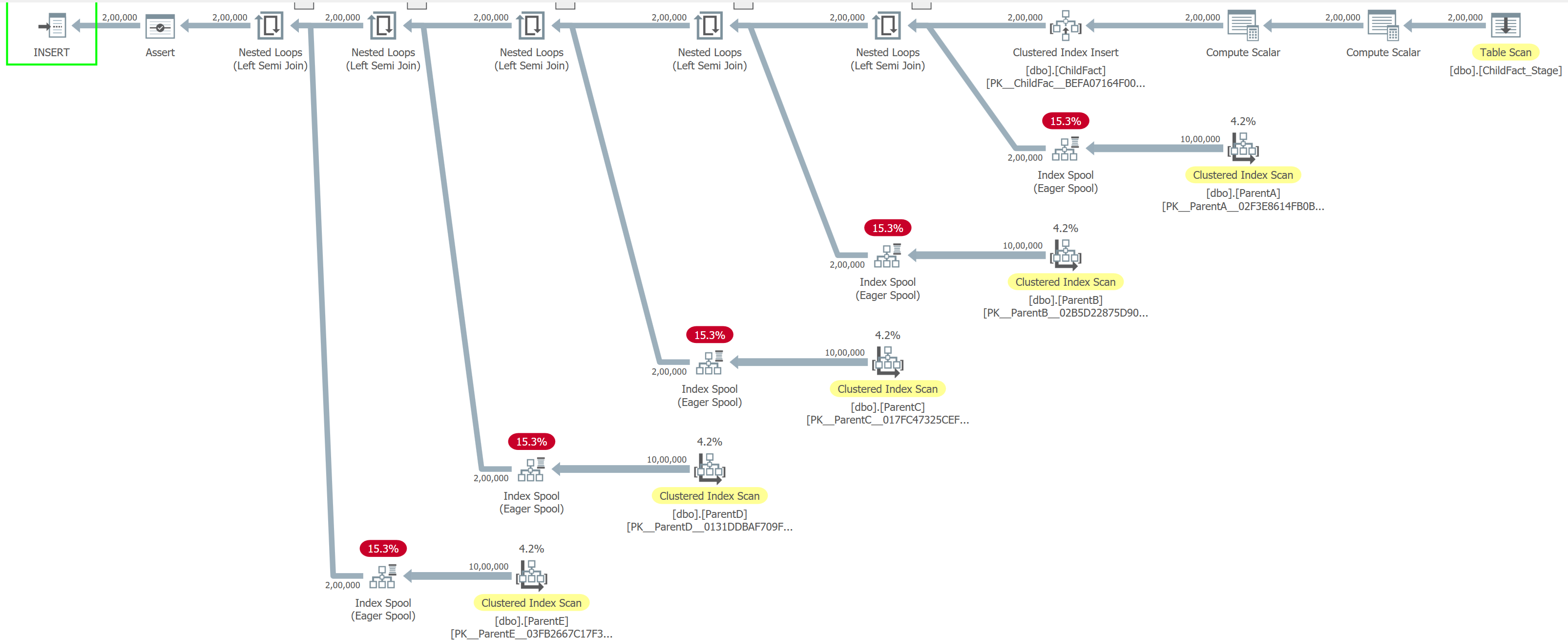
Here is the screenshot for the execution plan:
Step 7. What’s happening under the covers
In Test 1, SQL Server performs a straightforward insert. The engine reads the staging table once (817 logical reads) and writes directly into the target table. There are no parent tables to check, no extra validation, and no internal worktables involved. As a result, the operation completes in about 1 second of CPU time and ~1 second elapsed time, with the system doing exactly what you would expect: read the data and write it out. This is close to the best-case scenario for bulk inserts.
Test 2 tells a very different story. The same 200,000 rows now require SQL Server to validate referential integrity against five parent tables. This validation is not free. SQL Server creates internal worktables and repeatedly scans them, resulting in 1,000,000 scan operations and roughly 16.4 million logical reads just for FK enforcement. Each parent table is also read (~26K logical reads per table) to confirm that referenced keys exist.
The cost shows up clearly in the timings:
- CPU time: ~25.5 seconds
- Elapsed time: ~27 seconds
- Compilation time alone: ~1.4 seconds
What was once a simple insert becomes a CPU-heavy workload dominated by lookups, scans, and internal data shuffling. If the data modification batch is large, the optimizer may choose different join strategies that lead to scans on parent tables instead of seeks.
Understanding how SQL Server enforces foreign keys, and the impact on IO and CPU through execution plans, lets you make informed design and workload decisions.
Here is the summary of performance numbers of both tests
| Aspect | Test 1 – Insert Without Foreign Keys | Test 2 – Insert With Foreign Keys |
|---|---|---|
| Rows inserted | 200,000 | 200,000 |
| Foreign key checks | None | 5 parent tables validated per row |
| Execution pattern | Simple sequential insert | Insert + referential integrity validation |
| CPU time | ~1,000 ms | ~25,547 ms |
| Elapsed time | ~1,070 ms | ~27,214 ms (total ~80 sec incl. compile) |
| Compilation time | Negligible | ~1,380 ms |
| Logical reads (staging table) | 817 | 817 |
| Logical reads (target table) | ~605,830 | ~6,172 |
| Logical reads (parent tables) | 0 | ~26,415 each (ParentA–E) |
| Worktable usage | None | 16.4 million logical reads |
| Worktable scan count | 0 | 1,000,000 |
| Internal temp structures | Minimal | Heavy (spools/worktables) |
| Primary bottleneck | Disk writes | CPU and memory (validation overhead) |
| Overall performance | Very fast | 25–30× slower |
| Root cause | No referential checks | Per-row FK validation at scale |
I'd also like to mention that I tried (and hoped) that if I break this insertion in smaller batches, would that make a difference. Interestingly, breaking the insert into smaller batches made overall performance worse, not better.
Trusted vs untrusted foreign keys - difficult design decision
Adding foreign keys with WITH NOCHECK is a common operational shortcut. It avoids validating existing data and can be useful during migrations or emergency fixes. However, untrusted foreign keys come with trade-offs:
- The optimizer cannot rely on them for certain query transformations.
- Read performance may suffer.
- Constraints are often left untrusted indefinitely.
From a write perspective, new rows must still be validated. WITH NOCHECK avoids historical validation, not ongoing enforcement.
When should you disable foreign keys?
This is where opinions differ, and where the comment section usually gets interesting.
Disabling foreign keys can be reasonable when:
- performing large, controlled batch loads where data integrity is validated upstream,
- running one-time migrations or rebuilds under strict operational control,
- executing maintenance jobs where referential integrity is temporarily guaranteed by process, not constraints.
Disabling foreign keys is usually a bad idea when:
- the system is OLTP-heavy with concurrent writers,
- integrity violations would be costly or difficult to detect later,
- there is no clear process to re-enable and validate constraints.
Foreign keys should not be treated as untouchable, nor as optional. They are a tool. Like all tools, they are most effective when used deliberately and with full understanding of their cost.
Final thoughts
Foreign keys remain one of SQL Server’s most valuable features. They protect data, document intent, and enable better optimization when trusted. But they are not free. At scale, their enforcement cost is real, measurable, and visible in execution plans.
If you design systems that move large volumes of data, you owe it to yourself to understand that cost before it shows up in production.
