High Availability (HA)

SQLServerCentral Article

Steps for Installing AlwaysOn Availability Groups - SQL 2019

  • Article

With SQL Server 2012 Microsoft introduced the AlwaysOn Availability Group feature, and since then many changes and improvements have been made.  This article is an update to another article, and will cover the prerequisites and steps for installing AlwaysOn in your SQL Server 2019 environment. Prerequisites Before implementing your AlwaysOn Availability Group (AG), make sure […]

You rated this post out of 5. Change rating

2025-12-24 (first published: )

1,093 reads

External Article

How to Measure Replication Latency in SQL Server AlwaysOn Synchronous Availability Groups

  • Article

Synchronous replicas in SQL Server Availability Groups promise no data loss, but they don’t promise zero delay; under heavy load they can still fall behind. This article shows how to measure and track that hidden replication delay using SQL Server performance counters, so you can see how well your system keeps up during IO‑intensive operations and plan maintenance more safely.

2025-09-17

External Article

PostgreSQL High Availability Options

  • Article

We are deploying a new application that uses PostgreSQL database. My manager has asked me to design high availability into the implementation. As a SQL Server database administrator, I’ve been managing PostgreSQL databases for a while. However, I’m not sure which high availability options to implement. What are the different high availability options for PostgreSQL?

2025-08-27

Contained Availability Groups in SQL Server 2022

  • Article

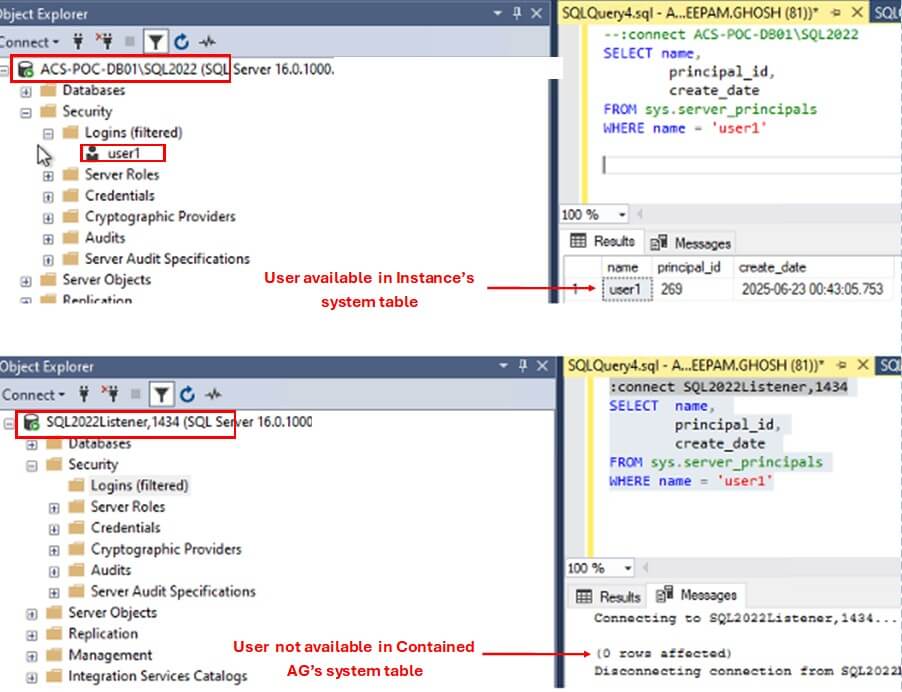
SQL Server 2022 introduced a new feature called Contained Availability Groups. It allows the Database Administrators to effectively manage the Server Level objects, such as Logins, SQL Agent jobs, etc. in an HA environment. In today's article, we will learn about this new feature of SQL Server. The Challenge of Managing Server Objects in Availability […]

You rated this post out of 5. Change rating

2025-08-20

9,335 reads

SQLServerCentral Article

Basic Always On Availability Groups in SQL Server Standard

  • Article

Once Windows Server Failover Clusters have been set up, we can set up Availability Groups in SQL Server. This article will focus on setting up Basic Always-On Availability Groups in SQL Server Standard Edition.
This facilitates High Availability in SQL Server Standard, with three levels of availability and failover:
Asynchronous commit with manual or forced failover,
Synchronous commit with manual or forced failover,
Synchronous commit with automatic failover.

(3)

You rated this post out of 5. Change rating

2024-06-05

13,737 reads

Blogs

AI: Blog a Day – Day 8: RAG – Retrieval Augmented Generation

By

RAG — Retrieval Augmented Generation. we have covered so far — embeddings, vectors, vector...

AI: Blog a Day – Day 7: Vector and Vector Databases

By

Continuing from Day 6 we learned Embeddings, Semantic Search and Checks, on Day 7...

AI: Blog a Day – Day 6: Embeddings – How AI Understands

By

Continuing from Day 5 where we covered notebooks, HuggingFace and fine tuning AI now...

Read the latest Blogs

Forums

Not Just an Upgrade

By Steve Jones - SSC Editor

Comments posted to this topic are about the item Not Just an Upgrade

Restoring On Top I

By Steve Jones - SSC Editor

Comments posted to this topic are about the item Restoring On Top I

Designing Delta Tables with Liquid Clustering: Real-World Patterns for Data Engineers

By mehul.bhuva@gmail.com

Comments posted to this topic are about the item Designing Delta Tables with Liquid...

Visit the forum

Question of the Day

Restoring On Top I

I am doing development work on a database and want to keep a backup so I can reset my database. I make some changes and want to restore over top of my changes. When I run this code, what happens?

USE Master
BACKUP DATABASE DNRTest TO DISK = 'dnrtest.bak'
GO

USE DNRTest
GO
CREATE TABLE MyTest(myid INT)
GO
USE master
RESTORE DATABASE DNRTest FROM DISK = 'dnrtest.bak' WITH REPLACE

See possible answers