

This is for anyone tired of manually creating and deleting individual PostgreSQL logins every time someone joins, leaves, or changes teams, and whose security team wants centralized, AD-driven access control instead.
A security review at a previous job turned up something embarrassing: our Aurora PostgreSQL cluster had eleven database logins for people who'd left the company over the past two years. Nobody had a bad intention here; offboarding just never included a step to revoke database access, because database access wasn't tied to anything else in the identity lifecycle. The fix we landed on wasn't a better offboarding checklist; it was removing the need for one: Kerberos authentication against AWS Managed Microsoft AD, with AD security groups mapped directly to PostgreSQL roles, so that removing someone from Active Directory removes their database access automatically, the same day, with no DBA involved.
Why This Matters
Aurora PostgreSQL supports three authentication methods, which are mutually exclusive per user: password authentication, IAM database authentication (the rds_iam role, with tokens that expire after fifteen minutes), and Kerberos authentication (the rds_ad role) against Microsoft Active Directory. Kerberos is the one built for enterprises that already run AD, because it gives you real single sign-on: a user who's already authenticated to their AD domain gets a Kerberos ticket and uses it to connect, no separate database password to manage or rotate.
On its own, though, Kerberos still means provisioning individual AD users into the database one at a time, which is most of the operational burden password auth had. That's where AD security group mapping comes in. Starting with Aurora PostgreSQL 14.10 and 15.5, the pg_ad_mapping extension lets you map an entire AD security group to a PostgreSQL role, so access follows group membership instead of a list of individually granted logins. Put someone in the right AD group and they have the right database access on their next login; take them out, and they don't, without anyone touching SQL.
Setting up the Directory and the Cluster
Kerberos authentication for Aurora PostgreSQL is built on AWS Directory Service for Microsoft Active Directory (AWS Managed Microsoft AD), whether you use a fresh directory in AWS or an existing on-premises AD joined by a trust relationship. The setup has a handful of discrete steps, and skipping the IAM role step is the most common way to get stuck.
- Create an AWS Managed Microsoft AD directory (Directory Service console, CLI, or API), noting its Directory ID (a "d-" identifier).
- If you're extending an existing on-premises AD instead of starting fresh in AWS, set up a one-way or two-way forest trust between it and the AWS Managed Microsoft AD directory.
- Create an IAM role using the managed policy AmazonRDSDirectoryServiceAccess, so Aurora can call Directory Service on your behalf. This is a different role than the one used for IAM database authentication.
- If the directory and the DB cluster sit in different VPCs, set up VPC peering or Transit Gateway so they can reach each other, and make sure the DB cluster's security group allows traffic to and from the directory.
With the directory and IAM role in place, join the Aurora PostgreSQL cluster to the domain. Kerberos authentication is only supported on standalone Aurora PostgreSQL clusters in a VPC; it isn't currently supported during migration from RDS for PostgreSQL.
aws rds modify-db-cluster \
  --db-cluster-identifier orders-primary-use1 \
  --domain d-1234567890 \
  --domain-iam-role-name rds-directoryservice-kerberos-access-role \
  --apply-immediately

aws rds reboot-db-instance \
  --db-instance-identifier orders-primary-use1-writer
The reboot is required; enabling Kerberos on a running cluster doesn't take effect until the instance restarts. After the reboot, confirm the domain membership shows kerberos-enabled before moving on.
aws rds describe-db-clusters \
  --db-cluster-identifier orders-primary-use1 \
  --query 'DBClusters[*].DomainMemberships[*].Status[][]'
Creating Individual Kerberos Logins
Before adding group mapping, it's worth understanding the per-user path this replaces, since you may still use it for a handful of service accounts. Connect as your rds_superuser account, and create a PostgreSQL role that matches the AD principal name exactly. Then grant it the rds_ad role.
psql --host=orders-primary-use1-writer.xxxxx.us-east-1.rds.amazonaws.com \
  --port=5432 --username=dbadmin --password

postgres=> CREATE USER "jsmith@CORP.EXAMPLE.COM" WITH LOGIN;
postgres=> GRANT rds_ad TO "jsmith@CORP.EXAMPLE.COM";
This works, but it's exactly the eleven-stale-logins problem from the introduction waiting to happen again at a larger company: every new hire is a manual CREATE USER, every departure is a manual step someone has to remember.
Mapping AD security groups to PostgreSQL roles
The pg_ad_mapping extension replaces the one-user-at-a-time model with group-based access. Install it on the cluster, then create the PostgreSQL roles you want AD groups to map to.
postgres=> CREATE EXTENSION IF NOT EXISTS pg_ad_mapping CASCADE;
postgres=> CREATE ROLE app1dev_role LOGIN;
postgres=> CREATE ROLE app2dev_role LOGIN;
postgres=> GRANT CONNECT ON DATABASE orders TO app1dev_role, app2dev_role;
Then map each AD security group's SID to the matching role, with a weight that breaks ties when a user belongs to more than one mapped group. Get the SID from Active Directory (PowerShell's Get-ADGroup, or an equivalent AD tool), then register the mapping from psql.
postgres=> SELECT pgadmap_set_mapping('app1dev', 'app1dev_role', 'S-1-5-21-2773742795-607290122-2880450345-1609', 7);
postgres=> SELECT pgadmap_set_mapping('app2dev', 'app2dev_role', 'S-1-5-21-2773742795-607290122-2880450345-1622', 9);
postgres=> SELECT * FROM pgadmap_read_mapping();
From this point on, when an AD user authenticates with Kerberos, pg_ad_mapping checks their AD group memberships and assigns the corresponding database role automatically. A user in both app1dev and app2dev gets app2dev_role, because it has the higher weight; that precedence rule is what lets you express "this group's access wins" without writing any conditional logic yourself. Move a user from app1dev to app2dev in Active Directory, and their next login picks up app2dev_role with zero PostgreSQL changes.

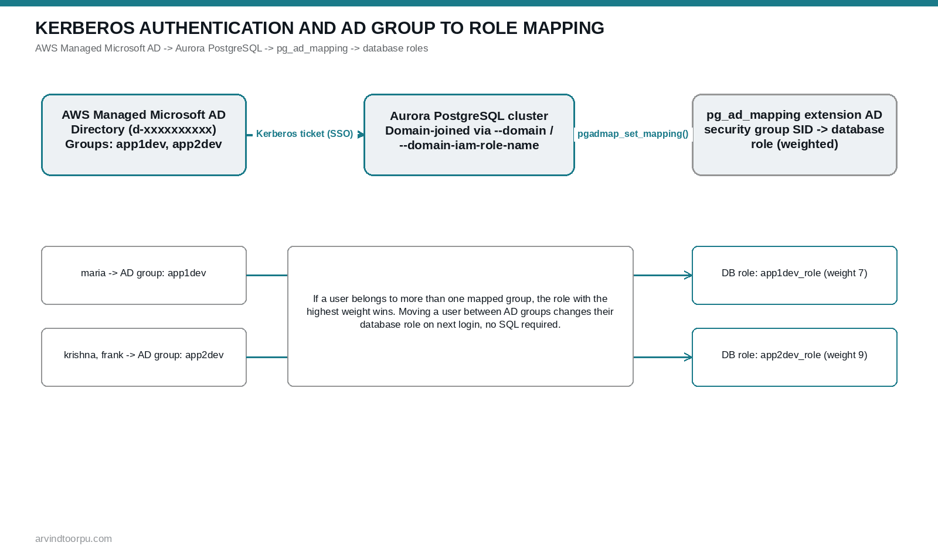 AD groups mapped to weighted PostgreSQL roles via the pg_ad_mapping extension
Where This Requires Care
A user granted rds_ad can't also be granted rds_iam, including through nested group membership; pick one authentication method per user rather than trying to layer them. Users authenticating via Kerberos must connect from client machines that are themselves members of the Active Directory domain, which is worth testing early since it's an easy thing to get wrong in a hybrid on-prem/cloud client environment.
Username casing is a real gotcha. By default, PostgreSQL treats AD principal names case-sensitively, so "JSmith@CORP.EXAMPLE.COM" and "jsmith@CORP.EXAMPLE.COM" are different identities unless you're on Aurora PostgreSQL 14.5, 13.8, 12.12, 11.17, or newer and have explicitly set the krb_caseins_users parameter to true in a custom DB cluster parameter group.
If your Aurora Global Database spans multiple Regions, Kerberos-authenticated Windows clients can only connect through instance or cluster endpoints in the primary Region; they can't connect through cluster endpoints in secondary Regions, and that's not something write forwarding or endpoint tricks work around. Plan your Kerberos client connectivity around the primary Region specifically if you're combining this with a global database setup.
AD user identity isn't currently surfaced directly in Aurora's audit logs. Enable log_connections to capture session establishment events, which do include the AD identity, and cross-reference that with the backend PID if you need to attribute specific actions back to a specific AD user for a compliance review.
Quick Reference
- Kerberos auth uses AWS Managed Microsoft AD (or an on-premises AD via trust) and the rds_ad PostgreSQL role; it's mutually exclusive with rds_iam per user.
- Setup requires an IAM role using the AmazonRDSDirectoryServiceAccess policy, a domain-joined DB cluster (--domain, --domain-iam-role-name), and a reboot before it takes effect.
- The pg_ad_mapping extension (Aurora PostgreSQL 14.10/15.5+) maps AD security group SIDs to PostgreSQL roles with a weight, so access follows AD group membership instead of individually granted logins.
- Ties between multiple group memberships are broken by weight; the highest-weight mapped role wins.
- Case sensitivity, domain-joined client requirements, and primary-Region-only Windows client connectivity on global databases are the most common places this trips people up.
Conclusion
The eleven stale logins that started this for us weren't a technology problem, they were a process gap that Kerberos plus group mapping closes structurally instead of procedurally. I'd rather build access control on top of a system someone is already maintaining for other reasons (Active Directory, in most enterprises) than maintain a second, parallel list of who should have database access. The setup has more moving pieces than password auth, directory, trust, IAM role, domain join, but once it's running, the ongoing maintenance is close to zero, which is exactly the tradeoff you want for something as security-sensitive as who can log into production data.
Further Reading
- Using Kerberos authentication with Aurora PostgreSQL (AWS Docs)
- Setting up Kerberos authentication for PostgreSQL DB clusters (AWS Docs)
- Using AD security groups for Aurora PostgreSQL access control (AWS Docs)
- Simplify database authentication management with the pg_ad_mapping extension (AWS Database Blog)