

Steve Jones posted a request for an article on finding missing foreign key constraints and fixing them. This was serendipitous timing as the capability Steve was requesting would be ideal in meeting my challenges I was about to face in a data warehouse migration.
- Systems were unsupported
- Documentation sparse or non-existent
- Data models are unknown or poorly understood
- Few (if any) people retain comprehensive technical knowledge of that system.
An understanding of the data model for a system reveals much about the system itself and how it is intended to work. If you can derive the foreign keys then you can use your tool of choice for reverse engineering a schema diagram. Of course, if a picture paints a thousand words then a schema diagram is pure oratory
This topic sounded like a straight forward problem however, as you will see, producing a solution took a lot of thought and hard work.
Things to consider before starting
There are a number of things to consider when beginning this type of project.
Data compliance
Given the number of published data breaches in 2015, your starting point should be to restore a copy of the database in question into an appropriately secure environment to carry out your investigation.
Always check if there are any regulatory or legal restrictions on where you restore the database in question. If you are restoring an HR database or a financial services database you might be required to use a specific and restricted environment and not simply restore the database onto a development machine.
How big is the problem?
The first questions I want to answer are as follows:
- Will the diagramming/modelling tool be overwhelmed by the number of objects in the database?
- Will my database yield useful information to the diagramming/modelling tool?
These answers can be found by running a few basic queries on the system tables.
WARNING: I have not used INFORMATION_SCHEMA views due the Microsoft warning shown below:
Do not use INFORMATION_SCHEMA views to determine the schema of an object. The only reliable way to find the schema of a object is to query the sys.objects catalog view.
Will the diagramming tool be overwhelmed?
The query shown below will identify how many objects could be included in the diagram and whether we have any convenient pagination based on schemas. There are two points to note about the query below:
- The use of the WITH ROLLUP clause to produce an overall total number of objects
- The use of the GROUPING function to indicate the row that is the overall total number of objects.
;WITHcte(SchemaName)AS(SELECTOBJECT_SCHEMA_NAME(T.object_id)FROMsys.objectsASTWHERET.type='U')SELECTCOALESCE(SchemaName,' TOTAL NUMBER OF TABLES')ASSchemaName, COUNT(*)ASTablesInSchema, GROUPING(SchemaName)ASIsTotalFROMcteGROUP BYSchemaNameWITH ROLLUPORDER BYSchemaName
When run on the Adventureworks2014 database this will produce a recordset similar to the one below:-
SchemaName | TablesInSchema | IsTotal |
|---|---|---|
TOTAL NUMBER OF TABLES | 72 | 1 |
dbo | 4 | 0 |
HumanResources | 6 | 0 |
Person | 13 | 0 |
Production | 25 | 0 |
Purchasing | 5 | 0 |
Sales | 19 | 0 |
Will the database yield useful information?
You won’t get much value from pointing a diagramming tool at a database that does not contain foreign key relationships or for which the relationships are sparse.
The query below consists of two common table expressions and a query that utilises them.
- FKTables produces a distinct list of tables that either reference or are referenced by a foreign key relationships
- UserTables is simply a list of user tables
;WITHFKTables (FQTableName)AS(SELECTOBJECT_SCHEMA_NAME(fkeyid)+'.'+OBJECT_NAME(fkeyid)FROMsys.sysreferencesUNION SELECTOBJECT_SCHEMA_NAME(rkeyid)+'.'+OBJECT_NAME(rkeyid)FROMsys.sysreferences), UserTables (FQTableName)AS(SELECTOBJECT_SCHEMA_NAME(object_id)+'.'+OBJECT_NAME(object_id)FROMsys.objectsWHEREtype='U')SELECTCOUNT(U.FQTableName)ASTotalUserTables, COUNT(F.FQTableName)ASTablesInARelationshipFROMUserTablesASU LEFT JOIN FKTablesASFONU.FQTableName=F.FQTableName
Whereas COUNT(*) would count all records, COUNT(<fieldname>) only counts the non-null entries. Tables that do not reference or are not referenced by a foreign key will not be in the query results for the FKTables CTE so the LEFT JOIN will give a NULL field state that will not be counted.
If we run the query against the Adventureworks2014 database then we get the following results.
TotalUserTables | TablesInARelationship |
|---|---|
71 | 67 |
If the figure for TablesInARelationship is a small proportion of the figure for TotalUserTables then pointing a diagramming tool at the database will produce little of value.
Starting off with a high level plan
The next is to take a step back and think through a plan of action. I thought that this could be broken down into a few simple challenges.
- Identify missing primary keys and unique constraints
- Identify the number of fields in the key
- Identify naming conventions for primary key fields and the equivalent in other tables
- Identify candidate FK where a table contains the equivalent fields as those participating in a PK
- Discount those where there is already an FK relationship
- Test the data to precheck violations
- Generate PK & FK scripts through automated means
The flow chart below illustrates my initial plan for identifying primary keys.
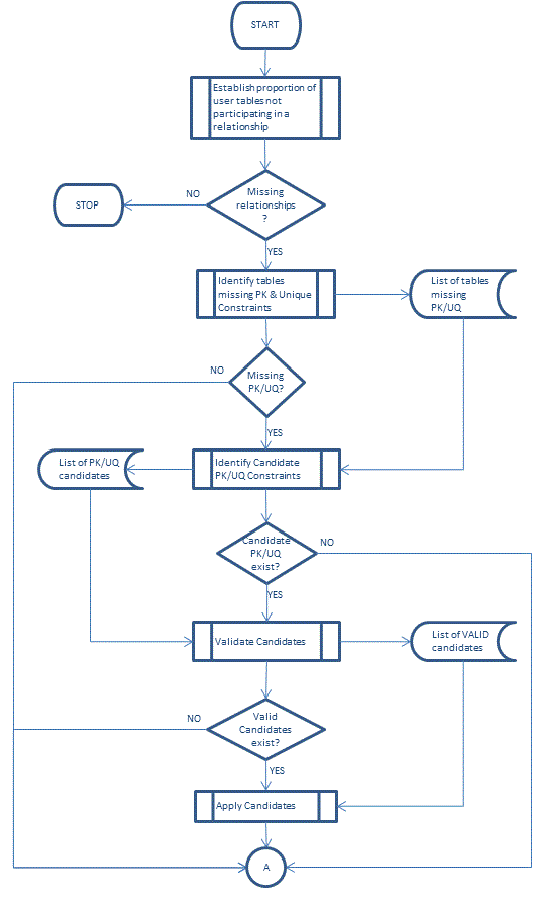
We need to establish whether we have the base requirements for adding candidate foreign key constraints (Primary or Unique constraints)?
As this is a copy of a production database we are free to add any foreign key constraints and enabling objects.
Identifying tables without primary or unique constraints
We know that for a foreign key relationship to be created the field(s) within the referenced table must participate in some form of unique constraint, usually a primary key.
WARNING: If the table has a unique index but not a unique constraint then a foreign key relationship cannot be created.
The query to find tables without the required constraints is shown below.
;WITHPKAS(SELECTparent_object_idFROMsys.objectsWHEREtype IN('PK','UQ') )SELECTOBJECT_SCHEMA_NAME(T.object_id) +'.'+ OBJECT_NAME(T.object_id)ASFQ_TableNameFROMsys.objectsAST LEFT JOIN PK ON PK.parent_object_id = T.object_idWHERET.type='U'AND PK.parent_object_id IS NULL
If you are lucky there should be very few tables in the results of this query.
But what do you do if tables are listed?
Identifying candidate unique Keys
Devising an automated test can be more error prone than it would first appear from the properties of the two types of unique constraint shown below:
Type of Constraint | Nullable | Description |
|---|---|---|
Primary Key | NO | Clustered unless explicitly defined otherwise |
Unique constraint | YES | Where nullable can have a single null value. |
The pitfalls as I see it are as follows:
Pitfall | Description |
|---|---|
Compound keys | A legitimate and useful physical modelling technique. Massively increases the scope of the automated tests that may have to be carried out before applying a unique constraint. A compound key can be up to 16 fields so you have 65,535 possible combinations. Granted that there is a 900 byte limit on any key and the most fields I have seen in a primary key is five but in any one table that still increases the range of automated tests to carry out. |
Naming conventions | Most people I know tend to stick to adopt a naming convention for fields they use as primary keys. A quick look at Adventureworks2014 reveals that this isn’t bomb proof. HumanResources.Employee has a primary key of BusinessEntityID! |
Co-incidental uniqueness | Where there is a small amount of data then testing an assumption about uniqueness may give a false positive. · We identify a candidate unique key · Data testing indicates that a unique constraint can be added · Although the data is physically compliant with our assumptions those assumptions are incorrect. |
If we limit ourselves to looking for single field candidates for unique keys then can prioritise the things we will evaluate first.
- Fields that use identity values
- Fields that have a default for a sequence
- A field whose name is ID
- A field whose name is Code
- A field whose name is basically the table name suffixed by ID.
- A field whose name is basically the table name suffixed by Code.
- The first field in a table.
- Fields that have a GUID type
Housekeeping objects
Clearly evaluating candidate unique constraints is going to be quite an involved process. We are going to have to build up the information we need in a series of steps and store the results in tables.
As we do not want to pollute our existing schemas with the objects we need our first step is to build a couple of schemas explicitly to hold our objects.
Schema | Lifecycle | Purpose |
|---|---|---|
CandidateKey | Permanent | Holds our toolkit. This consists of tables, views and procs used to identify and evaluate potential keys. |
Validate | Transient | Holds tables used to validate candidates for unique keys. |
The code below creates the schemas we need.
IFNOT EXISTS(SELECT*FROMsys.schemasWHEREname='CandidateKey')BEGIN EXEC('CREATE SCHEMA CandidateKey')'SCHEMA CREATED: CandidateKey'END ELSE PRINT'SCHEMA EXISTS: CandidateKey'GO IFNOT EXISTS(SELECT*FROMsys.schemasWHEREname='Validate')BEGIN EXEC('CREATE SCHEMA Validate')'SCHEMA CREATED: Validate'END ELSE PRINT'SCHEMA EXISTS: Validate'GO
As I intend the Validate schema to hold transient objects I will also need a stored procedure that can clean out any table specific evaluation tables that might exist in that schema.
Under normal circumstances I would parameterise my code to maximize reuse however in the case of a destructive procedure I deliberately hard code it to restrict it to my Validate schema.
IFEXISTS(SELECT*FROMsys.objectsWHEREtype='P'AND name='FlushValidateSchema')BEGIN DROP PROCCandidateKey.FlushValidateSchema'PROC DROPPED: CandidateKey.FlushValidateSchema'END GO CREATE PROCCandidateKey.FlushValidateSchemaAS SET NOCOUNT ON DECLARE@ValidateSchemaObjectsTABLE(TableIDINTNOT NULL)INSERT INTO@ValidateSchemaObjects (TableID)SELECTobject_idFROMsys.objectsAS OWHEREO.schema_id=SCHEMA_ID('Validate') AND O.nameLIKE'T[0-9][0-9][0-9][0-9]%'ORDER BYobject_idDECLARE@TableIDINTDECLARE@SQLVARCHAR(MAX)SET@TableID = 0WHILE@TableID IS NOT NULLBEGIN SELECT@TableID=MIN(TableID)FROM@ValidateSchemaObjectsWHERETableID>@TableIDIF@TableID IS NOT NULLBEGIN SET@SQL ='DROP TABLE '+ QUOTENAME(OBJECT_SCHEMA_NAME(@TableID)) +'.'+ QUOTENAME(OBJECT_NAME(@TableID))EXEC(@SQL)END END GO IF@@ERROR=0'PROC CREATED: CandidateKey.FlushValidateSchema'GO
I want to store the results of the prioritisation so I will create a table in a CandidateKey schema as follows:-
IFEXISTS(SELECT*FROMsys.objectsWHEREobject_id=OBJECT_ID('CandidateKey.CandidateUniqueConstraints'))BEGIN DROP TABLECandidateKey.CandidateUniqueConstraints'TABLE DROPPED: CandidateKey.CandidateUniqueConstraints'END GO CREATE TABLECandidateKey.CandidateUniqueConstraints ( TableIDINTNOT NULL, KeyPriorityTINYINTNOT NULL, IsValidatedBITNOT NULLCONSTRAINTDF_CandidateUniqueConstraints_IsValidatedDEFAULT(0), Is_NullableBITNOT NULL ValidationTableAS'T'+CAST(TableIdAS SYSNAME), ColumnNameSYSNAMENOT NULL,CONSTRAINTPK_CandidateUniqueConstraintsPRIMARY KEYCLUSTERED (TableID, ColumnName) )GO IF@@ERROR=0'TABLE CREATED: CandidateKey.CandidateUniqueConstraints'GO
Priority One - Identifying Identity columns
This is a very simple query to execute. This finds all the tables and columns with the identity property.
INSERT INTOCandidateKey.CandidateUniqueConstraints(TableID, ColumnName, KeyPriority,Is_Nullable)SELECTTableId=object_id, ColumnName=name, KeyPriority=1, Is_NullableFROMsys.columnsWHEREis_identity=1 AND OBJECTPROPERTY(object_id,'IsUserTable')=1RAISERROR('Candidate Keys with an identity property %d',10,1,@@ROWCOUNT)WITH NOWAIT
Priority Two - Identifying columns with a sequence default
This is a bit more complicated and relies on the sys.depends table. Here is the list of tables I will use.
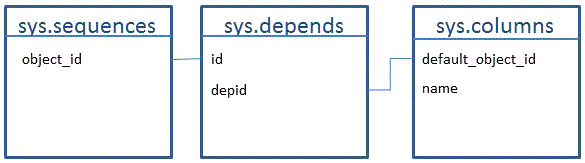
INSERT INTOCandidateKey.CandidateUniqueConstraints(TableID, ColumnName, KeyPriority, Is_Nullable)SELECTTableId=c.object_id, ColumnName=c.name, KeyPriority=2 , C.Is_NullableFROMsys.sequencesASSQ INNER JOINsysdependsDPONSQ.object_id=DP.depid INNER JOINsys.columnsAS C ON C.default_object_id = DP.idWHEREOBJECTPROPERTY(C.object_id,'IsUserTable')=1RAISERROR('Candidate Keys using a SEQUENCE %d',10,1,@@ROWCOUNT)WITH NOWAIT GO
Priorities Three To Eight
It turns out that one nested Common Table Expression query can generate the information we need.
We could have included the priority one identity criteria here however it has been excluded to avoid a situation where priority two sequence defaults lose out to lower priority items. By running 3 separate queries this situation is avoided.
For simplicity sake we will capture this query in a view.
IFEXISTS(SELECT*FROMINFORMATION_SCHEMA.VIEWSWHERETABLE_SCHEMA='CandidateKey'AND TABLE_NAME='CandidatePrimaryKeys')BEGIN DROP VIEWCandidateKey.CandidatePrimaryKeys'VIEW DROPPED: CandidateKey.CandidatePrimaryKeys'END GO CREATE VIEWCandidateKey.CandidatePrimaryKeysAS WITHCleanTablesAS(SELECTTableId=O.object_id, TableName=O.name, CleanTableName=CASE WHENLEFT(O.name,3)='tbl'THEN REPLACE(SUBSTRING(O.name,4,LEN(O.name)),'_','')ELSEO.nameEND FROMsys.objectsASOWHEREO.type='U'), PriorityFieldsAS(SELECTO.TableId, ColumnName=C.name, Priority=CASEWHENC.name='ID'THEN3WHENC.name='Code'THEN4WHENCleanTableName+'ID'=REPLACE(C.name,'_','')THEN5WHENCleanTableName+'Code'=REPLACE(C.name,'_','')THEN6WHENC.column_id=1THEN7WHENC.system_type_id=36THEN8END, C.Is_NullableFROMsys.columnsASC INNER JOIN CleanTablesASOONC.object_id = O.TableIdWHEREC.column_id=1 or C.name like'%id'OR C.name like'%code'or C.system_type_id=36 )SELECTTableID, ColumnName, Priority, Is_NullableFROMPriorityFieldsWHEREPriority IS NOT NULLGO IF@@ERROR = 0'VIEW CREATED: CandidateKey.CandidatePrimaryKeys'GO
The CleanTables CTE addresses the practise of prefixing tables with tbl or tbl_
The PriorityFields CTE assigns priorities as described in our original priority list. The point to note is the naming convention logic will deal with any of the following combinations of table name and field name.
Table name | Field Name |
|---|---|
Tbl_MyTable TblMyTable MyTable | MyTableId MyTable_Id MyTableCode MyTable_Code |
By wrapping up our query in a view the query to append data to our CandidateKey.CandidateUniqueConstraints table is straight forward as shown below.
INSERT INTOCandidateKey.CandidateUniqueConstraints(TableID, ColumnName, KeyPriority, Is_Nullable)SELECTSRC.TableId, SRC.ColumnName, SRC.KeyPriority, SRC.Is_NullableFROMCandidateKey.CandidatePrimaryKeysASSRC LEFT JOIN CandidateKey.CandidateUniqueConstraintsASTARGONSRC.TableID = TARG.TableID AND SRC.ColumnName = TARG.ColumnNameWHERETARG.TableID IS NULLRAISERROR('Candidate Keys with column properties %d',10,1,@@ROWCOUNT)WITH NOWAIT GO
I would wrap all 3 queries up into a single stored proc called CandidateKey.GetCandidateKeys
Validating uniqueness
We now need to validate unique values in columns, which takes a bit of work.
How to identify uniqueness
If COUNT(*)and COUNT(DISTINCT <fieldname>) are equal and greater than zero will tell us if the field name in question contains unique values.
What is needed is a stored proc that allows me to pass in the object_id for a table identified in the CandidateKey.CandidateUniqueConstraints table.
IFEXISTS(SELECT*FROMsys.objectsWHEREtype='P'AND name='AssessCandidateUniqueness')BEGIN DROP PROCCandidateKey.AssessCandidateUniqueness'PROC DROPPED: CandidateKey.AssessCandidateUniqueness'END GO CREATE PROCCandidateKey.AssessCandidateUniqueness @TableIDINTAS SET NOCOUNT ON DECLARE@SQLVARCHAR(MAX)SELECT@SQL=COALESCE(@SQL+',','') +'CAST(CASE WHEN COUNT(*)>0 AND COUNT(*)-COUNT(DISTINCT '+ ColumnName +') =0 THEN 1 ELSE 0 END AS BIT) AS '+ ColumnNameFROMCandidateKey.CandidateUniqueConstraintsWHERETableID=@TableIDORDER BYKeyPrioritySET@SQL='SELECT COUNT(*) AS TotalRows,'+ @SQL +' INTO Validate.T'+ CAST(@TableIDAS SYSNAME) +' FROM '+ OBJECT_SCHEMA_NAME(@TableID)+'.'+OBJECT_NAME(@TableID)EXEC(@SQL)GOIF@@ERROR=0'PROC CREATED: CandidateKey.AssessCandidateUniqueness'GO
Safety Considerations when identifying uniqueness
WARNING: Running COUNT(DISTINCT <fieldname>) across a number of fields on a large table can be extremely expensive. For this reason it is wise to run a simple query to determine the number of records in our database tables.
SELECTOBJECT_SCHEMA_NAME(object_id)ASSchemaName, OBJECT_NAME(object_id)ASTableName, SUM(rows)ASRowCountEstimateFROMsys.partitionsWHEREindex_id in(0,1) AND OBJECTPROPERTY(object_id,'IsUserTable')=1GROUP BYobject_idORDER BY3DESC
Evaluating a database safely
I need a stored proc that will loop through the candidate tables executing the CandidateKey.AddessCandidateUniqueness procedure. This stored procedure should have safety logic to check that any qualifying tables will have their row count checked against the specified thresholds as follows:
- More rows than the ceiling row count will raise an error.
- Fewer rows than the floor row count will be ignored.
IFEXISTS(SELECT*FROMsys.objectsWHEREtype='P'AND name='ExecuteCandidateUniqueness')BEGIN DROP PROCCandidateKey.ExecuteCandidateUniqueness'PROC DROPPED: CandidateKey.ExecuteCandidateUniqueness'END GO CREATE PROCCandidateKey.ExecuteCandidateUniqueness @ThresholdFloorRowCountBIGINT=0,--##PARAM @ThresholdFloorRowCount The minimum number of records for which a uniqueness assessment will take place.@ThresholdCeilingRowCountBIGINT=10000--##PARAM @@ThresholdCeilingRowCount The maximum number of records for which a uniqueness assessment will take place.AS SET NOCOUNT ON DECLARE@TableIDINT, @RowCountBIGINT, @FQTableNameSYSNAME SET@TableID=0WHILE@TableID IS NOT NULLBEGIN SELECT@TableID=MIN(TableID)FROMCandidateKey.CandidateUniqueConstraintsWHERETableID>@TableIDIF@TableID IS NOT NULLBEGIN SET@FQTableName=QUOTENAME(OBJECT_SCHEMA_NAME(@TableID))+'.'+QUOTENAME(OBJECT_NAME(@TableID))SELECT@RowCount=SUM(rows)FROMsys.partitionsWHEREobject_id = @TableID AND index_id IN(0,1)IF@RowCount > @ThresholdCeilingRowCountBEGIN RAISERROR('THRESHOLD %I64d EXCEEDED: %s = %I64d ',10,1,@ThresholdCeilingRowCount,@FQTableName,@RowCount)WITH NOWAIT END ELSE BEGIN IF@RowCount >= @ThresholdFloorRowCountexecCandidateKey.AssessCandidateUniqueness @TableIDEND END END GO
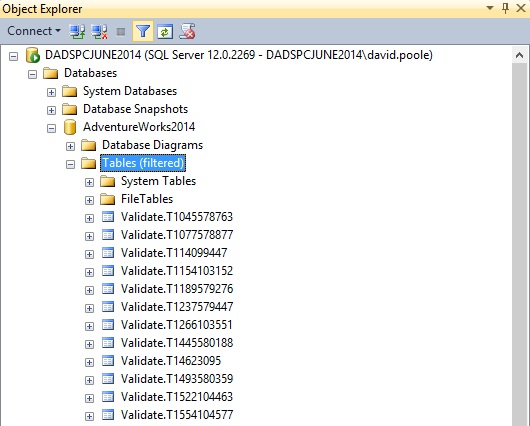
By the time we have executed our CandidateKey.ExecuteCandidateUniqueness and swept up all relevant database objects our Validate schema will look something like the following:
The structure of a Validate table
The table below recaps the naming convention of the tables in the Validate schema.
Original Table | Object_Id | Validate table |
|---|---|---|
Sales.SalesOrderDetail | 1154103152 | T1154103152 |
If we look at the table the structure is as follows:
TotalRows | SalesOrderDetailID | SalesOrderID | rowguid |
|---|---|---|---|
121317 | 1 | 0 | 1 |
This tells us that SalesOrderID is not a valid candidate for a unique key but the other two fields are based on an evaluation of all the rows in the table.
This structure of the table came about due to what we captured in our CandidateKey.CandidateUniqueConstraints table forSales.SalesOrderDetail.
TableID | KeyPriority | IsValidated | ValidationTable | ColumnName |
|---|---|---|---|---|
1154103152 | 1 | 0 | T1154103152 | SalesOrderDetailID |
1154103152 | 7 | 0 | T1154103152 | SalesOrderID |
1154103152 | 8 | 0 | T1154103152 | rowguid |
Our next step is to update the IsValidated field with the appropriate flag from our Validate. T1154103152 table.
We need to turn our T1154103152 table into a recordset as follows:
TableId | ColumnName | IsValidated |
|---|---|---|
1154103152 | SalesOrderDetailID | 1 |
1154103152 | SalesOrderID | 0 |
1154103152 | rowguid | 1 |
Fortunately we have the T-SQL UNPIVOT clause to help us.
SELECTTableId, ColumnName, IsValidatedFROM(SELECT1154103152ASTableId, SalesOrderDetailID, SalesOrderID, rowguidFROMvalidate.T1154103152) pUNPIVOT( IsValidatedFORColumnName IN (SalesOrderDetailID, SalesOrderID, rowguid) )ASunpvt;GO
We need to do this for all the T<object_id> tables in the Validate schema and record the results.
Table to record the results of the UNPIVOT function.
As our results will be used to update CandidateKey. We will create a transient shadow table in the Validate schema
IFEXISTS(SELECT*FROMsys.objectsWHEREobject_id=OBJECT_ID('Validate.CandidateUniqueConstraints'))BEGIN DROP TABLEValidate.CandidateUniqueConstraints'TABLE DROPPED: Validate.CandidateUniqueConstraints'END GO CREATE TABLEValidate.CandidateUniqueConstraints ( TableIdINTNOT NULL, ColumnNameSYSNAMENOT NULL, IsValidatedBITNOT NULL,CONSTRAINTPK_Validate_CandidateUniqueConstraintsPRIMARY KEY CLUSTERED(TableId, ColumnName) )GO IF@@ERROR=0'TABLE CREATED: Validate.CandidateUniqueConstraints'GO
Procs to generate and execute the UNPIVOT functionality.
We need two stored procedures to keep record the evaluation of our candidate keys
- Generate and execute the required UNPIVOT query
- Loop through the Validate.T<Object_Id> tables executing the above query.
The first query is as follows:
CREATE PROCCandidateKey.ExtractValidatedCandidates @TableNameSYSNAME-- The name of the Validate.T<Object_id> tableAS SET NOCOUNT ON--Must be a table matching the desired pattern in the Validate schema.IF@TableName NOTLIKE'T[0-9][0-9][0-9]%'OR NOT EXISTS (SELECT1FROMsys.objectsWHEREname = @TableName AND schema_id=SCHEMA_ID('Validate'))BEGIN RAISERROR('Table %s is not a validation table',16,1,@TableName)with nowait RETURN1END DECLARE@TableIDVARCHAR(10), @ValidationTableIDINT, @ColumnListVARCHAR(MAX), @SQLVARCHAR(MAX)SET@TableID = RIGHT(@TableName,LEN(@TableName)-1)--The numeric part of the Validate.T<Object_id> table nameSET@ValidationTableID = OBJECT_ID('Validate.'+@TableName)-- The object_id of the actual Validate.T<Object_id> table nameSELECT@ColumnList=COALESCE(@ColumnList+',','') + nameFROMsys.columnsASCWHEREobject_id=@ValidationTableID AND name<>'TotalRows'ORDER BYC.column_idSET@SQL='INSERT INTO Validate.CandidateUniqueConstraints(TableId, ColumnName, IsValidated) SELECT TableId, ColumnName, IsValidated FROM ( SELECT '+ @TableID +' AS TableId, '+ @ColumnList +' FROM Validate.'+@TableName+') p UNPIVOT ( IsValidated FOR ColumnName IN ('+ @ColumnList +') )AS unpvt'EXEC(@SQL)GO IF@@ERROR=0'PROC CREATED: CandidateKey.ExtractValidatedCandidates'GO
The 2nd stored procedure is straight forward.
CREATE PROCCandidateKey.SetCandidateValidityAS SET NOCOUNT ON DECLARE@TableNameSYSNAME='', @SchemaIDintSET@SchemaID=SCHEMA_ID('Validate')TRUNCATE TABLEValidate.CandidateUniqueConstraintsWHILE@TableName IS NOT NULLBEGIN SELECT@TableName = MIN(name)FROMsys.objectsWHEREname>@TableName AND schema_id=@SchemaID AND type='U'AND nameLIKE'T[0-9][0-9][0-9][0-9]%'IF@TableName IS NOT NULLBEGIN EXECCandidateKey.ExtractValidatedCandidates @TableNameEND END UPDATEDESTSETDEST.IsValidated=SRC.IsValidatedFROMValidate.CandidateUniqueConstraintsASSRC INNER JOIN CandidateKey.CandidateUniqueConstraintsASDESTONSRC.TableID = DEST.TableID AND SRC.ColumnName = DEST.ColumnNameWHERESRC.IsValidated<>DEST.IsValidatedRAISERROR('%d Candidate Keys Updated',10,1,@@ROWCOUNT)WITH NOWAIT-- Discard any candidates that didn't resolve as PK CandidatesDELETE FROMCandidateKey.CandidateUniqueConstraintsWHEREIsValidated=0RAISERROR('%d Invalid candidate Keys removed',10,1,@@ROWCOUNT)WITH NOWAIT GO
Putting it all together
We can assemble the execution of our stored procedures into a repeatable script
-- Flush out existing tablesexecCandidateKey.FlushValidateSchema-- Grab a list of potential candidatesexecCandidateKey.GetCandidateKeys-- Evaluate the uniqueness of the candidate fieldsexecCandidateKey.ExecuteCandidateUniqueness 0,999999-- Unpivot the results and flag the potential candidatesexecCandidateKey.SetCandidateValidity
Looking at the recommended keys
We can also build a query to list the ALTER TABLE commands necessary to create the missing primary keys in our database.
-- List the SQL to generate the candidate keys;WITHPotentialKeys(Likelihood,SchemaName,TableName,ColumnName,KeyPriority)AS(SELECTROW_NUMBER()OVER(PARTITION BYTableIDORDER BYKeyPriority), SchemaName=OBJECT_SCHEMA_NAME(TableID), TableName=OBJECT_NAME(TableID), ColumnName, KeyPriorityFROMCandidateKey.CandidateUniqueConstraints )SELECT'ALTER TABLE '+ SchemaName +'.'+ TableName +' ADD CONSTRAINT PKCandidate_'+ SchemaName +'_'+ TableName +' PRIMARY KEY ('+ ColumnName +')'FROMPotentialKeysWHERELikelihood=1ORDER BYSchemaName,TableNameGO
When I ran the entire process against the Adventureworks2014 database the process did produce credible primary key candidates. However, as stated earlier no system is perfect and some anomalies crept in.
Anomaly | Reason |
|---|---|
Incidents of the rowguid field | The rowguid field has a particular mechanical significance which means that it gives a false positive. In the Adventureworks2014 schema it aligns to those tables where the true primary key would actually be a compound key. |
Person.EmailAddress | An example of coincidental uniqueness. The true primary key is a compound key of BusinessEntityID and EmailAddressID. In this case the identity property caused the field to be chosen as a candidate and it did turn out to hold unique values. |
Person.PersonPhone | Again, coincidental uniqueness. The true primary key is a compound key of BusinessEntityId, PhoneNumber and PhoneNumberTypeId. In this case BusinessEntityID was chosen as a candidate because it is the first field in a record. |
With the knowledge that rowguid is a false positive I ran a slightly tweaked version for supplemental unique constraints.
;WITHPotentialKeys(Likelihood,SchemaName,TableName,ColumnName,KeyPriority)AS( SELECT ROW_NUMBER()OVER(PARTITION BYTableIDORDER BYKeyPriority), SchemaName=OBJECT_SCHEMA_NAME(TableID), TableName=OBJECT_NAME(TableID), ColumnName, KeyPriorityFROMCandidateKey.CandidateUniqueConstraints )SELECT'ALTER TABLE '+ SchemaName +'.'+ TableName +' ADD CONSTRAINT UQCandidate_'+ SchemaName +'_'+ TableName+'_'+ColumnName +' UNIQUE ('+ ColumnName +')'FROMPotentialKeysWHERELikelihood>1 AND ColumnName<>'rowguid'ORDER BYSchemaName,TableNameGO
Again this picked up Person.EmailAddress and identified BusinessEntityID as a valid unique candidate.
This false positive reveals something interesting about the Person.EmailAddress table.
- The two participants in the primary key are both unique in their own right
- The 2nd field is an IDENTITY field which is an odd thing to have in a compound primary key
This is precisely the sort of information that is useful to a data modeller and it indicates that the modelling of the Person.EmailAddress table is something warranting deeper analysis.
Challenges in Deriving Foreign Key Relationships
As described earlier there are a number of characteristics of fields within tables that defined whether or not they are likely to participate in primary keys.
- Naming conventions
- Identity value
- Use of a sequence
- Data types
- Position within the table structure
Any candidate can be rejected if it does not contain unique values.
With foreign key relationships, short of parsing execution plans, we are much more dependent on naming conventions. The diagram below illustrates why even a simple schema can present serious challenges.
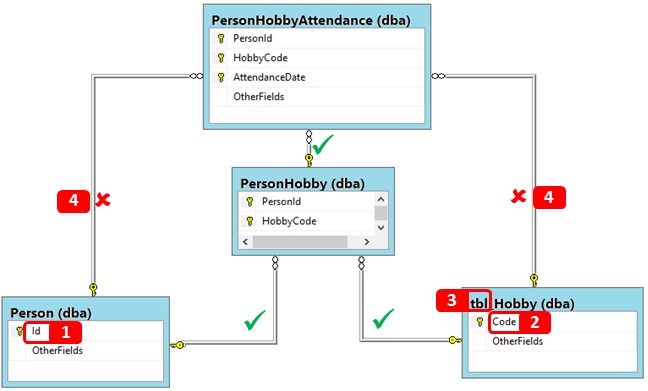
Let us look at what the challenges are
# | Challenge | Description |
|---|---|---|
1 & 2 | Field whose names have context only within the table | If we have fields such as “Id” and “Code” these only have significance within the table in which they are embedded. PersonID has its own context, Id does not. We can add artificial context by prefixing the fieldname with the table name. When doing so we have to allow for prefixes such as tbl in table names. |
3 | Prefixing of table names | If prefixes are consistently applied then this is easy to cater for. Even when not consistently applied if a separator exists between the prefix and the table name this is reasonably straight forward. If the prefix could be part of a legitimate word then this introduces the need for language parsing which is too advanced a topic for this article. |
4 | Undesired relationships | We don’t want to suggest every possible relationship between two entities. In our example diagram the relationships with the red crosses are superfluous. They won’t do any harm but will make any schema diagram more crowded. Remember we are simply trying to establish relationships in a copy system. There will be no DML activity in the copy system. To satisfy this we need a mechanism for determining whether a child table already has a parent relationship that includes the candidate attributes. |
5 | 1 to 0..1 relationships | Adventureworks2014 has a number of tables with a primary key of BusinessEntityID. We need a rules based system for determining the correct lineage between such tables. |
6 | Pluralisation of object names | If the tbl_Hobby table was called tbl_Hobbies then standardising the Code field to HobbyCode would not be possible without introducing language parsing capabilities. This is sophistication beyond that which we can cover in this article. |
Caveats
The process of identifying foreign keys is going to depend heavily on naming conventions and establishing rules.
It is difficult enough defining the rules in sufficient detail to attempt to build an automated process let alone building that process.
A naming convention based ruleset will fail if the database is weak in following naming conventions. Even with a strong naming convention it is easy to get false positives with relationships and also to relate objects that should not be related.
High level process
It helps to have mapped out the approach at a high level to act as a road map.
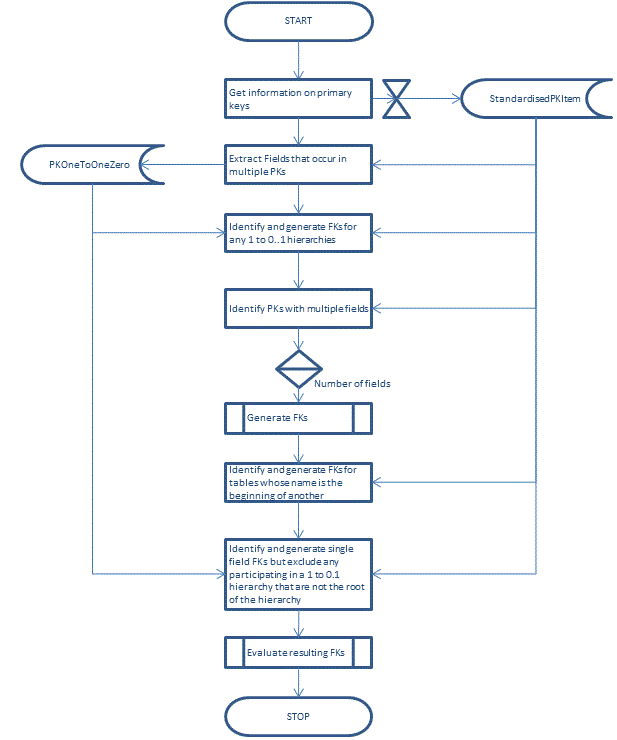
Prioritising the candidate foreign keys
From our table of challenges we know we need mechanisms for the following:
- Matching on standardised names for table and field objects
- Identifying where a suitable relationship already exists so as not to create another
- A mechanism for determining the master in a 1 to 0..1 relationship
- A mechanism for prioritising the order in which relationships are created.
If we started to create relationships from our tbl_Hobby table we would get a relationship to both PersonHobby and PersonHobbyAttendance.
If we started to create relationships in reverse order of the number of fields participating in a primary key then we would get the following:
- A relationship from PersonHobby to PersonHobbyAttendance
- A relationship from tbl_Hobby to PersonHobby
- NO RELATIONSHIP from tbl_Hobby to PersonHobbyAttendance because the first relationship already contains the HobbyCode fields in a relationship.
Clearly the order in which foreign keys are created is going to be important.
Capturing Primary Key Information
My starting point is to capture information about the primary keys in the database and standardise their field and column names.
CREATE TABLECandidateKey.StandardisedPKItems ( Object_idINTNOT NULL , ColumnId INT NOT NULL, DataTypeId INT NOT NULL, SchemaNameSYSNAMENOT NULL, OriginalObjectNameSYSNAMENOT NULL, StandardisedObjectNameSYSNAMENOT NULL, OriginalColumnNameSYSNAMENOT NULL, StandardisedColumnNameSYSNAMENOT NULL,CONSTRAINTPK_StandardisedPKItemsPRIMARY KEY CLUSTERED(Object_id,OriginalColumnName) )GO
The stored procedure to populate the table is shown below.
CREATE PROCCandidateKey.GetStandardisedPKItemsAS SET NOCOUNT ON TRUNCATE TABLECandidateKey.StandardisedPKItemsINSERT INTOCandidateKey.StandardisedPKItemsSELECTO.Object_Id, C.Column_Id, C.system_type_id, OBJECT_SCHEMA_NAME(c.object_id), O.name, StandardisedObjectName= REPLACE(CASE WHENLEFT(O.name,3)='tbl'THENSUBSTRING(O.name,4,len(O.name))ELSEO.nameEND,'_',''), OriginalColumnName=C.name, StandardisedColumnName=REPLACE(-- Deal with primary key fields like Id & code and the tibblers.CASE WHENC.name IN('Id','Code') AND LEFT(O.name,3)='tbl'THENSUBSTRING(O.name,4,len(O.name))+C.nameWHENC.name IN('Id','Code') AND LEFT(O.name,3)!='tbl'THENO.name + c.nameELSEC.nameEND,'_','')FROMsys.index_columnsAS IC INNER JOINsys.indexesASIONIC.object_id = I.object_id AND IC.index_id = I.index_id INNER JOINsys.columnsASCONIC.object_id = C.object_id AND IC.index_column_id = C.column_id INNER JOINsys.objectsASOONO.object_id=C.object_idWHEREI.is_primary_key=1 AND IC.is_included_column=0 AND OBJECT_SCHEMA_NAME(c.object_id) NOT IN ('Validate','CandidateKey','dba','sys')-- Exclude mechanical schemasGO
Dealing with 1 to 0..1 relationships
The first step is to identify tables that share a standardised fieldname. The common table expression below would identify two fields as occurring across the Adventureworks2014 database
- BusinessEntityID
- TransactionID
;WITHMultiFieldAS(-- Single field primary keys that occur more than once i.e. 1 to 0..1 relationships.SELECTpk.StandardisedColumnNameFROMCandidateKey.StandardisedPKItemsASPK-- Table to contain standardised names of primary key artefactsINNER JOIN CandidateKey.PKFieldCountASPKC-- View to determine number of fields in a primary key.ONpk.Object_id = PKC.Object_idWHEREPKC.PKFieldCount=1GROUP BYPK.StandardisedColumnNameHAVINGCOUNT(*)>1 )
Identifying rules for prioritising tables
We also need to define the rules that will prioritise which table is the master table.
Priority | Rule | Rationale |
|---|---|---|
1 | Original field name is ID | This cannot be reduced further. |
2 | Original field name is Code | Again this cannot be reduced further |
3 | Standardised table name is the beginning of the field name | We are looking at <tablename>id, <tablename>code etc. |
4 | Schema name is same as the standardised object name | This assumes that a table name with the same name as the schema in which it resides is of primary importance. |
5 | Does not fit any of the preceding rules. | Every field should have a priority value. |
If we could apply these rules to tables that share a primary key then we should have some form of hierarchy for building relationships. The prioritised list of tables will also have other uses so we will store these in a table defined as follows:
CREATE TABLECandidateKey.PKOneToOneZero ( Object_IdINTNOT NULLCONSTRAINTPK_PKOneToOneZeroPRIMARY KEY CLUSTERED, TablePriorityTINYINTNOT NULL, SchemaNameSYSNAMENOT NULL, TableNameSYSNAMENOT NULL, StandardisedTableNameSYSNAMENOT NULL, OriginalColumnNameSYSNAMENOT NULL, StandardisedColumnNameSYSNAMENOT NULL )GO
The number of fields participating in the primary key is also important in the prioritisation and is supported by a view.
CREATE VIEWCandidateKey.PKFieldCountAS SELECTObject_id, PKFieldCount=COUNT(*)FROMCandidateKey.StandardisedPKItemsGROUP BYObject_idGO
CREATE PROCCandidateKey.GetPKOneToOneZeroPriorityAS SET NOCOUNT ON TRUNCATE TABLECandidateKey.PKOneToOneZero ;WITHMultiFieldAS(-- Single field primary keys that occur more than once i.e. 1 to 0..1 relationships.SELECTpk.StandardisedColumnNameFROMCandidateKey.StandardisedPKItemsASPK-- Table to contain standardised names of primary key artefactsINNER JOIN CandidateKey.PKFieldCountASPKC-- View to determine number of fields in a primary key.ONpk.Object_id = PKC.Object_idWHEREPKC.PKFieldCount=1GROUP BYPK.StandardisedColumnNameHAVINGCOUNT(*)>1 )INSERT INTOCandidateKey.PKOneToOneZero( Object_Id, TablePriority, SchemaName, TableName, StandardisedTableName, OriginalColumnName, StandardisedColumnName )SELECTPK.Object_id, TablePriority=CASE WHENPK.OriginalColumnName ='ID'THEN1WHENPK.OriginalColumnName='Code'THEN2WHENPATINDEX(StandardisedObjectName+'%',PK.StandardisedColumnName)=1THEN3WHENOBJECT_SCHEMA_NAME(PK.object_id) = object_name(PK.object_id)THEN4ELSE5END, SchemaName=OBJECT_SCHEMA_NAME(PK.object_id), TableName=object_name(PK.object_id), StandardisedObjectName, OriginalColumnName, StandardisedColumnNameFROMCandidateKey.StandardisedPKItemsASPK INNER JOIN CandidateKey.PKFieldCountASPKCONPK.Object_id = PKC.Object_idWHEREPK.StandardisedColumnName IN (SELECTStandardisedColumnNameFROMMultiField) AND PKC.PKFieldCount=1ORDER BYStandardisedColumnNameGO
Function to return fields in an existing relationships
If we are proposing to create a relationship from a parent table to a child so we want to make sure that the child does not already have an existing parent relationship involving any fields that we propose to use in our relationship.
We need our function to retrieve any fields for the given child table that already participate in a relationship. To do this we need an understanding of how the sys.sysreferences table works. The diagram uses data within sys.objects, sys.columns and sys.sysreferences to illustrate the key mechanisms.
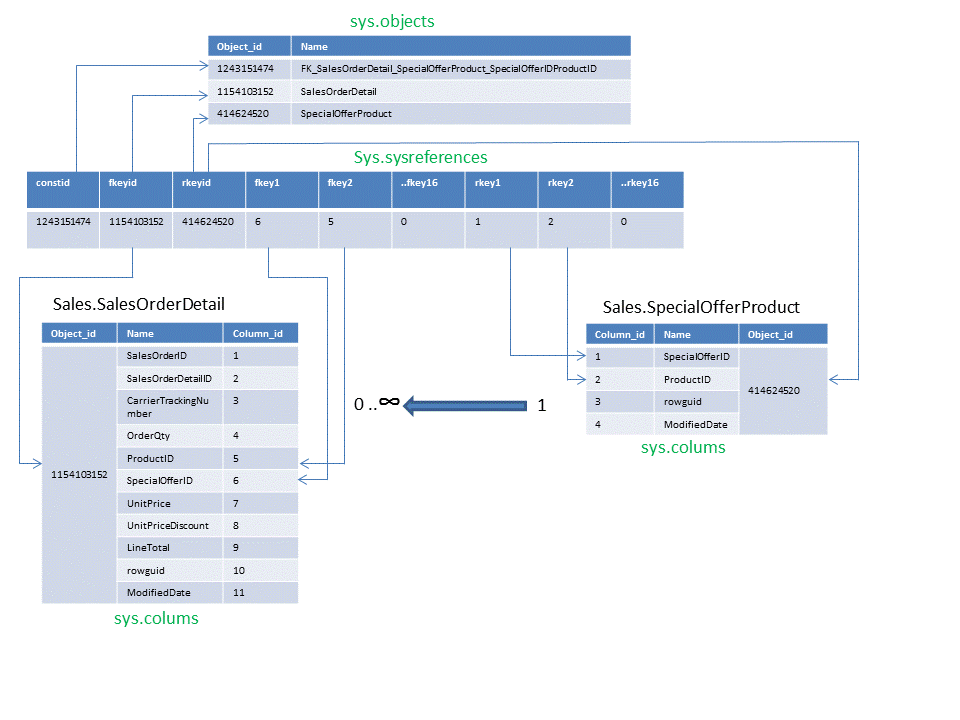
For a given object_id our function has to unpivot the sys.sysreferences table and return any fields that are already used in a relationship.
CREATE FUNCTIONCandidateKey.GetFieldsUsedInExistingFK( @ChildObjectIdINT)RETURNS@ChildFieldListTABLE( StandardisedColumnNameSYSNAMENOT NULL )AS BEGIN--Unpivot the table.;WITHCurrentFK (PARENT_object_id,CHILD_object_id,column_id)AS(SELECT DISTINCTrkeyId,fkeyid, column_idFROM(SELECTrkeyid,fkeyid, fkey1,fkey2,fkey3,fkey4, fkey5,fkey6,fkey7,fkey8, fkey9,fkey10,fkey11,fkey12, fkey13,fkey14,fkey15,fkey16FROMsysreferencesWHEREfkeyid=@ChildObjectId) pUNPIVOT(column_idFORKeyID IN (fkey1,fkey2,fkey3,fkey4, fkey5,fkey6,fkey7,fkey8, fkey9,fkey10,fkey11,fkey12, fkey13,fkey14,fkey15,fkey16) )ASunpvt )INSERT INTO@ChildFieldList(StandardisedColumnName)SELECTREPLACE(C.name,'_','')FROMCurrentFK INNER JOINsys.columnsASCONCurrentFK.CHILD_object_id = C.object_id AND CurrentFK.column_id = C.column_idWHERECurrentFK.column_id>0-- Zero means no column at this positionRETURN END GO
Generating the 1 to 0..1 keys
We can create a stored procedure to generate the candidate foreign key. There are a four key features to emphasise here
- To perform a self-join on the prioritised 1 to 0..1 relationships to produce a hierarchy. As the TablePriority can contain gaps in the priority range we need to create a common table expression that will generate a sequence to align the relationships correctly.
- To determine the master object in any schema for an attribute and build a relationship from those tables that share a primary key within the same schema but for which we haven’t got a rule
- We generate the candidate foreign keys using the WITH NOCHECK option.
- All our foreign keys being with FKCandidate so we can distinguish between the pre-existing relationships and those we generate.
CREATE PROCCandidateKey.GeneratePKOneToOneZeroHierarchyAS SET NOCOUNT ON DECLARE@ProcName VARCHAR(256)=OBJECT_SCHEMA_NAME(@@PROCID)+'.'+OBJECT_NAME(@@PROCID)'==============================================='RAISERROR('PROC: %s',10,1,@ProcName)WITH NOWAIT DECLARE@SQLVARCHAR(MAX)DECLARE@CRLFCHAR(2)=CHAR(13)+CHAR(10) ;WITHFKHierarchyAS(SELECTFKSequence=ROW_NUMBER()OVER(PARTITION BYStandardisedColumnNameORDER BYSchemaName,TablePriority ), Object_Id, TablePriority, SchemaName, TableName, StandardisedTableName, OriginalColumnName, StandardisedColumnNameFROMCandidateKey.PKOneToOneZero )SELECT@SQL = COALESCE(@SQL+';'+@CRLF,'') +'ALTER TABLE '+ QUOTENAME(c.SchemaName)+'.'+QUOTENAME(C.TableName) +' WITH NOCHECK ADD CONSTRAINT '+ QUOTENAME('FKCandidate_'+c.SchemaName+'_'+C.TableName+'_'+P.schemaName+'_'+P.tablename) +' FOREIGN KEY ('+ C.originalColumnName +') REFERENCES '+ QUOTENAME(P.SchemaName)+'.'+QUOTENAME(P.TableName) +'('+ p.OriginalColumnName +')'FROMFKHierarchyASP INNER JOIN FKHierarchyASCONp.StandardisedColumnName = c.StandardisedColumnName AND P.Object_id<>c.Object_id AND P.SchemaName = C.SchemaName AND P.TablePriority<c.TablePriority AND P.FKSequence=C.FKSequence-1 AND C.StandardisedColumnName NOT IN(SELECTStandardisedColumnNameFROMCandidateKey.GetFieldsUsedInExistingFK( C.Object_id ))ORDER BYP.TablePriorityEXEC(@SQL)GO
Dealing with other relationships
We have dealt with 1 to 0..1 hierarchies within a schema but now we have to consider the one to many relationships and cross schema relationships.
One of the challenges we have to face is that of compound primary keys and also ensuring that we do not get superfluous relationships as described earlier.
Stored procedure to generate Foreign Keys
The complexity of what we want to do suggests that a stored procedure that accepts a parent table object_id and generates the required new relationships for children of that parent.
We can capitalise on the tables we built earlier to hold information on our primary key tables.
CREATE PROCCandidateKey.GetCandidateForeignKey @TableIDINT-- The object_id of the parent objectAS SET NOCOUNT ON DECLARE@PKFieldCountint, @SQLReferencesVARCHAR(MAX)DECLARE@FKTableAS TABLE( Object_idINTNOT NULL, ColumnIdINTNOT NULL, StandardisedObjectNameSYSNAMENOT NULL , OriginalColumnNameSYSNAMENOT NULL , StandardisedColumnNameSYSNAMENOT NULL )-- Retrieve the number of fields in the primary key for the table.SELECT@PKFieldCount = PKFieldCountFROMCandidateKey.PKFieldCountWHEREObject_ID = @TableID-- Build a comma delimited list of fields in the primary key table.SELECT@SQLReferences = COALESCE(@SQLReferences+',','')+ OriginalColumnNameFROMCandidateKey.StandardisedPKItemsWHEREObject_Id=@TableIDORDER BYColumnId--Essential for multi-field keysSET@SQLReferences =' REFERENCES '+OBJECT_SCHEMA_NAME(@TableId)+'.'+OBJECT_NAME(@TableId)+'('+@SQLReferences+')'
Notice that we order by ColumnId in order as we need to make sure that our FOREIGN KEY fields and REFERENCES fields are going to be in the same order as the order in the primary key.
Recording the foreign key object and fields
We are looking for tables other than the parent that contain all the fields in the parent primary key. The comparison is done on the standardised field names rather than the actual field names in order to increase the chances of a match.
;WITHFKCandidateAS(SELECTC.object_id, C.name, StandardisedObjectName= REPLACE(CASE WHENLEFT(O.name,3)='tbl'THENSUBSTRING(O.name,4,len(O.name))ELSEO.nameEND,'_',''), StandardisedColumnName=REPLACE(C.name,'_','')FROMsys.columnsASC INNER JOINsys.objectsASOONC.object_id = O.object_idWHEREREPLACE(C.name,'_','') in (SELECTStandardisedColumnNameFROMCandidateKey.StandardisedPKItemsWHEREobject_id=@TableID)-- Primary key fieldsAND C.object_id<>@TableId AND O.type='U'AND OBJECT_SCHEMA_NAME(O.object_id) NOT IN ('dba','validate','CandidateKey','sys') AND O.name NOTLIKE'sysdiagram%'), FKQualifierAS(SELECTobject_idFROMFKCandidateGROUP BYobject_idHAVINGCOUNT(*)=@PKFieldCount-- Identify the table objects that have all the fields in the primary key.), PKFieldOrderAS(SELECTStandardisedColumnName, ColumnIDFROMCandidateKey.StandardisedPKItemsWHEREObject_Id = @TableID )INSERT INTO@FKTable(Object_Id,ColumnID,StandardisedObjectName,OriginalColumnName,StandardisedColumnName)SELECTFKCandidate.object_id, PKFieldOrder.ColumnID, FKCandidate.StandardisedObjectName, FKCandidate.name, FKCandidate.StandardisedColumnNameFROMFKQualifier INNER JOIN FKCandidateONFKQualifier.object_id = FKCandidate.object_id INNER JOIN PKFieldOrderONPKFieldOrder.StandardisedColumnName = FKCandidate.StandardisedColumnNameORDER BYPKFieldOrder.ColumnId-- Essential for multi-field relationships
The common table expressions used are as follows:
CTE | Description |
|---|---|
FKCandidate | Tables and fields where the fields match against any that appear in the parent primary key |
FKQualifier | For those tables and fields identified in FKCandidate identify those tables that contain all the fields that appear in the parent primary key. |
Generating the full ALTER TABLE statement
This is simply a case of looping the records in.
DECLARE@NextObjectINT=0-- Child table object_idDECLARE@ForeignKeyTextVARCHAR(MAX)-- Full blown ALTER TABLE ... FOREIGN KEY... REFERENCES statement.DECLARE@ForeignKeyFieldsVARCHAR(MAX)-- delimited list of foreign key fieldsWHILE@NextObject IS NOT NULLBEGIN SELECT@NextObject = MIN(Object_Id)FROM@FKTableWHEREObject_Id>@NextObjectIF@NextObject IS NOT NULLBEGIN IFNOT EXISTS(SELECTFK.StandardisedColumnNameFROM@FKTableASFK INNER JOIN CandidateKey.GetFieldsUsedInExistingFK(@NextObject)ASCKONFK.StandardisedColumnName = CK.StandardisedColumnName )BEGIN SET@ForeignKeyText='ALTER TABLE '+ OBJECT_SCHEMA_NAME(@NextObject)+'.'+OBJECT_NAME(@NextObject) +' WITH NOCHECK ADD CONSTRAINT FKCandidate_'+OBJECT_SCHEMA_NAME(@NextObject)+'_'+OBJECT_NAME(@NextObject) +'_'+OBJECT_SCHEMA_NAME(@TableId)+'_'+OBJECT_NAME(@TableId) +' FOREIGN KEY ('-- Build concatenated list of foreign key namesSELECT@ForeignKeyFields = COALESCE(@ForeignKeyFields+',','')+OriginalColumnNameFROM@FKTableWHEREObject_Id=@NextObjectORDER BYColumnIDSET@ForeignKeyText=@ForeignKeyText + @ForeignKeyFields +') '+ @SQLReferencesBEGIN TRY EXEC(@ForeignKeyText)END TRY BEGIN CATCH PRINT'================================='RAISERROR('ERROR TableID=%i, SQL=%s',10,1,@TableID,@ForeignKeyText)WITH NOWAIT PRINT'================================='END CATCH SET@ForeignKeyFields = NULLEND END END GO
Dealing with Multi-field relationships
This is simply a case of iterating through the list of objects with multiple field primary keys in reverse order of the number of fields.
For each object we simply call CandidateKey.GetCandidateForeignKey.
CREATE PROCCandidateKey.GenerateMultiFieldFKAS SET NOCOUNT ON DECLARE@ProcNameVARCHAR(256)=OBJECT_SCHEMA_NAME(@@PROCID)+'.'+OBJECT_NAME(@@PROCID)RAISERROR('PROC: %s',10,1,@ProcName)WITH NOWAIT DECLARE@object_idINT, @PKFieldCountTINYINTDECLAREcsr_FKINSENSITIVE CURSOR FOR SELECTObject_Id, PKFieldCountFROMCandidateKey.PKFieldCountWHEREPKFieldCount>1 ORDER BYPKFieldCountDESCOPENcsr_FKFETCH NEXT FROMcsr_FKINTO@object_id,@PKFieldCountWHILE@@FETCH_STATUS = 0BEGIN EXECCandidateKey.GetCandidateForeignKey @object_idFETCH NEXT FROMcsr_FK INTO @object_id,@PKFieldCountEND CLOSEcsr_FKDEALLOCATEcsr_FKGO
Relationships constrained to a schema
We have identified a rules based hierarchy that allows us to cater for the relationship between BusinessEntity, Person and Password in the Person schema within the Adventureworks2014 database.
The puzzle we now face is where we have BusinessEntityID as the primary key in the other schemas. What we want to achieve is have objects within a schema that contain the BusinessEntityID field to relate to the table in their schema with BusinessEntityId as the primary key field and not link back to the Person.BusinessEntity object.
We want a stored procedure that generates a foreign key based on the following rules:
- The parent table must contain a single field primary key
- Both parent and child must exist in the same schema
- The child must not already have a parent relationship using the same fieldname as the primary key
- The parent table name must be at the start of the table name for the child. That is Sales.SalesPerson is the parent of Sales.SalesPersonQuota.
The stored procedure to achieve this is shown below.
CREATE PROCCandidateKey.GenerateSchemaSpecificFKAS SET NOCOUNT ON DECLARE@ProcNameVARCHAR(256)=OBJECT_SCHEMA_NAME(@@PROCID)+'.'+OBJECT_NAME(@@PROCID)'==============================================='RAISERROR('PROC: %s',10,1,@ProcName)WITH NOWAIT DECLARE@SQLVARCHAR(MAX), @CRLFCHAR(2)=CHAR(13)+CHAR(10)SELECT@SQL=COALESCE(@SQL+';'+@CRLF,'') +'ALTER TABLE '+ QUOTENAME(c.SchemaName)+'.'+QUOTENAME(C.OriginalObjectName) +' WITH NOCHECK ADD CONSTRAINT '+ QUOTENAME('FKCandidate_'+c.SchemaName+'_'+C.OriginalObjectName+'_'+P.schemaName+'_'+P.OriginalObjectname) +' FOREIGN KEY ('+ C.originalColumnName +') REFERENCES '+ QUOTENAME(P.SchemaName)+'.'+QUOTENAME(P.OriginalObjectName) +'('+ p.OriginalColumnName +')'FROMCandidateKey.StandardisedPKItemsASP INNER JOIN CandidateKey.PKFieldCountASFCONP.Object_Id = FC.Object_Id AND FC.PKFieldCount=1 INNER JOIN CandidateKey.StandardisedPKItemsASCONP.SchemaName = C.SchemaName AND P.Object_Id <> C.Object_Id AND PATINDEX(P.StandardisedObjectName+'%',C.StandardisedObjectName)=1 AND P.StandardisedColumnName = C.StandardisedColumnNameWHEREC.StandardisedColumnName NOT IN(SELECTStandardisedColumnNameFROMCandidateKey.GetFieldsUsedInExistingFK( C.Object_id ))EXEC(@SQL)GO
Final sweep up of single field primary key relationships
So far we have dealt with the following items
- One to 0..1 hierarchies within a schema
- Multi-field relationships
- One to many relationships within a schema
We now have to deal with cross schema relationships and any other relationships not catered for by the rules applied so far.
The puzzle to solve this time is that where there are 1 to 0..1 relationships we want to exclude any but the root object in that particular hierarchy.
Once we have a list of qualifying objects then we can simply iterate through that list of objects calling our CandidateKey.GetCandidateForeignKey stored procedure. The stored procedure below illustrates how this can be achieved.
CREATE PROCCandidateKey.GenerateFinalSingleFieldFKAS SET NOCOUNT ON DECLARE@ProcNameVARCHAR(256)=OBJECT_SCHEMA_NAME(@@PROCID)+'.'+OBJECT_NAME(@@PROCID)'==============================================='RAISERROR('PROC: %s',10,1,@ProcName)WITH NOWAIT DECLARE@SingleFieldPKsTABLE(Object_IdINTNOT NULLPRIMARY KEY CLUSTERED)DECLARE@Object_IdINT=0 ;WITHMOAS(-- For the 1 to 0..1 relationships rank the prioritySELECTObject_id, SequenceNumber=row_number()OVER(PARTITION BYStandardisedColumnNameORDER BYStandardisedColumnName, TablePriority), StandardisedColumnNameFROMCandidateKey.PKOneToOneZero ), PriorityObjectAS(-- Choose the master table in the 1 to 0..1 relationshipsSELECTStandardisedColumnName,Object_IdFROMMOWHERESequenceNumber=1 )-- Exclude tables if they participate in a 1 to 0..1 relationship and are not the master.INSERT INTO@SingleFieldPKs(Object_Id)SELECTFC.Object_IdFROMCandidateKey.PKFieldCount FC INNER JOIN CandidateKey.StandardisedPKItemSASSPKONFC.Object_Id = SPK.Object_Id LEFT JOIN PriorityObjectONSPK.StandardisedColumnName = PriorityObject.StandardisedColumnNameWHEREFC.PKFieldCount=1 AND FC.Object_Id = ISNULL(PriorityObject.Object_Id,FC.Object_ID)WHILE@Object_Id IS NOT NULLBEGIN SELECT@Object_Id = MIN(Object_Id)FROM@SingleFieldPKsWHEREObject_Id>@Object_IdIF@Object_Id IS NOT NULLEXECCandidateKey.GetCandidateForeignKey @object_idEND GO
Putting the foreign key procs together
Running the process
This is as simple as running the following:-
exec CandidateKey.GetStandardisedPKItems;
exec CandidateKey.GetPKOneToOneZeroPriority;
exec CandidateKey.GeneratePKOneToOneZeroHierarchy;
exec CandidateKey.GenerateMultiFieldFK;
exec CandidateKey.GenerateSchemaSpecificFK;
exec CandidateKey.GenerateFinalSingleFieldFK;
Examining the results
My starting point was my copy of AdventureWorks2014. From this I took a backup and restored a copy into a database called AW2014.
I destroyed all foreign keys in AW2014 and ran my process.
A straight count of the sysreferences table in both databases produced the following results
DatabaseName | NumberOfRelationships |
|---|---|
Adventureworks2014 | 92 |
Aw2014 | 79 |
The numbers do not reveal the full story. The following query highlights 37 different table to table relationships.
SELECT DISTINCTOriginalParentName=Original.ParentName, OriginalChildName=Original.ChildName, NewParentName=NewR.ParentName, NewChildName=NewR.ChildNameFROM(SELECTParentName=PS.name+'.'+P.name, ChildName=CS.name+'.'+C.nameFROMAdventureworks2014..sysreferencesASR INNER JOIN Adventureworks2014.sys.objectsASPONR.rkeyId = P.object_id INNER JOIN Adventureworks2014.sys.schemasASPSONP.schema_id = PS.schema_id INNER JOIN Adventureworks2014.sys.objectsASCONR.fkeyId = C.object_id INNER JOIN Adventureworks2014.sys.schemasASCSONC.schema_id = CS.schema_id )ASOriginal FULL OUTER JOIN(SELECCTParentName=PS.name+'.'+P.name, ChildName=CS.name+'.'+C.nameFROMAW2014..sysreferencesASR INNER JOIN AW2014.sys.objectsASPONR.rkeyId = P.object_id INNER JOIN AW2014.sys.schemasASPSONP.schema_id = PS.schema_id INNER JOIN AW2014.sys.objectsASCONR.fkeyId = C.object_id INNER JOIN AW2014.sys.schemas AS CS ON C.schema_id = CS.schema_id ) NewRONOriginal.ParentName = NewR.ParentName AND Original.ChildName = NewR.ChildName WHERE Original.ParentName IS NULL OR NewR.ParentName IS NULL
One example of the gap is in the Sales.CurrencyRate table. In Adventureworks2014 this is related to the Sales.Currency table with two relationships neither of which have been detected by our process.
- FromCurrencyCode
- ToCurrencyCode
The stored procedure below caters for this occurence:
CREATE PROCCandidateKey.PartialKeyNameFKsAS SET NOCOUNT ONDECLARE@ProcNameVARCHAR(256)=OBJECT_SCHEMA_NAME(@@PROCID)+'.'+OBJECT_NAME(@@PROCID)'==============================================='RAISERROR('PROC: %s',10,1,@ProcName)WITH NOWAIT DECLARE@SQLVARCHAR(MAX)DECLARE@CRLFCHAR(2)=CHAR(13)+CHAR(10) ;WITHPKFieldsAS(SELECTSPK.Object_id, SPK.ColumnId, SPK.StandardisedColumnName, SPK.OriginalColumnName, SPK.DataTypeID, SPK.SchemaName, SPK.OriginalObjectNameFROMCandidateKey.StandardisedPKItemsASSPK INNER JOIN CandidateKey.PKFieldCountASPKFCONSPK.Object_id = PKFC.Object_id AND PKFC.PKFieldCount=1-- We are only interested in single field PKsWHEREStandardisedColumnName NOT IN ('ID','Code')-- Exclude these as they generate huge numbers of false positivesAND DataTypeID NOT IN (SELECTsystem_type_idFROMsys.typesWHEREname LIKE'date%'OR name LIKE'%time%') )SELECT@SQL = COALESCE(@SQL+';'+@CRLF,'') +'ALTER TABLE '+ QUOTENAME(OBJECT_SCHEMA_NAME(O.object_id))+'.'+QUOTENAME(O.name) +' ADD CONSTRAINT '+ QUOTENAME('FKCandidate_'+OBJECT_SCHEMA_NAME(O.object_id)+'_'+O.name+'_'+PKFields.SchemaName+'_'+PKFields.OriginalObjectName+'_'+C.Name) +' FOREIGN KEY ('+ C.Name +') REFERENCES '+ QUOTENAME(PKFields.SchemaName)+'.'+QUOTENAME(PKFields.OriginalObjectName) +'('+ PKFields.OriginalColumnName +')'FROMsys.columnsASC INNER JOINsys.objectsASOONC.object_id = O.object_id INNER JOIN CandidateKey.PKFieldCountASPKFCONO.object_id = PKFC.Object_id AND PKFC.PKFieldCount=1 INNER JOIN PKFieldsONC.system_type_id = PKFields.DataTypeID-- A FK must share the same data type from parent to child.AND ( REPLACE(C.name,'_','') LIKE PKFields.StandardisedColumnName+'%'OR REPLACE(C.name,'_','') LIKE'%'+PKFields.StandardisedColumnName ) LEFT JOINsys.sysreferencesASREF ON REF.rkeyid = PKFields.Object_id AND REF.rkey1 = PKFields.ColumnId AND REF.fkey1 = C.column_id AND REF.fkeyid = O.object_idWHEREO.type='U'AND REPLACE(C.name,'_','') <>PKFields.StandardisedColumnName AND REF.rkeyid IS NULLEXEC(@SQL)GO
However an example we cannot cater for is in the Production.BillOfMaterials table. In Adventureworks2014 this has three relationships of which AW2014 has one. The two missing ones are as follows:
- BillOfMaterials.ProductAssemblyID = Product.ProductID
- BillOfMaterials.ComponentID = Product.ProductID
Neither of the above could be detected without some form a thesaurus capability.
An example of a false positive is that our process defined a relationship between ProductListPriceHistory and ProductCostHistory. Both have a primary key of ProductID and StartDate.
Further differences involves the 1 to 0..1 relationship for the BusinessEntityId field. To take an example of Sales.SalesPerson
- Adventureworks2014 the parent is HumanResources.Employee
- AW2014 the parent is Person.BusinessEntity
In all the cases mentioned above the reasons for the discrepancy can be explained by the limitations of a naming convention.
Concluding thoughts
The problem of auto-suggesting foreign key relationships is far more difficult than it would first appear.
Strong naming conventions help but are by no means a panacea. If a database has strong naming conventions that suggests discipline and I would question whether a database produced using disciplined approaches would be likely to omit foreign key constraints.
I did consider a solution that involves parsing views, functions and stored procedures and even execution plans but rejected for the following reasons:
- There is no guarantee of views, functions and procs being present in the database
- A quick look at the objects within Adventureworks2014 suggests that parsing such objects is even more complicated that the naming convention solution.
I should be interested to hear how well the techniques and code described here work with real world examples.

