

Introduction
An INSERT, UPDATE, or DELETE statement changes data, but sometimes we also need information about the rows that were affected. For example, an insert may generate identity values, an update may require both the old and new values, and deleted rows may need to be preserved before they are removed.
SQL Server provides the OUTPUT clause for these situations. In this article, we'll use a small product inventory example to see how OUTPUT works with INSERT, UPDATE, and DELETE, and how OUTPUT INTO can store affected-row information in another table.
Problem
Suppose an application maintains a product inventory table. After inserting products, we may need the generated ProductID values. During an update, we may want to compare the previous quantity with the new one. When discontinued products are deleted, we may also want to keep a copy of those rows.
A separate SELECT can show the current table state, but it does not always give us the previous values or the exact rows involved in the change. We therefore need a way to access affected-row information as part of the data modification itself.
Solution
SQL Server's OUTPUT clause lets us access values from rows affected by an INSERT, UPDATE, or DELETE statement. The main idea is simple:
- inserted represents new values created by an INSERT or UPDATE.
- deleted represents old values from an UPDATE or rows removed by a DELETE.
An UPDATE can use both, which allows us to compare values before and after the change.
OUTPUT returns the affected-row information directly, while OUTPUT INTO stores it in another table or table variable.
We'll use these forms in the next examples with the same product inventory data.
Setting Up the Sample Data
We'll use one dbo.ProductInventory table throughout the article. ProductID is defined as IDENTITY(1,1), so SQL Server generates its value automatically whenever a new product is inserted. This will become important in the first OUTPUT example because we will return those generated IDs.
CREATE TABLE dbo.ProductInventory
(
    ProductID       INT IDENTITY(1,1) NOT NULL
        CONSTRAINT PK_ProductInventory PRIMARY KEY,
    ProductCode     VARCHAR(20) NOT NULL,
    ProductName     VARCHAR(100) NOT NULL,
    QuantityOnHand  INT NOT NULL,
    UnitPrice       DECIMAL(10,2) NOT NULL,
    IsDiscontinued  BIT NOT NULL
);
GO

INSERT INTO dbo.ProductInventory
(
    ProductCode,
    ProductName,
    QuantityOnHand,
    UnitPrice,
    IsDiscontinued
)
VALUES
('PRD-100', 'Standard Keyboard',   18,  29.99, 0),
('PRD-110', 'Wireless Mouse',      35,  19.50, 0),
('PRD-120', 'USB-C Dock',           9,  89.00, 0),
('PRD-130', 'HD Webcam',           14,  54.75, 0),
('PRD-140', '24-inch Monitor',      7, 179.99, 0),
('PRD-150', 'Laptop Stand',        22,  39.95, 0),
('PRD-160', 'Legacy USB Hub',       4,  24.00, 1),
('PRD-170', 'Old Wireless Adapter', 6,  14.50, 1);
GO
The table starts with eight products. The last two are marked as discontinued and will be used later in the DELETE example.
Capturing Inserted Rows with OUTPUT
When we insert new products, SQL Server generates the ProductID values because the column uses IDENTITY(1,1). We do not supply those IDs in the VALUES list.
The OUTPUT clause lets us return the generated IDs together with the rest of the inserted row values.
INSERT INTO dbo.ProductInventory
(
    ProductCode,
    ProductName,
    QuantityOnHand,
    UnitPrice,
    IsDiscontinued
)
OUTPUT
    inserted.ProductID,
    inserted.ProductCode,
    inserted.ProductName,
    inserted.QuantityOnHand,
    inserted.UnitPrice,
    inserted.IsDiscontinued
VALUES
('PRD-180', 'Portable SSD',        12, 79.99, 0),
('PRD-190', 'Bluetooth Speaker',   20, 44.50, 0),
('PRD-200', 'Mechanical Keyboard', 11, 69.95, 0);
GO
Here, inserted represents the new rows created by the INSERT. Each expression in the OUTPUT list returns a value from those new rows. inserted.ProductID is especially useful because it returns the identity values generated by SQL Server.
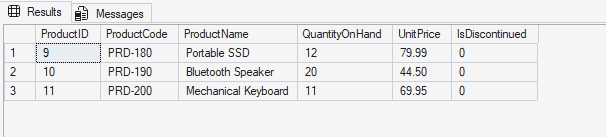
The result contains three rows because the INSERT created three products. SQL Server generated the ProductID values 9, 10, and 11 and returned them together with the other inserted values. We did not need a separate query to retrieve the generated IDs.
Seeing Old and New Values During an UPDATE
An UPDATE is where OUTPUT becomes especially useful because SQL Server can expose both the value before the change and the value after it.
In this example, we'll add five units to three products.
UPDATE dbo.ProductInventory
SET QuantityOnHand = QuantityOnHand + 5
OUTPUT
    inserted.ProductID,
    inserted.ProductCode,
    deleted.QuantityOnHand AS OldQuantity,
    inserted.QuantityOnHand AS NewQuantity
WHERE ProductCode IN
(
    'PRD-120',
    'PRD-180',
    'PRD-200'
);
GO
For an UPDATE, deleted contains the previous version of the row, while inserted contains the new version after the change. In this example, deleted.QuantityOnHand returns the original quantity and inserted.QuantityOnHand returns the quantity after five units have been added.
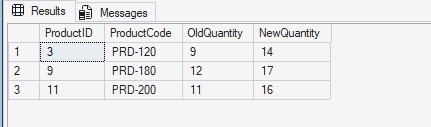
The result shows the previous and new quantities side by side. PRD-120 changed from 9 to 14, PRD-180 from 12 to 17, and PRD-200 from 11 to 16. This confirms that deleted returned the old values while inserted returned the values produced by the update.
Preserving Deleted Rows with OUTPUT INTO
For a DELETE, there is no new version of the row, so we use deleted to access the values that are being removed. If those values need to be kept, OUTPUT INTO can write them directly to another table.
First, we'll create a small archive table:
CREATE TABLE dbo.DeletedProductArchive
(
    ProductID       INT NOT NULL,
    ProductCode     VARCHAR(20) NOT NULL,
    ProductName     VARCHAR(100) NOT NULL,
    QuantityOnHand  INT NOT NULL,
    UnitPrice       DECIMAL(10,2) NOT NULL,
    IsDiscontinued  BIT NOT NULL,
    DeletedAt       DATETIME2(0) NOT NULL
);
GO
Now we'll delete the discontinued products and store their original values in the archive.
DECLARE @DeletedAt DATETIME2(0) = SYSUTCDATETIME();

DELETE FROM dbo.ProductInventory
OUTPUT
    deleted.ProductID,
    deleted.ProductCode,
    deleted.ProductName,
    deleted.QuantityOnHand,
    deleted.UnitPrice,
    deleted.IsDiscontinued,
    @DeletedAt
INTO dbo.DeletedProductArchive
(
    ProductID,
    ProductCode,
    ProductName,
    QuantityOnHand,
    UnitPrice,
    IsDiscontinued,
    DeletedAt
)
WHERE IsDiscontinued = 1;
GO
The WHERE clause selects the discontinued products for deletion. The deleted values represent those rows before they are removed, while the INTO clause sends the values listed in OUTPUT into the corresponding columns of dbo.DeletedProductArchive. The @DeletedAt variable records when the operation took place.
We can confirm the archived rows with:
SELECT
    ProductID,
    ProductCode,
    ProductName,
    QuantityOnHand,
    UnitPrice,
    IsDiscontinued,
    DeletedAt
FROM dbo.DeletedProductArchive
ORDER BY ProductID;
GO
The archive contains PRD-160 and PRD-170, which were the two rows marked as discontinued. We also verified during testing that those rows no longer remained in dbo.ProductInventory.
OUTPUT vs OUTPUT INTO
The main difference between OUTPUT and OUTPUT INTO is where the affected-row information goes. OUTPUT returns the values directly as a result set, as we saw in the INSERT and UPDATE examples. OUTPUT INTO stores those values in another table or table variable. In the DELETE example, we used it to save the discontinued product rows in dbo.DeletedProductArchive.
If the values only need to be returned immediately, OUTPUT is enough. If they need to be kept for later use, OUTPUT INTO is the better choice.
Practical Points to Remember
The inserted and deleted row sources depend on the type of DML operation. With OUTPUT, an INSERT can reference inserted, a DELETE can reference deleted, and an UPDATE can use both to compare values before and after a change.
The order of rows returned by OUTPUT should not be treated as guaranteed. If a particular order is required, it should be established separately.
For important operations, transaction and error handling should also be considered. Capturing values with OUTPUT does not by itself prove that the complete operation succeeded, so the surrounding process should handle failures appropriately.
Conclusion
The OUTPUT clause gives us a practical way to work with values from rows affected by INSERT, UPDATE, and DELETE statements.
In the examples, we used inserted to return newly generated identity values, used deleted and inserted together to compare values before and after an update, and used OUTPUT INTO to preserve deleted rows in an archive table.
The main benefit is that the affected-row information can be captured as part of the same data modification operation, whether it needs to be returned immediately or stored for later use.