

Introduction
In the previous parts of this series, we explored how the APPLY operators can solve practical reporting problems with correlated queries.
We'll begin with a reporting problem where each customer may have a different minimum order value. We'll place the reusable filtering logic in an inline table-valued function and use CROSS APPLY to pass customer-specific values into that function in a single query.
Problem
Suppose a report needs to return orders that meet a minimum value for each customer. The difficulty is that the minimum value is not the same for everyone. One customer may have a threshold of 500.00, while another may use 400.00. The reporting logic therefore needs to use both the current CustomerID and that customer's minimum order value. If the same filtering rule is required in several reports, repeating the logic in every query can also make maintenance more difficult.
Solution
We can place the reusable filtering logic in an inline table-valued function that accepts a CustomerID and a minimum order value. The function returns all orders for that customer that meet the supplied threshold.
After testing the function for one customer, we'll use CROSS APPLY to pass both values from each customer row into the function and combine the qualifying orders into a single result.
Creating the Sample Data
To keep the example focused, we'll use two small tables. The CustomerThresholds table stores each customer's minimum order value, while the CustomerOrders table stores the orders that will be evaluated against that threshold.
CREATE TABLE dbo.CustomerThresholds
(
CustomerID INT PRIMARY KEY,
CustomerName VARCHAR(100),
MinimumOrderValue DECIMAL(10,2)
);

INSERT INTO dbo.CustomerThresholds
(CustomerID, CustomerName, MinimumOrderValue)
VALUES
(1, 'Aisha Khan', 500.00),
(2, 'Daniel Reed', 400.00),
(3, 'Maria Lopez', 430.00),
(4, 'Ethan Clark', 300.00);

CREATE TABLE dbo.CustomerOrders
(
OrderID INT PRIMARY KEY,
CustomerID INT,
OrderDate DATE,
OrderValue DECIMAL(10,2)
);

INSERT INTO dbo.CustomerOrders
(OrderID, CustomerID, OrderDate, OrderValue)
VALUES
(101, 1, '2026-06-02', 480.00),
(102, 1, '2026-06-10', 550.00),
(103, 2, '2026-06-04', 440.00),
(104, 2, '2026-06-15', 255.00),
(105, 3, '2026-06-06', 275.00),
(106, 3, '2026-06-18', 440.00),
(107, 4, '2026-06-08', 170.00),
(108, 4, '2026-06-20', 220.00);
GO
The customers have different minimum order values. Aisha's threshold is 500.00, Daniel's is 400.00, Maria's is 430.00, and Ethan's is 300.00. This gives CROSS APPLY two values from each customer row to supply to the table-valued function.
Creating the Inline Table Valued Function
Next, we'll create an inline table-valued function that accepts a CustomerID and a minimum order value. It returns the orders for that customer that meet or exceed the supplied threshold.
CREATE FUNCTION dbo.GetCustomerOrdersAboveValue
(
@CustomerID INT,
@MinimumOrderValue DECIMAL(10,2)
)
RETURNS TABLE
AS
RETURN
(
SELECT
OrderID,
CustomerID,
OrderDate,
OrderValue
FROM dbo.CustomerOrders
WHERE CustomerID = @CustomerID
AND OrderValue >= @MinimumOrderValue
);
GO
Because the function returns a rowset, it can return zero, one, or several qualifying orders. Before using it with CROSS APPLY, we'll test it for a single customer to confirm that the filtering logic works as expected.
Testing the Function for One Customer
Before using the function with CROSS APPLY, let's test it for a single customer. The following query requests orders for CustomerID = 1 with a minimum order value of 500.00.
SELECT *
FROM dbo.GetCustomerOrdersAboveValue(1, 500.00)
ORDER BY OrderID;
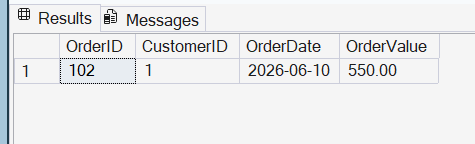
Based on the sample data, the function should return only Aisha Khan's OrderID = 102, with an order value of 550.00. Her 480.00 order does not meet the 500.00 minimum. The result confirms that the function is applying both the customer ID and minimum value correctly.
Using CROSS APPLY for Multiple Customers
Now that the function works for a single customer, we can use CROSS APPLY to evaluate it for every customer. The outer query reads from the CustomerThresholds table, where each customer has their own minimum order value. CROSS APPLY passes both the current CustomerID and MinimumOrderValue to the function.
SELECT
c.CustomerID,
c.CustomerName,
c.MinimumOrderValue,
x.OrderID,
x.OrderDate,
x.OrderValue
FROM dbo.CustomerThresholds AS c
CROSS APPLY dbo.GetCustomerOrdersAboveValue
(
c.CustomerID,
c.MinimumOrderValue
) AS x
ORDER BY
c.CustomerID,
x.OrderID;
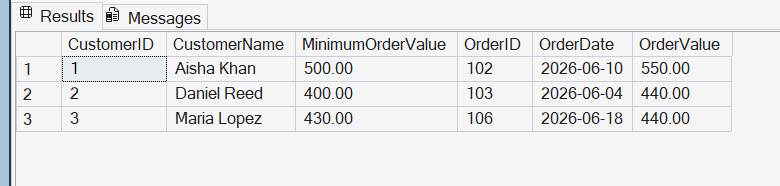
Based on the sample data, Aisha should return OrderID = 102 because its value of 550.00 exceeds her 500.00 threshold. Daniel should return OrderID = 103 at 440.00, and Maria should return OrderID = 106 at 440.00. Ethan should not appear because both of his orders are below his 300.00 minimum.
The important point is that neither function parameter is fixed. Logically, CROSS APPLY takes the CustomerID and MinimumOrderValue from each customer row and supplies both values to the function. If the function returns no qualifying rows, that customer is excluded from the result; OUTER APPLY could be used instead when those customers need to remain visible.
When This Pattern Is Useful
This pattern is useful when a table-valued function contains reusable row-returning logic that needs one or more values from each row of another query. In this example, CROSS APPLY supplies both the current CustomerID and that customer's minimum order value.
The same approach can be used for other parameterized rowsets, such as returning transactions above a threshold, products within a price range, or records that meet a customer-specific rule.
The main benefit is reuse and clarity. The function contains the filtering logic, while CROSS APPLY connects that logic to each row from the outer query. This pattern should be used when that relationship makes the query easier to understand, rather than simply as a replacement for a normal JOIN.
An inline table-valued function can help centralize reusable logic, but it should not be treated as an automatic performance improvement. Indexing, data volume, and the overall execution plan still affect query performance.
Conclusion
CROSS APPLY is especially useful when a row-returning function needs values from the current row of an outer query. In this example, each customer had a different minimum order value, and CROSS APPLY passed both the customer ID and threshold into the inline table-valued function.
This extends the earlier examples in the series by showing how CROSS APPLY can work with reusable, parameterized row-returning logic. When that logic belongs in an inline table-valued function, this pattern can keep reporting queries clear while still allowing each outer row to supply its own parameter value.
