

Introduction
When working in Classification, in practical scenarios, you may have to deal with large volume of data. If you try to find a one super model for entire dataset, it might not be accurate due to it's volume. Instead of building a super model of the entire dataset, you can group this data and build models for each group. But how are you going to group this data?
Since clustering is natural grouping of your data, this article provides how Clustering can be used as a preprocessing technique to find customized classification models for sub-set of a large volume of data.
What is Classification
Classification is supervised learning techniques where you need annotated or labeled data to train the model. For example, if you are predicting diabetic patient, you should have a dataset with all the parameters such as age, weight, other medical parameters and whether the patient is a diabetic patient or not. Using this dataset by employing classification model, you can train the model.
When using classification, typically a dataset will be split into two datasets: training and testing. Depending on the circumstances, this split will be 80/20 or 70/30. Once the classification model is built, the testing dataset will be used to evaluate the model, depending on the evaluation parameters such accuracy, precision, recall or F1 score. You can use any preferred techniques, such as Decision Tree, Random Forest or Naïve base.
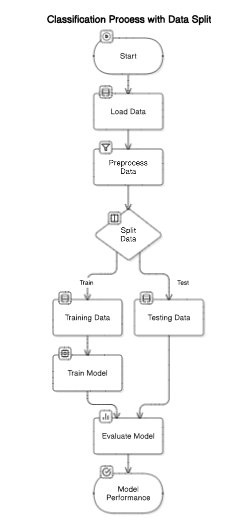
The following image depicts the classification process. First, it will capture data at the Load Data stage and then there will be a Preprocess Data step to create data to match to the classification process. The data will be split (typically 80/20 or 75/25 ratio) to Training and Testing datasets. Using the Training dataset model will be built and Testing dataset will be used to evaluate the model. Depending on the model evaluation parameters such as Accuracy, Precision or Recall the best model will be selected.
Please note that there are other evaluation techniques such cross validation apart from train/test method.
What is Clustering
Clustering is an unsupervised learning technique that groups similar data points together based on their features without using predefined labels. If you have large volume of data and you need to get an understanding about data, clustering is the process you typically perform. The number of clusters will depend on the requirement, and you can find the optimal number of clusters as well. When there are large number of data points, such in billions, there will be one best model. However, if you can cluster or group your data and build classification model for different cluster you will be able to achieve higher accuracies as clusters are build into similar data points.
How Azure Machine Learning Can be used
To get started with Azure Machine Learning, log into https://ml.azure.com/ with an account that has an Azure subscription. The sample dataset for Diabetics is uploaded to Azure Machine Learning and following data can be viewed. Outcome is the target classification attribute. 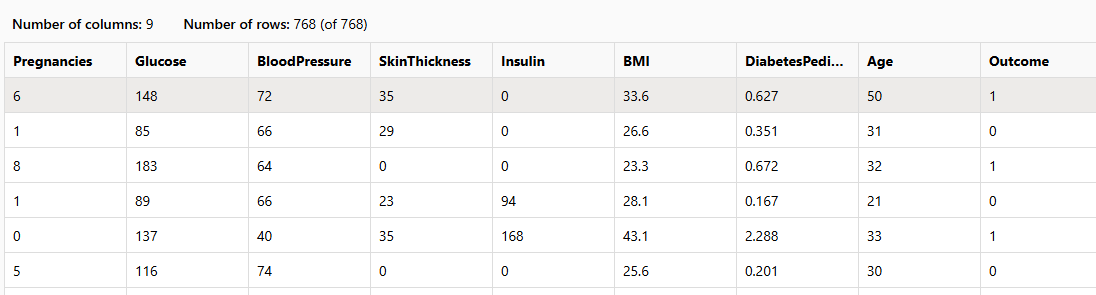 After the dataset is uploaded, you can view the profile of your dataset as shown below.
 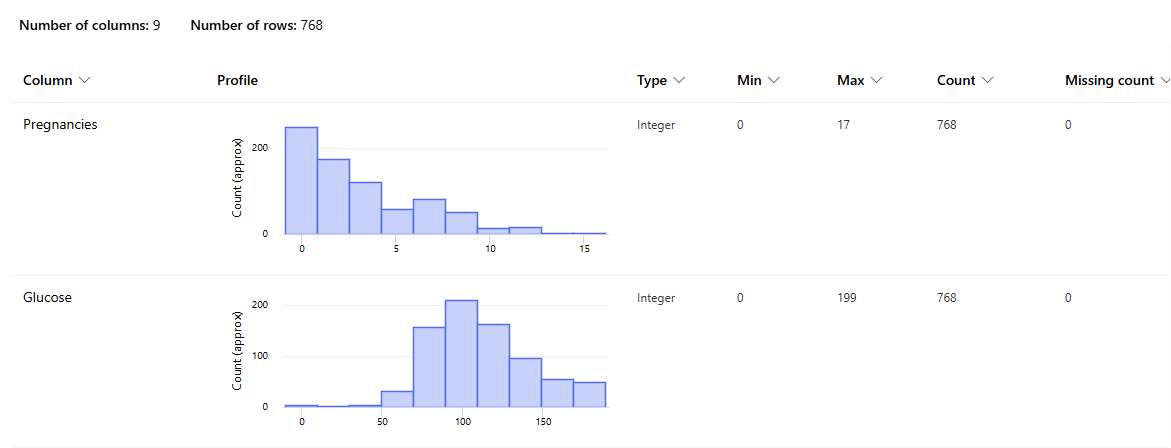 The above image shows the profile of the data for the two parameters that can be generated from the in-built functionality. This will provide you the option of finding the minimum, maximum, and missing count for each parameter. Further, it will provide the range for each parameter. Then the following pipeline is created to execute the classification model.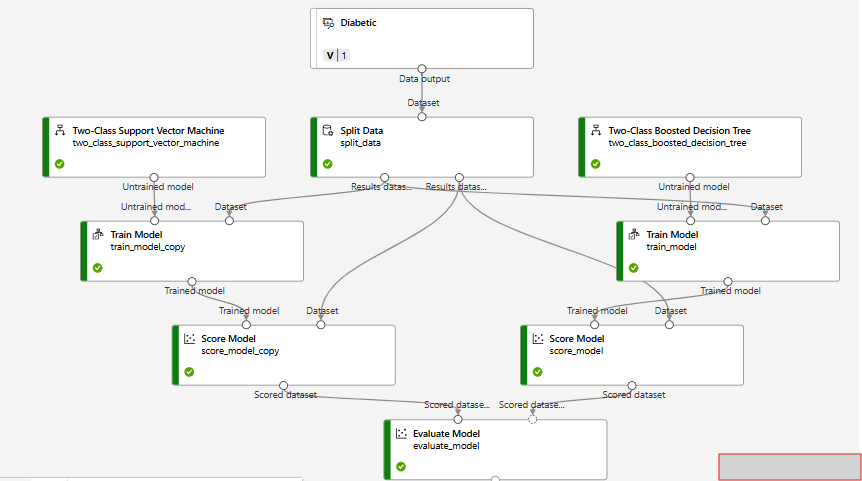
The following are the evaluation parameters for the Two-Class Support Vector Machine and the Two-Class Boosted Decision Tree classification techniques. 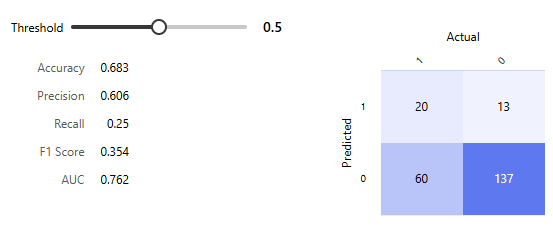
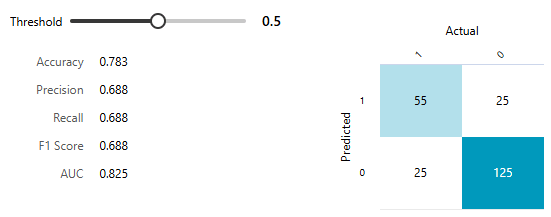 The next step is to include clustering in the above work flow.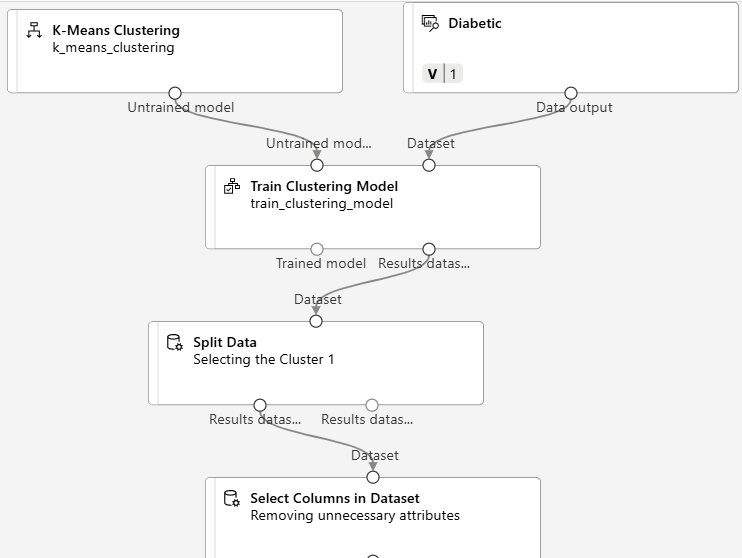
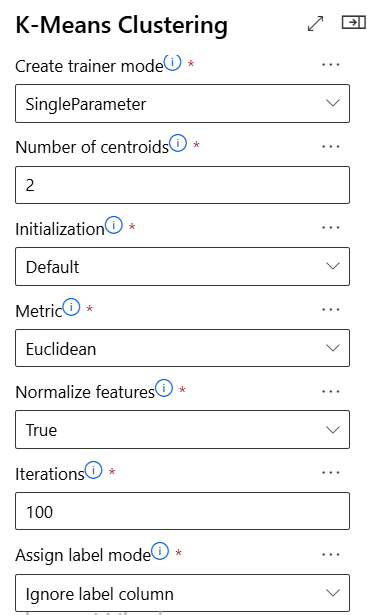
The Clustering model is included in the above classification model. The K-Means clustering technique was used with following clustering parameters. K-means clustering a basic clustering algorithm where you can find more technical details from K means Clustering – Introduction - GeeksforGeeks The following image shows the K-mean clustering properties. Each of the properties is described here.
- Create trainer mode: Defines how the model is trained, either with a single set of parameters or multiple parameter combinations.
- Number of centroids: Specifies the number of clusters (k) the algorithm will form.
- Initialization: Determines how the initial cluster centers are selected before training begins.
- Metric: Chooses the distance measure (e.g., Euclidean) used to assign points to clusters.
- Normalize features: Indicates whether features are scaled to ensure equal contribution to distance calculations.
- Iterations: Sets the maximum number of times the algorithm updates cluster centers.
- Assign label mode: Controls how labels are handled, such as ignoring any existing label column.
Once the clustering completed, classification is performed to the one of the clusters. The following is the sample set of data once the clustering is completed. 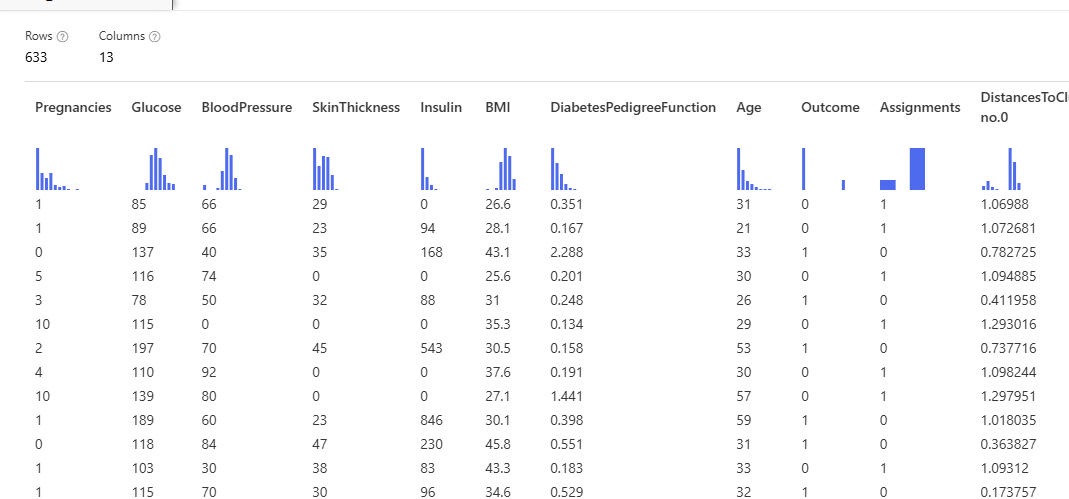
Once the clustering is completed, we need to ignore attributes such as Assignments and DistancestoClusters as they are internal values and don't add any value for our primary task which is classification. Once the attribute selection is done, then the same procedure as we did for the Classification is shown in the figure below. 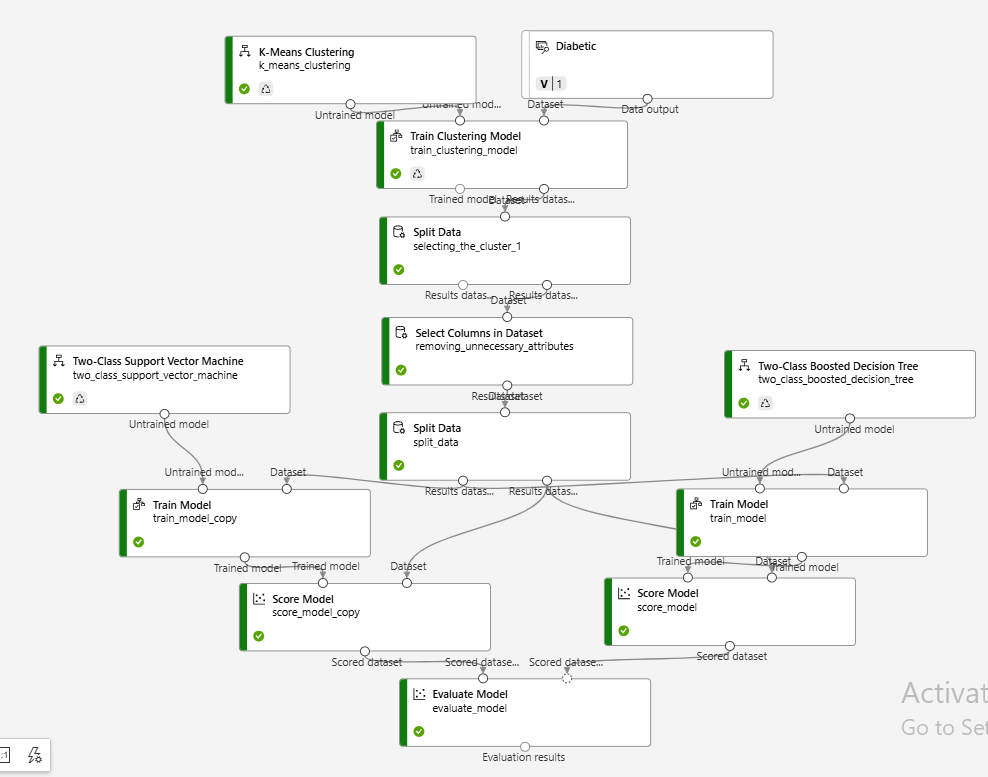
Once the classification is performed, we have achieved the accuracy of more than 85% which is higher from the previous execution without the clustering.
Next Steps
This article has introduced a clustering technique as a preprocessing techniques for classification. This is a better suited technique for large data set which are in the order of millions. If this technique is used for small data sets, overfitting problem can occur.
