

Introduction
This article offers an alternative approach for avoiding hardcoded literal values (magic values, mostly numbers) in MS SQL Server queries by using single-row views that "imitate" enum behavior. These views are created as hardcoded pairs of column names and single row values representing the enum's member name-value pairs. Due to their similarity to enums in C# (or similar languages), I refer to them as “enum” views and prefer to prefix their names with “en_” for easier recognition and usage.
Below, I will demonstrate how I create and use them, and the advantages I believe they offer over other methods for handling magic values in SQL code, despite involving hardcoding.
A Short story Behind “Enum” Views
Way back, I inherited SQL Server projects with hardcoded numeric values scattered throughout procedures, functions, and views across multiple databases. That SQL code was messy and difficult to read because there were places in the code containing more than 10, 20, or even 30 numeric values in the “IN” operator, mostly representing primary key IDs from related tables. These values should have been added to configuration tables as part of different configuration sets.
However, this experience made me think about how to implement code without magic numbers. I searched for a solution but didn’t find anything that truly satisfied me. Then, I saw somewhere a syntax example where column names were used in the “IN” operator. It looked similar to the following:
SELECT c.*
FROM dbo.Customers c
WHERE @PhoneNumber IN (c.PhoneNumber, c.FaxNumber, c.MobileNumber);
That example gave me an idea to create a single-row view containing hardcoded columns with single numeric values, and to check how they would behave in real situations.
"Enum" Views Definition and Examples
For examples, I will use the StackOverflow2013 database, graciously provided by Brent Ozar (How to Download the Stack Overflow Database). I will use dbo.Votes and dbo.VoteTypes tables because the main table has more than 40M rows, and diverse distribution of values for the VoteTypeId column.
Before continuing with “enum” view creation, we need to add a foreign key and index on the VoteTypeId column for the dbo.Votes table.
ALTER TABLE dbo.Votes ADD CONSTRAINT FK_Votes_VoteTypes_VoteTypeId FOREIGN KEY (VoteTypeId) REFERENCES dbo.VoteTypes(Id);
CREATE NONCLUSTERED INDEX IDX_Votes_VoteTypeId ON dbo.Votes (VoteTypeId);
Also, set the database compatibility level at least to SQL Server 2016 (level 130).
ALTER DATABASE [StackOverflow2013] SET COMPATIBILITY_LEVEL = 130;
“Enum” view creation
For testing “enum” (re)generation, you can use and adapt a simple SQL generator like this:
-- Simple code generator for the “enum“ view (using singular in the name of the view as it is mostly recommended for enums).
DECLARE @CreateEnumSql NVARCHAR(max);
DECLARE @NewLine CHAR(2) = CHAR(13) + CHAR(10);
SELECT @CreateEnumSql =
    N'CREATE OR ALTER VIEW dbo.en_VoteType AS '
    + @NewLine + N'SELECT ' + STRING_AGG(@NewLine + N'  ' + CAST(t.Id as NVARCHAR(20)) + N' as [' + t.Name + N']', N',') WITHIN GROUP (ORDER BY t.Id)
    + N';'
FROM dbo.VoteTypes t;

PRINT @CreateEnumSql;
EXECUTE sp_executesql @CreateEnumSql;
GO
This will result in the following view definition:
CREATE OR ALTER VIEW dbo.en_VoteType AS
SELECT
  1 as [AcceptedByOriginator],
  2 as [UpMod],
  3 as [DownMod],
  4 as [Offensive],
  5 as [Favorite],
  6 as [Close],
  7 as [Reopen],
  8 as [BountyStart],
  9 as [BountyClose],
  10 as [Deletion],
  11 as [Undeletion],
  12 as [Spam],
  13 as [InformModerator],
  15 as [ModeratorReview],
  16 as [ApproveEditSuggestion];
Usage examples
Here are two examples for a single parameter. One using a scalar and one with a value from a table.
SELECT COUNT(v.Id) AS VoteTypeCount
FROM dbo.Votes v
WHERE v.VoteTypeId = 3;

SELECT COUNT(v.id) AS VoteTypeCount
FROM dbo.Votes v
CROSS JOIN dbo.en_VoteType vt
WHERE v.VoteTypeId = vt.DownMod;
Both queries produce almost the same execution plan, but the first one with numeric literal values produces a parameterized plan.
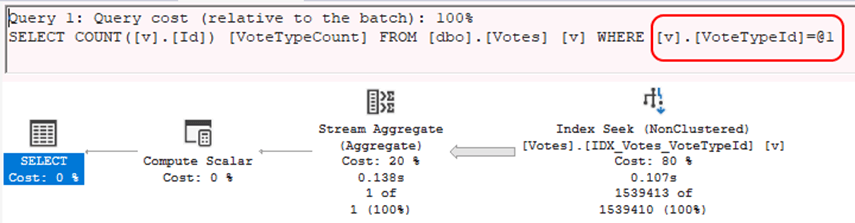
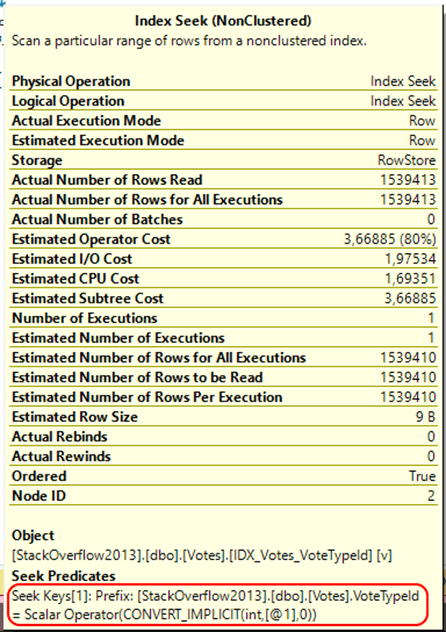
For the second query, I never saw parametrization.
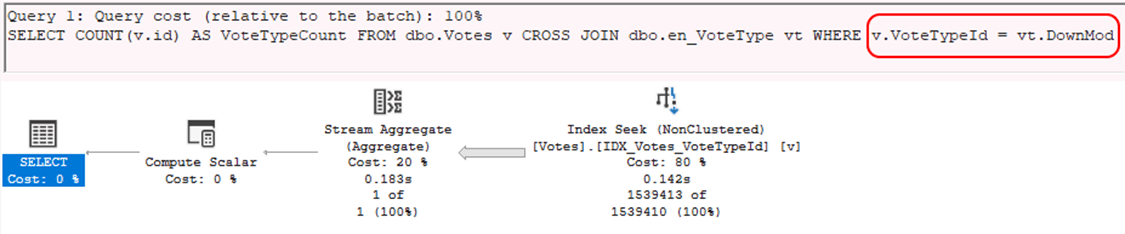
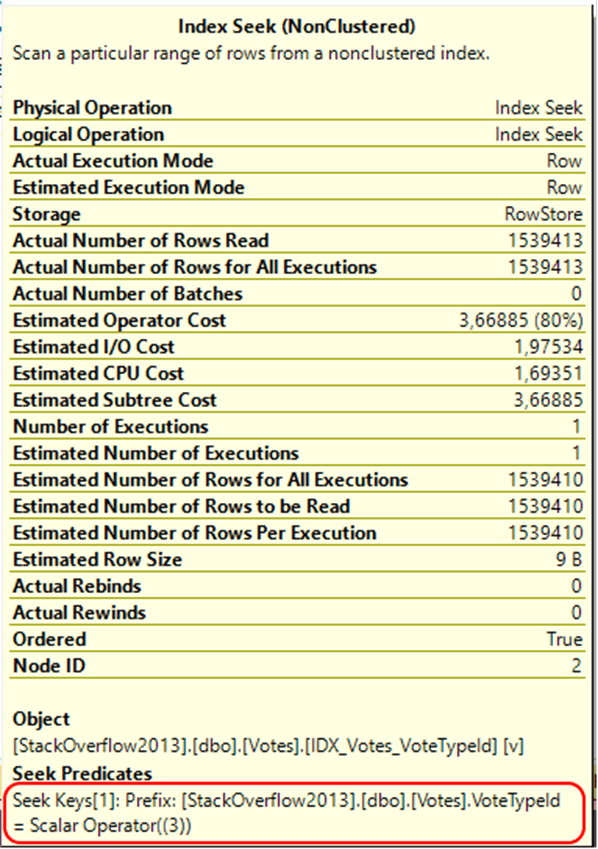
Both plans include a Scalar Operator, and for “enum” views, the actual underlying values are embedded in the Scalar Operator as part of the seek predicate.
Here is a more complex example with multiple values in filter. The first one uses scalars, and the second joins to the table.
SELECT v.VoteTypeId, COUNT(v.Id) AS VoteTypeCount
FROM dbo.Votes v
WHERE v.VoteTypeId IN (3, 6, 7, 12)
GROUP BY v.VoteTypeId;

SELECT v.VoteTypeId, COUNT(v.Id) AS VoteTypeCount
FROM dbo.Votes v
CROSS JOIN dbo.en_VoteType vt
WHERE v.VoteTypeId IN (vt.DownMod, vt.[Close], vt.Reopen, Spam)
GROUP BY v.VoteTypeId;
Both execution plans look the same, so I will present only the one for the “enum” view query.

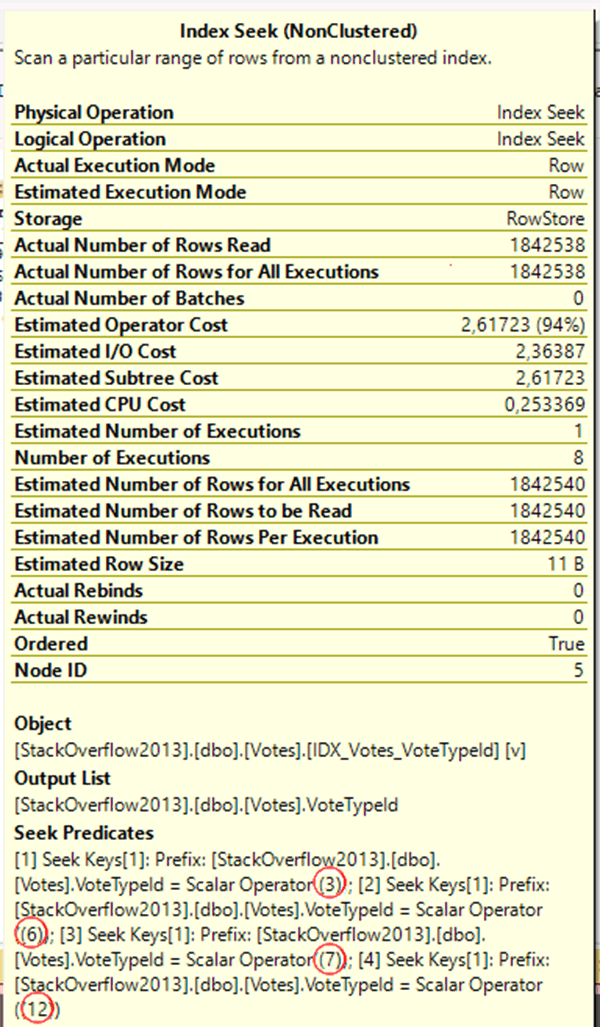
Here, all actual values from the “enum” view are also embedded into the Scalar Operators, so there is no difference from the first query that uses numeric literal values.
Other Examples
Here are some more complex examples of using “enums” (not related to the StackOverflow2013 database). I prefer to place “enums” at the end of the FROM clause because, to me, it feels more natural to keep them out of the main tables join logic. Also, keep in mind that sometimes we still need to place them earlier in the FROM clause code so that we can use them later for filtering.
SELECT o.*
FROM dbo.Orders o
-- "enum" views
CROSS JOIN dbo.en_OrderStatus s
CROSS JOIN dbo.en_DeliveryType t
WHERE
    (
        u.OrderStatusID IN (s.Pending, a.Processing)
        AND
        o.OrderStatusID NOT IN (s.Shipped, s.Delivered)
     )
     OR u.DeliveryTypeID = t.Mail;
Also, I like to have generic “enums”:
-- Boolean "enum" view for BIT values
CREATE OR ALTER VIEW dbo.en_Boolean AS
SELECT
    CAST(NULL as BIT) AS [Unknown], -- Be aware of the three value logic when using Unknown column value.
    CAST(0 as BIT) AS [False],
    CAST(1 as BIT) AS [True];
You can then do something like this:
SELECT c.*
FROM dbo.Companies c
CROSS JOIN dbo.en_Boolean b
WHERE c.IsActive = b.True -- Same as u.IsActive = 1, but with explicit cast to BIT type in "enum" view
Pragmatic and Unorthodox Usage
Single-row views with hardcoded values can be used in more ways:
- For holding constant values, mainly for those with some implicit information or usage scenarios.
- As placeholders for frequently used values.
- As a helper view dynamically generated from “constant” values in different tables.
CREATE OR ALTER VIEW dbo.helper_SystemSettings AS
SELECT
    -1 AS CommunityVirtualUser, -- Value from actual StackOverflow2013 Users table implicitly representing system’s community user.
    -2 AS SomeOtherVirtualUser, -- Sometimes we use negative ID's for special purposes that are not described in tables (this Id does not exist in StackOverflow2013 database).
    N'en-US' AS DefaultFormatCulture,
    N'$' AS DefaultCurrency,
    GETDATE() AS CurrentLocalTime,
    GETUTCDATE() AS CurrentUtcTime
    -- etc
;

-- Functions will be evaluated only when the query references the column that contains them.
CREATE OR ALTER VIEW dbo.helper_LocalTimeData AS
SELECT
    GETDATE() AS CurrentTime,
    YEAR(GETDATE()) AS CurrentYear,
    MONTH(GETDATE()) AS CurrentMonth,
    DAY(GETDATE()) AS CurrenDay,
    DATEPART (weekday, GETDATE()) AS CurrentDayOfWeek,
    EOMONTH (GETDATE()) AS CurrentMonthEnd,
    DAY(EOMONTH(GETDATE())) AS CurrentMonthDays
;
All of these usage scenarios should be applied very carefully and require programmer discipline, ideally as part of automatic code (re)generation followed by unit testing.
Maintaining “Enum” Views
You can use the following procedure to refresh SQL modules (procedures, functions, views, and triggers) and find any errors after changing the definition of “enum” views:
EXECUTE sp_refreshsqlmodule ‘dbo.SomeSqlModuleReferencingXyzEnum’;
Of course, you have to do this for all SQL modules that reference “enum” views to avoid problems. The best way to avoid these problems is to put “enum” (re)generation and module refresh as a part of an automatic build process.
Advantages and Considerations
Here is my list of advantages for using “enum” views:
- Avoiding magic numbers.
- Easy to use, read code, immediately understanding the meaning of values.
- IntelliSense suggests column names (enum member names), so they are really easy to use.
- Easy to refactor code.
- Failure to implement changes correctly will cause errors when refreshing SQL modules.
- Easy to find all references in code (e.g. view dependency in SSMS).
- Resistant to misspelled enum member names in SQL code. (It's sometimes hard to spot errors like “Disabled” vs “Disalbed”.)
- Without performance penalties (it behaves in the same way as if we were using hardcoded numbers).
- Avoiding SARG problem when using SQL functions to retrieve underlaying integer value from enum member name (using lookup/mapping functions).
- Avoiding hard-to-maintain SQL code when “enums” are used as check constraints on tables.
Warnings and considerations for using this method:
- Denormalization creating single-row views from lookup tables.
- Requests programmers discipline using manual code refresh and regeneration, or implementation of an automatic code refresh and regeneration, when “enum” view member changes.
- When using many “enum” views, code will be bigger and could reduce readability for larger queries.
- Not meant to be used for the large lookup tables, similar as general recommendation for enums to contain smaller number of constant members.
Conclusion
Based on my experience, I find this approach very useful and have never encountered significant issues using it. As with all coding, it is important to understand what you are doing and why, but I believe that "enum" views offer far more advantages than disadvantages. From my perspective, there is not so much overhead in creating and maintaining these single-row views. Although some may critique the need for additional code regeneration, it is important to consider that when using enums in backend code, developers must also generate code to synchronize them with database values in lookup tables to preserve foreign key relationships.
Another general issue with using "enum" views is the requirement for programmers to have a basic knowledge of SQL and the database engine, since these views are utilized within procedures, functions, or other views. However, this issue actually belongs to the realm of software architectural decisions.
Feedback
I would appreciate hearing your thoughts on using this method to simulate the behavior of enums within MS SQL Server. Feel free to share any criticisms or suggestions you may have.
Also, I hope that some of you will find this useful. 🙂
Disclaimer: English is not my native language, so I used AI for grammar check and some text improvements.
