

Introduction
SQL Server 2025 introduces a new way to compare strings. In the past, it was necessary to integrate T-SQL with Python or use CLR to apply fuzzy matching. Now, SQL Server 2025 includes a feature that helps us find similar words. This feature is smarter at finding information to check the data quality. Also, it detects inconsistencies and human errors in the data.
In this article, we will explain how to use this new feature.
Requirements
How to enable the Fuzzy string-matching features
This feature is not enabled by default at the time that this article was written. The following code will enable this Preview Feature.
ALTER DATABASE SCOPED CONFIGURATION SET PREVIEW_FEATURES = ON;

GO
There are 4 new fuzzy functions in SQL Server:
We will explain each one.
EDIT_DISTANCE function
It shows the number of insertions, deletions, substitutions, and transportations to convert one string into another. Let’s take a look at an example.
SELECT 'John' AS name1,

'Jon' AS name2,

EDIT_DISTANCE('John', 'Jon') AS Distance;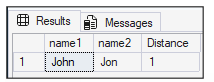
Only one insertion is required to change the h from John to Jon.
Simple example
The following example shows how to assess data quality using 2 tables. The following code will create 2 tables with data to understand the functions later.
CREATE TABLE dbo.CustomerRaw
(
    CustomerID INT IDENTITY(1, 1) PRIMARY KEY,
    CustomerName NVARCHAR(100),
    CityRaw NVARCHAR(100)
);

GO

CREATE TABLE dbo.CityMaster
(
    CityID INT IDENTITY(1, 1) PRIMARY KEY,
    StandardCity NVARCHAR(100)
);

GO

INSERT INTO dbo.CityMaster
(
    StandardCity
)
VALUES
('New York'),
('Los Angeles'),
('Chicago'),
('Houston'),
('Miami');

GO

INSERT INTO dbo.CustomerRaw
(
    CustomerName,
    CityRaw
)
VALUES
('John Smith', 'New Yrok'),
('Emily Johnson', 'New York'),
('Michael Brown', 'Los Angles'),
('Sarah Davis', 'Los Angeles'),
('David Wilson', 'Chcago'),
('Olivia Taylor', 'Chicago'),
('James Anderson', 'Huston'),
('Sophia Thomas', 'Houston'),
('Daniel Moore', 'Maimi'),
('Emma Martin', 'Miami');

GO
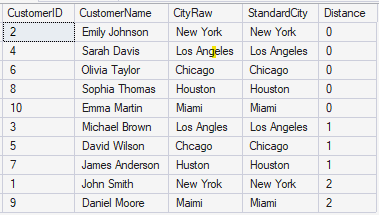
We have the table cityMaster with the column StandardCity with the correct names of the cities. We also have the table CustoverRaw with some city names with some spelling errors.
The code will compare the cityMaster column with the CityRaw column and detect the errors using the EDIT_DISTANCE function. The next code will verify the quality of the data.
SELECT r.CustomerID,
       r.CustomerName,
       r.CityRaw,
       m.StandardCity,
       EDIT_DISTANCE(r.CityRaw, m.StandardCity) AS Distance
FROM dbo.CustomerRaw r
    CROSS JOIN dbo.CityMaster m
WHERE EDIT_DISTANCE(r.CityRaw, m.StandardCity) <= 3
ORDER BY Distance,
         r.CustomerID;
The code is doing a cross join to check all the data from the CityRaw column with the StandardCity column and detecting words with a distance lower than 3.
This query will show several typo errors.
EDIT_DISTANCE_SIMILARITY
The EDIT_DISTANCE_SIMILARITY is almost the same, but in this case, we use a % instead of a number. The values returned by this function are from 0 to 100 %, and the EDIT_DISTANCE is from 0 to infinity.
Let’s take a look at a simple example to understand how it works.
SELECT 'Peter' AS name1,
       'Petre' AS name2,
       EDIT_DISTANCE_SIMILARITY('Peter', 'Petre') AS [Distance Percentage];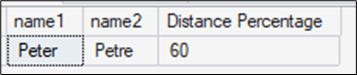
The distance in percentage is 60%. That is because just 3 of 5 letters are the same in the same order (Pet), so (3/5) *100= 60 %
Now, let’s take a look at another example.
Detect duplicated data with the EDIT_DISTANCE_SIMILARITY
Let’s say we have a table of customer information and want to run a quality check.
The following code will create tables with some data.
CREATE TABLE dbo.CustomersDQ
(
    CustomerID INT IDENTITY(1, 1),
    CustomerName NVARCHAR(100)
);
GO

INSERT INTO dbo.CustomersDQ
(
    CustomerName
)
VALUES
('John Smith'),
('Jon Smith'),
('Jhon Smith'),
('John Smit'),
('Emily Johnson'),
('Emely Jonson'),
('Michael Brown'),
('Micheal Brown'),
('Sara Davis'),
('Sarah Davis'),
('David Wilson'),
('David Willson');
GO

SELECT a.CustomerID AS ID1,
       a.CustomerName AS Name1,
       b.CustomerID AS ID2,
       b.CustomerName AS Name2,
       EDIT_DISTANCE_SIMILARITY(a.CustomerName, b.CustomerName) AS Similarity
FROM dbo.CustomersDQ a
    JOIN dbo.CustomersDQ b
        ON a.CustomerID < b.CustomerID
WHERE EDIT_DISTANCE_SIMILARITY(a.CustomerName, b.CustomerName) >= 85
ORDER BY Similarity DESC;
The result of the query shows the names with some differences.
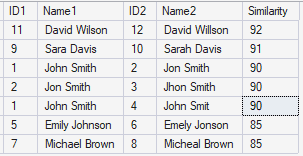
The query compares names and identifies those with high similarity to identify possible errors. For example, John or Jon. Sara or Sarah. Some may be mistakes, but some data could be ok.
JARO_WINKLER_DISTANCE function
Another new feature in SQL Server 2025 is the JARO_WINKLER_DISTANCE function. It returns 0 if the strings are identical, with the value increasing toward 1 as they become more distinct. For example, this will return 0:
SELECT 'Peter' AS name1,
       'Peter' AS name2,
       JARO_WINKLER_DISTANCE('Peter', 'Peter') AS [Jaro Winkler Distance];
And this example will return a value higher than 0.
SELECT 'Peter' AS name1,
       'Petre' AS name2,
       JARO_WINKLER_DISTANCE('Peter', 'Petre') AS [Jaro Winkler Distance];
The result returned is the following:

Validating physical addresses with the JARO_WINKLER_DISTANCE function
In this example, we will validate physical addresses and check if they match. First, we will create a table with some addresses:
-- 1. Create the sample address table

CREATE TABLE CustomerAddresses
(
    AddressID INT IDENTITY(1, 1) PRIMARY KEY,
    InputAddress NVARCHAR(255),
    ReferenceAddress NVARCHAR(255)
);

-- 2. Insert test cases

INSERT INTO CustomerAddresses
(
    InputAddress,
    ReferenceAddress
)
VALUES
('123 Main St.', '123 Main Street'),
('456 W. Washington Ave', '456 Washington Ave'),
('789 Morning Star Rd', '789 Mornig Star Rd'),
('101 Broadway Blvd', '101 Broadway Blvd'),
('202 Rockfeller Ctr', '202 Rockefeller Center');
After creating the table with data, we will verify errors in the physical addresses using this query:
-- 3. Run validation using JARO_WINKLER_DISTANCE

SELECT AddressID,
       InputAddress,
       ReferenceAddress,
       JARO_WINKLER_DISTANCE(InputAddress, ReferenceAddress) AS DistanceScore,
       CASE
           WHEN JARO_WINKLER_DISTANCE(InputAddress, ReferenceAddress) = 0 THEN
               'Exact Match'
           WHEN JARO_WINKLER_DISTANCE(InputAddress, ReferenceAddress) < 0.12 THEN
               'Highly Likely'
           WHEN JARO_WINKLER_DISTANCE(InputAddress, ReferenceAddress) < 0.25 THEN
               'Needs Manual Review'
           ELSE
               'No Match'
       END AS ValidationStatus
FROM CustomerAddresses
ORDER BY DistanceScore ASC;
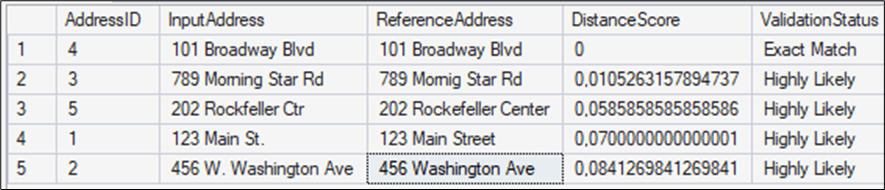
The query compares the addresses and checks for similar addresses in the table. If it is an exact match, if it is highly likely the same, or if manual review is required.
A value lower than 0.12 means that it could be the same address. If the value of the function is lower than 0.25, a manual review is required.
JARO_WINKLER_SIMILARITY function
Finally, we have the JARO WINKLER SIMILARITY function. This function returns a percentage of similarity.
The following example shows how this function works:
SELECT 'Peter' AS name1,
       'Petre' AS name2,
       JARO_WINKLER_SIMILARITY('Peter', 'Petre') AS [Jaro Winkler Distance %];
The JARO WINKLER functions are smarter than the EDIT DISTANCE functions. It is a smarter algorithm specially designed for proper names and short texts. It takes into consideration and assigns more weight to the first characters.
Let’s take a look at an example. First, we will create 2 tables with data. We have a table named MasterBrand with the official brand names, and Incoming sales have dirty data.
-- Create Master Brands table

CREATE TABLE MasterBrands
(
    BrandID INT PRIMARY KEY IDENTITY(1, 1),
    OfficialName NVARCHAR(100)
);

INSERT INTO MasterBrands
(
    OfficialName
)
VALUES
('Samsung'),
('Apple'),
('Microsoft'),
('Adidas'),
('Coca-Cola');

-- Create Dirty Data table

CREATE TABLE IncomingSales
(
    SaleID INT PRIMARY KEY IDENTITY(1, 1),
    InputName NVARCHAR(100)
);

INSERT INTO IncomingSales
(
    InputName
)
VALUES
('Samsumg'),
('Aple'),
('Microsft'),
('Adiddas'),
('Koka Kola'),
('SAMSUNG INC');
The following query will show the words with errors:
SELECT I.InputName,
       M.OfficialName,
       JARO_WINKLER_SIMILARITY(I.InputName, M.OfficialName) AS Score
FROM IncomingSales I
    CROSS APPLY
(
    SELECT TOP 1
           OfficialName
    FROM MasterBrands
    ORDER BY JARO_WINKLER_SIMILARITY(I.InputName, OfficialName) DESC
) M
WHERE JARO_WINKLER_SIMILARITY(I.InputName, M.OfficialName) > 75
ORDER BY Score DESC;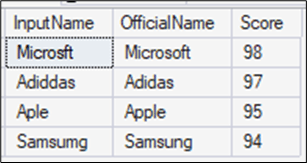
As you can see in the results, the query found some errors in the brand names in the InputName column.
Conclusions
We have 4 new functions for fuzzy string matching. The EDIT_DISTANCE functions use the Levenshtein algorithm, and the JARO_WINKLER functions use the JARO_WINKLER algorithm. The Jaro-Winkler is more sensitive for the first letters.
These functions are essential for data cleansing and implementing fuzzy search logic to identify approximate string matches.