

In today's fast-moving world, where every organization is rapidly adopting AI technologies, Microsoft SQL Server is no longer behind. In its latest release, SQL Server 2025, Microsoft promises to deliver one of the most enterprise-ready relational databases. Now SQL Server can seamlessly integrate Large Language Models(LLM's) directly within the database. This allows developers to leverage AI and combine it with business data without leaving SQL Server.
In this article, we will learn some of the basic concepts of AI and ML, such as Vectors, Embeddings, LLM models, etc. Then we will see how to integrate an external LLM model with SQL Server and perform semantic search, natural and context-free queries on your data.
Note: It is recommended that reader should have a basic knowledge of AI, Machine Learning, and T-SQL.
Vector Data Type
Vectors are backbone of any LLM models. They represent data such as text, images, songs, etc. as an ordered list of numbers that ML algorithms process.
SQL Server introduces a new data type, Vector, to support AI and machine learning workloads. This data type stores multi-dimensional data, making it useful for semantic search, similarity findings, and embedding storage. A vector stores values in an ordered numerical array. For example, a three-dimensional vector is represented as '[0,1,2]'. The Vector data type supports up to 1998 dimensions and uses a familiar JSON array format for creating and storing values.
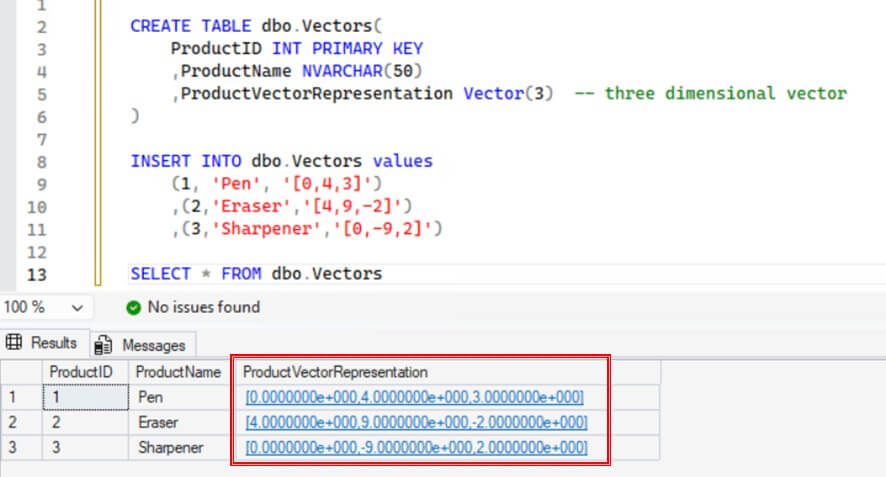
The following example below creates a table with Vector column and inserts data into it.
CREATE TABLE dbo.Vectors(
ProductID INT PRIMARY KEY
,ProductName NVARCHAR(50)
,ProductVectorRepresentation VECTOR(3)  -- three dimensional vector
)

INSERT INTO dbo.Vectors values
(1, 'Pen', '[0,4,3]')
,(2,'Eraser','[4,9,-2]')
,(3,'Sharpener','[0,-9,2]')
We can see the results below of this, with the vector data stored as an array of floating point values.
For additional details about Vectors, please refer this article.
Embeddings
Embeddings are the numerical values stored in the vectors that represents features of data. These are generated using a Deep Learning model, and ML/AI models uses them to measure similarity between vectors. For example, two similar words like 'Animal' and 'Dog' have similar embeddings (vector representations).
You can generate embeddings using LLM models, such as OpenAI, Ollama, etc. Generated embeddings then can be stored in a Vector column inside a SQL Server database alongside the original data which they represent. Furthermore, you can perform vector searches using T-SQL to find semantically similar words or concepts.
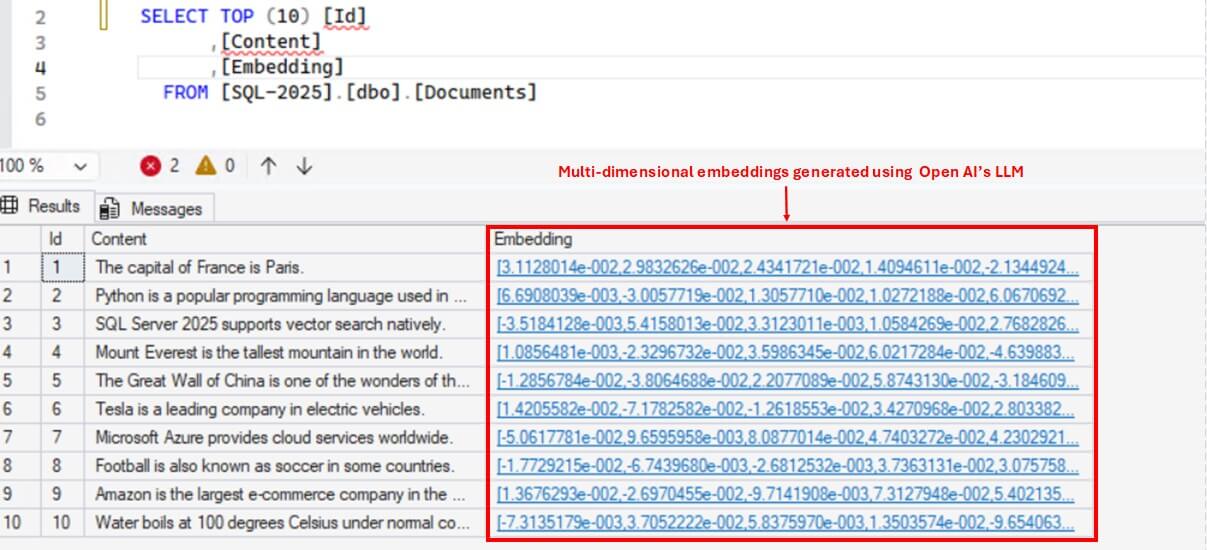
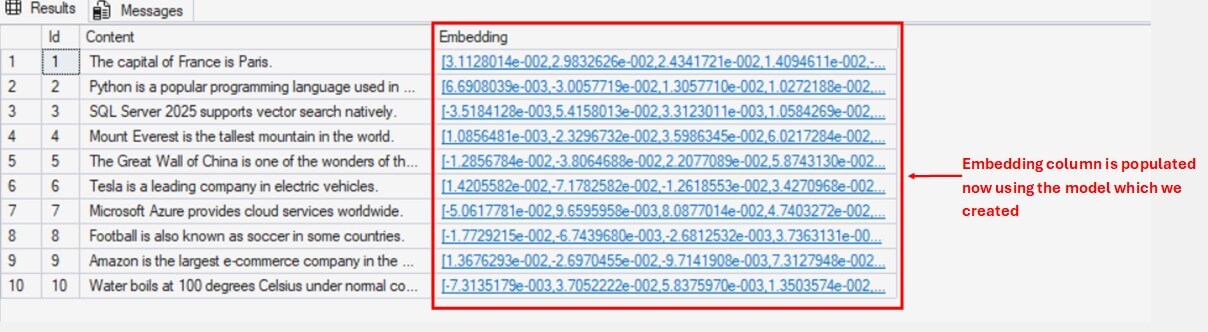
In the screenshot below, the document table contains two columns: Content(nvarchar) and Embeddings(vector). The Content column stores textual data, while Embeddings column stores the corresponding embedding values. These embeddings are generated using OpenAI's LLM model. In the demo section, we will go through how to generate the embeddings and store it in a database table.
Vector Searches
Vector Search is a process of finding vectors in a dataset that closely match a given input vector. It is similar to searching text using 'LIKE' operator is SQL Server. The difference is that, instead of simply matching text patterns, it scans the entire vector column and return the vectors whose embeddings are similar to input vector's embeddings. Hence it performs semantic search.
For example, if the input vector represents the word 'cat', it return vectors of semantically similar words like 'Animal' as close match.
The closer the embeddings are, more similar they are. This closeness is measured using different metrices like Cosine distance, Euclidean distance or dot product. SQL offers two functions VECTOR_DISTANCE() and VECTOR_SEARCH() to measure the similarity between two vectors.
VECTOR_DISTANCE()
It calculates the exact similarity between two vectors using a predefined metric(cosine, dot, Euclidean) and returns a scalar value of difference between two vectors, based on the distance metric you specify. It doesn't uses any vector index for finding similarity, hence this function is best suited for smaller datasets and for finding exact distance between two vectors.
Below is the syntax:
VECTOR_DISTANCE('distance_metric', [Vector1], [Vector2])and the arguments are:
- distance_metric: Distance metric to be used for calculating the distance between the two vectors. Supported metrics are cosine, Euclidean and dot product.
- Vector1: First Vectorized data type array.
- Vector2: Second Vectorized data type array.
VECTOR_SEARCH()
It calculates the similarity between the vectors using an ANN(approximate nearest neighbor) algorithm. Unlike VECTOR_DISTANCE(), it doesn't calculates the exact distance between the vectors and only returns the most nearest vectors. This function requires a vector index on the vector column of the table. As it uses vector indexes, this function is best suited for larger datasets.
Please note at the time of writing this article this function is still in Preview and subject to change.
Below is the Syntax:
 VECTOR_SEARCH(
        TABLE = table_name,
        COLUMN = embedding_column_name,
        SIMILAR_TO = query_vector,
        METRIC = 'cosine | euclidean | dot',
        TOP_N = k
    )
and the arguments are:
- TABLE: Table where search will be performed
- COLUMN: Vectorized Column with Vector Index which stores the embeddings of the textual data and where the search will be performed
- SIMILAR_TO: Vectorized value of the input query text which will be used for finding similarity.
- METRIC: Metric to be used for calculating the similarity between the two vectors. Supported metrics are cosine, Euclidean and dot product.
- TOP_N: Maximum number of similar rows to return in the result.
Demo - Integrating External LLM Models and Semantic Search
Now that we understand the basic concepts, lets see how we can integrate an external LLM model in our SQL Server and perform semantic search.
Configuring Open AI API Key
We will use Open AI's Web API in this demo. If you do not have an API key, you have to purchase one. To generate a new key follow the below steps:
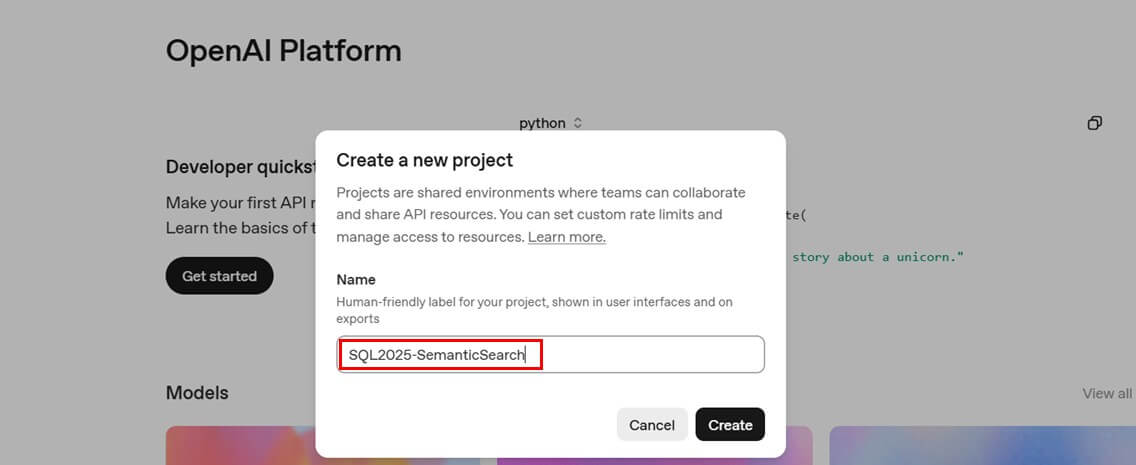
First, register on https://platform.openai.com/ and then create a new project.(e.g. SQL2025-SemanticSearch), as shown below.
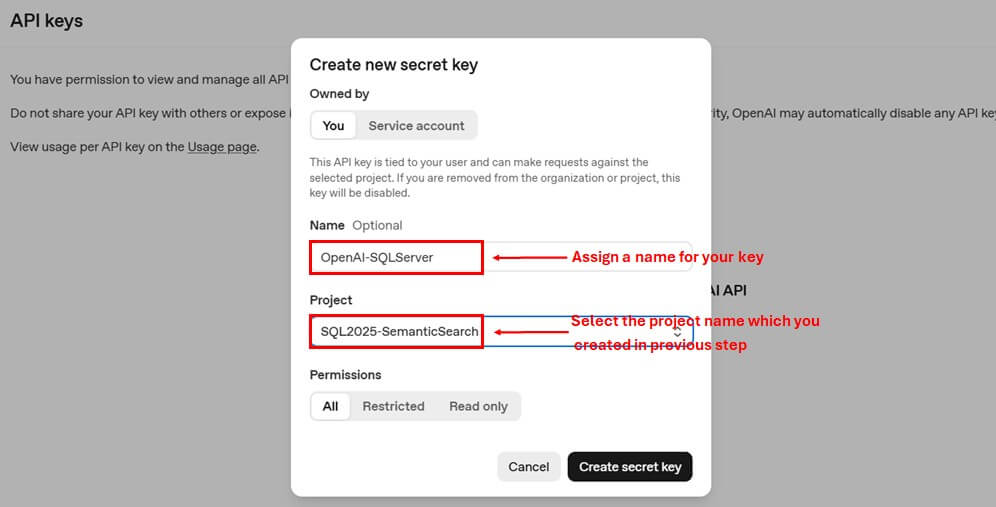
Then navigate to API keys from settings option and create new secret key by assigning it a name. Select the project which you created in previous step.
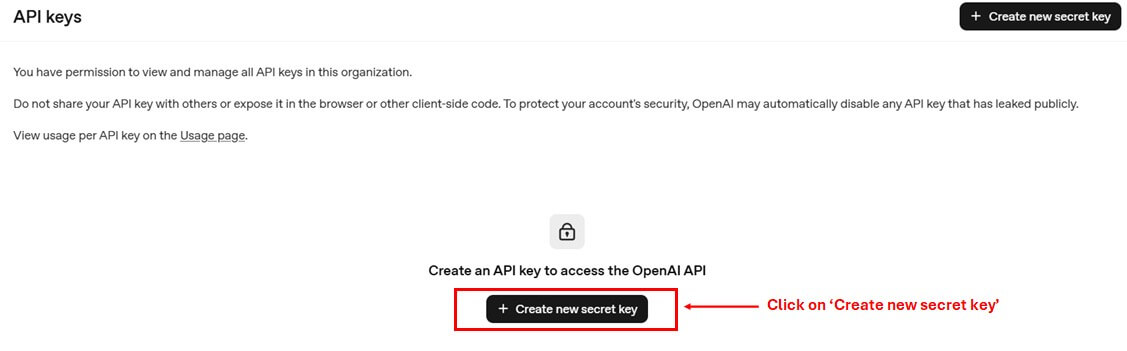
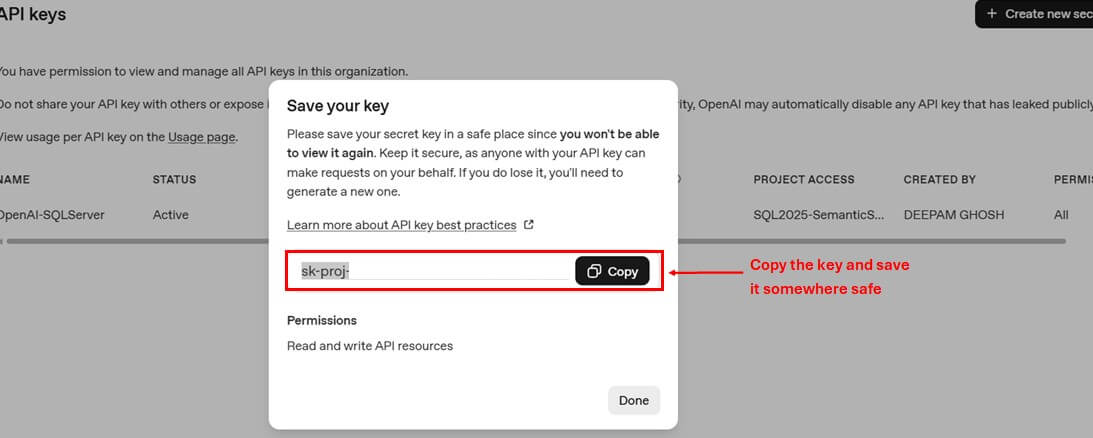
It is important to note down the value of the secret key at the time of creation only as it complete value disappears after this step. If you missed to note down the value, you have to delete and create a new key again.
Your key will look something like sk-proj........B7wA.
Next, you have to add a payment option from Billing section to buy the credits. Additionally you can track the pricings, billing history and usage limits from the same section.
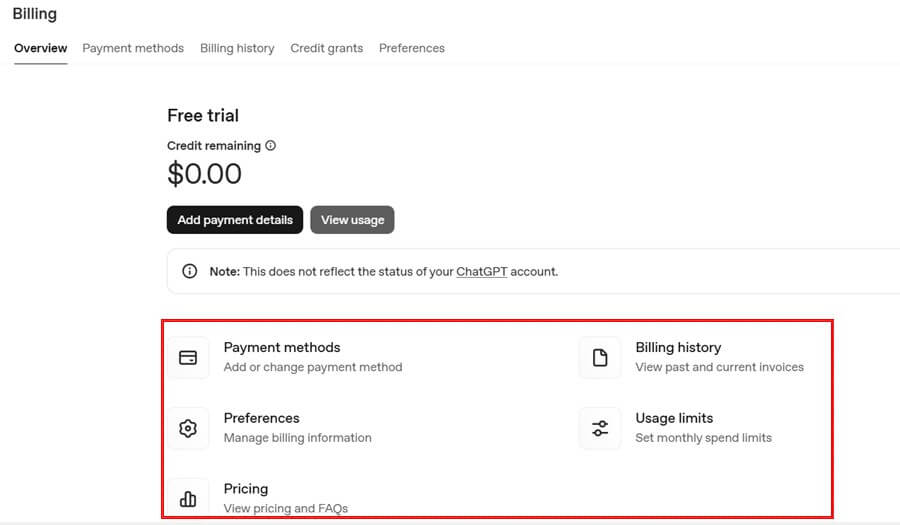
Also, keep track of Credit Limits and Usage. You may refer this article for Credit Limit usage.
Creating an External LLM in SQL Server
Now we will see how to create an OpenAI model in SQL Server.
To begin with, first create a database credential and master key using below sql statements. A Database Credential will be required at the time of creation of external model.
USE [SQL-2025];
GO

-- Create a master key (use a strong password you will remember)
CREATE MASTER KEY ENCRYPTION BY PASSWORD = 'Str0ngP@ssword!';

IF EXISTS (SELECT * FROM sys.database_scoped_credentials WHERE name = 'https://api.openai.com')
    DROP DATABASE SCOPED CREDENTIAL [https://api.openai.com];
GO

CREATE DATABASE SCOPED CREDENTIAL [https://api.openai.com]   --- For OpenAI API
WITH IDENTITY = 'HTTPEndpointHeaders',
SECRET = '{"Authorization": "Bearer sk-proj........B7wA"}';  --- Provide the API Key secret which you created in previous section
Next, create the external model using T-SQL's new command CREATE EXTERNAL MODEL. Also make sure to enable the external rest endpoint advance configuration so that SQL can make calls to external OpenAI API.
EXEC sp_configure 'external rest endpoint enabled',1;
RECONFIGURE WITH OVERRIDE;

CREATE EXTERNAL MODEL OpenAIEmbeddingModel
WITH (
    LOCATION = 'https://api.openai.com/v1/embeddings',
    CREDENTIAL = [https://api.openai.com],   -- Database Scoped Credential
    API_FORMAT = 'OpenAI',    -- For OpenAI. Other examples - Azure OpenAI,Ollama
    MODEL_TYPE = EMBEDDINGS,
    MODEL = 'text-embedding-3-small'  -- For Text Embeddings
);
If you want to alter or drop any external model you can use ALTER EXTERNAL MODEL and DROP EXTERNAL MODEL commands respectively.
Creating Documents Table with Vector Column for textual data
Once the external model is ready, create a table named 'document' for semantic search using below T-SQL script. It contains following columns:
- ID - Primary Key column for each document
- Content(nvarchar) - Stores some random textual data
- Embedding(vector) - Stores embeddings of the textual data in vector data type.
CREATE TABLE dbo.Documents (
    Id INT IDENTITY(1,1) PRIMARY KEY,
    Content NVARCHAR(MAX),
    Embedding VECTOR(1536) NULL   -- for storing embeddings
);
GO
Next, insert some random data into the table using below script.
INSERT INTO dbo.Documents (Content)
VALUES
(N'The capital of France is Paris.'),
(N'Python is a popular programming language used in AI and data science.'),
(N'SQL Server 2025 supports vector search natively.'),
(N'Mount Everest is the tallest mountain in the world.'),
(N'The Great Wall of China is one of the wonders of the world.'),
(N'Tesla is a leading company in electric vehicles.'),
(N'Microsoft Azure provides cloud services worldwide.'),
(N'Football is also known as soccer in some countries.'),
(N'Amazon is the largest e-commerce company in the world.'),
(N'Water boils at 100 degrees Celsius under normal conditions.'),
(N'ChatGPT is an AI model developed by OpenAI.'),
(N'India is the largest democracy in the world.'),
(N'Bananas are rich in potassium.'),
(N'Shakespeare wrote the play Romeo and Juliet.'),
(N'The human brain contains billions of neurons.'),
(N'Coffee is one of the most popular beverages in the world.'),
(N'Cristiano Ronaldo is a famous football player.'),
(N'Google was founded by Larry Page and Sergey Brin.'),
(N'Bitcoin is a type of cryptocurrency.'),
(N'The Pacific Ocean is the largest ocean on Earth.'),
(N'Leonardo da Vinci painted the Mona Lisa.'),
(N'The speed of light is approximately 299,792 km per second.'),
(N'Tokyo is the capital city of Japan.'),
(N'The Sahara Desert is the largest hot desert in the world.'),
(N'COVID-19 pandemic started in 2019.'),
(N'Einstein developed the theory of relativity.'),
(N'Lionel Messi is regarded as one of the greatest footballers.'),
(N'J.K. Rowling wrote the Harry Potter series.'),
(N'Water is composed of hydrogen and oxygen atoms.'),
(N'YouTube is a video sharing platform owned by Google.'),
(N'Apple produces the iPhone, iPad, and MacBook.'),
(N'The Amazon Rainforest is known as the lungs of the Earth.'),
(N'Facebook was founded by Mark Zuckerberg.'),
(N'The currency of the United States is the US Dollar.'),
(N'Mona Lisa is displayed at the Louvre Museum in Paris.'),
(N'The Statue of Liberty is located in New York.'),
(N'Elon Musk founded SpaceX.'),
(N'The Nile is the longest river in the world.'),
(N'Ice cream is a frozen dessert loved worldwide.'),
(N'The Sun is a star at the center of our solar system.'),
(N'BMW is a German luxury car manufacturer.'),
(N'Mahabharata is one of the oldest epics in Indian history.'),
(N'The Internet revolutionized communication.'),
(N'Mars is called the Red Planet.'),
(N'Venus is the hottest planet in our solar system.'),
(N'Microsoft was founded by Bill Gates and Paul Allen.'),
(N'The Taj Mahal is located in Agra, India.'),
(N'The Eiffel Tower is an iconic landmark in Paris.'),
(N'Kolkata was formerly known as Calcutta.'),
(N'The first man on the moon was Neil Armstrong.'),
(N'Giraffes are the tallest land animals.'),
(N'Penguins live mostly in the Southern Hemisphere.'),
(N'The Earth orbits around the Sun in 365 days.'),
(N'Samsung is a South Korean multinational company.'),
(N'Opera is a style of theatre performance.'),
(N'Rome was the center of the Roman Empire.'),
(N'The human heart has four chambers.'),
(N'Einstein won the Nobel Prize in Physics in 1921.'),
(N'Photosynthesis occurs in plant leaves.'),
(N'The first World War began in 1914.'),
(N'Second World War ended in 1945.'),
(N'The iPhone was first released in 2007.'),
(N'Manufacturing industries are part of the secondary sector.'),
(N'The Pyramids of Giza are in Egypt.'),
(N'Pluto was reclassified as a dwarf planet.'),
(N'The Great Fire of London happened in 1666.'),
(N'Football World Cup is held every four years.'),
(N'The brain controls the central nervous system.'),
(N'China has the largest population in the world.'),
(N'Canada is the second-largest country by land area.'),
(N'The Berlin Wall fell in 1989.'),
(N'WhatsApp is a popular messaging application.'),
(N'Sound travels faster in water than in air.'),
(N'Volcanoes erupt when magma rises to the surface.'),
(N'Milk is a source of calcium.'),
(N'The internet was first developed for military use.'),
(N'The first programming language was Fortran.'),
(N'Vegetables are essential for a healthy diet.'),
(N'Saturn is famous for its rings.'),
(N'Airplanes fly due to the principle of lift.'),
(N'Chess originated in India.'),
(N'The Cold War was a period of geopolitical tension.'),
(N'The periodic table organizes chemical elements.'),
(N'You need oxygen to breathe.'),
(N'Mahatma Gandhi was a leader of Indian independence.'),
(N'The Himalayas are the youngest mountain range.'),
(N'Sri Lanka is an island nation in South Asia.'),
(N'The Indian Ocean lies south of India.'),
(N'George Washington was the first US president.'),
(N'The Eiffel Tower was built in 1889.'),
(N'Newton discovered the law of gravitation.'),
(N'The Milky Way is our galaxy.'),
(N'The Moon causes ocean tides.'),
(N'The Leaning Tower of Pisa is in Italy.'),
(N'Polar bears live in the Arctic region.'),
(N'Lightning is caused by static electricity.'),
(N'Kangaroos are native to Australia.'),
(N'Amazon Alexa is a virtual assistant.'),
(N'Machine learning is a subset of artificial intelligence.'),
(N'The Golden Gate Bridge is in San Francisco.'),
(N'The ozone layer protects Earth from UV rays.'),
(N'Cricket is very popular in India.'),
(N'The brain uses electrical signals to transmit information.'),
(N'Global warming is caused by greenhouse gases.'),
(N'The first computer was ENIAC.'),
(N'Blockchain technology is used in cryptocurrencies.'),
(N'The UN was founded in 1945.');

GO
You can see the data is in my table:
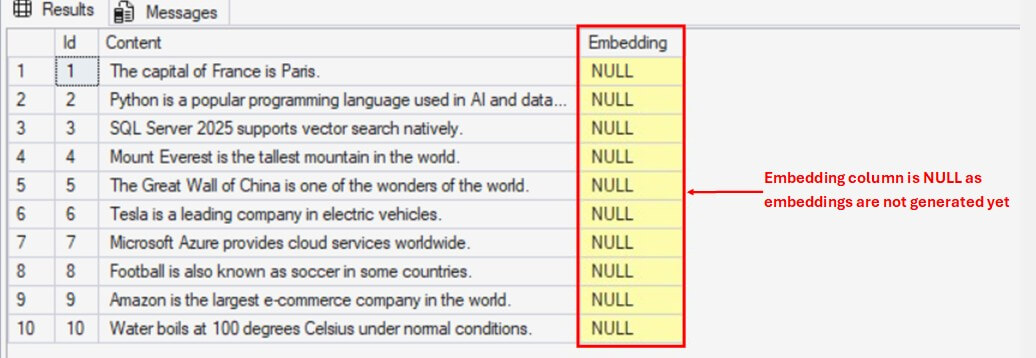
After inserting the textual data, we have to generate the embeddings for each content(row) using the external model which we have created. Use T-SQL's new function AI_GENERATE_EMBEDDINGS() to generate and insert the embeddings into document table.
UPDATE dbo.documents
SET Embedding = AI_GENERATE_EMBEDDINGS ([Content] Use MODEL OpenAIEmbeddingModel);
Now if you run select query on documents table, you will see numerical values(embeddings) for each content in the embedding column.
Semantic Search of Textual Query
Now that our embeddings are ready, we can perform some semantic searches on the documents table and see how the model behaves. First, lets see couple of examples for VECTOR_DISTANCE().
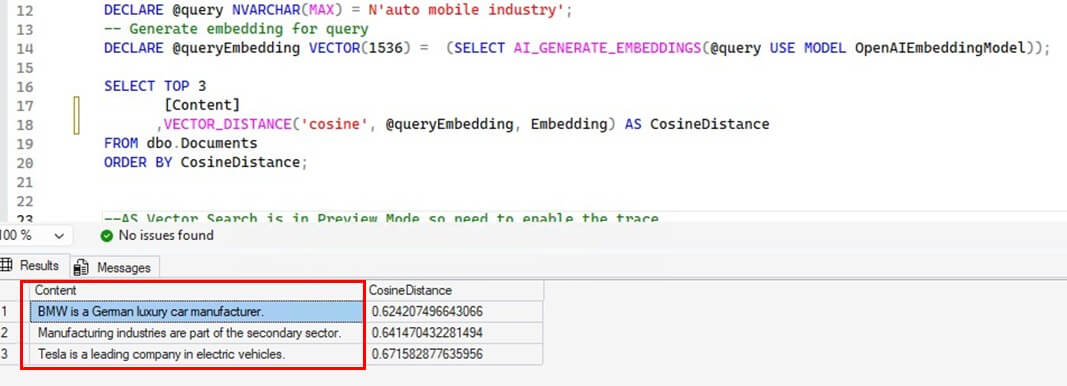
The first example conducts a random search for some contents related to auto mobile industry. The query is shown in the first line of the code:
DECLARE @query NVARCHAR(MAX) = N'auto mobile industry';

-- Generate embedding for query
DECLARE @queryEmbedding VECTOR(1536) =  (SELECT AI_GENERATE_EMBEDDINGS(@query USE MODEL OpenAIEmbeddingModel));

 SELECT TOP 3
       Content
      ,VECTOR_DISTANCE('cosine', @queryEmbedding, Embedding) AS CosineDistance
FROM dbo.Documents
ORDER BY CosineDistance;
The output is impressive as all the returned results are related to automobile industry.
The next example conducts a specific search for Mona Lisa:
DECLARE @query NVARCHAR(MAX) = N'leonardo da vinci''s famous painting';
-- Generate embedding for query
DECLARE @queryEmbedding VECTOR(1536) =  (SELECT AI_GENERATE_EMBEDDINGS(@query USE MODEL OpenAIEmbeddingModel));

SELECT TOP 3
       [Content]
      ,VECTOR_DISTANCE('cosine', @queryEmbedding, Embedding) AS CosineDistance
FROM dbo.Documents
ORDER BY CosineDistance;
The returned output with most similarity correctly answers our query.
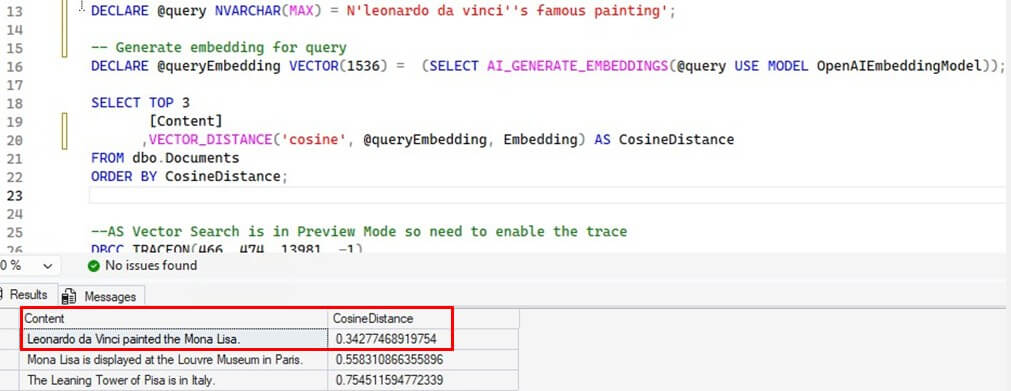
Here is an explanation on how the code worked. In both the examples above, first we take a input text - 'auto mobile industry' and 'leonardo da vinci's famous painting'. Then we generated a vector embedding of this input text using the same external AI model and stored it in a queryEmbedding variable. Finally using VECTOR_DISTANCE function we calculated the cosine similarity between the input text vector and values from Embedding column of the documents table. It compared the distance between the input vector and each row of embedding column one by one and returns the corresponding top 3 most similar row from Content column. Please note that the less the value of cosine distance, the more is the similarity.
Now, we will perform some searches using VECTOR_SEARCH(). As this feature is still in preview, we need to enable the trace flag using below query to make this function work:
DBCC TRACEON(466, 474, 13981, -1)
Then create a vector index on the embedding column as an index is mandatory for vector search to work.
CREATE VECTOR INDEX vec_idx ON [dbo].[Documents]([Embedding])
WITH (METRIC = 'cosine', TYPE = 'diskann', MAXDOP = 4);
GO
A little explanation for the arguments:
- Metric : defines how similarity is calculated (options are cosine/dot/Euclidean)
- Type: defines algorithm used to calculate the nearest neighbors. Currently only 'diskann' is supported.
- MAXDOP: parallel threads for rebuilding the index
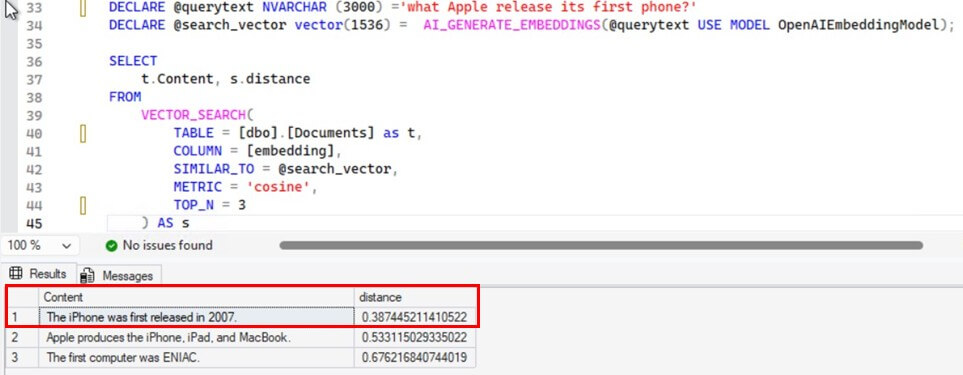
Let us see when the iPhone was released.
DECLARE @querytext NVARCHAR (3000) ='what Apple released its first phone?'
DECLARE @queryEmbedding vector(1536) =  AI_GENERATE_EMBEDDINGS(@querytext USE MODEL OpenAIEmbeddingModel);

SELECT
    t.Content, s.distance
FROM
    VECTOR_SEARCH(
        TABLE = [dbo].[Documents] as t,
        COLUMN = [embedding],
        SIMILAR_TO = @queryEmbedding,
        METRIC = 'cosine',
        TOP_N = 3
    ) AS s
It did well. The results with maximum similarity correctly answers the query.
The next example is finding the nationality of Cristiano Ronaldo. Actually, we'll ask the LLM who is the famous football player from Portugal.
DECLARE @querytext NVARCHAR (3000) ='who is the famous footballer from portugal?'
DECLARE @queryEmbedding vector(1536) =  AI_GENERATE_EMBEDDINGS(@querytext USE MODEL OpenAIEmbeddingModel);

SELECT
    t.Content, s.distance
FROM
    VECTOR_SEARCH(
        TABLE = [dbo].[Documents] as t,
        COLUMN = [embedding],
        SIMILAR_TO = @queryEmbedding,
        METRIC = 'cosine',
        TOP_N = 3
    ) AS s
Again the results were impressive and model worked quite well. The vector with maximum similarity correctly answers the query.
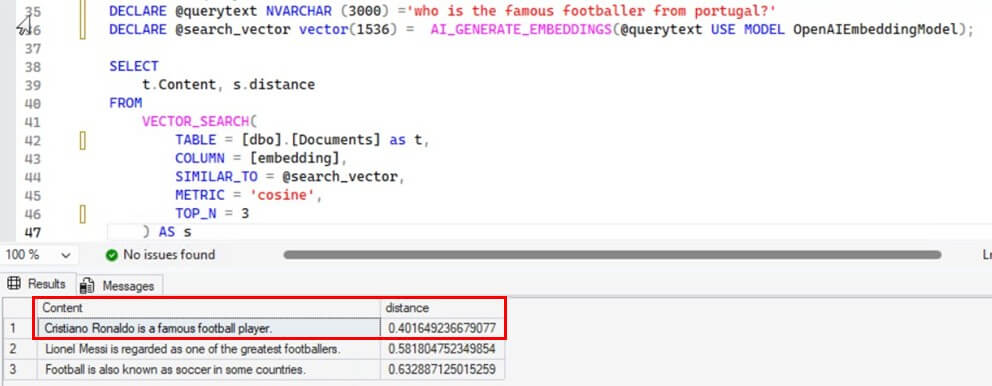
Like the previous examples, first we generated the embeddings of the input text using the external AI model and stored the result in queryEmbedding variable. Then VECTOR_SEARCH() function performs approximate nearest search using diskann algorithm defined in the vector index and filtered the top 3 rows with maximum cosine similarity.
Conclusion
Microsoft has taken a big leap by integrating AI within SQL Server. Now it is possible to directly use LLM AI models within SQL Server. However these features(embeddings, external AI models, Vector Searches, etc.) are still very new and evolving, so we need to be very careful before implementing them in our organizations specially in production environments. Below are some of the points which we should consider before implementing them:
- Vector Searches uses approximate algorithms and compromises results for speed. So we should be careful to use them for deterministic solutions.
- Vector Indexes consumes high memory and disk IO. Inappropriate VM sizing can affect overall database performances.
- LLM models are not hosted on SQL Server thus every model call occurs outside the database server which can introduce latency in the database transactions.
- Inappropriate/bad model selection can lead to undesired results. Be careful when you select the external model for generating the embeddings.
- Vector tables or databases should not be stored with critical OLTP workloads as it may create resource contentions and affect database performance.

