

Last year, I used a lot of JSON to exchange data between systems. There are several ways to extract data from a JSON file, but there is one specific, probably less-used possibility that I’d like to highlight. For one project, I received JSON files containing a variable number of parameters and their values. If I would have known all the parameter names, I could have used a more common way to extract the data, but that was not the case.
Now JSON contains key-value pairs. In SQL Server, you have the ability to get these key and value pairs with the OPENJSON table-valued function. This gives you a result table with the keys, the values, and the type of value (see OPENJSON (Transact-SQL) - SQL Server | Microsoft Learn. With this solution in mind, I got excited about other possibilities.
Let’s start with an example. First we need to create a table and insert a few rows.
-- Step 1: Create table with test data
create table #test_data
    (
    id int primary key,
    name varchar(100),
    birth_date date
    )

-- Step 2: Insert rows
insert into #test_data
values(1, 'Olivia', '2025-01-05'),
      (2, 'Emma', '2025-03-02'),
      (3, 'Liam', '2025-11-15'),
      (4, 'Noah', '2025-12-22')
Now we are able to select the rows in the table as JSON output with the FOR JSON PATH clause.
-- Step 3: Create JSON for table data
select t.* from #test_data as t for json path
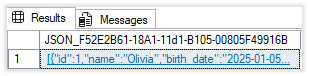
The result is a JSON containing all rows as an array of JSON objects (see Format Query Results as JSON with FOR JSON - SQL Server | Microsoft Learn)
In the next step we’re going to split the result JSON output from previous step, with the OPENJSON table valued function.
-- Step 4: Select from JSON
select * from openjson((select t.* from #test_data as t for json path)) t
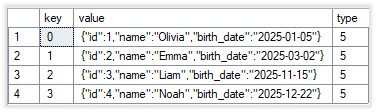
The result is a key-value-pair for each array element in the JSON array. The key is the element number in the array, the value is a JSON (type=5) from the row.
Now we are going to split the JSON values again to key-value pairs, but we want to keep the element number of the original row.
-- Step 5: Break down JSON to a single row for each column
select t1."key" as row, t2.*
    from openjson((select t.* from #test_data as t for json path)) t1
    cross apply openjson(t1.value) t2
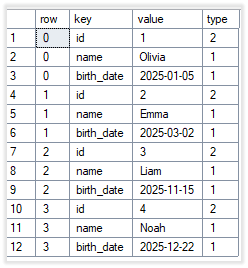
The result shows the element as row and a key-value-pair for each column.
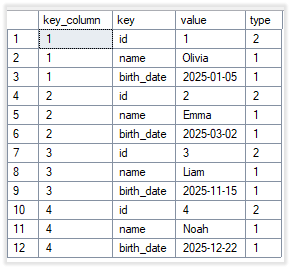
With a little more effort, you could select the original key instead of the element number. To prevent the column is added twice (id and key_column), the WHERE-clause is used to omit the key column in the result.
-- Step 6: Break down JSON to a single row for each column and use key instead of row
select
   json_value(t1.value, '$.key_column') as key_column,
   t2.*
   from openjson((select t.id as key_column, t.* from #test_data as t for json path)) t1
   cross apply openjson(t1.value) t2
   where t2."key" <> 'key_column'
Now the result shows the key column instead of the row.
The last step is to put the JSON, for example for one selected row, into a variable. This gives us the possibility to execute a function or procedure with a JSON variable as parameter.
-- Step 7: Use variable with JSON
declare @variable nvarchar(max) = (select t.* from #test_data as t where t.id = 1 for json path)
select t1."key", t2.*
    from openjson(@variable) t1
    cross apply openjson(t1.value) t2
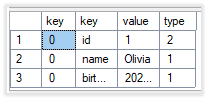
The result is the key-value-pair for each column of the selected row.
Now we are able to split a JSON In a row for each column, we could also use this to create a CSV or to replace multiple values in a text.
JSON to CSV
We regularly get the question to export the result of a query to a file. The first question is always: “What are you going to do with the result?”. But, often an export is needed.
Now we are able to break down a JSON to a row for each column, we could also reassemble it to a comma separated file. The example query from step 5 already gives us all the information we need.
We are going to create a function JSON_to_CSV with the following parameters:
- JSON parameter
- First row is column heading
- Column separator
- Line feed
Create the function below.
-- Step 8: Create and execute function JSON to CSV
create or alter function "json_to_csv"
(
   @json_parameter             nvarchar(max),
   @first_row_column_heading   int = 1,
   @column_separator           char(1) = ';',
   @line_feed                  char(1)
)
returns nvarchar(max)
as
begin
    -- Transform JSON to CSV. For the JSON parameter use a query like "select * from table for json path, include_null_values")
    return(select string_agg(csv.row_value, @line_feed) -- Line feed
             from (select top 1  -- Column heading
                      (select string_agg(t22.value, @column_separator)
                            from(select quotename(t2."key", '"') as value
                                    from openjson(t1.value) t2
                                    where t2.type in (0, 1, 2, 3)) t22) as row_value  -- Check types to use.
                         from openjson(@json_parameter) t1
                         where @first_row_column_heading = 1
                       union all
                       select
                         (select string_agg(t22.value, @column_separator) from(select  -- Column separator. Text in double quotes.
                                           case when t2.type = 0 then 'NULL'
                                                when t2.type = 1 then quotename(t2.value, '"')
                                                when t2.type in (2, 3) then t2.value
                                                end as value
                                           from openjson(t1.value) t2) t22) as row_value
                            from openjson(@json_parameter) t1
                         ) csv
       )
end
GO
We can test the function with the query below. Be sure to add INCLUDE_NULL_VALUES when selecting rows as JSON. Otherwise the columns with NULL-values are not present in the result.
-- Step 9: Execute JSON to CSV
select dbo.json_to_csv((select * from #test_data for json path, include_null_values), 1, ';', char(10)) as csv
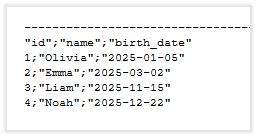
The result is one long string with separators for columns and rows. If we set the result output in the SSMS to text, we get the result below.
Note: If the values in the JSON could contain the column separator or the line feed character, the result could be unpredictable. You first have to replace these characters or use a different characters.
Merge text
Recently I had to replace multiple values in a text. I wanted to create a generic function that could replace multiple values at once. This function would have 2 parameters:
- The text with the variable names. The variable names are placed between brackets (e.g. [NAME]).
- A list of variable names and values.
For the second parameter I used a JSON string.
To be sure that I only process variables that are used in the text, I added a where clause to check if the variable exists. I didn’t want to use a cursor to loop through the variable names. To prevent an infinite loop. I added a maximum (100). For example, when the value of a variable also contains a variable name with brackets.
-- Step 10: Create function Merge text
create or alter function "merge_text"
(
   @source_text   nvarchar(max),
   @json_parms    nvarchar(max)
)
returns nvarchar(max)
as
begin

    declare @loop_count int,
            @result_text nvarchar(max) = @source_text

    if isjson(@json_parms) = 1
    begin
        select @loop_count = 1  -- sets @@rowcount for first loop
        while @@ROWCOUNT = 1
          and @loop_count < 100
        begin
            select top 1
                @loop_count += 1,
                @result_text = replace(@result_text, t1.quote_name_key, t1.[value])
                from (select
                         quotename(t2."key") as quote_name_key,
                         t2.[value],
                         t2.[type]
                         from openjson(@json_parms) t1
                         cross apply openjson(t1.value) t2
                         where charindex(quotename(t2.key), @result_text) > 0  -- Value used
                           and quotename(t2.key) <> t1.value
                           and t2.value is not null
                         ) t1
        end
    end
    return @result_text
end
GO
You can test the function with the example @variable value from the #test_data above.
-- Step 11 Execute merge text
declare @text nvarchar(max) = N'Hello [name], I want to merge your record with ID=[id], name=[name] and birthdate [birth_date] into the text.',
        @variable nvarchar(max) = (select t.* from #test_data as t where t.id = 1 for json path)

select dbo.merge_text(@text, @variable) as merged_text

Final words
This is what I wanted to share. Thanks Erland Sommarskog for your tips!
The last step cleans up the created objects.
-- Step 12: Clean-up
drop table if exists #test_data
drop function if exists dbo.json_to_csv
drop function if exists dbo.merge_text
You can find the complete SQL script
Have fun with JSON!

