

Introduction
Data quality rules often change as an application grows. A customer table that originally allowed repeated email addresses may later need to enforce a rule that each known email address belongs to only one customer record. Adding that rule is difficult when duplicates already exist. SQL Server cannot create a unique index until the conflicting values are resolved, and simply deleting duplicate rows without deciding which record should survive can remove useful data.
In this article, we'll clean existing duplicate customer emails before enforcing uniqueness. We'll identify the affected records, define which row should be retained, archive the rows being removed, verify the cleanup, and then prevent the duplicates from returning.
Problem
Suppose an existing customer table contains unique email addresses, duplicate email addresses, and customers whose email address is not yet known. The new business rule is: Known email addresses must be unique, but multiple customers may have a NULL email address.
The following sample data reproduces that situation.
CREATE TABLE dbo.Customers
(
    CustomerID INT PRIMARY KEY,
    CustomerName VARCHAR(100) NOT NULL,
    EmailAddress VARCHAR(255) NULL,
    LastUpdated DATETIME2(0) NOT NULL
);

INSERT INTO dbo.Customers
    (CustomerID, CustomerName, EmailAddress, LastUpdated)
VALUES
(101, 'Aisha Khan',    'aisha@example.com',  '2026-08-10T09:00:00'),
(102, 'Aisha Khan',    'aisha@example.com',  '2026-08-18T14:30:00'),
(103, 'Daniel Reed',   'daniel@example.com', '2026-08-12T11:00:00'),
(104, 'Maria Lopez',   NULL,                 '2026-08-13T10:00:00'),
(105, 'Ethan Clark',   NULL,                 '2026-08-14T10:00:00'),
(106, 'Olivia Stone',  'olivia@example.com', '2026-08-08T16:00:00'),
(107, 'Olivia Stone',  'olivia@example.com', '2026-08-20T09:15:00'),
(108, 'Noah Anderson', 'noah@example.com',   '2026-08-22T13:00:00');
GO
Because several customers are allowed to have an unknown email address, a normal UNIQUE constraint is not a good match for this requirement. SQL Server treats NULL as a value for a unique constraint and permits at most one NULL. A filtered unique index can instead enforce uniqueness only for rows where the email address is present.
We might therefore try to create this index:
CREATE UNIQUE INDEX UX_Customers_EmailAddress
ON dbo.Customers (EmailAddress)
WHERE EmailAddress IS NOT NULL;
GO
However, SQL Server rejects the statement because aisha@example.com and olivia@example.com already occur more than once. Duplicate values have to be resolved before the unique index can be created.

The failure establishes the real problem: before we can enforce the new rule, we need to clean the existing data without arbitrarily deciding which rows to delete.
Solution
The cleanup follows a controlled sequence. First, we'll locate the duplicate values and define which record should survive. After previewing the rows selected for removal, we'll archive and delete those rows before creating the filtered unique index.
Finding the Duplicate Email Addresses
We can begin by identifying only the known email addresses that occur more than once.
SELECT
    EmailAddress,
    COUNT(*) AS DuplicateCount
FROM dbo.Customers
WHERE EmailAddress IS NOT NULL
GROUP BY EmailAddress
HAVING COUNT(*) > 1
ORDER BY EmailAddress;
The result should contain aisha@example.com and olivia@example.com, with a duplicate count of 2 for each email address. The EmailAddress IS NOT NULL condition is intentional. Multiple NULL values are allowed by the business rule, so they are not duplicates that need to be removed.
At this stage, we know which email addresses have a problem, but we still do not know which customer rows should be retained.
Choosing the Record to Keep
For this example, the business has decided to keep the most recently updated record for each email address. ROW_NUMBER() can apply that rule by ranking rows within each email address. LastUpdated DESC gives rank 1 to the newest record. CustomerID DESC acts as a tie-breaker if two records have the same LastUpdated value.
WITH RankedCustomers AS
(
    SELECT
        CustomerID,
        CustomerName,
        EmailAddress,
        LastUpdated,
        ROW_NUMBER() OVER
        (
            PARTITION BY EmailAddress
            ORDER BY LastUpdated DESC, CustomerID DESC
        ) AS DuplicateRank
    FROM dbo.Customers
    WHERE EmailAddress IS NOT NULL
)
SELECT
    CustomerID,
    CustomerName,
    EmailAddress,
    LastUpdated,
    DuplicateRank
FROM RankedCustomers
WHERE DuplicateRank > 1
ORDER BY EmailAddress;
Including a unique tie-breaker matters because ROW_NUMBER() is not guaranteed to assign the same ordering when the values used in its ORDER BY do not uniquely determine the row order.
Based on the sample data, the query should identify CustomerID 101 for Aisha Khan and CustomerID 106 for Olivia Stone as the duplicate rows to remove. Both rows receive a DuplicateRank of 2 because newer records with the same email addresses exist and receive rank 1.
Customer 102 is retained for Aisha because it has the later LastUpdated value. Customer 107 is retained for Olivia for the same reason.
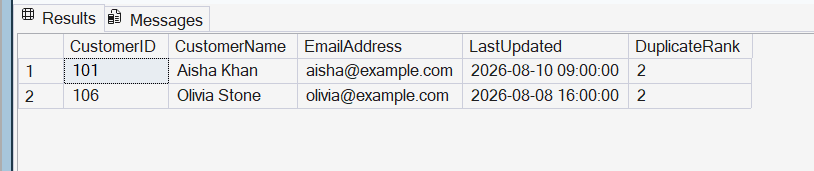
This preview is important because the delete rule can be reviewed before any data is changed. ROW_NUMBER() is not deciding which customer is correct; it is implementing the survivor rule that was already defined.
Creating an Archive Table
Before removing anything, we'll create an archive table for the duplicate records.
CREATE TABLE dbo.CustomerDuplicateArchive
(
    CustomerID INT NOT NULL,
    CustomerName VARCHAR(100) NOT NULL,
    EmailAddress VARCHAR(255) NOT NULL,
    LastUpdated DATETIME2(0) NOT NULL,
    ArchivedAt DATETIME2(0) NOT NULL
);
GO
The archive stores the original customer values together with the time at which the cleanup occurred.
For a real production system, an archive design may include additional information such as the cleanup batch, operator, or reason for removal. For this example, we'll keep it focused on the rows being deleted.
Archiving the Duplicates and Enforcing the Rule
Now we can perform the cleanup. The following script ranks the customer records using the same rule that we already previewed. Rows with DuplicateRank > 1 are deleted, while the OUTPUT clause writes their original values to the archive table.
The filtered unique index is then created in the same transaction.
SET XACT_ABORT ON;
GO

BEGIN TRY
    BEGIN TRANSACTION;

    DECLARE @ArchivedAt DATETIME2(0) = SYSUTCDATETIME();

    ;WITH RankedCustomers AS
    (
        SELECT
            CustomerID,
            ROW_NUMBER() OVER
            (
                PARTITION BY EmailAddress
                ORDER BY LastUpdated DESC, CustomerID DESC
            ) AS DuplicateRank
        FROM dbo.Customers
        WHERE EmailAddress IS NOT NULL
    )
    DELETE c
    OUTPUT
        DELETED.CustomerID,
        DELETED.CustomerName,
        DELETED.EmailAddress,
        DELETED.LastUpdated,
        @ArchivedAt
    INTO dbo.CustomerDuplicateArchive
    (
        CustomerID,
        CustomerName,
        EmailAddress,
        LastUpdated,
        ArchivedAt
    )
    FROM dbo.Customers AS c
    INNER JOIN RankedCustomers AS r
        ON r.CustomerID = c.CustomerID
    WHERE r.DuplicateRank > 1;

    CREATE UNIQUE INDEX UX_Customers_EmailAddress
    ON dbo.Customers (EmailAddress)
    WHERE EmailAddress IS NOT NULL;

    COMMIT TRANSACTION;
END TRY
BEGIN CATCH
    IF @@TRANCOUNT > 0
        ROLLBACK TRANSACTION;

    THROW;
END CATCH;
GO
The OUTPUT clause can return values from rows affected by a DELETE and write those values to another table. Here it preserves the duplicate customer records as part of the same delete operation.
The transaction also ties the cleanup to creation of the uniqueness rule. If an error causes the operation to fail before the transaction is committed, the delete and archive insert are rolled back rather than leaving the cleanup partially completed.
After the transaction succeeds, customers 101 and 106 should be in CustomerDuplicateArchive, while customers 102 and 107 remain in the main table.
Verifying the Cleanup
Before testing the new rule, we can verify that no duplicate known email addresses remain.
SELECT
    EmailAddress,
    COUNT(*) AS DuplicateCount
FROM dbo.Customers
WHERE EmailAddress IS NOT NULL
GROUP BY EmailAddress
HAVING COUNT(*) > 1;
This query should return no rows.
We can also confirm which records were archived:
SELECT
    CustomerID,
    CustomerName,
    EmailAddress,
    LastUpdated,
    ArchivedAt
FROM dbo.CustomerDuplicateArchive
ORDER BY CustomerID;
The archive should contain customer IDs 101 and 106.
Preventing Duplicates from Returning
The filtered unique index now prevents another non-NULL email address from duplicating an existing value.
For example, daniel@example.com already belongs to customer 103. The following insert should fail:
INSERT INTO dbo.Customers
    (CustomerID, CustomerName, EmailAddress, LastUpdated)
VALUES
(109, 'Duplicate Test', 'daniel@example.com', '2026-08-25T10:00:00');
GO
SQL Server should reject the row because the filtered unique index already contains daniel@example.com.

The business rule still permits customers whose email address is unknown, so we should also test that case:
INSERT INTO dbo.Customers
    (CustomerID, CustomerName, EmailAddress, LastUpdated)
VALUES
(110, 'New Customer', NULL, '2026-08-25T11:00:00');
GO
This insert should succeed because rows with EmailAddress IS NULL are not included in the filtered index. Microsoft specifically documents filtered unique indexes as a way to enforce uniqueness only for non-NULL values.
Together, these tests confirm both sides of the requirement: known email addresses must be unique, while multiple unknown email addresses remain valid.
Production Considerations
In this case, we keep the most recently updated customer. A production system may require a different rule.
For example, one customer row may already be referenced by orders, invoices, payments, or support tickets. Those relationships may need to be transferred or reconciled before a duplicate customer is deleted. The business should therefore decide what makes a record authoritative before the cleanup is performed. ROW_NUMBER() only applies that decision; it cannot determine which record is correct from the business perspective.
The cleanup should also be performed as a controlled deployment. Even though the delete and index creation are grouped in a transaction in this example, concurrent application activity and dependent tables still need to be considered before applying the process to a production database.
Conclusion
Existing duplicate data can prevent SQL Server from enforcing a new uniqueness rule, but deleting duplicate rows should not be the first step.
In this example, we first identified the duplicated customer emails and defined a deterministic rule for choosing the record to retain. The rows selected for removal were previewed before being deleted, and the OUTPUT clause preserved those records in an archive table.
The cleanup and filtered unique index were then applied in the same transaction. Afterward, duplicate known email addresses were rejected while multiple customers with a NULL email address remained allowed.
The exact survivor rule will vary between systems, but the overall process remains useful: understand the business rule, inspect the conflicting data, preserve what is being removed, verify the cleanup, and enforce the rule so the same problem cannot return.