
The previous levels of this Stairway progressively introduced a structured approach to database deployments. Starting from the definition of changesets as the basic unit of deployment in Level 1, the model was formalized through the deployment contract in Level 2, exercised across environments in Level 3, and prepared for production in Level 4. Subsequent levels addressed coordination challenges such as concurrency and baseline control in Level 5, and the management of changesets as a consistent history of evolution over time in Level 6.
Together, these elements form an attempt to provide a coherent framework for managing database change in a controlled and predictable way. However, not all database changes behave the same way. Some fit naturally within this model, while others introduce additional complexity that must be addressed explicitly.
In this final level, the focus shifts to the practical application of the model, addressing how a changeset can be created and managed, and exploring scenarios where the system of rules may not fully apply and may require additional care.
A Few Practical Considerations For Database Changes
Here are a few practical items that you should consider as you track database changes. I will show you how I use tooling and some guidance.
On Tooling
The approach described throughout this Stairway does not depend on any specific tool. At its core, it only requires the ability to organize and execute scripts in a controlled and predictable way, following what we refer to as the deployment contract.
That said, for those accustomed to working with Visual Studio, let me share the approach I typically use in my daily work, based on Visual Studio Database Projects—although not in its native object-oriented form. Instead, I always work with scripts that are excluded from the build process, avoiding binding them too closely to individual database objects:
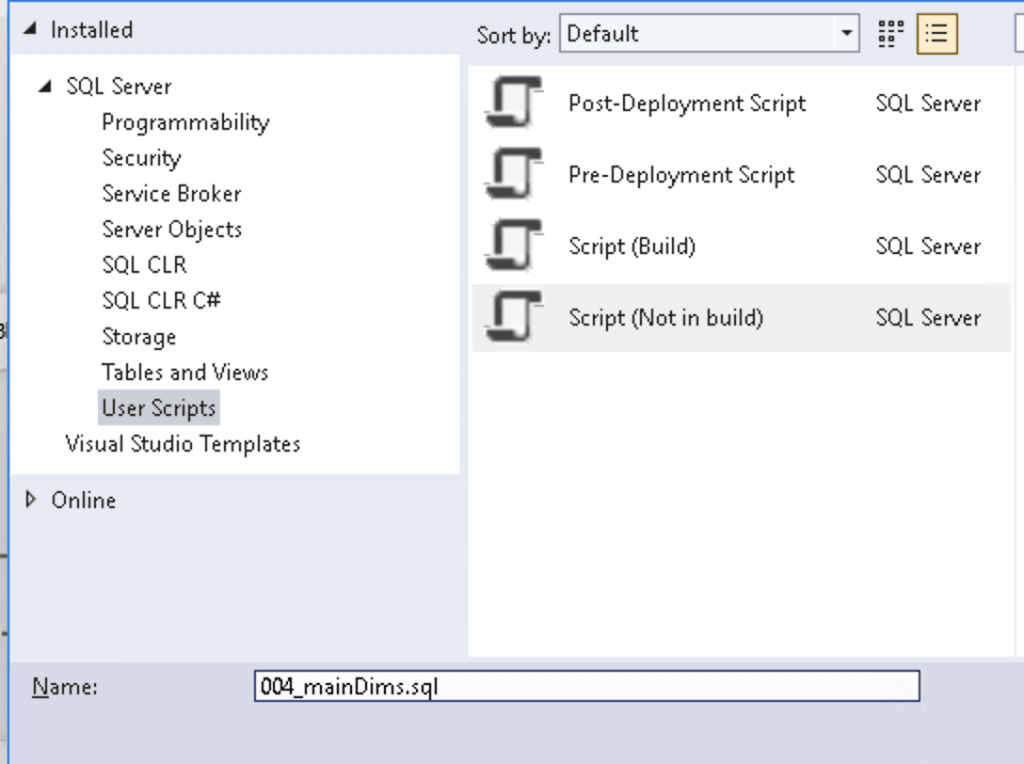
This approach helps preserve the degree of flexibility that changeset scripts are intended to provide, as discussed throughout the Stairway, allowing multiple related changes to be grouped together when needed.
Another useful feature I often leverage in VS DB Project is the ability to define a default database connection. This allows scripts to be executed directly against a target database without any additional setup:
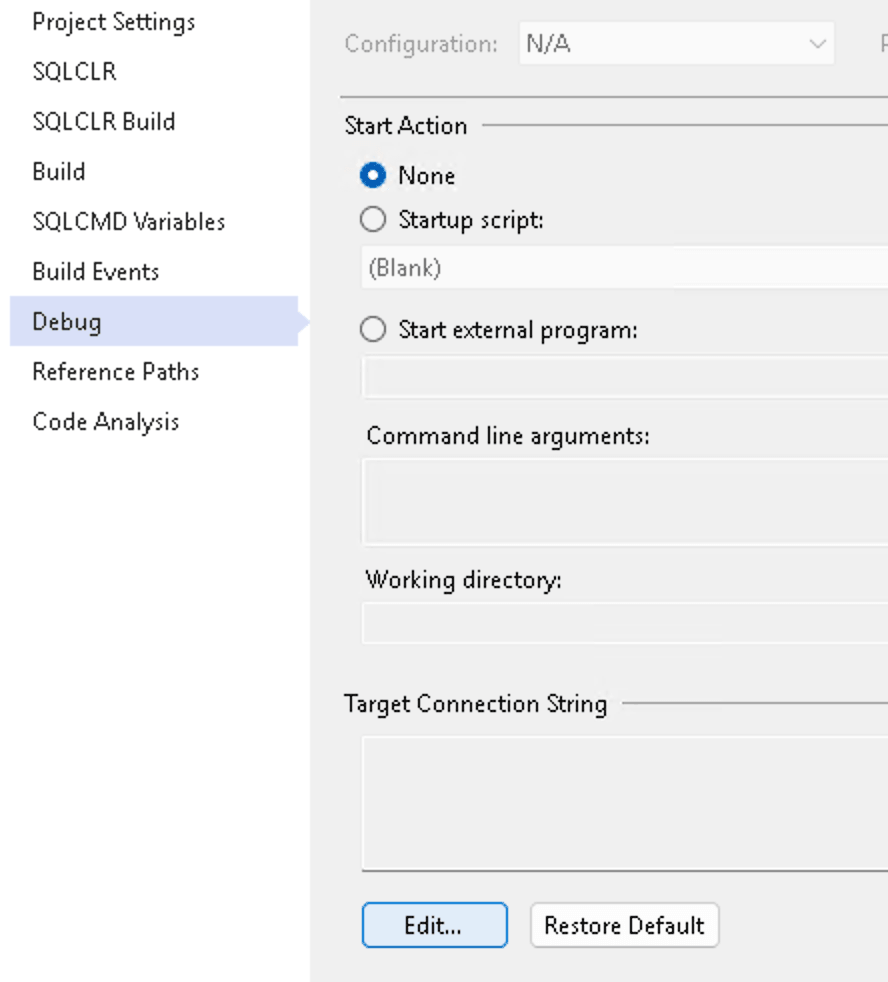
This can be particularly useful in multi-environment scenarios, where the same scripts are executed across different instances, as it simplifies switching between environments during development and testing.
Light Guidance for Common Operations
Regardless of the tooling used, let’s now focus on how different types of changes behave and how they can be effectively managed. Creating a changeset is usually a straightforward activity. The main discipline lies in defining the corresponding rollback logic from the beginning and keeping it aligned with the Create scripts as they evolve. This is where the previously mentioned freedom from individual database objects proves useful: the idea is to group related changes—even when they affect different objects—within a single script. The only thing to consider with this pattern is the execution order, to avoid failures due to dependencies. The Rollback script should address the same operations in reverse order. In any case, rehearsal will help surface any issues.
When altering existing objects, a practical approach is to start from the Rollback script definition, capturing the current state, and then derive the Create script from it by applying the necessary changes. The same principle applies to dropping logic, where the Create counterpart is nothing more than a single statement or a sequence of DROP statements in reverse order. Please note that defensive logic such as DROP ... IF EXISTS should not be applied when a DROP statement is part of the Create script:
DROP PROCEDURE dwh.updCustomers
DROP VIEW dim.vwCustomers
DROP TABLE dim.Customers
To keep defensive logic tailored to your needs, the Rollback script should typically differ only in the initial statement when altering or dropping an object:
-- Rollback script for an ALTER VIEW|PROCEDURE|WHATEVER change
ALTER VIEW dbo.myView
-- ... current object definition follows
-- Rollback script to restore from a DROP operation
CREATE OR ALTER VIEW dbo.myView
-- ... current object definition follows
No particular guidance is required when dealing with new objects, as they are created from scratch and have already been covered extensively throughout the Stairway.
Complexity in Table Changes
In most cases, database changes remain straightforward as long as rollback can be handled as a pure structural reversal. Complexity begins to emerge when rollback involves not only restoring definitions but also reconstructing state. This is typically the case when dealing with tables. Unlike other database objects, tables are not only structural elements but also containers of persisted data. As a result, changes affecting tables—actually only when altering or dropping them—may require additional logic to restore the original state, making the rollback phase the most critical aspect of the deployment.
Dropping Tables
Dropping a table is, in principle, a simple operation once all dependency issues have been identified and addressed, whether they involve external constraints or references within views and other programmable objects. The rollback phase, however, depends heavily on the scenario.
In the simplest case, the table does not require any reconstruction of its data state—for example, when it was regularly repopulated as part of a scheduled full-load process prior to being dropped. In such situations, restoring the previous process is sufficient, and the data will be repopulated naturally.
Another relatively simple case involves configuration tables, or more generally small tables containing a limited number of rows and fixed values. In these situations, a practical solution is to append a series of INSERT statements at the end of the rollback script to rebuild the original state. This represents an exception to the separation of update logic into dedicated scripts. Nonetheless, this is usually preferable to handling the same logic within the Update folder, which is not intended to support rollback operations:
-- Create script

DROP TABLE cfg.Status
GO
CREATE TABLE cfg._operParams
(
 ParamsID tinyint NOT NULL CONSTRAINT PK_operParams PRIMARY KEY
,StatusID tinyint NOT NULL
,ContextID tinyint NOT NULL
,ParamDescription varchar(30) NOT NULL
,CONSTRAINT UQ_operParams UNIQUE (StatusID, ContextID)
)

-- Rollback script

DROP TABLE IF EXISTS cfg._operParams
DROP TABLE IF EXISTS cfg.Status
GO
CREATE TABLE cfg.Status
(
 StatusID tinyint NOT NULL  CONSTRAINT PK_Status PRIMARY KEY
,Status varchar(30) NOT NULL
)
GO
-- Update logic here as an exception
INSERT cfg.Status SELECT 0,'StandBy'
INSERT cfg.Status SELECT 1,'Completed'
INSERT cfg.Status SELECT 2,'Error'
A similar case, but with added complexity, involves tables with a larger volume of data. In such situations, appending a long series of INSERT statements at the end of the Rollback script may reduce readability. Executing a stored procedure to repopulate the table is often a more effective solution. If an initialization procedure already exists, it can be leveraged. Otherwise, creating one—even if only for this specific purpose—may make sense. Such procedures can be placed in a dedicated schema, making them easy to identify and clean up once the changeset has completed its deployment cycle (for example, using schemas such as [trash] or [init]).
That said, real complexity emerges when dealing with large fact tables, often positioned at the core of a star schema, with numerous dependencies, incremental data maintenance logic, and possibly partitioning strategies to manage historical data. In such scenarios, when a table needs to be dropped, my suggestion is not to drop it: just move it.
-- Create script
ALTER SCHEMA [trash] TRANSFER [fact].[Amounts]

-- Rollback script
IF EXISTS
(
    SELECT 0
    FROM sys.tables t
    JOIN sys.schemas s ON s.schema_id = t.schema_id
    WHERE s.name = N'trash'
      AND t.name = N'Amounts'
)
BEGIN
 DROP TABLE IF EXISTS [fact].[Amounts]
 ALTER SCHEMA [fact] TRANSFER [trash].[Amounts]
END
The additional existence check is intentional. Throughout this Stairway, Rollback scripts are treated as defensive artifacts: they should always be executable safely, regardless of the current deployment stage. If the Create script has not yet been executed, the original table is still in its initial location and the rollback simply leaves the database unchanged. If the move has already taken place, the same rollback restores the original table to its previous schema, preserving the consistency of the changeset.
Altering Tables
While restoring from dropping such large tables may already require careful handling, altering them can introduce even greater complexity. This typically occurs when a change:
- applies to columns;
- cannot be easily balanced in the Rollback script with a single statement.
Appending a column, for instance, can easily be addressed in the Rollback script with an ALTER TABLE DROP COLUMN statement. Modifiyng a column’s data type or length can be restored with a plain ALTER TABLE ALTER [column] command. Dropping a column, by contrast, is not always a trivial operation, for at least two reasons:
- it requires reloading the original value that was lost in the Create phase;
- it may affect metadata, as restoring the column in its original position may be required.
The same concerns apply to other changes, such as inserting a column in a specific position or moving the position of an existing one. Restoring from all these operations requires a complete rebuild of the original table. This can be a complex task when you need to preserve the original data and cannot afford to lose information that an incremental update would not be able to fully recover. Again, an effective strategy to address all these issues and restore the previous definition, without losing data, is to use the SCHEMA TRANSFER technique:
-- Create script
ALTER SCHEMA [trash] TRANSFER [fact].[Amounts]
GO
CREATE TABLE [fact].[Amounts]
(
factID bigint NOT NULL CONSTRAINT PK_Amounts PRIMARY KEY
,CreationDate date NOT NULL
--... remaining columns in the new order
)
GO
INSERT [fact].[Amounts] ([factID],[CreationDate], ...)
SELECT [factID],[CreationDate], ...
FROM [trash].[Amounts]
GO

-- Rollback script
IF EXISTS
(
    SELECT 0
    FROM sys.tables t
    JOIN sys.schemas s ON s.schema_id = t.schema_id
    WHERE s.name = N'trash'
      AND t.name = N'Amounts'
)
BEGIN
 DROP TABLE IF EXISTS [fact].[Amounts]
 ALTER SCHEMA [fact] TRANSFER [trash].[Amounts]
END
The main advantage of moving the original table to a temporary schema is that the operation remains safe from a data perspective: in case of failure, the data remains available in the temporary schema, while in case of success it is restored to its original structure.
It is worth noting that all these scenarios, which address data reconstruction challenges, may leave residual objects that should be removed after deployment. This is a drawback and a deviation from the model, but a necessary compromise.
Dealing with Complex Data Maintenance Logic
Right at the end of the Stairway, it is worth considering one of the most extreme scenarios—one that can challenge the discipline of the deployment contract described so far. This concerns programmable objects involved in ETL processes, which actively modify data and, in some cases, the underlying structure itself.
This is a technique I am personally very fond of. In continuous development scenarios—such as data warehouse maintenance—I often populate new tables in a parallel schema and then substitute the original ones. This approach offers several advantages, with relatively few downsides:
- Data consistency is preserved by avoiding temporary deletion or in-place updates
- Performance is often improved by avoiding row-level update overhead; for example, clustered indexes can be created at the end of the process
- Tables and indexes are fully rebuilt each time, reducing the need for ongoing DBA maintenance (although this approach may be less appreciated by more conservative DBA practices)
Nonetheless, this introduces a level of variability that cannot always be captured by a predefined Rollback script. While structural changes can be reversed by restoring previous definitions, data-modifying logic may produce effects that are not easily reproducible in reverse.
In these cases, the role of the changeset remains the same, but its boundaries must be carefully evaluated. The emphasis shifts from exact reversibility to controlled and predictable behavior.
Conclusion
The approach presented throughout this Stairway is not intended to cover every possible scenario, but to provide a consistent and reliable foundation for managing database change. In most cases, the principles of changesets, structured deployment, and rollback discipline are sufficient to ensure predictable outcomes.
As complexity increases—particularly when data reconstruction or advanced maintenance logic comes into play—these principles still apply, but may require more careful interpretation and, at times, pragmatic adjustments. Ultimately, the goal is not to eliminate complexity, but to make it explicit, controlled, and reversible.

