

You already know to use parameterised queries. I'm not going to lecture you about that.
So why am I writing about SQL injection in 2026? Because the code that actually gets exploited is never the code you wrote last month. It's the stored procedure someone wrote in 2014 that "just works" so nobody touches it. It's the reporting query that was supposed to be temporary. It's the admin script that somehow ended up being called from three different applications.
I spent a week last year tracing an injection vulnerability through a system that had been "fully parameterised" for years. The hole was in a dynamic sort-order feature buried in a procedure that predated half the current dev team. Nobody remembered it existed.
This post is about adding a safety net at the database layer not to replace proper parameterisation, but to catch the stuff that slips through the cracks and, crucially, to give you visibility into what's actually hitting your procedures. Here's a typical flow of how we can approach the situation.

Figure 1: Where the guardrail sits in the request flow
A final check inside the stored procedure before execution, with optional audit logging.
Values vs identifiers
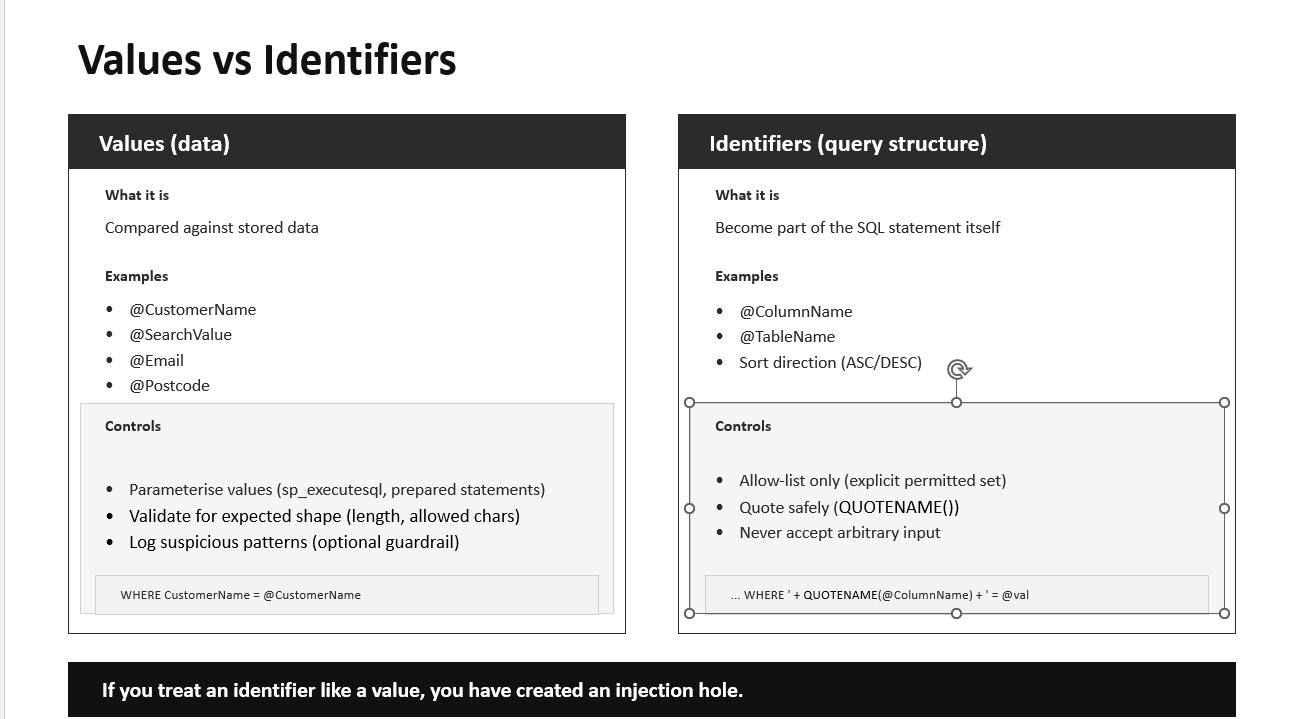
Most injection mistakes happen when people treat query structure as if it were just another parameter.
Values are the data you compare against—@CustomerName, @SearchValue, that sort of thing. These should always be parameterised.
Identifiers are the structure of the query: column names, table names, sort direction. You cannot parameterise these in the same way, so you need an allow-list, and you should wrap them with QUOTENAME() when building dynamic SQL.
Figure 2: Values vs identifiers
Here's where people get hurt. Someone needs to let users pick which column to sort by, so they write this:
SET @sql = N'SELECT * FROM Orders ORDER BY ' + @SortColumn;
They think: "I'm not concatenating a value, just a column name, so it's fine."
It's not fine. If @SortColumn contains 1; DROP TABLE Orders;--, you've just lost your Orders table. The fix is an allow-list:
IF @SortColumn NOT IN (N'OrderDate', N'CustomerName', N'Total') THROW 51000, 'Invalid sort column', 1;
The guardrail function in this post is aimed at free-text value inputs. For identifiers, the allow-list is your only real defense.
What you'll build
This walkthrough is self-contained. You'll create a sample Customers table, an audit table for logging blocked attempts, a detection function, and two stored procedures one simple lookup and one that demonstrates safe dynamic SQL with allow-lists. Everything is copy-and-paste runnable in SSMS.
Run this in a sandbox or dev database. The demo includes DROP TABLE statements in the sample payload strings.
Step 1: Create sample tables and seed data
We need some data to query and somewhere to log suspicious inputs. The audit table matters because blocking without logging leaves you blind—you won't know what you're catching or whether you're getting false positives.
The default columns in the audit table capture connection context automatically. We're using ORIGINAL_LOGIN() rather than SUSER_SNAME() because when you're investigating at 2am, you want to know which application server sent the dodgy input, not that it was executed by your service account.
In a real system, be careful with sensitive fields in your audit log: truncate, redact, and follow your organisation's data handling rules.
Step 2: Create the guardrail function
This function scans input for patterns commonly found in injection attempts. It assigns risk points to each pattern and returns 1 if the total reaches a threshold (default is 2 or above).
Why a scoring system instead of blocking on any single suspicious character? Because legitimate data contains suspicious characters all the time. A customer named O'Connor has a quote in their name. A company might have a semicolon in its legal name. Scoring lets us tolerate one low-risk signal while still catching combinations that are almost certainly malicious.
The scoring reflects how likely each pattern is to appear in legitimate input. A semicolon or comment marker (--, /*) scores 2 because these almost never appear in customer names or search terms. A single quote only scores 1 because names like O'Connor are common you don't want to block every Irish customer.
The keyword checks are space-padded (% union % rather than %union%) to reduce false positives. Without the spaces, you'd flag anyone searching for "reunion" or "executor."
Tuning in practice
This is heuristic. It will miss clever payloads and it will occasionally flag legitimate strings. That's why you log everything and tune as you go.
We had a false positive early on: a company called "Drop Zone Logistics" was getting flagged because of the word "drop." The fix was easy we raised the threshold for that particular procedure's parameters from 2 to 3, since company names legitimately contain more unusual strings than, say, postcodes.
If you're seeing too many false positives, raise the threshold or reduce weights for the patterns causing problems. If obvious payloads are slipping through, lower the threshold or add patterns you're seeing in your logs. Tune by parameter type, not globally a postcode field can be much stricter than a free-text notes field.
Here we see the results of our suite of test values. Some are suspicious and some are not in the result set.
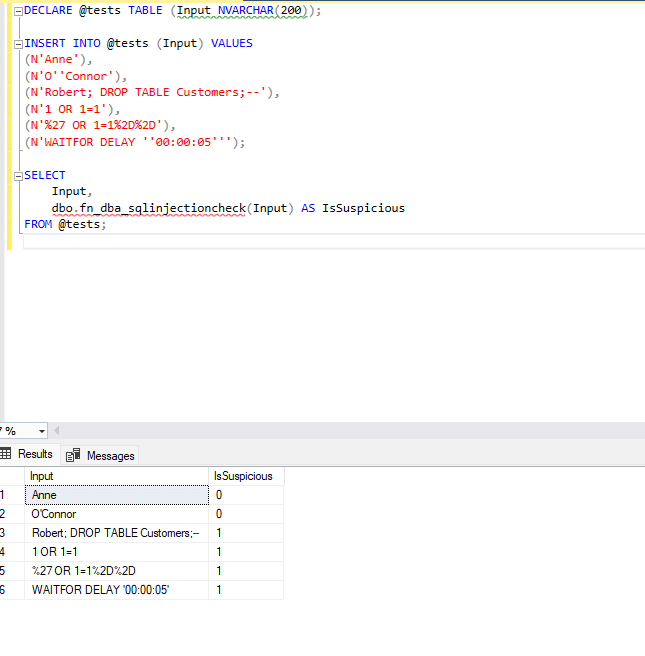
You should see Anne and O'Connor returning 0, and the rest returning 1.
Step 4: A simple stored procedure with the guardrail
Now let's wire the function into a real procedure. The pattern is simple: check the input first, log and throw if it's suspicious, otherwise continue with your normal parameterised query.
Let's test it with a normal value and an obvious payload. The TRY...CATCH keeps the output readable.
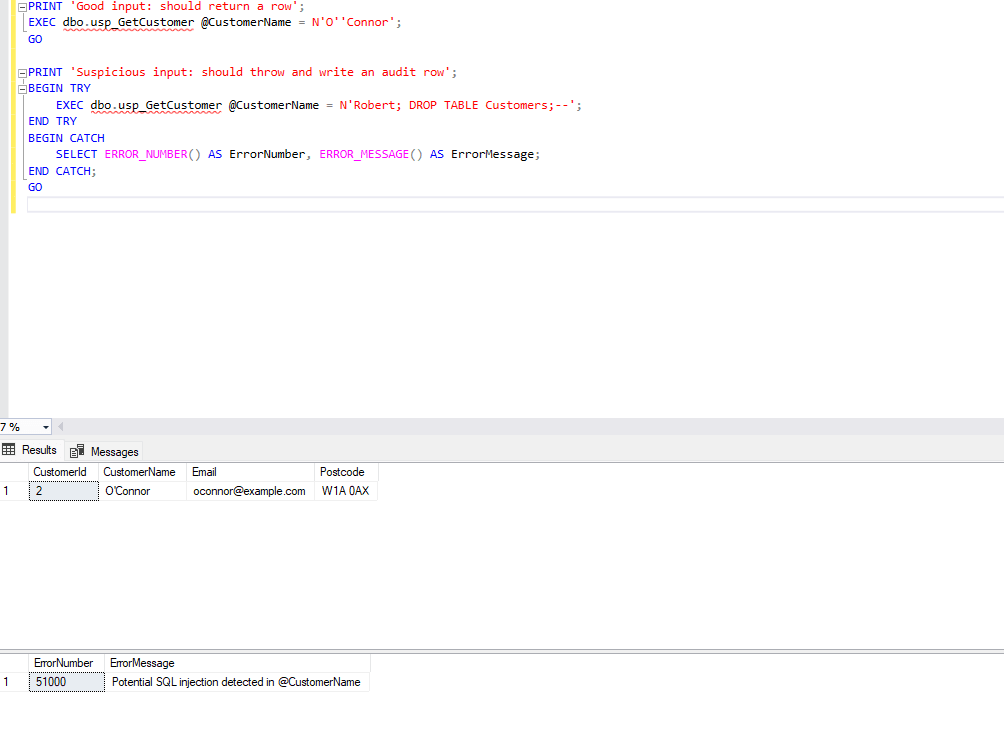
The first call returns O'Connor's row. The second gets blocked, throws an error, and writes a record to the audit table.
Step 5: Dynamic SQL done properly
Dynamic SQL is where teams get hurt. You need two separate controls, and you need both:
- Identifiers must be allow-listed. There's no way to parameterise a column name, so you check it against an explicit list of permitted values.
- Values must be parameterised using
sp_executesql. Never concatenate user input into the SQL string.
The guardrail function helps with values, but it's not a substitute for the allow-list on identifiers.
Notice that even after the allow-list check passes, we still wrap @ColumnName in QUOTENAME(). Belt and braces. The allow-list is the real protection; QUOTENAME() is defense in depth.
Let's test all three scenarios: a good search, a bad identifier, and a suspicious value.
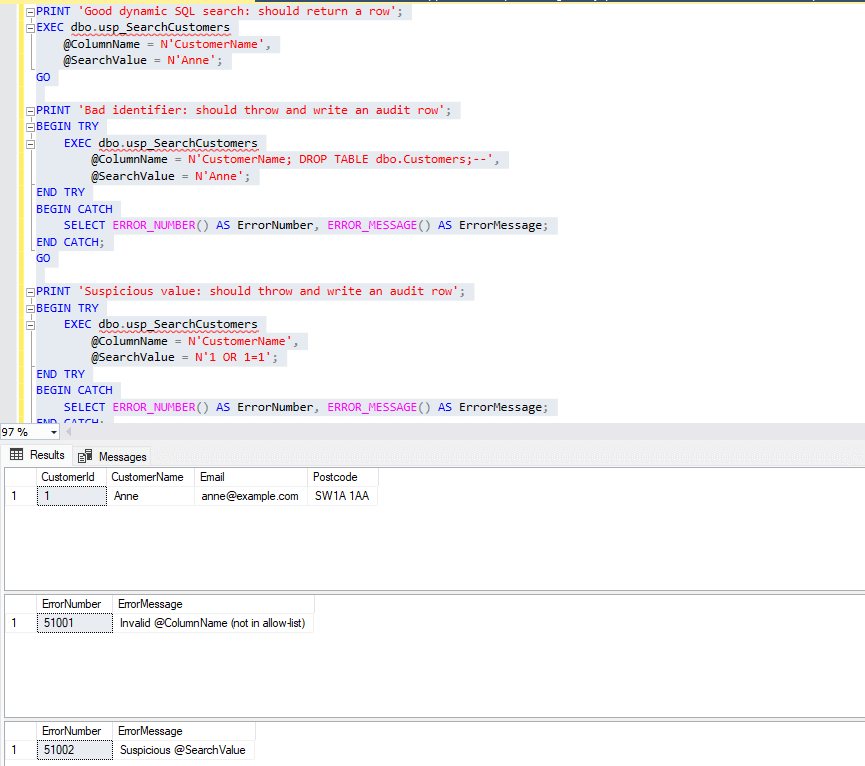
Step 6: Review the audit log
After running the demos, check what's been captured:
We can see below that three different suspicious values were caught.
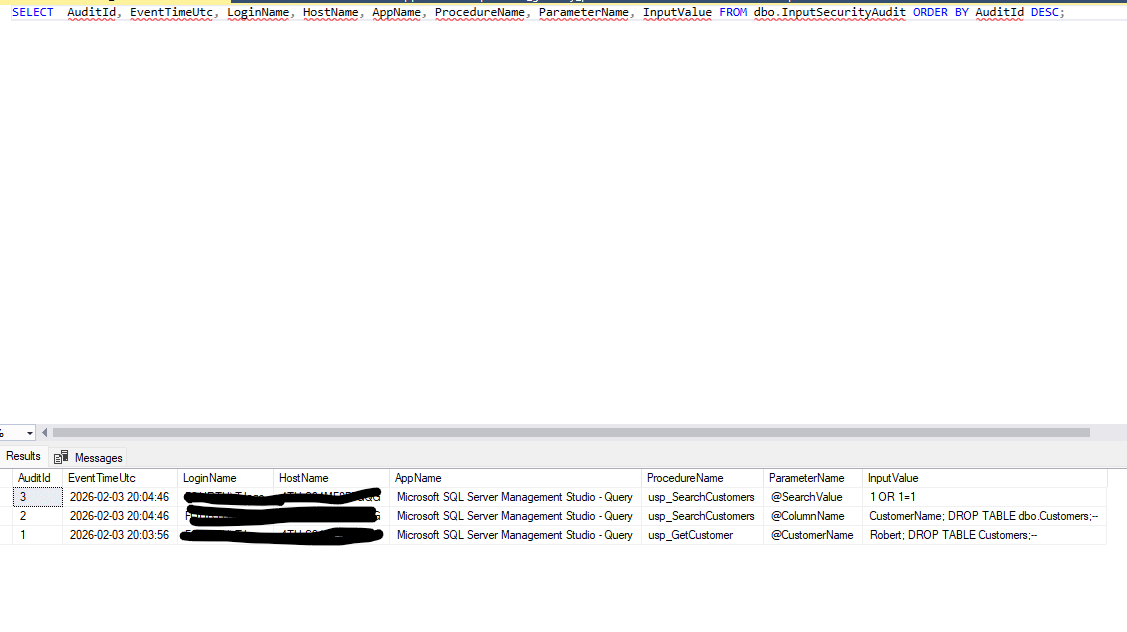
This is the operational payoff. You can see exactly which procedure blocked the input, which parameter triggered it, and what the input contained. When something gets flagged in production, you have enough context to investigate.
Working with the audit data
Once this is running in production, check the audit log weekly at first. You're looking for two things: false positives you need to tune out, and genuine probes you need to investigate.
A single blocked attempt is probably someone testing, or a false positive. The same payload from the same AppName hitting multiple procedures over several days is worth a conversation with that application's team.
Wrapping up
This won't catch everything. A determined attacker with time and creativity will find ways around heuristics. But it will catch the opportunistic scans, the copy-pasted payloads from script kiddies, and the accidental discoveries – and more importantly, it will show you what's being thrown at your database.
That visibility alone is worth the effort. You can't fix what you can't see, and most teams have no idea what's actually hitting their stored procedures until something goes wrong.
The function, the audit table, and the patterns shown here are a starting point. Tune the thresholds, add patterns based on what you see in your logs, and extend the audit data if you need more context. The goal isn't perfection it's making the implicit explicit, and giving yourself a fighting chance when legacy code lets something slip through.
