

I have been working in various computer languages for a long time. When I saw that the || operator was coming, I was a bit confused as to why we needed this, and how it would work. After all, this is a part of other languages. I decided to dig in a bit.
This is part of a series on how the T-SQL language is evolving in SQL Server 2025.
Note: some of these changes are already available in the various Azure SQL products.
The || Operator
The pipes operator consists of two vertical pipes ||. This is also called the || (string concatenation) operator. This is listed in the string operators section of the docs, alongside the + (string concatenation) operator. This is designed to work like the CONCAT() and + operator in that it combines two strings and returns the result.
As a simple example, let's start with the classic computer science program:
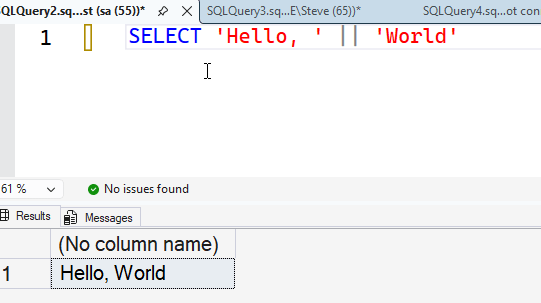
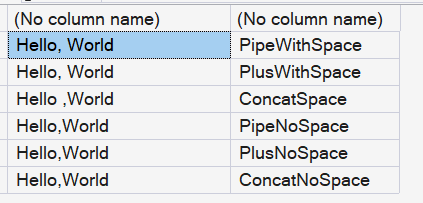
As you can see, the code does the same thing as other operators. Let me put a few together so we can see the results. I'll add in the plus sign and CONCAT() along with a missing space. Here is the code:
SELECT 'Hello, ' || 'World', 'PipeWithSpace'
UNION ALL
SELECT 'Hello, ' + 'World', 'PlusWithSpace'
UNION ALL
SELECT CONCAT('Hello ,', 'World') ,'ConcatSpace'
UNION ALL
SELECT 'Hello,' || 'World' ,'PipeNoSpace'
UNION ALL
SELECT 'Hello,' + 'World' ,'PlusNoSpace'
UNION ALL
SELECT CONCAT('Hello,','World') ,'ConcatNoSpace'
If you see the results below, the different items work the same, and without explicit spaces, the strings run together.
Now that we see it working, let's get into more details.
Syntax
The syntax for || is simple. It is:
expression || expression
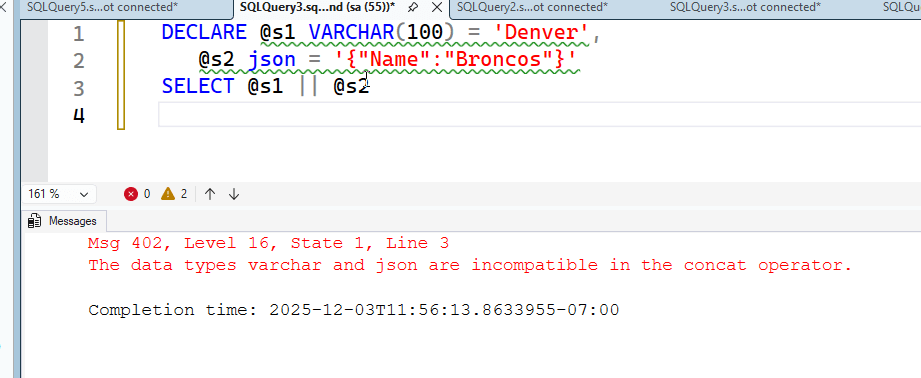
Both expressions should be of the same data type, or able to be implicitly converted to one another. The types can be in the character and binary types, but there are exceptions. These are not allowed: XML, JSON, image, ntext, text. The return type is the highest precedence, according to the precedence rules of SQL Server.
If you try to use something not allowed, you get an error. This is shown below. You get similar errors with the other data types.
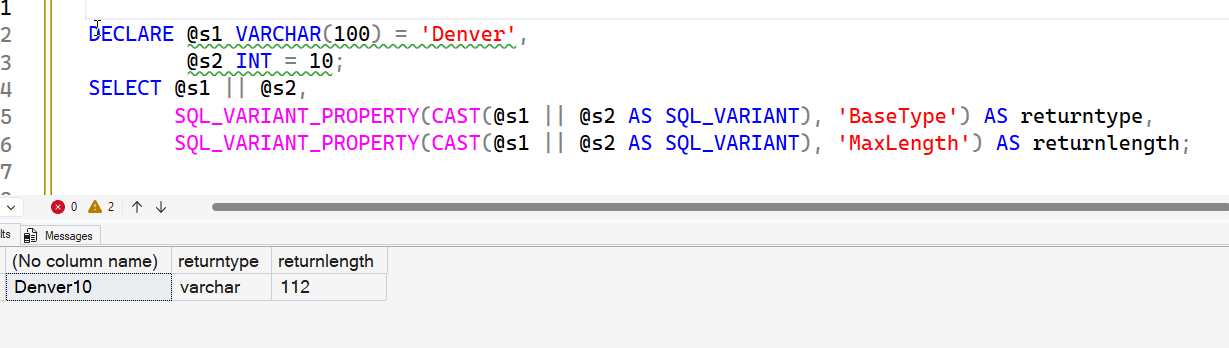
You can, however, mix data types. This code has different types, but an INT can be implicitly converted to a string.
DECLARE @s1 VARCHAR(100) = 'Denver',
   @s2 int = 10
SELECT @s1 || @s2
As you might expect, this gives me the two values together. I've included the data on the return type. The INT apparently converts to a 12 byte string., which is one more than the max negative INT value.
Let's look at a few examples of how this can be used.
Examples
We've used a string and a number, but what about a date? Here I'll get (as of this writing) the last win by the Denver Broncos.
DECLARE @s1 VARCHAR(20) = 'Last Win:',
        @s2 DATE = '2025-11-30';
SELECT @s1 || @s2,
       SQL_VARIANT_PROPERTY(CAST(@s1 || @s2 AS SQL_VARIANT), 'BaseType') AS returntype,
       SQL_VARIANT_PROPERTY(CAST(@s1 || @s2 AS SQL_VARIANT), 'MaxLength') AS returnlength;
The results are what we'd expect here. I assume there is a conversion reason for the length, likely to do with the sql_variant conversion.

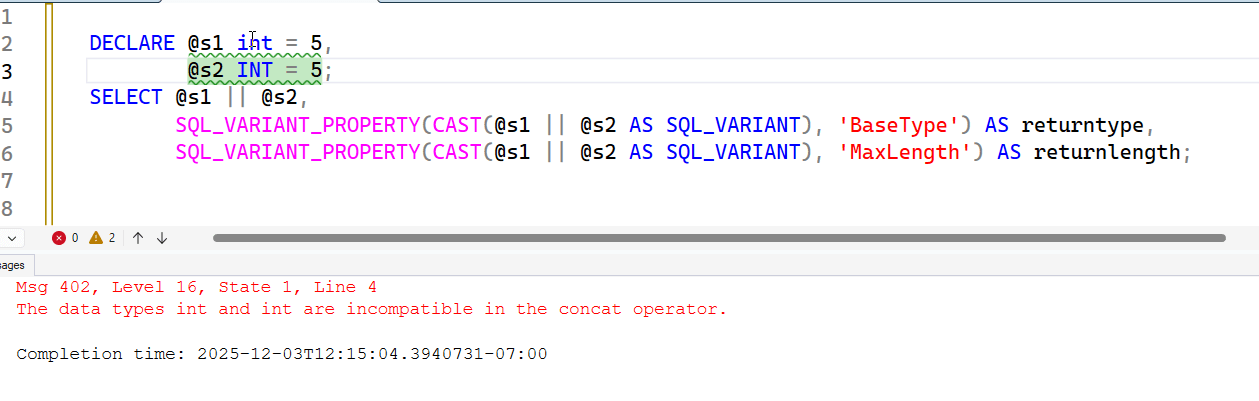
What about two numbers or two dates? Let's try that. First, numbers, and this doesn't work.
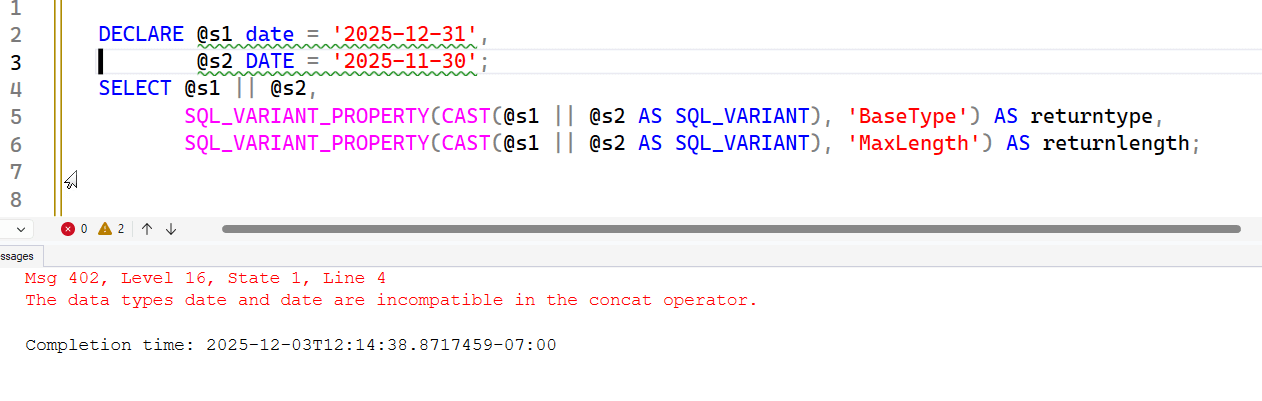
Neither do dates, which makes sense.
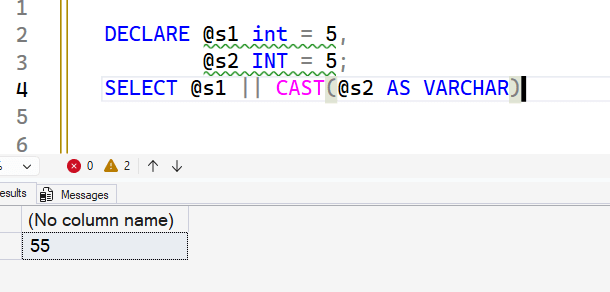
Without one of the expressions being a string, there is no implicit conversion. CASTing one does work, as shown here.
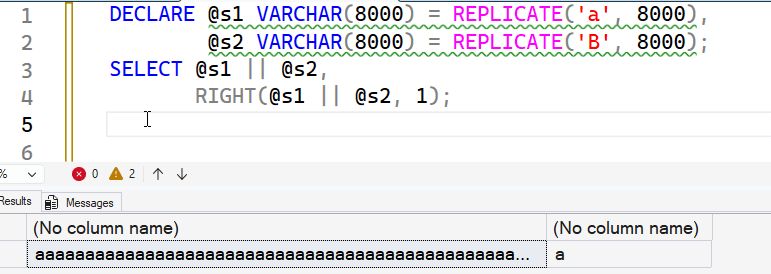
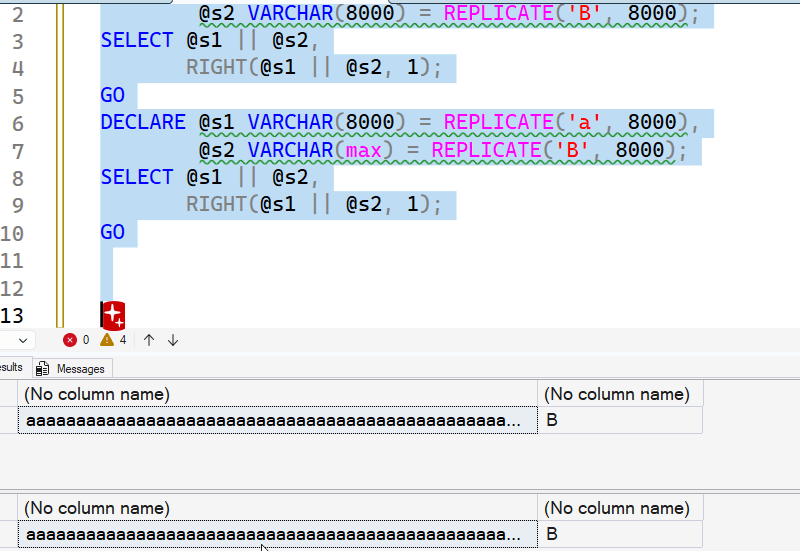
There are limits to ||, as there are for + and CONCAT. If you don't have a large type (max type), then the output is truncated to 8000 characters. I'm not showing 8,000 in my SSMS results, but notice the second column. I'm getting the rightmost value. It's not b, it's a. All the b's are truncated.
However, if one of the types of a max, the results aren't truncated. Code is here:
DECLARE @s1 VARCHAR(max) = REPLICATE('a', 8000),
        @s2 VARCHAR(8000) = REPLICATE('B', 8000);
SELECT @s1 || @s2,
       RIGHT(@s1 || @s2, 1);
GO
DECLARE @s1 VARCHAR(8000) = REPLICATE('a', 8000),
        @s2 VARCHAR(max) = REPLICATE('B', 8000);
SELECT @s1 || @s2,
       RIGHT(@s1 || @s2, 1);
GO
The results. Notice the second column is B in both cases.
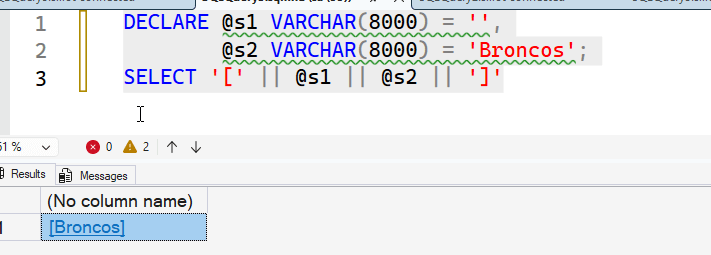
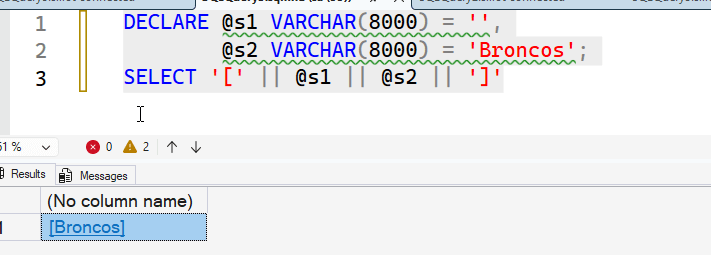
If I have an empty string, as expected, this behaves as empty. I get no characters.
What about NULL values? This is different than +. Here's a couple of examples. In the first one, the CONCAT_NULL_YIELDS_NULL is ON. This is the default, and it's always on by default sice SQL Server 2017. This results in NULLs for both operators. The second example turns this off, but || doesn't behave as if that happened. It's always set on. Here's the code:
SET CONCAT_NULL_YIELDS_NULL ON
DECLARE @s1 VARCHAR(8000) = NULL,
        @s2 VARCHAR(8000) = 'Broncos';
SELECT @s1 || @s2,
       @s1 + @s2
GO
SET CONCAT_NULL_YIELDS_NULL OFF
DECLARE @s1 VARCHAR(8000) = NULL,
        @s2 VARCHAR(8000) = 'Broncos';
SELECT @s1 || @s2,
       @s1 + @s2
The results.
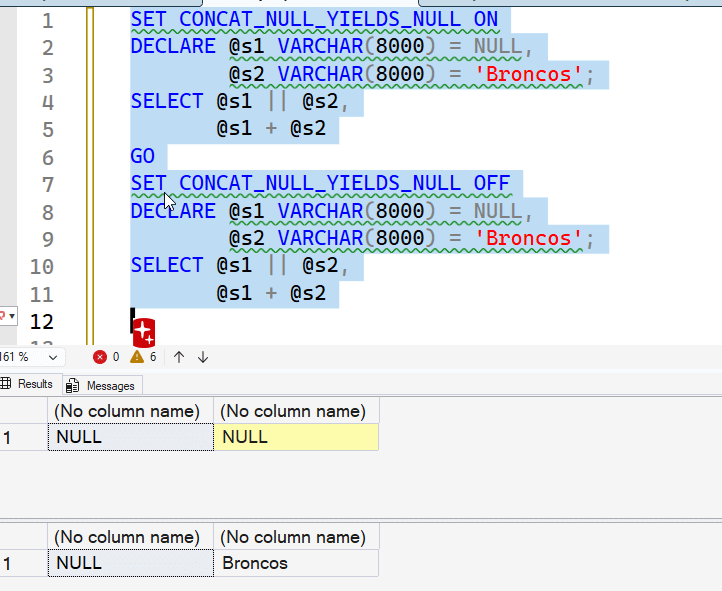
FYI, this is always set on by default in SSMS.
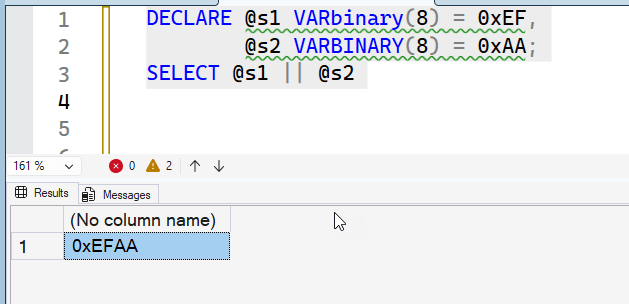
One last thing. With binary strings, I can put them together easily, as this example shows. Two varbinary strings are concatenated.
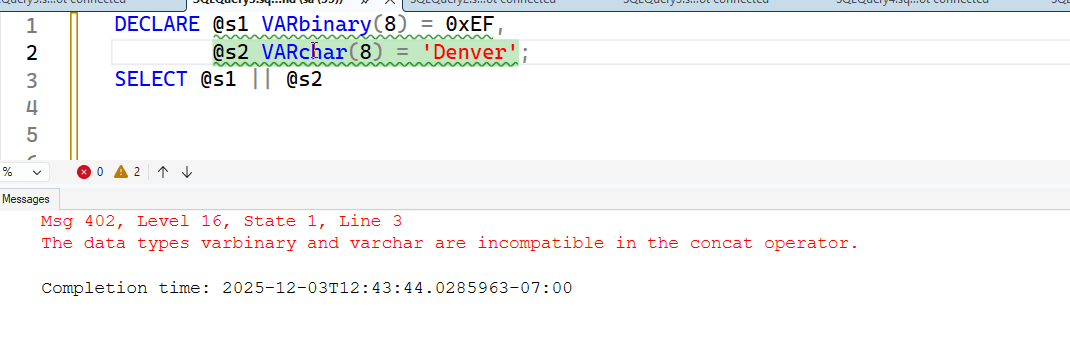
However, if one of these is a string, then I need to cast things. The first example shows an error.
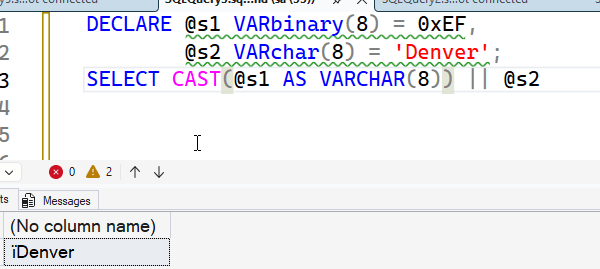
The second one shows that if I cast this, it works.
One last thing to look at in this article.
Compound Assignment
Many of us are familiar with this in the + operator. This is actually a separate entry as the += operator in the docs. This works as follows. It adds the next string to an existing string. For example, I can use this code:
DECLARE @s1 VARCHAR(8) = 'Broncos',
        @s2 VARchar(8) = 'Denver',
        @s3 VARCHAR(8) = 'Win',
        @result VARCHAR(100);
SELECT @result = @s1 + ' ' + @s2
SELECT @result = @result + ' ' + @s3
SELECT @result
However, I can simplify this as follows. Rather than repeating the @result in the assignment, I use +=, essentially shortcutting the need for the left expression.
DECLARE @s1 VARCHAR(8) = 'Broncos',
        @s2 VARchar(8) = 'Denver',
        @s3 VARCHAR(8) = 'Win',
        @result VARCHAR(100);
SELECT @result = @s1 + ' ' + @s2
SELECT @result += ' ' + @s3
SELECT @result
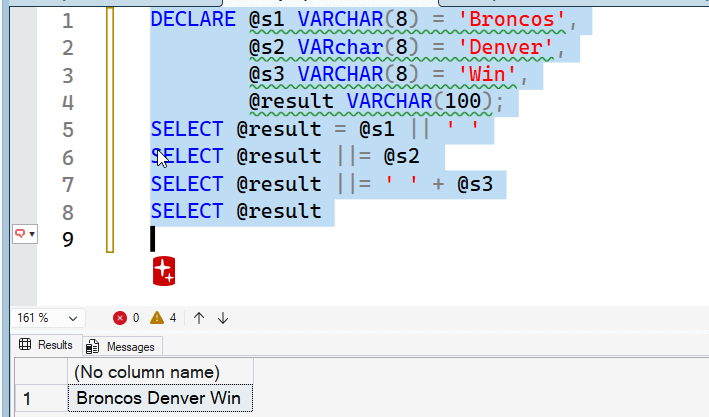
I can do the same thing with ||, as shown here.
DECLARE @s1 VARCHAR(8) = 'Broncos',
        @s2 VARchar(8) = 'Denver',
        @s3 VARCHAR(8) = 'Win',
        @result VARCHAR(100);
SELECT @result = @s1 || ' '
SELECT @result ||= @s2
SELECT @result ||= ' ' + @s3
SELECT @result
Both return the same results:
Why Add This?
This is slightly confusing, as other languages use the double pipes as well. A few examples:
- C - OR operator
- C# - OR operator
- Python - short circuit OR
- LISP - enclose variables for case sensitivity
- APL - not used
- Java - OR operator
Sense a pattern? I would somewhat expect that this would be the same in T-SQL, but apparently not. This isn't a Microsoft issue, but rather a standards body issue. This blog talks about the operator a bit, and notes this is an ANSI SQL standard.
I don't know this adds a lot to the language, but it does check a box for ANSI compatibility, so that's likely the reason why this was added.
Summary
The || operator essentially duplicates the operation of the + operator (or CONCAT() function with two parameters) in the T-SQL language. This combines two expressions together into a single string. The only real difference is that the behavior of NULLs is always the same in || while a setting can change how + operates. There is also a compound assignment version of the || , which is the ||=.
The main reason this was added appears to be because this is an ANSI SQL function and this brings T-SQL more into compliance with the standard. Likely some customers are using ANSI SQL as a checkbox for their purchase decision and this was added to comply. This also helps developers used to using || in other platforms to not learn a new way of concatenating strings together.
