

Introduction
Questions like “What was this product’s price last month?” or “Who changed this customer’s address, and what was it before?” may come up often in an enterprise application.To address such situations, traditionally, teams handle this with database triggers, audit tables, or custom tracking in the application layer. These approaches can work, but they often add extra maintenance and complexity. Triggers may affect the performance, the audit data can become inconsistent across tables, and rebuilding an earlier version of a record can require writing difficult queries.
SQL Server’s System-Versioned Temporal Tables offer a simpler approach. Introduced in SQL Server 2016 and based on the ANSI SQL:2011 standard, they automatically preserve the history of inserts, updates, and deletes in a separate history table. This removes the need for custom triggers or application-level audit logic in many cases.
This article walks us through how to create, query, manage, and maintain temporal tables in SQL Server.
Core Architecture and Mechanics
Before we deep dive into the article, let us take a moment to understand the core architecture and working principle of SQL Server's temporal tables. When system versioning is enabled, SQL Server creates a physical binding between two tables: one, the actual table which stores every record that is active and in use, commonly referred to as the current table, and second, the historic data maintenance table that stores the inactivated/outdated/obsolete data, commonly referred to as the historic table. To illustrate, we will consider a use case where we store an employee's remuneration in a database table. The current table that stores the employee's current salary is EmployeePay, while the historic table that stores the employee's past/outdated salary information is EmployeePayHistory.
SQL Server manages these 2 tables as a single logical unit:
- Current table (EmployeePay): Stores the latest version of each row (active records), the data our application normally reads and updates. Applications query and modify this table directly using standard INSERT, UPDATE and DELETE statements.
- History table (EmployeePayHistory): Keeps the previous version of a row whenever it is updated or deleted. This makes it possible to see how data looked at an earlier point in time without building separate audit logic.
The link between the current table and a history table relies on deep engine-level mechanics, starting with structural mirroring where the history table replicates the exact schema, columns, and data types of the current table while deliberately omitting constraints, identity properties, and triggers. Unlike the current table, which requires a primary key constraint to manage active records, the history table contains no primary key, enabling it to store multiple historical versions of the same entity without reporting violation errors. To track these versions, both tables utilize a pair of datetime2 period columns (SysStartTime and SysEndTime) defined as GENERATED ALWAYS AS ROW START/END. In the current table (i.e., EmployeePay), active records maintain a maximum possible end time value (9999-12-31 23:59:59.999), whereas the history table (i.e., EmployeePayHistory) utilizes these timestamps to define the precise UTC time intervals during which past row versions were active.
Under the hood, SQL Server explicitly binds these tables together in its system metadata and coordinates automated transaction handling whenever data modifications occur. When an UPDATE happens, the database engine automatically copies the pre-update row state into the history table, stamps its SysEndTime with the current transaction time in UTC, and refreshes the active row with new values and an updated SysStartTime. Similarly, during a DELETE, the engine moves the entire row to the history table and closes its lifecycle by setting the SysEndTime to the transaction time. Because of this profound structural and transactional coupling, direct modifications like INSERT, UPDATE, or DELETE executed straight against the history table are strictly blocked by default, ensuring that data integrity remains uncompromised across schema changes and temporal queries.
Before we can make a regular table a system-versioned temporal table, we need to ensure the following:
- A primary key on the current table.
- Two datetime2 columns to record when each row version starts and ends.
- PERIOD FOR SYSTEM_TIME definition that links those two date-time columns.
- SYSTEM_VERSIONING = ON in the table definition to enable automatic history tracking.
Setting Up a Temporal Table
Now that we understand what a temporal table is, what purpose it serves and how it works, we are all set to proceed with setting up a temporal table ourselves and understand it better with a real-time scenario example. To set up a temporal table, we can make use of the DDL (Data Definition Language) script provided below. The script will create a temporal table named EmployeePay inside an HR schema. We will first understand what the script does.
Understanding the Script
First, we are checking if the schema with the name HR already exists. If it does, we make use of the same and do nothing. However, if it does not exist, we create one.
-- Step 1: Create schema if it does not exist
IF NOT EXISTS (
    SELECT 1
    FROM sys.schemas
    WHERE name = 'HR'
)
BEGIN
    EXEC ('CREATE SCHEMA HR');
END;
Next, we will create the temporal table. The following snippet creates a table named EmployeePay inside the HR schema. Its fully qualified name would be HR.EmployeePay. The entire block of code inside the parentheses hold the column definitions and the table rules.
- EmployeeID has been declared as a primary key. It is a numeric column which should mandatorily be populated
- EmployeeName is a varchar column which can store maximum of 100 characters, enough for an employee's name. This should also be mandatorily populated
- Department is a varchar column which can store maximum of 50 characters, enough for an employee's department name. This should also be mandatorily populated
- HourlyRate is a decimal column which can store the hourly compensation of an employee with precision up to 2 decimal places
- SysStartTime and SysEndTime are the temporal period columns in datetime2 format as we discussed above
- They both are DATETIME2 columns which store precise date and time
- GENERATED ALWAYS means SQL Server, not our application, controls the value
- SysStartTime uses AS ROW START which identifies this as the beginning of the row’s validity period
- SysEndTime uses AS ROW END which identifies it as the end of the validity period
- HIDDEN keyword keeps these columns out of result set generated by using SELECT * query run on this table
- PERIOD FOR SYSTEM_TIME (SysStartTime, SysEndTime) - This statement tells the SQL Server that:
- SysStartTime is the start of the validity period
- SysEndTime is the end of the validity period
CREATE TABLE HR.EmployeePay
(
    EmployeeID INT NOT NULL PRIMARY KEY CLUSTERED,
    EmployeeName VARCHAR(100) NOT NULL,
    Department VARCHAR(50) NOT NULL,
    HourlyRate DECIMAL(10, 2) NOT NULL,

    -- Temporal period columns
    SysStartTime DATETIME2 GENERATED ALWAYS AS ROW START HIDDEN NOT NULL,
    SysEndTime DATETIME2 GENERATED ALWAYS AS ROW END HIDDEN NOT NULL,

    PERIOD FOR SYSTEM_TIME (SysStartTime, SysEndTime)
)
Note: For an active row, SQL Server uses a far-future value in SysEndTime column to indicate that the row is still current. When the row is updated or deleted, SQL Server sets SysEndTime value to the time when that version ended (or the operation on that row data was performed). A temporal table must have exactly one PERIOD FOR SYSTEM_TIME definition using the two DATETIME2 columns.
Finally, we will enable the automatic history tracking.
- SYSTEM_VERSIONING = ON turns the table into a system-versioned temporal table. From that point onwards, SQL Server automatically manages the history (or versioning of records).
- We define the name of the history table that our SQL Server should use.
- HR.EmployeePay is the current table which will store the active/in-use data in real time.
- HR.EmployeePayHistory is the temporal table which will store the older versions of the rows of HR.EmployeePay (which are obsolete/deleted).
- We do not need to manually create this history table: HR.EmployeePayHistory at all. SQL Server creates it when this statement is executed, provided the table name is available for creation.
- The history table must stay structurally aligned with the current table, and SQL Server manages it for us.
WITH
(
    SYSTEM_VERSIONING = ON
    (
        HISTORY_TABLE = HR.EmployeePayHistory
    )
);
DDL Script
The entire consolidated script becomes as:
-- Step 1: Create schema if it does not exist
IF NOT EXISTS (
    SELECT 1
    FROM sys.schemas
    WHERE name = 'HR'
)
BEGIN
    EXEC ('CREATE SCHEMA HR');
END;

-- Step 2: Create system-versioned temporal table
CREATE TABLE HR.EmployeePay
(
    EmployeeID INT NOT NULL PRIMARY KEY CLUSTERED,
    EmployeeName VARCHAR(100) NOT NULL,
    Department VARCHAR(50) NOT NULL,
    HourlyRate DECIMAL(10, 2) NOT NULL,

    -- Temporal period columns
    SysStartTime DATETIME2 GENERATED ALWAYS AS ROW START HIDDEN NOT NULL,
    SysEndTime DATETIME2 GENERATED ALWAYS AS ROW END HIDDEN NOT NULL,

    PERIOD FOR SYSTEM_TIME (SysStartTime, SysEndTime)
)
WITH
(
    SYSTEM_VERSIONING = ON
    (
        HISTORY_TABLE = HR.EmployeePayHistory
    )
);
Using the Temporal Table
Now that we have the actual table called HR.EmployeePay created in our database, the next obvious step is to populate it with some set of initial data. Once we have some initial data load populated into our actual table (referred here as HR.EmployeePay), we will then try updating/deleting one/few of such record(s) to see how SQL Server manages to maintain the history of those records.
Populating data into actual table
To start with the usage of temporal table and see how history is maintained there (i.e., in HR.EmployeePayHistory), we have to first insert a record into the actual data table (HR.EmployeePay). To do so, we can make use of a simple INSERT query as provided below. This query inserts 2 records into the HR.EmployeePay table.
INSERT INTO HR.EmployeePay (EmployeeID, EmployeeName, Department, HourlyRate)
VALUES
(101, 'Alex Smith', 'Engineering', 45.00),
(102, 'Sara Connor', 'Marketing', 38.50);
After running the above DML (Data Manipulation Language) query, we can execute a simple SELECT query to check the data on our HR.EmployeePay table as below:
SELECT EmployeeID, EmployeeName, Department, HourlyRate, SysStartTime, SysEndTime
FROM HR.EmployeePay;
The above query when executed, should generate a similar output:
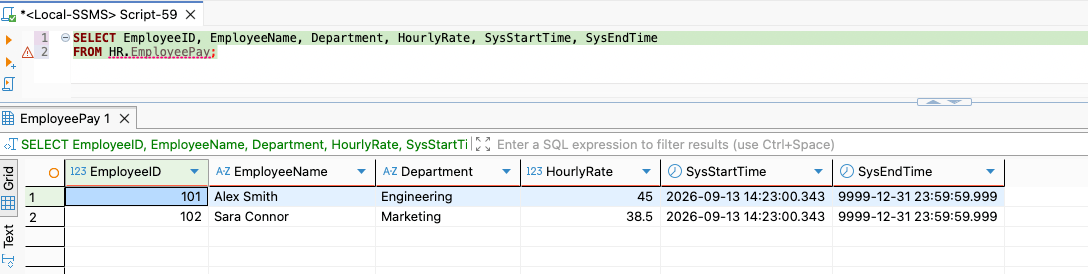
Note the result set above. We just discussed a few minutes back that for any active record (like the ones shown above in the result set), the SQL Server uses a far-future value as the row end time (i.e., SysEndTime here) to indicate that the row is still valid. In the above result set, we can see that the SysEndTime for both the rows have been set as 9999-12-31 which means the row end time has been set to 31st December 9999 which is the far-future value for the SQL Server. However, the row start time has been kept as the transaction timestamp in UTC.
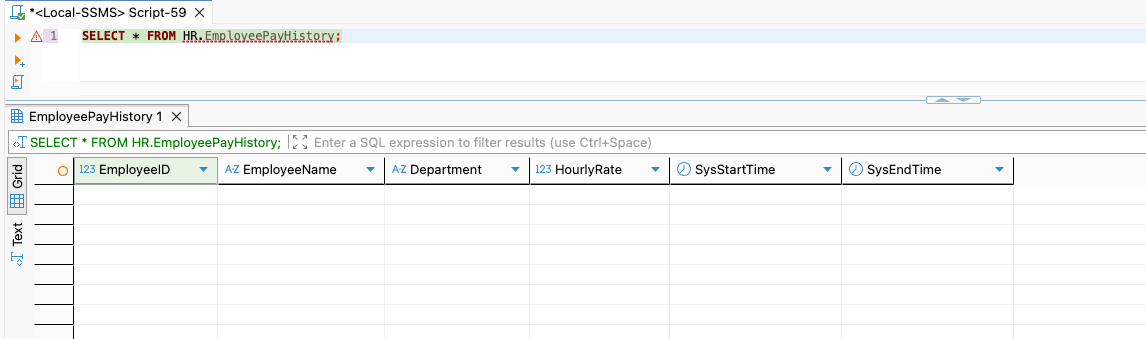
If we execute a SELECT query on the HR.EmployeePayHistory table, we should see no records there yet. That is obvious because in our actual table: HR.EmployeePay we did not update or delete any record yet. So, running the below query:
SELECT * FROM HR.EmployeePayHistory;
generates no result set.
Updating data in the actual table
Let us assume that after a performance evaluation, at the end of the appraisal cycle, the employee Alex Smith receives a decent raise of $52.00 per hour. To do so, we can update the salary of Alex Smith on the HR.EmployeePay table using the following query:
UPDATE HR.EmployeePay
SET HourlyRate = 52.00
WHERE EmployeeID = 101;
Once the above query is executed, the record in the HR.EmployeePay gets updated against Alex Smith. But let us take a moment to understand what happened behind the scenes when we executed this update statement.
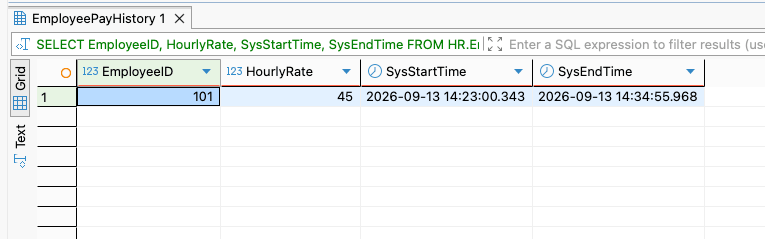
- SQL Server copies the existing state of employee 101 (Alex Smith) into HR.EmployeePayHistory
- It sets the history row's SysEndTime to the current transaction timestamp in UTC
- Next, it updates the active record in HR.EmployeePay with new hourly rate and sets its SysStartTime to current transaction timestamp in UTC
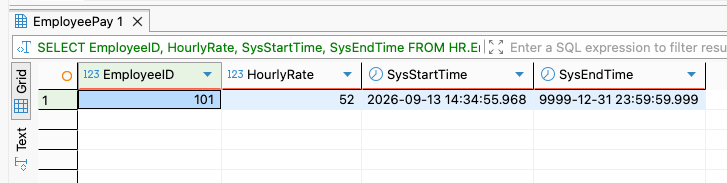
So, if we query the live (or actual) table and the history table using the following SELECT queries:
-- Current State
SELECT EmployeeID, HourlyRate, SysStartTime, SysEndTime
FROM HR.EmployeePay
WHERE EmployeeID = 101;

-- History State
SELECT EmployeeID, HourlyRate, SysStartTime, SysEndTime
FROM HR.EmployeePayHistory
WHERE EmployeeID = 101;
We should see following outputs:
Deleting data from the actual table
Finally, we will see what happens when we delete a data from the actual table. Assume that an employee exits from the company. In that case, the HR can decide to remove the info about the exited employee from the HR.EmployeePay table. In our example, let's consider Sara Cornor decides to exit from the company. We can record the same using a delete query as below:
DELETE FROM HR.EmployeePay
WHERE EmployeeID = 102;
When the above query is run, the following happens:
- SQL Server deletes the record from the HR.EmployeePay table
- It copies the record over to HR.EmployeePayHistory table and updates the SysEndTime there to the current timestamp in UTC
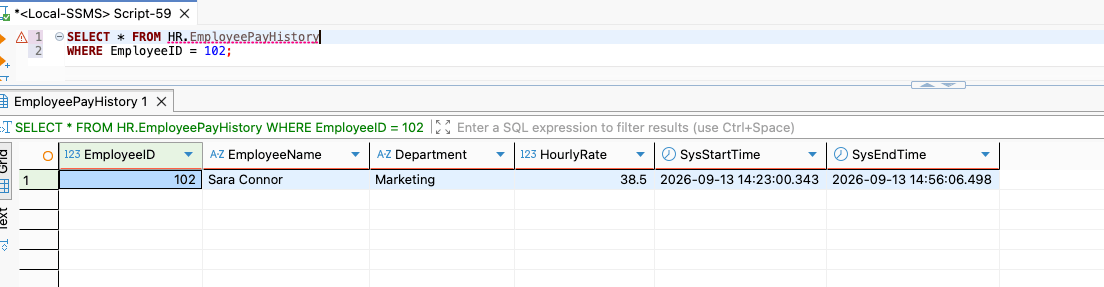
If we query the HR.EmployeePay table now, it will return no records for this employee id 102 since the record has been deleted from the live table. However, if we run the select query on HR.EmployeePayHistory table, it will fetch the historical record.
Querying historical data using FOR SYSTEM_TIME
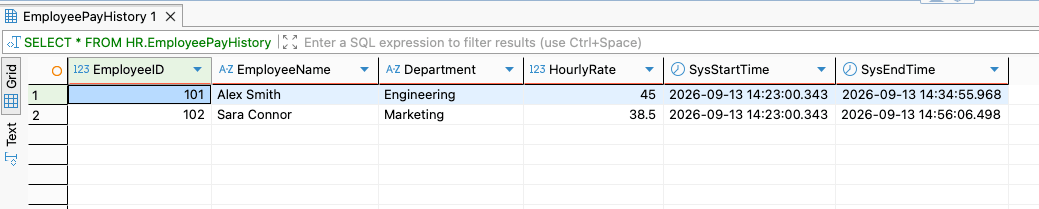
Considering that our historical data in the history table now looks like this:
Now, we just understood how historical record is maintained by SQL Server automatically for our live table. However, employees who serve a company for a decade may see multiple salary changes or department changes during their tenure. So what if we want to see what was the department and hourly rate of employees at a particular time? In that case, we can make use of FOR SYSTEM_TIME AS OF <DATETIME> clause.
So, what if we want to see the details of the employees at a particular time in the historical moment, say at: 13th Sept., 2026 at 14:36:00.000 hours? To do so, we can make use of the following query:
SELECT EmployeeID, EmployeeName, Department, HourlyRate
FROM HR.EmployeePay
FOR SYSTEM_TIME AS OF '2026-09-13 14:36:00.000';
The output of the above query is:
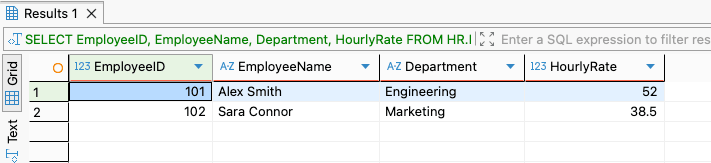
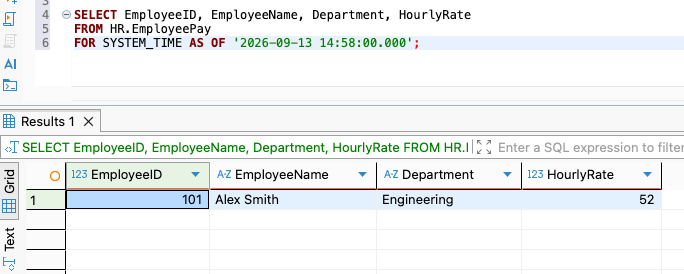
If we take a closer look, we can see that the time we used was after Alex's pay raise (or hourly rate hike) and before Sara's exit. So, the record shows the hourly rate of Alex Smith as $52 and not $45. Also, we can see that Sara Connor was still in the company then. However, if we take the time to 14:58:00.000, which is after Sara Connor's exit, we should see the following output:
SELECT EmployeeID, EmployeeName, Department, HourlyRate
FROM HR.EmployeePay
FOR SYSTEM_TIME AS OF '2026-09-13 14:58:00.000';
Performance Tuning and Best Practices
In a real time production grade environment, the historical volume will grow large. It is important to focus on performance tuning for faster query executions. To achieve that, we can make use of the following best practices:
- History table indexing: We need to ensure that the history table has a clustered columnstore index (CCI) or a suitable clustered B-Tree index structured around high-cardinality period dates. It can be done using a query like this below:
CREATE CLUSTERED COLUMNSTORE INDEX IX_EmployeePayHistory
ON HR.EmployeePayHistory;?
- Avoiding direct history writes: The system-versioning guarantees data non-repudiation. So we should never bypass history restrictions unless executing compliance/purge maintenance under controlled maintenance windows.
- Using UTC timestamps: SQL Server uses the UTC time for temporal system values (sysutcdatetime()). We should always handle the timezone conversions at the application reporting tier.
Conclusion
System-Versioned Temporal Tables provide an out-of-the-box, ANSI SQL-compliant solution for auditing and historical data tracking in the SQL Server. By automatically offloading UPDATE and DELETE records into a managed history table, they eliminate the need for error-prone custom triggers and complex schema logic.
Whether we need to answer point-in-time analytical queries using FOR SYSTEM_TIME AS OF or meet strict enterprise compliance requirements, temporal tables always deliver a low-maintenance, reliable foundation. When combined with proper indexing strategies (such as Clustered Columnstore Indexes) and automated retention policies, they offer a scalable way to preserve full data lineage without sacrificing read performance.