

Every DBA has encountered parameter sniffing at least once. A stored proc executes fast throughout the day, but then suddenly it locks one core and uses a lot of disk I/O - the same query, the same parameters, and no changes were made. What probably happened is that the procedure was executed with some unusual parameters. SQL Server has saved the execution plan for this value, and now it is using this plan in all further executions of the stored proc.
This article provides a demonstration of the problem with parameter sniffing; it explains the occurrence of the problem step by step and presents different ways of resolving it and their performance. The values in this article were obtained through the live SQL Server 2025 environment. You may get different absolute values, but the logical read count of each execution remains consistent.
Building Skewed Data
For parameter sniffing to function effectively, it is important to have skew present. If there is no variability among the rows produced by all of the parameter values of a plan, interesting cached plans simply do not exist. Therefore, the Orders table was created with an uneven distribution of the StatusID’s value.
SET NOCOUNT ON;
DROP TABLE IF EXISTS dbo.Orders;
CREATE TABLE dbo.Orders
(
    OrderID INT IDENTITY(1, 1) PRIMARY KEY, -- clustered PK
    OrderDate DATETIME2 NOT NULL,
    CustomerID INT NOT NULL,
    StatusID INT NOT NULL,
    TotalAmount DECIMAL(12, 2) NOT NULL
);
-- whale: StatusID = 1 (very common)
INSERT dbo.Orders
(
    OrderDate,
    CustomerID,
    StatusID,
    TotalAmount
)
SELECT DATEADD(MINUTE, - (ROW_NUMBER() OVER (ORDER BY (SELECT NULL))), SYSDATETIME()),
       ABS(CHECKSUM(NEWID())) % 100000,
       1,
       (ABS(CHECKSUM(NEWID())) % 50000) / 100.0
FROM sys.all_objects a
    CROSS JOIN sys.all_objects b; -- medium: StatusID = 2
INSERT dbo.Orders
(
    OrderDate,
    CustomerID,
    StatusID,
    TotalAmount
)
SELECT TOP (50000)
       DATEADD(MINUTE, - (ROW_NUMBER() OVER (ORDER BY (SELECT NULL))), SYSDATETIME()),
       ABS(CHECKSUM(NEWID())) % 100000,
       2,
       (ABS(CHECKSUM(NEWID())) % 50000) / 100.0
FROM sys.all_objects a
    CROSS JOIN sys.all_objects b;
-- minnows: StatusID 3...9 (rare)
INSERT dbo.Orders
(
    OrderDate,
    CustomerID,
    StatusID,
    TotalAmount
)
SELECT TOP (2100)
       DATEADD(MINUTE, - (ROW_NUMBER() OVER (ORDER BY (SELECT NULL))), SYSDATETIME()),
       ABS(CHECKSUM(NEWID())) % 100000,
       3 + (ABS(CHECKSUM(NEWID())) % 7),
       (ABS(CHECKSUM(NEWID())) % 50000) / 100.0
FROM sys.all_objects a
    CROSS JOIN sys.all_objects b;
CREATE NONCLUSTERED INDEX ix_Orders_StatusID ON dbo.Orders (StatusID);
UPDATE STATISTICS dbo.Orders
WITH FULLSCAN;
SELECT StatusID,
       COUNT(*) AS Rows
FROM dbo.Orders
GROUP BY StatusID
ORDER BY StatusID;
The count query confirms the distribution:
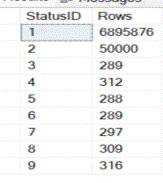
Two names for the rest of this piece: StatusID 1 is the “whale” (6.88 million rows - a scan is genuinely the right plan for it), and StatusID 3–9 are the “minnows” (a few hundred rows each - a quick seek is right). The whole problem comes down to one fact: no single execution plan is good for both a 6.88-million-row value and a 300-row value. SQL Server caches one plan, and whichever value it compiled for wins.
Here’s the proc under test:
CREATE OR ALTER PROCEDURE dbo.GetOrdersByStatus @StatusID INT
AS
BEGIN
    SELECT OrderID,
           OrderDate,
           CustomerID,
           TotalAmount
    FROM dbo.Orders
    WHERE StatusID = @StatusID;
END;
One more piece of setup. SQL Server 2022 and later ship a feature called Parameter Sensitive Plan Optimization (PSPO), on by default at compatibility level 160+, which can keep several plans for one query and pick per value at runtime. It changes the results, so we look at it directly later. For now, to see the classic behavior on its own, we turn it off:
ALTER DATABASE SCOPED CONFIGURATION SET PARAMETER_SENSITIVE_PLAN_OPTIMIZATION = OFF;
SELECT name,
       value
FROM sys.database_scoped_configurations
WHERE name = ‘PARAMETER_SENSITIVE_PLAN_OPTIMIZATION’; -- expect 0
The Problem, Direction One: The Minnow Pays
Clear the cache, run the whale first so it compiles and caches a scan, then hit the proc with a minnow:
SET STATISTICS IO, TIME ON;
DBCC FREEPROCCACHE;

EXEC dbo.GetOrdersByStatus @StatusID = 1; -- whale, compiles a scan

EXEC dbo.GetOrdersByStatus @StatusID = 7; -- minnow, stuck with the scan
The output:
StatusID:1

StatusID:7

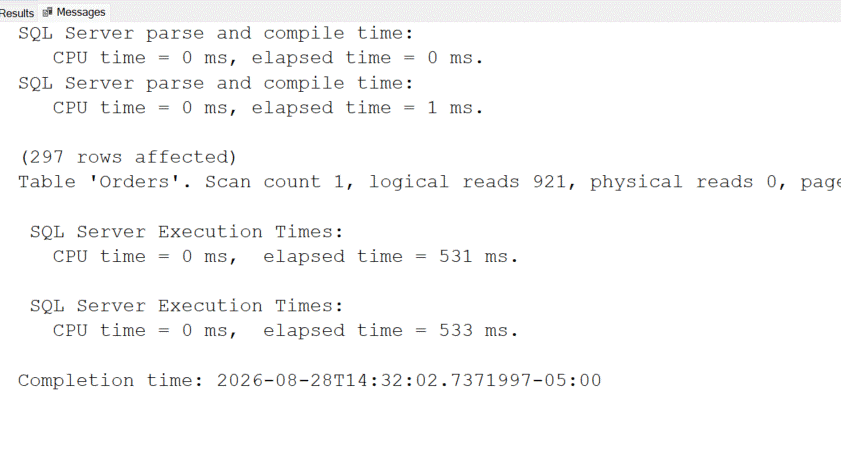
The logical reads are identical. The minnow returned 297 rows and did exactly as much I/O as the query that returned 6.88 million. It inherited the whale’s scan plan and read all 32,668 pages of the table to find its 297 rows - roughly 5,400 times more work than it needed, that should be nearly free. Run that a few thousand times a second and there’s your pinned core.
The Problem, Direction Two: The Whale Pays
Now flip the order. Clear the cache, run the minnow first so it caches a seek-plus-lookup plan, then hit it with the whale:
DBCC FREEPROCCACHE;

EXEC dbo.GetOrdersByStatus @StatusID = 7;
EXEC dbo.GetOrdersByStatus @StatusID = 1;
StatusID:7
StatusID:1
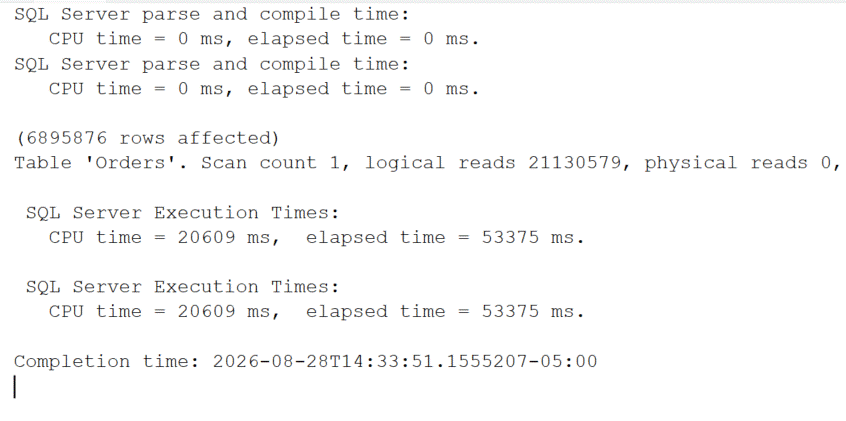
Twenty-one million logical reads. The whale got jammed onto the minnow’s seek-plus-lookup plan and did a key lookup for every one of its 6.88 million rows, about 645 times the I/O of its own scan plan, and 22 seconds of CPU.
This route is a cunning one. In this case, the cache plan is a seek, which is a preferred plan to use. It has undergone an evaluation and looks impressive until a procedure is called with a big parameter and it fails. This helps to explain why at 2am there is a problem that seemingly has no reason, as using the cached plan seems reasonable.
Both examples above prove that there is no such thing as the only right plan. The one that compiles gets its victory, while the other loses badly.
Fix 1: OPTION (RECOMPILE)
Build a fresh plan on every execution, so SQL Server always sniffs the actual value in hand:
CREATE OR ALTER PROCEDURE dbo.GetOrdersByStatus_Recompile @StatusID INT
AS
BEGIN

    SELECT OrderID,
           OrderDate,
           CustomerID,
           TotalAmount
    FROM dbo.Orders
    WHERE StatusID = @StatusID
    OPTION (RECOMPILE);

END;

DBCC FREEPROCCACHE;

EXEC dbo.GetOrdersByStatus_Recompile @StatusID = 1; -- whale

EXEC dbo.GetOrdersByStatus_Recompile @StatusID = 7; -- minnow
StatusID: 1
StatusID: 7
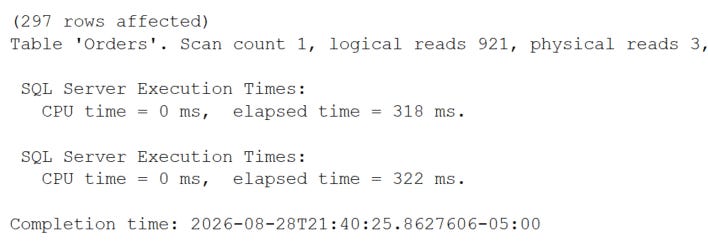
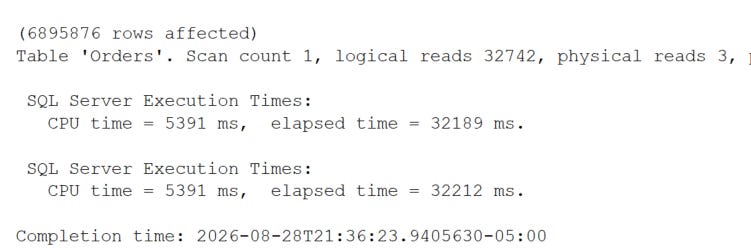
The reads no longer match which is the fix working. The minnow dropped from 32,742 reads to 921 because RECOMPILE threw away the whale’s scan and built a proper seek for StatusID 7. Each value gets the plan it deserves.
The cost shows up in the messages tab: every execution now prints a fresh “parse and compile time” line. But RECOMPILE pays that compile on every call, forever. For a proc that runs occasionally with varied parameters, that’s a fine trade. For a hot OLTP proc firing thousands of times a second, the constant recompilation can cost more CPU than the bad plan ever did. RECOMPILE trades a plan-reuse problem for a compile-cost problem, you need to know which one your workload can afford.
Fix 2: OPTIMIZE FOR
The other classic fix - stop letting SQL Server guess and tell it which value to plan for:
CREATE OR ALTER PROCEDURE dbo.GetOrdersByStatus_OptForValue @StatusID INT
AS
BEGIN
    SELECT OrderID,
           OrderDate,
           CustomerID,
           TotalAmount
    FROM dbo.Orders
    WHERE StatusID = @StatusID
    OPTION (OPTIMIZE FOR (@StatusID = 1));
END;
GO

DBCC FREEPROCCACHE;
EXEC dbo.GetOrdersByStatus_OptForValue @StatusID = 1; -- whale
EXEC dbo.GetOrdersByStatus_OptForValue @StatusID = 7; -- minnow
This says “always build the plan as if the value is 1” - the whale.
The minnow’s output:
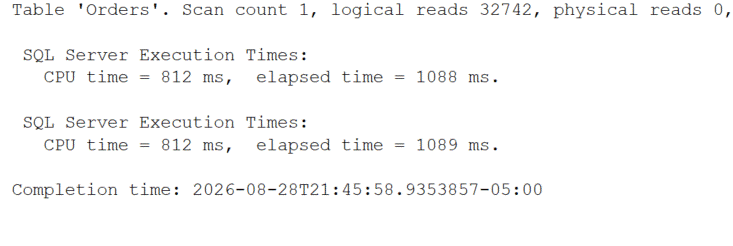
The minnow is back to 32,742 reads. That’s the expected behavior: OPTIMIZE FOR pins the whale’s scan plan onto everything, so the minnow gets crushed by it. This fix helps the value you name and punishes the rest. If your traffic is mostly whale, that’s fine. If it’s mostly minnows, you’ve made things worse — so the value you choose matters, and “1” is only right if 1 is actually your common case.
What PSPO changes
Now turn PSPO back on and look at the same query again:
ALTER DATABASE SCOPED CONFIGURATION
SET PARAMETER_SENSITIVE_PLAN_OPTIMIZATION = ON;

SELECT name, value FROM sys.database_scoped_configurations
WHERE name = ‘PARAMETER_SENSITIVE_PLAN_OPTIMIZATION’; -- expect 1
First, the plain proc with no hints at all:
DBCC FREEPROCCACHE;

EXEC dbo.GetOrdersByStatus @StatusID = 1; -- whale
EXEC dbo.GetOrdersByStatus @StatusID = 7; -- minnow
The minnow comes back on its own seek, around 921 reads, even though the whale compiled first. PSPO kept separate plans for the two cardinality ranges and handed each value the right one, with no hint and no recompile. You can confirm it’s dispatching multiple plans by checking Query Store:
SELECT q.query_id, p.plan_id, p.query_plan_hash
 FROM sys.query_store_query q
 JOIN sys.query_store_plan p ON p.query_id = q.query_id
 JOIN sys.query_store_query_text t ON t.query_text_id = q.query_text_id
 WHERE t.query_sql_text LIKE N’%FROM dbo.Orders%StatusID%’
 ORDER BY q.query_id, p.plan_id;
Two or more plan_id rows for the one logical query means PSPO is doing its job.
The following is a breakdown of these solutions. RECOMPILE provides each individual parameter with its personalized plan, but requires the CPU cycles to be paid for repeatedly, hence this is beneficial for infrequent and diverse parameter values but may not be best suited for situations involving OLTP. Making use of the OPTIMIZE FOR option allows specifying parameters for which the system will offer an effective plan without needing to pay for CPU usage. However, this option requires a very important assumption on parameter value parameters and has the possibility of failing if the wrong parameter value is used due to the change in data behavior. Finally, PSPO operates the same way as RECOMPILE, but provides the best of both worlds in that it makes the costless assumption and allows the engine to use its knowledge and experience.


