

I love SQL Prompt, and think it’s a great productivity tool. Even before I worked at Red Gate, I love the tool and had a copy before Red Gate bought the technology from the original developer. Recently I’ve run into a few people that weren’t aware of some of the ways in which it can help you. This is a quick look at one of the ways I use SQL Prompt.
SSF
I probably type SSF more than any other character combination in SMSS. With SQL Prompt installed, I usually quickly type “SSF” and hit “tab” and get this:

SQL Prompt has expanded my “SSF” into “Select * From” and then popped up a list of tables in this database. I could down arrow to select one, or use the cursor, or start typing.
This is a quick way to get data from a table back to your SSMS client without worrying about the columns or rows you need from a table. I use this constantly, though I’ve edited this command to return the top 10 rows only. Here’s how I do that:
Snippet Manager
There’s a dialog for managing these snippets of code, called the Snippet Manager. You can access that from the SQL Prompt menu
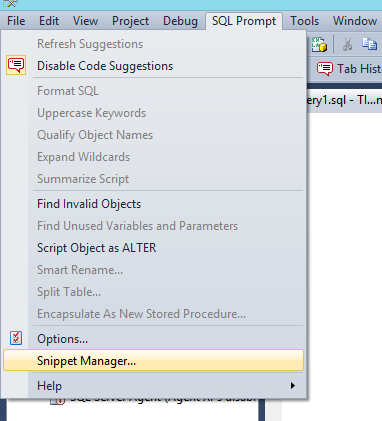
Once you select this, you get a dialog that shows all the snippets installed on your system. I scrolled down to the “SSF” snippet that I often use.
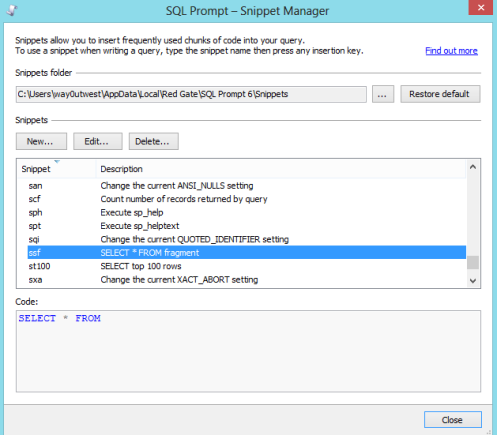
If I click the Edit button, then I get a small editor where I can paste in code or edit what’s there. In this case, I add the “TOP 10″ keywords, and I also reformat the code slightly. I like my code formatted, so I ensure it’s formatted here.
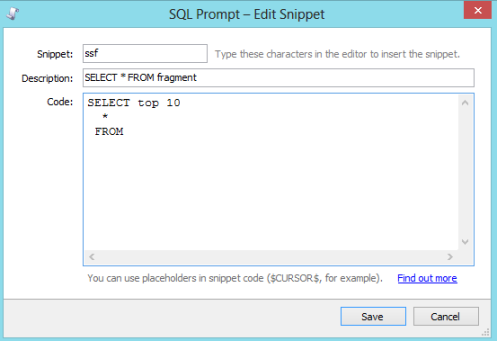
Once that’s done, I click “Save” and then “close” for the Snippet Manager. Then the next time I type “SSF” and tab, I get this:

Note that there is an st100 snippet that does the same thing I edited with 100 rows, but I find ssf easier to type, so I just edit this snippet.
I’d encourage you to play around with snippets, and also adopt this in your daily work. If you don’t have a copy of SQL Prompt, download the evaluation and I’m sure you’ll realize it’s worth the cost of the tool in time savings quickly.
Filed under: Blog Tagged: QuickTips, Red Gate, SQL Prompt, syndicated 

