

Introduction
Minimax m3 is a Chinese AI company founded in 2021. Why should we focus on MiniMax if we already have ChatGPT, Claude, Gemini, and other technologies? Chinese models offer cheaper—and sometimes free —alternatives. MiniMax M3 supports a high token count at a low cost.
In this article, we'll cover MiniMax M3 in the cloud and show what it can do with SQL Server.
What is MiniMax M3 cloud?
MiniMax M3 can handle a large context. MiniMax M3 in the cloud is a very large model you cannot install locally because it isn't open source. It has 428 billion parameters and requires several servers with multiple GPUs.
Requirements
In order to use it, you will need to have Ollama installed. It is an open-source AI engine that you can use to download and run local AI models.
Getting started
Open Ollama and select the Minimax m3 cloud.
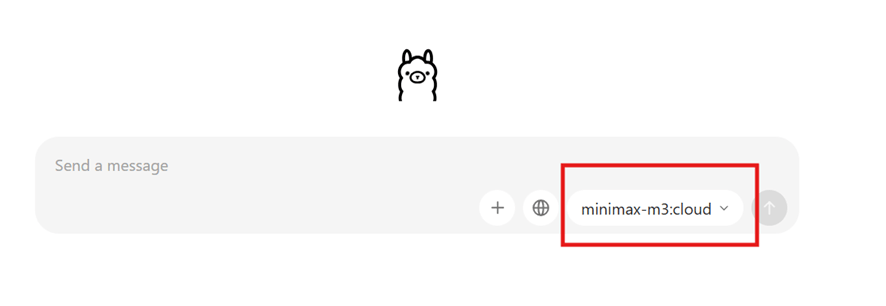
You do not need to install it (in fact, you cannot install it); you only need to use it.
Minimax m3 limitation knowledge cutoff
Minimax information is not up to date. Let’s find out the limitations.
Me: Do you have information up to date?
Minimax m3: Yes, my information is reasonably up to date. My knowledge cutoff is January 2026, which means I have information about events, developments, and topics up through that point.
A few important things to keep in mind:
Knowledge cutoff limitations: I don't have information about events that occurred after January 2026. If you ask me about something that happened more recently, I may not know about it or could provide incomplete/outdated information.
Real-time data: I cannot browse the internet or access live data, so I can't provide real-time information like current stock prices, breaking news, weather, or sports scores.
Verification recommended: For critical or time-sensitive information (medical, legal, financial, etc.), it's always a good idea to verify with current sources.
Is there something specific you'd like to know? I'll do my best to help based on what I know.
MiniMax M3 can handle bigger documents
Something I have heard about MiniMax M3 is that it can handle and generate large amounts of data. In this example, we will generate a script with all the tables of the Adventureworks2025 database.
I will generate a script with the structure of the database objects and ask MiniMax M3 to generate the documentation.
To generate the script, right-click the database and select Tasks > Generate Scripts.
Press the Select All Button to select all the objects.
Save the script in a path to send it to Minimax m3.
Create extensive SQL Server documentation with MiniMax m3 in a minute
Upload the script file created previously to Ollama. In my case, I had to change the extension from .sql to .txt to save it. Also, I had to save the file as UTF-8. Minimax had problems reading the .sql file, and it was detected as a binary file.
Here is the prompt to generate documentation.
Me:
Act as a Senior DBA and generate documentation based on the attached script:
- A high-level overview of the database and architecture documentation
- Documentation about the entity relationship dependency.
- A detailed data dictionary.
- A summary of the stored procedures, functions, triggers, and parameters.
- Indexing and performance considerations.
MiniMax m3 results
Minimax generated a lot of documentation. Unfortunately, you cannot generate a downloadable MS Word file as you can do with ChatGPT or Claude. The documentation was generated in approximately 82 seconds.
You can see the complete Adventureworks2025 documentation at this link.
I copied and pasted the text into MS Word. I had to change the configuration of the page from portrait to landscape because the information did not fit into the pages. It generated 45 pages in portrait format and 70 pages in landscape orientation.
Compared with ChatGPT and Claude, MiniMax m3 did it fast, and it can create longer documents. Usually, ChatGPT, Gemini, and other models cannot create long documents. You have to beg them to create extensive documentation.
MiniMax m3 advantages
It supports 1 million context tokens, which is a lot. Also, iIt guarantees a minimum of 521K tokens. It has a special architecture called MSA (MiniMax Sparse Attention). This technology allows using a high quantity of tokens at low cost.
Currently, Chinese AI Models do not offer the smartest AI models, but they offer low-cost models at an affordable price.
So, Minimal m3 can be used to analyze extensive documentation, big projects, and big contracts.
Traditional AI models cannot handle big projects, or at least they cannot handle them at a low cost.
Analyze SQL Server execution plans
This time, we are going to analyze an Adventureworks2025 query.
SET SHOWPLAN_XML ON;

GO


SELECT DISTINCT

c.CustomerID,

psc.Name AS SubCategory,

pc.Name AS Category,

YEAR(soh.OrderDate) AS SalesYear,

FORMAT(soh.OrderDate, 'yyyy-MM') AS SalesMonth,

SUM(sod.OrderQty) AS TotalQuantity,

SUM(sod.LineTotal) AS TotalSales

FROM Sales.SalesOrderHeader AS soh

INNER JOIN Sales.SalesOrderDetail AS sod

ON soh.SalesOrderID = sod.SalesOrderID

INNER JOIN Sales.Customer AS c

ON soh.CustomerID = c.CustomerID

INNER JOIN Production.Product AS p

ON sod.ProductID = p.ProductID

INNER JOIN Production.ProductSubcategory AS psc

ON p.ProductSubcategoryID = psc.ProductSubcategoryID

INNER JOIN Production.ProductCategory AS pc

ON psc.ProductCategoryID = pc.ProductCategoryID

WHERE YEAR(soh.OrderDate) = 2024

OR YEAR(soh.DueDate) = 2024

GROUP BY

c.CustomerID,

psc.Name,

pc.Name,

YEAR(soh.OrderDate),

FORMAT(soh.OrderDate, 'yyyy-MM')

ORDER BY

FORMAT(soh.OrderDate, 'yyyy-MM'),

TotalSales DESC;

GO
The SET SHOWPLAN_XML ON will generate the execution plan in XML format. Copy the XML Plan and the query.
Now I will send the prompt to Minimax m3.
For the next prompt, I will use the previous query and the XML execution plan.
Me: Can you improve this query? [Copy the previous query here]. Here you also have the Execution plan: [Copy the XML plan here].
Minimax m3:
Query Optimization Analysis — Senior DBA Review
Cost: 616.111 | Estimated Rows: 41,420 | Parallelism: ? Disabled Main culprit: NonParallelPlanReason="TSQLUserDefinedFunctionsNotParallelizable" (FORMAT is treated as UDF) + OR on YEAR() predicate prevents index seek
Top 5 Critical Issues (from the execution plan)
| # | Issue | Evidence from Plan | Impact |
| 1 | YEAR(OrderDate) = 2024 OR YEAR(DueDate) = 2024 is non-sargable | Clustered Index Scan (31,465 rows) on SalesOrderHeader with residual predicate | Cannot seek; reads entire table |
| 2 | FORMAT(soh.OrderDate, 'yyyy-MM') is treated as a UDF — kills parallelism | NonParallelPlanReason="TSQLUserDefinedFunctionsNotParallelizable" | All serial; no multi-core |
| 3 | Full Clustered Index Scan on SalesOrderDetail (121,317 rows) | Joined via Merge, but reads every row | Should seek via filtered header set |
| 4 | SELECT DISTINCT + GROUP BY is redundant | Both operations consume memory | Wasted sort/hash memory |
| 5 | No supporting index on SalesOrderHeader.OrderDate | Auto-created _WA_Sys_00000004 exists but stats are stale (2026-08-24) | Suboptimal row estimates |
Me: Minimax not only offered the top critical issues, but also it showed me an optimized query, an explanation of the changes applied, some options for the use of OR, several recommendations for statistics and indexes.
Optimized Query
Me: Minimax will also offer
This is the query optimized by the Minimax m3:
SELECT

    c.CustomerID,

    psc.Name AS SubCategory,

    pc.Name  AS Category,

    YEAR(soh.OrderDate)  AS SalesYear,

    CONVERT(char(7), soh.OrderDate, 120) AS SalesMonth,   -- '2024-01'

    SUM(sod.OrderQty)   AS TotalQuantity,

    SUM(sod.LineTotal)  AS TotalSales

FROM Sales.SalesOrderHeader AS soh

INNER JOIN Sales.SalesOrderDetail AS sod

    ON sod.SalesOrderID = soh.SalesOrderID

INNER JOIN Sales.Customer AS c

    ON c.CustomerID = soh.CustomerID

INNER JOIN Production.Product AS p

    ON p.ProductID = sod.ProductID

INNER JOIN Production.ProductSubcategory AS psc

    ON psc.ProductSubcategoryID = p.ProductSubcategoryID

INNER JOIN Production.ProductCategory AS pc

    ON pc.ProductCategoryID = psc.ProductCategoryID

WHERE soh.OrderDate >= '2024-01-01'

  AND soh.OrderDate <  '2025-01-01'

   -- OR-condition on DueDate REMOVED — see note below

GROUP BY

    c.CustomerID,

    psc.Name,

    pc.Name,

    YEAR(soh.OrderDate),

    CONVERT(char(7), soh.OrderDate, 120)

ORDER BY

    SalesMonth,

    TotalSales DESC;
What changed (and why)
This is the Minimax explanation of changes:
| Change | Reason |
| YEAR(col)=2024 ? col >= '2024-01-01' AND col < '2025-01-01' | Sargable — allows an index seek on OrderDate |
| Removed YEAR(DueDate) = 2024 | Mixing two columns in an OR also prevents seeks. If truly needed, see "If you must keep the OR…" below |
| FORMAT(..., 'yyyy-MM') ? CONVERT(char(7), ..., 120) | Pure scalar, parallel-safe, deterministic, ~10× faster |
| Removed DISTINCT | Redundant — every column in SELECT is already in GROUP BY |
| p is the driver (smaller, 504 rows) | Allows optimizer to choose nested loops after header seek |
Recommended Supporting Index
Me: Minimax m3 also offers suggestions for indexes.
Minimax m3:
In this section, Minimax recommends which indexes to drop and add.
-- Drop if exists:

-- DROP INDEX IX_SalesOrderHeader_OrderDate_Inc ON Sales.SalesOrderHeader;


CREATE NONCLUSTERED INDEX IX_SalesOrderHeader_OrderDate_Inc

ON Sales.SalesOrderHeader (OrderDate)

INCLUDE (CustomerID, DueDate);
Why this index:
- Enables seek on OrderDate between two literals
- Covers the columns returned for the join (no key lookups)
- Small, narrow index — fast inserts, minimal storage
Expected impact (based on estimates):
- SalesOrderHeader reads: 31,465 ~5,000–6,000 rows (1/6 of year, but filter selectivity depends on data distribution)
- Detail rows joined: 121,317 ~20,000 rows
- Estimated cost: 616 ~30–50 (˜ 10–20× speedup)
If You Must Keep the OR on DueDate
Me: Minimax m3 also offers 3 options (A, B, and C) for the OR on DueDate.
Minimax m3:
Mixing two columns in an OR always blocks a single-column seek. The standard fixes are:
Option A — UNION (often the best plan)
SELECT ...

FROM Sales.SalesOrderHeader soh

INNER JOIN Sales.SalesOrderDetail sod ON sod.SalesOrderID = soh.SalesOrderID

-- ... other joins ...

WHERE soh.OrderDate >= '2024-01-01' AND soh.OrderDate < '2025-01-01'

GROUP BY ...


UNION


SELECT ...

FROM Sales.SalesOrderHeader soh

INNER JOIN Sales.SalesOrderDetail sod ON sod.SalesOrderID = soh.SalesOrderID

-- ... other joins ...

WHERE soh.DueDate  >= '2024-01-01' AND soh.DueDate  < '2025-01-01'

  AND NOT (soh.OrderDate >= '2024-01-01' AND soh.OrderDate < '2025-01-01') -- avoid dup

GROUP BY ...;
Option B — Compute a derived flag
CROSS APPLY (SELECT TOP 1 in2024 = CASE WHEN soh.OrderDate >= '2024-01-01'

                                        AND soh.OrderDate < '2025-01-01' THEN 1 ELSE 0 END) o

WHERE soh.OrderDate BETWEEN '2024-01-01' AND '2024-12-31'

   OR soh.DueDate   BETWEEN '2024-01-01' AND '2024-12-31';

Option C — Indexed view (best for repeated runs)

CREATE OR ALTER VIEW dbo.vSales2024

WITH SCHEMABINDING

AS

SELECT  soh.SalesOrderID, soh.CustomerID, soh.OrderDate, soh.DueDate

FROM    Sales.SalesOrderHeader AS soh

WHERE   soh.OrderDate >= '2024-01-01' AND soh.OrderDate < '2025-01-01'

   OR   soh.DueDate   >= '2024-01-01' AND soh.DueDate   < '2025-01-01';

GO

CREATE UNIQUE CLUSTERED INDEX UCI_vSales2024 ON dbo.vSales2024 (SalesOrderID);
Other Notes from the Plan
Me: Minimax includes some observations and recommendations from the plan.
Minimax:
Observation | Recommendation |
| Stats on SalesOrderHeader show ModificationCount="0" but timestamp 2026-08-24 — auto-update may be triggered off | UPDATE STATISTICS Sales.SalesOrderHeader WITH FULLSCAN; |
| Customer is read via IX_Customer_TerritoryID index scan (19,820 rows) | If you filter by TerritoryID later, add (TerritoryID) INCLUDE (CustomerID, PersonID, StoreID) |
| Product (504 rows) and ProductSubcategory (37) and ProductCategory (4) are tiny | Hash joins are appropriate; no change needed |
| LineTotal is computed on every detail row (121,317×) | Persist it to avoid recomputation on large scans: ALTER TABLE Sales.SalesOrderDetail ADD LineTotal_P PERSISTED AS LineTotal; (do not run on the live system without testing — schema change) |
| SerialDesiredMemory=655280 KB (~640 MB) requested but GrantedMemory=0 | The query exceeded the small-RC threshold; increase memory grant or use a covering index to reduce row count |
| Estimated 41,420 distinct output rows ? final Sort is expensive | If output is consumed by another process, persist to a temp table or materialized view |
Validation Plan
Me: Minimax also includes an instruction to validate the plan.
Minimax:
-- Before

SET STATISTICS IO ON; SET STATISTICS TIME ON;

-- (run original)


-- After the index is created and the query is rewritten:

-- (run optimized)


-- Compare

-- Logical reads on SalesOrderHeader     (expect ~80% reduction)

-- CPU time / elapsed time              (expect 5–20× improvement)

-- Actual execution plan                (look for Index Seek instead of Scan)
After deployment, re-check with sys.dm_db_missing_index_groups to see if SQL Server suggests more.
Summary: Replace YEAR(...) with a half-open range, swap FORMAT for CONVERT(char(7), ..., 120), drop the redundant DISTINCT, and add a covering index on OrderDate. You should see a 10–20× cost reduction and parallelism restored.
Conclusion
MiniMax M3 can be used for longer requests. With the $20 ChatGPT plan, it can only generate smaller documents and cannot produce large amounts of code.
MiniMax, on the other hand, looks like it was designed to work with higher volumes of data, and it can generate more information. With ChatGPT or Gemini, you need to split your request into smaller chunks if you have to work with a lot of data and code.
When we asked it to analyze a query, Minimax offered a better-optimized query, several index suggestions, several options to handle filters, suggestions for statistics, observations, and recommendations, etc. It is a complete answer, more detailed than other models that show a shallow answer.