

Introduction
When building application backends or processing complex data sets in a SQL Server, we frequently need a temporary storage to hold the intermediate query results. For example:
- Store filtered rows before joining them to another table
- Hold calculation results inside a stored procedure
- Break a complex query into smaller readable steps
- Process a small list of IDs
- Reuse the same result set multiple times
The SQL Server offers two main tools for this: temporary tables and table variables. The both can store rows temporarily and they both can be queried with: SELECT, INSERT, UPDATE and DELETE. However, they behave differently internally and hence, choosing the wrong option can cause silent performance bottlenecks, excessive TempDB contention, or unexpected behavior inside transactions.
Core definitions
Before diving into queries and comparing performance between a temp table and table variable, let's understand what makes these two construct types fundamentally different from each other.
Temporary Tables
A temporary table is created using the CREATE keyword in the SQL Server’s "tempdb" database. It is created using a "#" prefix. There are two types of temp tables:
- Local temporary table,
- Global temporary table
Most of the time, we end up using local temporary table. As of now, we will consider our temporary table as a local temporary table for the ease of understanding.
A few key features of a temp table are:
- Storage: A temp table is created in the TempDB system database
- Scope: The scope of a temp table is available in the current session only
- Statistics: The SQL server can generate the statistics on the columns of a temp table
- Indexes: A temp table support primary keys, clustered indexes and non-clustered indexes
- Schema changes: A temp table supports schema changes via ALTER TABLE command
- Transaction & Rollback: Temp tables can be a part of transaction handling and operations done on it within a transaction can be rolled back.
Table Variables
A table variable is declared using the DECLARE keyword. It is declared using a "@" prefix. The table name starts with a "@" and accordingly, the SQL Server treats it as a variable.
Key features of a table variable:
- Storage: A table variable is usually memory-backed, but can still use TempDB internally
- Scope: Table variables are available only inside the batch, procedure, or function where it is declared explicitly
- Statistics: Table variables does not have the same full column statistics as temp tables
- Indexes: Table variables can have indexes defined only during declaration
- Schema changes: A table variable, unlike temp tables, cannot undergo schema changes using the ALTER TABLE declaration
- Transactions & Rollback: Rollback behavior is different for table variables than temp tables
Creating, populating and querying temp tables and table variables
Now that we know the basics of temp tables and table variables, let us take a quick look at how we can create each of these, populate them with some dummy data and retrieve records from them.
We will first create a sample temp table, called EmployeeBonus. To do so, we can just use commands similar to creating a table in SQL Server with only a "#" prefix before table name so that SQL Server identifies it as a temp table.
CREATE TABLE #EmployeeBonus
(
    EmployeeID INT,
    BonusAmount DECIMAL(10,2)
);
Next, we will insert some dummy data into this temp table using INSERT command as below:
INSERT INTO #EmployeeBonus
(
    EmployeeID,
    BonusAmount
)
VALUES
(1, 5000.00),
(2, 7500.00),
(3, 3000.00);
Finally, to query the temp table, we have to make use of the SELECT command to get the result set:
SELECT
    EmployeeID,
    BonusAmount
FROM #EmployeeBonus;
Once the temp table is created and populated, the above SELECT query should generate a similary output:
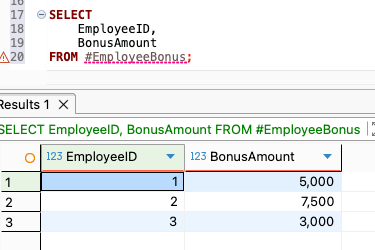
The rows are temporarily stored in #EmployeeBonus. We can query this table multiple times in the same database session. However, when our session ends, the SQL Server automatically removes the temp table.
Next, we will create a table variable. We will use the similar example to understand the syntax better. We will create a table variable, named EmployeeBonus, which will store similar information. To do so, we will make use of the DECLARE command and prefix the table name with "@" so that SQL Server treats it as a table variable. Then, we will populate data into the table variable so that we can go ahead and query them soon. To populate data, we will do it in the same way as we did earlier using the INSERT command.
Finally, once creation and population is done successfully, we can query the table variable in the same way as we did earlier for temp table using the SELECT command.
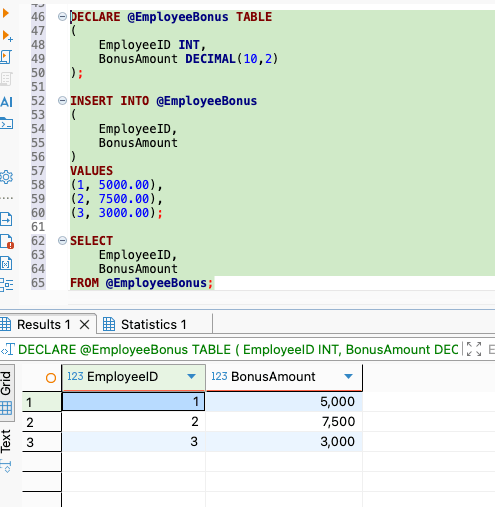
The noteable thing over here is that unlike temp table example, we cannot run create, insert and select commands separately since we learnt above that table variable scope is not at session level (like temp tables) but at the execution batch level.
If we run the DECLARE command first, SQL Server creates a table variable named EmployeeBonus and immediately destroys it at the end of the execution resulting in errors for INSERT and SELECT commands later. So, this entire below query block has to be selected and run at once for table variable to be created, populated and queried.
DECLARE @EmployeeBonus TABLE
(
    EmployeeID INT,
    BonusAmount DECIMAL(10,2)
);


INSERT INTO @EmployeeBonus
(
    EmployeeID,
    BonusAmount
)
VALUES
(1, 5000.00),
(2, 7500.00),
(3, 3000.00);


SELECT
    EmployeeID,
    BonusAmount
FROM @EmployeeBonus;
We should be able to see a similar output for the above query block execution:
Setting up a Local Environment
Now that we understand all the basics of temp tables and table variables, let us create a sample database and table so we can compare both options properly and compare their performance and utility in depth. For this, we will create an Orders table with 1,00,000 rows of data in it to make the table heavily loaded with data and replicate production-like scenario. This table will represent customer orders placed.
Before we run scripts to set up local environment, we will understand first what the script does. We will go through the code snippets from the entire script and understand what each section does.
USE master;
This tells SQL Server to use the master database. We are doing this because we are going to create or drop another database.
IF DB_ID('TempDemoDB') IS NOT NULL
BEGIN
    ALTER DATABASE TempDemoDB SET SINGLE_USER WITH ROLLBACK IMMEDIATE;
    DROP DATABASE TempDemoDB;
END;
GO
It checks if TempDemoDB already exists. It returns the database ID if the database exists. If the database exists, it runs the ALTER DATABASE command. This forces all existing connections to this database to close. Then it executes the DROP DATABASE command which deletes this existing old database. This gives us a clean environment every time we run the script.
CREATE DATABASE TempDemoDB;
USE TempDemoDB;
This creates a new database (with the same name after deleting the old one, if existed) and then switches into this newly created database.
CREATE TABLE dbo.Orders
(
    OrderID INT IDENTITY(1,1) PRIMARY KEY,
    CustomerID INT NOT NULL,
    OrderDate DATE NOT NULL,
    TotalAmount DECIMAL(10,2) NOT NULL,
    RegionCode VARCHAR(10) NOT NULL
);
This creates the main table Orders with the following expectations:
- OrderID: Unique ID for each order
- CustomerID: Customer who placed the order
- OrderDate:
Date of the order - TotalAmount:
Order amount - RegionCode: Region such as EAST, WEST or NORTH
IDENTITY(1,1)
This means that the SQL Server will automatically generate values starting from 1 and incrementing each time by 1.
DECLARE @i INT = 1;

WHILE @i <= 100000
BEGIN
    ...
    SET @i = @i + 1;
END;
This loop runs for 1,00,000 times. Each time it inserts one order.
(@i % 1000) + 1
This creates customer IDs from 1 to 1000. So we will have 1000 unique customers, and each customer will have multiple orders.
DATEADD(DAY, -(@i % 365), CAST(GETDATE() AS DATE))
This code ensures to generate dates within the last 365 days only.
CAST((@i * 1.35) % 500 + 10.00 AS DECIMAL(10,2))
This generates different random order amounts to make it look realistic.
CASE
    WHEN @i % 5 = 0 THEN 'WEST'
    WHEN @i % 3 = 0 THEN 'EAST'
    ELSE 'NORTH'
END
This assigns a region. This ensures that some record gets RegionCode as WEST, some as EAST and remaining as NORTH.
CREATE INDEX IX_Orders_CustomerID
ON dbo.Orders(CustomerID);
This creates an index on CustomerID column. This helps the SQL Server to find orders for a customer more quickly.
SELECT COUNT(*) AS TotalOrders
FROM dbo.Orders;
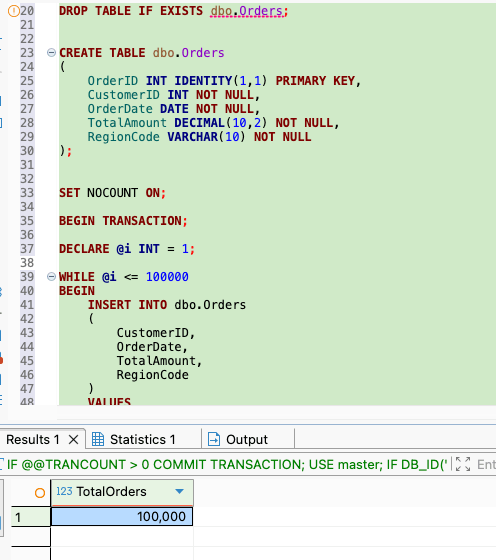
This fetches the number of records finally inserted into the Orders table and confirms that our script has done the job succcessfully.
So, the entire script file which we just learnt on what it does is:
IF @@TRANCOUNT > 0
    COMMIT TRANSACTION;

USE master;


IF DB_ID('TempDemoDB') IS NOT NULL
BEGIN
    ALTER DATABASE TempDemoDB SET SINGLE_USER WITH ROLLBACK IMMEDIATE;
    DROP DATABASE TempDemoDB;
END;


CREATE DATABASE TempDemoDB;


USE TempDemoDB;


DROP TABLE IF EXISTS dbo.Orders;


CREATE TABLE dbo.Orders
(
    OrderID INT IDENTITY(1,1) PRIMARY KEY,
    CustomerID INT NOT NULL,
    OrderDate DATE NOT NULL,
    TotalAmount DECIMAL(10,2) NOT NULL,
    RegionCode VARCHAR(10) NOT NULL
);


SET NOCOUNT ON;

BEGIN TRANSACTION;

DECLARE @i INT = 1;

WHILE @i <= 100000
BEGIN
    INSERT INTO dbo.Orders
    (
        CustomerID,
        OrderDate,
        TotalAmount,
        RegionCode
    )
    VALUES
    (
        (@i % 1000) + 1,
        DATEADD(DAY, -(@i % 365), CAST(GETDATE() AS DATE)),
        CAST((@i * 1.35) % 500 + 10.00 AS DECIMAL(10,2)),
        CASE
            WHEN @i % 5 = 0 THEN 'WEST'
            WHEN @i % 3 = 0 THEN 'EAST'
            ELSE 'NORTH'
        END
    );

    SET @i = @i + 1;
END;

COMMIT TRANSACTION;


CREATE INDEX IX_Orders_CustomerID
ON dbo.Orders(CustomerID);


SELECT COUNT(*) AS TotalOrders
FROM dbo.Orders;
Once executed, it should generate a similar output:
Deep dive : Performance and Statistics Comparison
Now that we have our local database setup completed, we will compare how SQL Server handles temp table versus table variable. We will shortly create a temp table, named #TargetCustomers, and a table variable, named @TargetCustomersTableVar, which we will use to store a list of customers and join that list back to Orders table. We will assume that the business question that we are trying to resolve is: for selected VIP customers, how many total orders do they have and how much money did they spend? This is the scenario which we will try to solve to understand how performance and statistics show up in using temp table versus table variable.
Why Statistics Matter
The SQL Server does not simply run a query blindly. Instead, before running a query, the SQL Server creates an execution plan, which is the SQL Server’s strategy for how to get the data. To choose a good plan, the SQL Server estimates:
- How many rows are there in each table
- How many rows will match a filter
- Which table should be read first
- Which join algorithm should be used
- Whether an index should be used
- How much memory the query may need
These estimates depend heavily on statistics. Now, as we discussed in the beginning, a temp table can have statistics but a table variable usually has weaker optimization information due to less statistics on it's column. This difference can make temp tables much faster for larger or more complex queries when compared to table variables.
To compare the performance of both the queries, we need to turn on the SQL Server runtime statistics before the queries are executed. To do so, we need to run the following script:
SET STATISTICS IO ON;
SET STATISTICS TIME ON;
Using a temporary table to solve the problem
First, we will use temporary table to address the above problem scenario and see the performance metrics of the same. To solve it using temporary table, we will run a query script in our database which is provided at the end of this section. We will first understand every bit of the script on what it does.
DROP TABLE IF EXISTS #TargetCustomers;
This removes the temp table if it already exists. This is useful when we run the script multiple times in the same session. This ensures that we don't end up getting table exists error.
CREATE TABLE #TargetCustomers
(
    CustomerID INT PRIMARY KEY,
    TierName VARCHAR(20) NOT NULL
);
This creates a temp table named: TargetCustomers as we mentioned earlier. It stores the customer ID and also creates an index because it is mentioned as a primary key. The temp table also stores the customer tier, such as VIP.
INSERT INTO #TargetCustomers
(
    CustomerID,
    TierName
)
SELECT DISTINCT
    CustomerID,
    'VIP' AS TierName
FROM dbo.Orders
WHERE CustomerID <= 200;
Next, we are inserting customers from the Orders table into the temp table we just created. We are using the DISTINCT keyword here since each customer has many orders and hence Orders table contains repeated CustomerID values while CustomerID has been setup as a primary key in the temp table. So, using DISTINCT keyword here ensures each customer appears only once and we do not end up getting primary key constraint violation error. We are assuming here that the CustomerID 1 to 200 are VIP customers and hence our temp table will have 200 records inserted into it.
SELECT
    tc.TierName,
    COUNT(o.OrderID) AS TotalOrders,
    SUM(o.TotalAmount) AS TotalSpent
FROM #TargetCustomers tc
INNER JOIN dbo.Orders o
    ON tc.CustomerID = o.CustomerID
GROUP BY
    tc.TierName;
This joins selected customers (identified as VIP customers) with their actual orders and counts the total number of orders placed by them and total amount spent by them in these orders collectively, finally grouping them by tier name. Since, the only customer tier we are considering here is VIP, so the result will be a single row which will contain total number of orders placed by all these VIP customers and the total amount spend in all these orders collectively by all these VIP customers altogether.
The final entire query snippet which we can use to solve the problem statement is as follows:
SET STATISTICS IO ON;
SET STATISTICS TIME ON;

DROP TABLE IF EXISTS #TargetCustomers;

CREATE TABLE #TargetCustomers
(
    CustomerID INT PRIMARY KEY,
    TierName VARCHAR(20) NOT NULL
);

INSERT INTO #TargetCustomers
(
    CustomerID,
    TierName
)
SELECT DISTINCT
    CustomerID,
    'VIP' AS TierName
FROM dbo.Orders
WHERE CustomerID <= 200;

SELECT
    tc.TierName,
    COUNT(o.OrderID) AS TotalOrders,
    SUM(o.TotalAmount) AS TotalSpent
FROM #TargetCustomers tc
INNER JOIN dbo.Orders o
    ON tc.CustomerID = o.CustomerID
GROUP BY
    tc.TierName;
The output of the above query should look like:
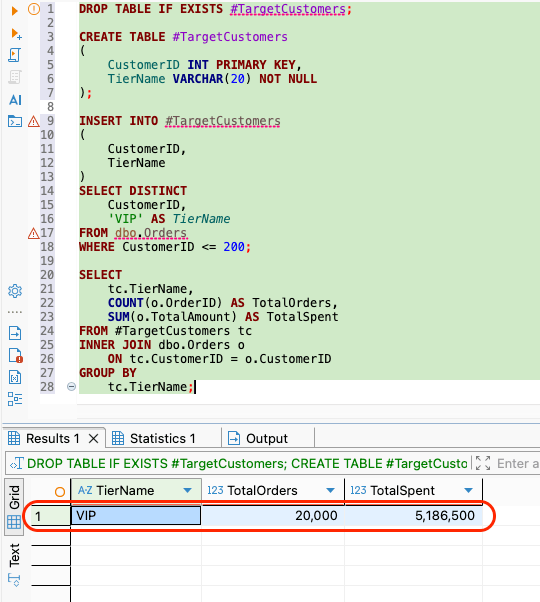
The TotalSpent amount may be different for different users since the amount was being generated randomly while insert script ran. However, TotalOrders count will always be 20,000. It is because we inserted 1,00,000 orders across 1,000 customers which means each customer has about 100 orders. Now, we selected 200 customer as VIP tier (CustomerID 1 to 200). So TotalOrders count becomes: 200 customers * 100 orders each = 20,000 orders.
With a temp table in place, the SQL Server can usually estimate the number of rows in #TargetCustomers correctly. It can understand that the temp table #TargetCustomers contains around 200 rows because the SQL Server has better information and it can choose a better execution plan. For example, it can choose:
- index seek,
- nested loops join
- Better memory grant
The exact plan depends on the version of our SQL Server and it's data distribution.
Performance metrics of the temp table
You should see a similar performance metrics in your database GUI too. In the metrics, it says that the SQL Server read the Orders table efficiently resulting in 468 logical reads since there was an index created on the CustomerID column. However, in the temporary table, it didn't have to do much work and had only went through 2 logical reads. However, the total execution time took around 30 milliseconds.
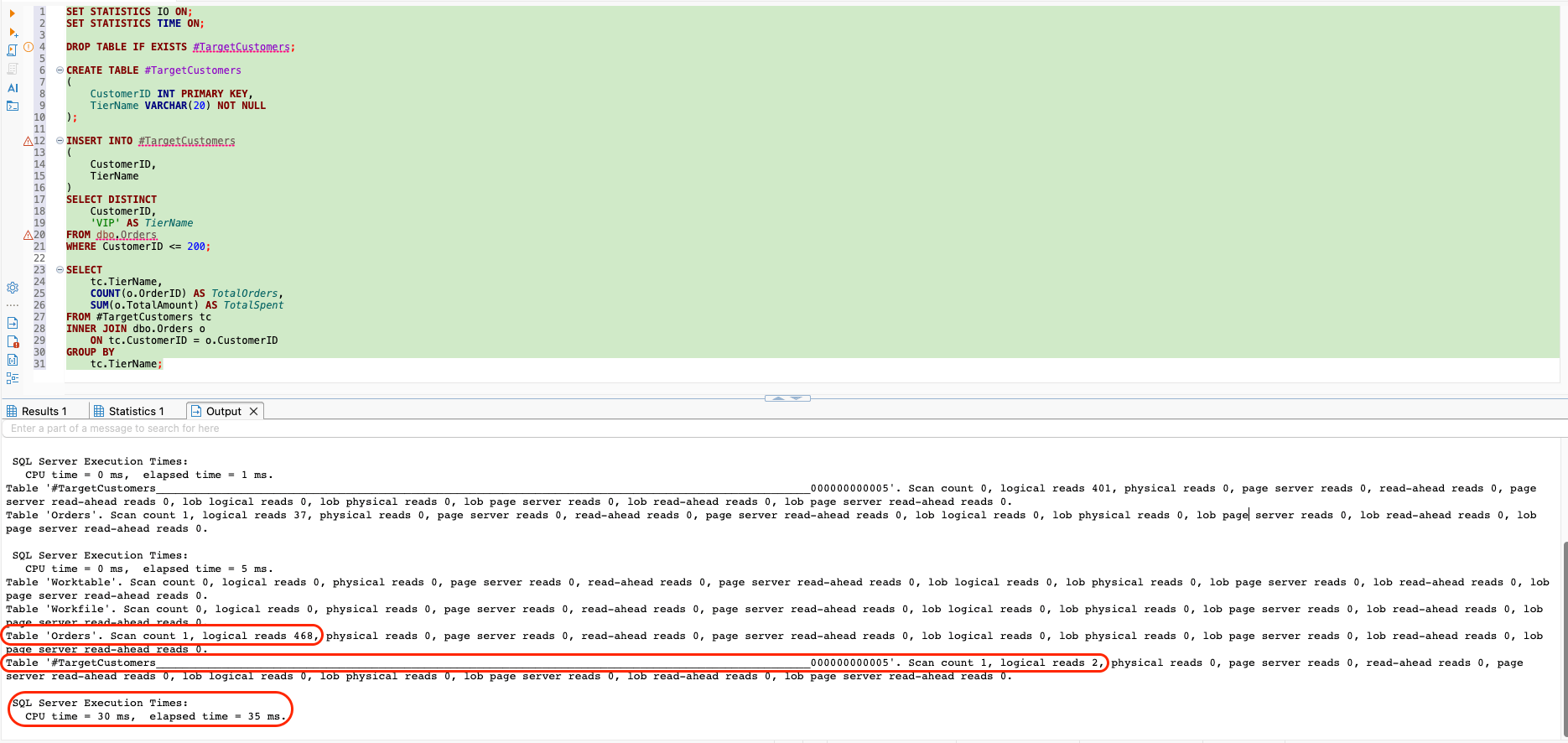
We will see how this performance metrics change when we shift to table variable.
Using a table variable to solve the problem
Now, we will try to solve the same problem with table variable and also check it's performance metrics. Before we jump to the query, we would take a look at different snippets of the query and try to understand what purpose it serves.
DECLARE @TargetCustomersTableVar TABLE
(
    CustomerID INT PRIMARY KEY,
    TierName VARCHAR(20) NOT NULL
);
This declares a table variable named TargetCustomersTableVar as we discussed earlier. It has the same columns as the temp table to ensure that we are doing exactly the similar things as earlier.
INSERT INTO @TargetCustomersTableVar
(
    CustomerID,
    TierName
)
SELECT DISTINCT
    CustomerID,
    'VIP' AS TierName
FROM dbo.Orders
WHERE CustomerID <= 200;
This inserts the same 200 customers into the table variable. Again, we are using DISTINCT since CustomerID is a primary key in the table variable.
SELECT
    tc.TierName,
    COUNT(o.OrderID) AS TotalOrders,
    SUM(o.TotalAmount) AS TotalSpent
FROM @TargetCustomersTableVar tc
INNER JOIN dbo.Orders o
    ON tc.CustomerID = o.CustomerID
GROUP BY
    tc.TierName;
This performs the same business operation as the temp table example.
So, the full query script would look like this:
SET STATISTICS IO ON;
SET STATISTICS TIME ON;

DECLARE @TargetCustomersTableVar TABLE
(
    CustomerID INT PRIMARY KEY,
    TierName VARCHAR(20) NOT NULL
);

INSERT INTO @TargetCustomersTableVar
(
    CustomerID,
    TierName
)
SELECT DISTINCT
    CustomerID,
    'VIP' AS TierName
FROM dbo.Orders
WHERE CustomerID <= 200;

SELECT
    tc.TierName,
    COUNT(o.OrderID) AS TotalOrders,
    SUM(o.TotalAmount) AS TotalSpent
FROM @TargetCustomersTableVar tc
INNER JOIN dbo.Orders o
    ON tc.CustomerID = o.CustomerID
GROUP BY
    tc.TierName;
Once the above query is run, we will get exactly the same output as earlier:
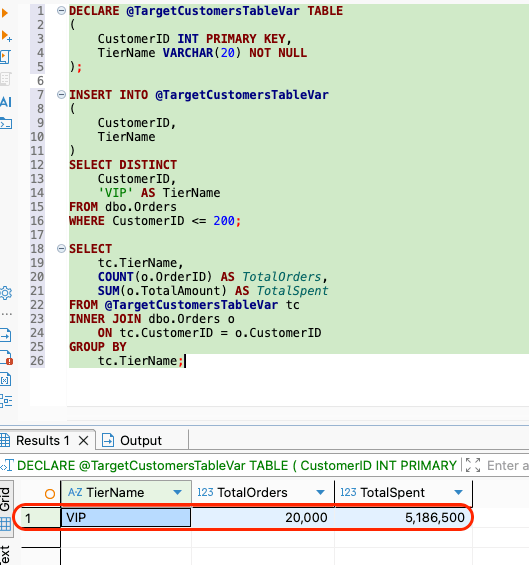
Performance metrics of the table variable
However, if we look at the performance metrics generated for the table variable approach, we can see that once again Orders table performed fine because it had an index on CustomerID column and resulted in exactly same 468 logical reads. However, the table variable also resulted in 2 logical reads like temp table. However, internally the SQL Server shows the table variable using an internal generated name as: #B938C83D. That does not mean that we created a temp table manually. It is just how the SQL Server reports the internal storage. However, the total execution time for table variable took around 40 milliseconds.
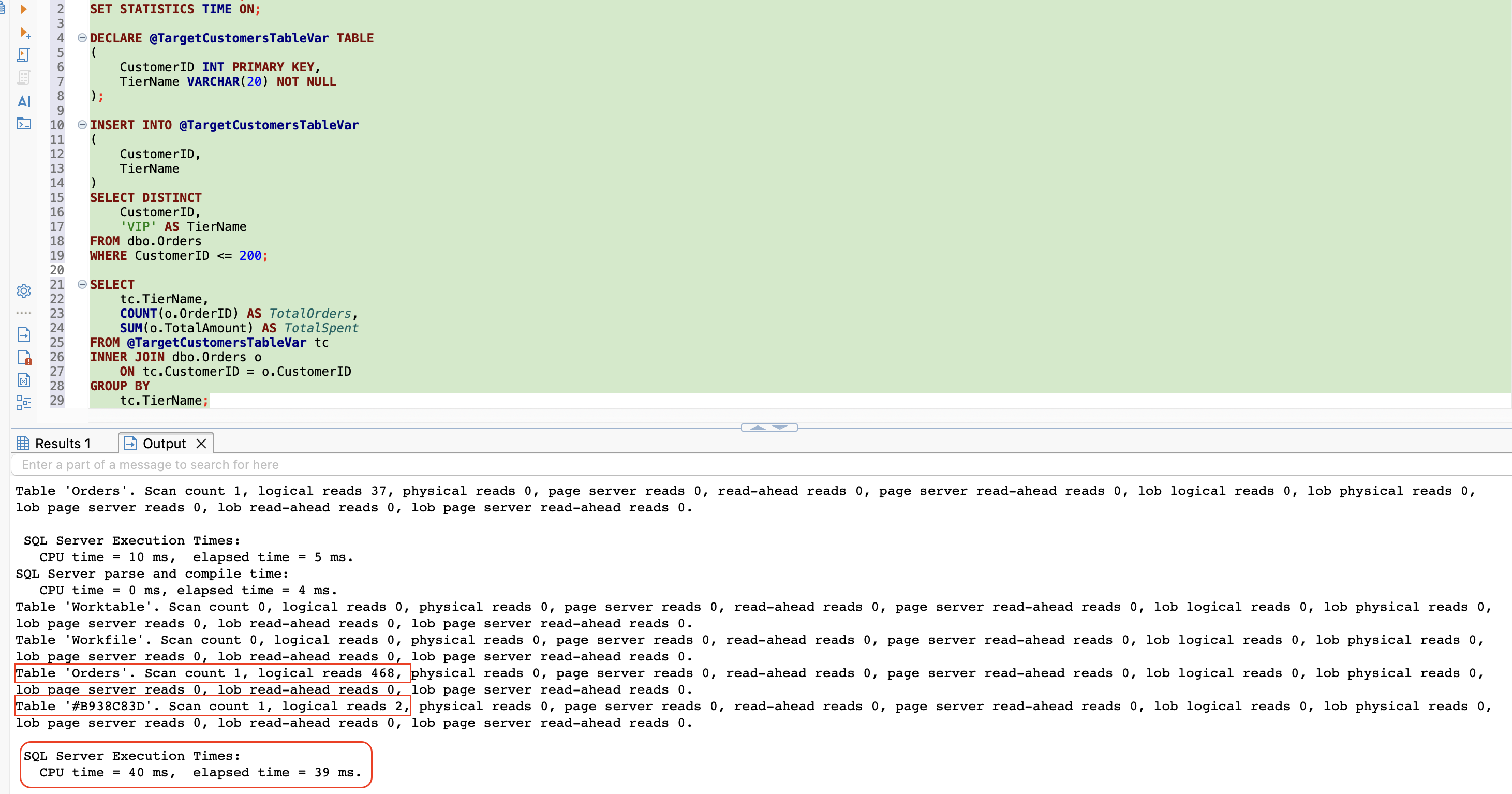
If we compare the final execution times of temp table versus table variable, we can see that temp table query execution took 30 milliseconds roughly which went up to 40 milliseconds (33% increment) for table variable query execution against a target row set of 200 records. If this record count was in millions as it would be in a production grade database, this time difference would have been increased manifolds resulting in high performance issues.
Conclusion
As a beginner, a simple rule that we should try to follow is to make sure that if the temporary data being dealt with is small and simple, we can approach it with a table variable. However, if the temporary data is large, joined, filtered, indexed or reused, we should try to use a temporary table instead. Temp tables give the SQL Server better information through statistics, which often leads to better execution plans for the queries. On the contrary, table variables are clean and convenient, but they can hide row-count information from the SQL Server's query optimizer.