

Introduction
Imagine that we are building a high-speed highway where all the cars can effortlessly travel at a very high cruising speed of say, 120 km/h. Now imagine that there is a single checkpoint on that highway that forces every single driver to roll down their window, hand over their identification card, wait for a guard to translate it into another language, and then proceed. In such case, our high-speed highway instantly becomes a traffic nightmare.
In Microsoft SQL Server, this exact scenario happens every day in many production grade code. It is commonly called an Implicit Conversion.
From a developer or database fresher standpoint, we often write queries that look perfectly logical but can accidentally force SQL Server to ignore its fastest optimization tools (such as Indexes) and read millions of rows of data one by one. In this comprehensive article, we will build a database completely from scratch using our local setup, recreate this performance bottleneck step-by-step, analyze exactly why it happens, and learn how to fix it.
Core concept
Before we start writing code, we must understand a few basic terminologies.
Index
Let us think of a database table equivalent to a massive 1,000-page textbook. If we want to find a specific chapter in this book, we don't start on page 1 and read every single page until we find it. Instead, what we do is flip to the table of contents at the front of the book, find the specific chapter name and see on which page it is and jump straight there. Just like we can find a chapter on a massive textbook in two different ways, similarly, we can find data in a database in two different ways:
- Table scan or index scan: This is like starting from page 1 and checking every single page until we find the specific chapter we are looking for. This method works, but it can be slow because the database has to look through a lot of data (i.e., every single row).
- Index seek: This is like going to the table of contents at the beginning of the textbook, finding where our specific chapter is located, seeing that it is on page 412, and jumping directly to that page. This is much faster because SQL Server already has a sorted lookup structure that tells it where the matching data is. SQL Server can use that index to quickly jump to that row where the data matches.
Data type precedence
We should be aware that SQL Server is highly strict about it's data types. If we ever try to compare a number (like 123) with a piece of text (like '123'), SQL Server cannot compare them directly. It has to convert one of them to the other data type so that they can be compared for and matched for.
SQL Server uses a strict rulebook called Data Type Precedence. This rulebook defines that numbers will always have higher priority than text. Therefore, if we try to compare a text column to a number, SQL Server will never turn the number into text. Instead, it will forcibly convert every single piece of text in our database column into a number on the fly.
Even if we have setup proper index (as discussed earlier), this can still make it fail because the data being compared/referred is now converted. Instead of jumping directly to the matching rows using an index seek (discussed above), it may need to convert many or all rows first into number and then compare them. That can turn a fast query into a very slow scan.
Setting up the local environment
Let's build a clean, isolated playground inside our database where we will create a table representing a user directory. We will add a fast index to it and fill it with 50,000 rows of mock data so that we can test performance realistically.
Creating the table
Just as we discussed above in our example scenarios to understand the basic terminologies, we need a table which must have a column storing a text data. This column will be indexed too. The following script creates one such table in our local database:
CREATE TABLE EmployeeDirectory (
    EmployeeID INT IDENTITY(1,1) PRIMARY KEY,
    NationalIDCode VARCHAR(20) NOT NULL,
    FirstName VARCHAR(50),
    LastName VARCHAR(50),
    Department VARCHAR(50)
);
Creating the Index Seek
As we discussed above, we will create an index on this table against the column: NationalIDCode which will contain numeric value as text. Creating this index will help us establish the criticality of implicit conversion inspite of having index on the specific column. To create the index, we can use the following code snippet:
CREATE INDEX IX_EmployeeDirectory_NationalIDCode
ON EmployeeDirectory (NationalIDCode);
Data setup
A database table with 2 or 3 rows populated will always run instantly thereby masking the performance flaws. We will use a recursive Common Table Expression (CTE) which is essentially a high-speed database loop to inject around 50,000 mock rows instantly into the table we created above. For that, we can make use of the below query:
WITH RowGenerator AS (
    -- Anchor Member: Start our counter at 1
    SELECT 1 AS RowNum
    UNION ALL
    -- Recursive Member: Keep adding 1 to the previous number
    SELECT RowNum + 1
    FROM RowGenerator
    WHERE RowNum < 50000
)
INSERT INTO EmployeeDirectory (NationalIDCode, FirstName, LastName, Department)
SELECT
    CAST(100000 + RowNum AS VARCHAR(20)), -- Turns the number into a string like '100001'
    'Employee_FN_' + CAST(RowNum AS VARCHAR(10)),
    'Employee_LN_' + CAST(RowNum AS VARCHAR(10)),
    'Engineering'
FROM RowGenerator
OPTION (MAXRECURSION 0);
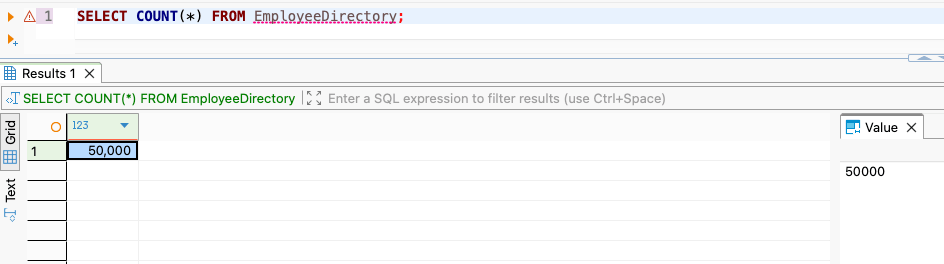
Once the script execution completes, we can verify the count of records in our table using the following query:
SELECT COUNT(*) FROM EmployeeDirectory;
The result should confirm there are 50,000 rows now:
Turning on performance metrics
To establish the problem scenario and the solution/workaround, we cannot rely on a gut feeling. We need a solid evidence to prove that the problem could be reproduced and solved. To achieve that, we need to enable the performance metrics in our database to ensure that it collects all the performance data and reveals before us so that we can reproduce the issue and justify our solution. To enable performance metrics, we need to run this command in our script editor window:
SET STATISTICS IO ON;
SET STATISTICS TIME ON;
Reproducing the Problem Scenario
Now, if we remember, we were talking about implicit conversion which means converting a data type from one form to the other. To reproduce the scenario in our local database and collect the performance metrics, we can do so using the NationalIDCode column of our EmployeeDirectory table which stores numeric code in text (VARCHAR) format. To do the same, we can run the following query. Clearly, we can seee that we are comparing the column value of NationalIDCode which stores text against pure numeric value which would need a data type conversion.
SELECT EmployeeID, NationalIDCode, FirstName, LastName
FROM EmployeeDirectory
WHERE NationalIDCode = 125432;
Once we run the above query in our SQL editor, we should be able to see the result along with the performance metrics as follows:
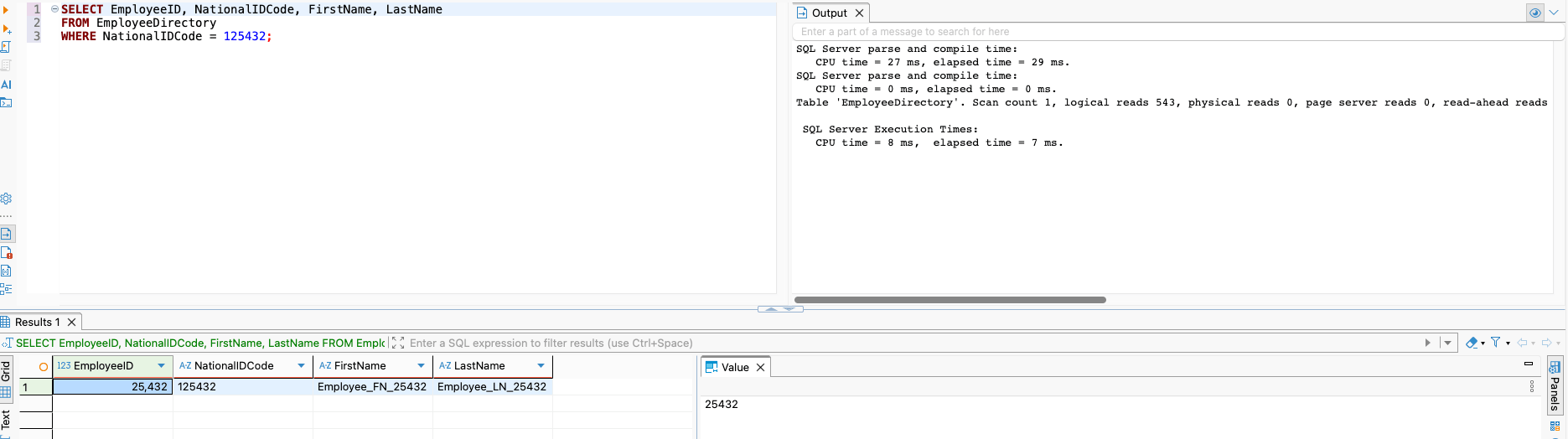
We will take a pause here to analyze what happens internally when we run this query into our editor. Since the data type precedence of SQL server defines that numbers have more precedence than text, SQL Server cannot simply treat 125432 as text. Instead, it rewrites our query internally behind the scenes to look like this:
SELECT EmployeeID, NationalIDCode, FirstName, LastName
FROM EmployeeDirectory
WHERE CONVERT(INT, NationalIDCode) = 125432;
Since it has to run a mathematical conversion function on our text column, it can no longer look at the sorted index values which we created to improve the look up performance. It is now forced to wake up, read every single one of the 50,000 rows, convert that row's text code into an integer, check if it matches with the provided integer value, and then move to the next row.
Now, if we take a look at the performance metrics, it reads out that:
logical reads 543
which simply means that SQL Server had to touch 543 data pages (i.e., memory blocks) to scan the entire dataset and find out our result.
Solution to improve the execution performance
As we mentioned earlier and saw right above, the index seek is not used by SQL Server if the indexed column undergoes data type conversion. So, the best way to not engage in such mistakee by ensuring that we use the right data type during value comparishons. If we had not converted the text column value to integer for comparison and rather compared the column value against same value in text, the performance metrics would have looked perfect as below:
Editor: No image, needs upload
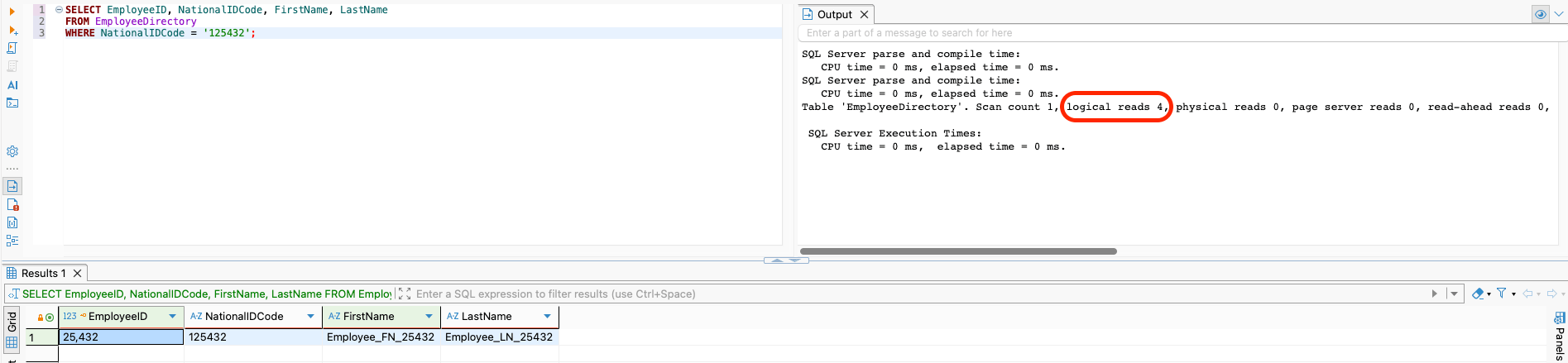
This happens because as there is no implicit conversion this time, so the existing index seek can be used by SQL Server to scan and find the right data much easily. The execution plan clearly reveals that only 4 pages were read to find the actual result.
Summary
We should always ensure to avoid implicit conversion of data types in production environment to let SQL Server make full use of the indexes in place. If an application framework (like Java, C#, or Node.js) maps an input variable to a database query, we must ensure that the application data type explicitly matches the database schema type. Also when writing manual ad-hoc T-SQL validation scripts, we must always place string variables within single quotes. We should not wait until production to find performance issues. We must run our queries locally during development and look closely for any index scan behaviors or yellow warning flags on columns where an index clearly exists.
