

Working with data in SQL Server is rarely clean. Even in well-designed systems, data often arrives in inconsistent formats such as numbers stored as text, unexpected characters in numeric columns, or poorly formatted values coming from external systems.
For example, I once worked on a reporting pipeline where everything was running smoothly until a scheduled report suddenly failed. The issue was not complex logic or performance but a single value, “N/A”, inside a numeric column imported from an external system. That one value broke the entire process.
This is a common problem in real-world systems, and SQL Server provides safe conversion functions like TRY_PARSE and TRY_CONVERT to handle such cases. Instead of failing queries when conversion is not possible, these functions return NULL and allow execution to continue safely.
However, the real value of these functions is not just preventing errors but using their output to build resilient data processing logic.
Why Safe Conversion Matters in Real Systems
Before understanding TRY_PARSE and TRY_CONVERT, it is important to see why safe conversion is needed. In many cases, developers perform direct conversions in aggregations or transformations, assuming data is clean. However, this assumption often leads to failures when even a single invalid value exists.
Consider a scenario where we try to calculate a sum of values stored as text using a direct conversion:
SELECT SUM(CONVERT(INT, Amount))
FROM (VALUES ('100'), ('200'), ('ABC')) AS Sales(Amount);
This query fails because SQL Server attempts to convert all values using CONVERT. While '100' and '200' are valid integers, the value 'ABC' cannot be converted, which results in a runtime error

This demonstrates a common issue in real systems where data comes from external sources such as CSV files, APIs, staging tables, or user input. Even a single invalid record can break an entire pipeline if proper handling is not implemented.
TRY_PARSE: When and How It Actually Helps
TRY_PARSE is used to convert string values into numeric or date types, especially when the input may contain culture-aware or loosely formatted data. In real-world scenarios, it is often used for validation rather than simple conversion.
To understand its behavior, consider two cases where one value is valid and the other is invalid.
SELECT TRY_PARSE('150' AS INT) AS Result;
SELECT TRY_PARSE('Test' AS INT) AS Result;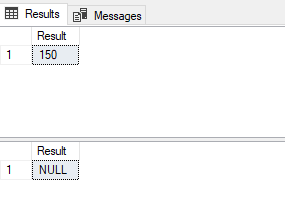
In the first case, the value '150' is successfully converted into an integer, so the result returned is 150. In the second case, the value 'Test' cannot be converted, so SQL Server does not throw an error. Instead, it returns NULL.
This behavior is important because it ensures that queries do not fail when unexpected data is encountered. Instead, invalid values are safely converted into NULL, allowing the rest of the query to continue execution.
Real Use Case: Validating Imported Data Before Processing
In real systems, data is often imported from external sources such as CSV files or APIs. These datasets frequently contain inconsistent or invalid values. To simulate this scenario, a sample Employees table is created where the Age column is stored as text instead of a numeric type.
CREATE TABLE Employees (
    Name VARCHAR(50),
    Age VARCHAR(50)
);

INSERT INTO Employees VALUES
('John', '28'),
('Emily', 'Thirty'),
('Michael', '45'),
('Sophia', 'Unknown');
In this dataset, some values such as 28 and 45 are valid numeric values, while others such as Thirty and Unknown are invalid and cannot be converted into integers.
To identify these differences, we apply TRY_PARSE to classify each record based on whether conversion is possible.
SELECT
    Name,
    Age,
    CASE
        WHEN TRY_PARSE(Age AS INT) IS NULL THEN 'Invalid Age'
        ELSE 'Valid Age'
    END AS ValidationStatus
FROM Employees;
The result of this query clearly separates valid and invalid records. John and Michael are classified as Valid Age because their values can be converted into integers. Emily and Sophia are classified as Invalid Age because their values cannot be converted.
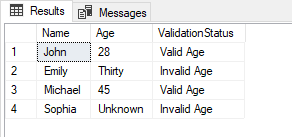
This demonstrates how TRY_PARSE can be used not only for conversion but also for data quality validation before inserting records into production systems.
Isolating Bad Records for Correction
After identifying invalid values, the next step is often to isolate those records so they can be reviewed or corrected. This is commonly used in ETL workflows where bad records are separated before loading data into reporting systems.
SELECT *
FROM Employees
WHERE TRY_PARSE(Age AS INT) IS NULL;
This query returns only the rows where conversion fails. Based on the sample data, Emily and Sophia are returned because their Age values ('Thirty' and 'Unknown') cannot be converted into integers.
John and Michael are not included because their values are valid numeric strings and successfully pass the conversion check.
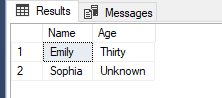
This approach is useful in data processing pipelines because it allows developers to separate problematic records instead of allowing them to silently affect downstream operations.
TRY_CONVERT: The Practical Workhorse
While TRY_PARSE is useful in specific scenarios, TRY_CONVERT is the function most commonly used in production systems. It is faster, fully native to SQL Server, and more stable in enterprise environments. Unlike TRY_PARSE, it does not depend on CLR integration, which makes it more reliable in restricted configurations.
Basic Behavior of TRY_CONVERT
To understand TRY_CONVERT, consider two simple cases where one value is valid and the other is invalid.
SELECT TRY_CONVERT(INT, '300') AS Result;
SELECT TRY_CONVERT(INT, 'XYZ') AS Result;
In the first case, the value '300' is successfully converted into an integer, so the result is 300. In the second case, the value 'XYZ' cannot be converted, so SQL Server returns NULL instead of throwing an error.
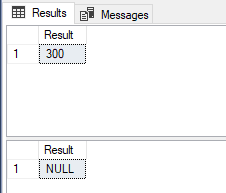
This ensures that queries continue execution even when invalid data exists.
Real Scenario: Preventing Report Failure in Aggregations
In reporting systems, invalid data can break aggregations if not handled properly. TRY_CONVERT ensures that only values successfully converted into integers are included in the calculation, while invalid values are automatically ignored as NULL.
We expect only valid numeric ages (28 and 45) to be included, while invalid values will be ignored.
SELECT AVG(TRY_CONVERT(INT, Age)) AS AverageAge
FROM Employees;
In this case, John (28) and Michael (45) are the only valid contributors. Emily and Sophia are ignored because their values cannot be converted and become NULL.
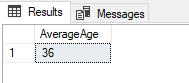
The calculation is therefore based only on valid values (28 and 45). In SQL Server, the AVG function returns 36 as the final result due to integer-based calculation behavior in this context. This ensures that reports do not fail due to invalid data and still return meaningful results.
Real Scenario: Filtering Valid Data
In data preparation workflows, it is often necessary to filter only valid records before further processing.
SELECT *
FROM Employees
WHERE TRY_CONVERT(INT, Age) IS NOT NULL;
This query returns only John and Michael because their Age values can be successfully converted into integers. Emily and Sophia are excluded because their values are invalid.
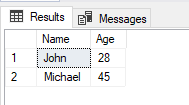
This pattern ensures that only clean data moves forward in processing pipelines.
Real Scenario: Data Cleanup During Transformation
In some cases, invalid values must be replaced with default values to ensure consistency in reporting systems.
SELECT
    Name,
    ISNULL(TRY_CONVERT(INT, Age), 0) AS SafeAge
FROM Employees;
In this output, John and Michael retain their original values of 28 and 45, while Emily and Sophia are converted into 0 because their values cannot be parsed.
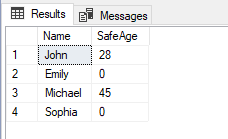
This ensures that downstream systems receive consistent and predictable data.
Performance Observation: TRY_PARSE vs TRY_CONVERT
To compare performance, SQL Server execution statistics can be enabled while running both functions on the same dataset.
SET STATISTICS TIME ON;

SELECT TRY_PARSE(value AS INT)
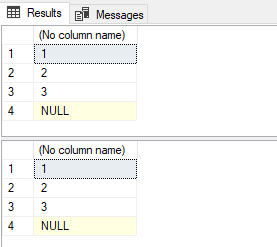
FROM (VALUES ('1'), ('2'), ('3'), ('ABC')) AS Test(value);

SELECT TRY_CONVERT(INT, value)
FROM (VALUES ('1'), ('2'), ('3'), ('ABC')) AS Test(value);

SET STATISTICS TIME OFF;
Both TRY_PARSE and TRY_CONVERT return the same result in this example, successfully converting numeric values while returning NULL for invalid input ('ABC'). This demonstrates that both functions safely handle invalid data and prevent query failures.
However, performance differences cannot be observed from the result set alone and must be evaluated using execution statistics such as SET STATISTICS TIME.
Internal Behavior (Why This Matters)
TRY_PARSE is designed for culture-aware parsing and relies on the .NET CLR, which makes it flexible but slower. TRY_CONVERT, on the other hand, is fully integrated into SQL Server and behaves consistently across environments, which makes it more suitable for large-scale and production workloads.
When NOT to Use These Functions
Although both functions are useful, they should be used carefully in certain situations. Using them inside JOIN conditions or large filtered WHERE clauses can negatively affect performance because they may prevent proper index usage.
It is also important to understand that NULL values produced by these functions are not just harmless results but indicators of underlying data quality issues that should not be ignored.
Practical Decision Guide
In most real-world scenarios, TRY_CONVERT should be used as the default choice because of its performance and consistency. TRY_PARSE should only be used when culture-specific or special format parsing is required. In all cases, NULL results should be treated as meaningful signals of data issues rather than ignored or overlooked.
Final Thoughts
In real systems, data is rarely perfect. The goal is not to assume clean input but to design systems that can handle imperfect data safely and consistently.
TRY_PARSE and TRY_CONVERT are defensive tools that help prevent failures, isolate bad data, and ensure stable processing pipelines. When used correctly, they improve reliability and make SQL Server systems more predictable in production environments.
