

Introduction
SQL Server includes several built-in mathematical functions that allow developers to perform complex calculations directly within queries. Among these are trigonometric functions such as SIN(), COS(), and TAN(), which are useful in scenarios involving engineering calculations, geographic data processing, simulations, and analytics.
Although these functions are straightforward to use, developers occasionally encounter unexpected results when working with angles and trigonometric calculations. In many cases, the issue is not with the function itself but with how SQL Server handles floating-point precision and data type conversions.
This article walks through several practical examples demonstrating how trigonometric calculations behave in SQL Server. We will also explore a few common pitfalls and show how small adjustments such as choosing the correct data type or rounding results can prevent confusing outputs.
Understanding Angle Units in SQL Server
Trigonometric functions in SQL Server operate using radians, not degrees. Because many real-world calculations are expressed in degrees, it is usually necessary to convert degrees into radians before calling functions like COS().
The mathematical relationship between degrees and radians is:
Radians = Degrees × p / 180
In T-SQL, there are two common ways to perform this conversion:
- Using the built-in RADIANS() function
- Using the mathematical formula together with PI()
Both approaches are valid and produce the same result when used correctly.
Example 1: Calculating Cosine Values
Let’s begin with a simple example that calculates cosine values for several angles. In this example, the conversion from degrees to radians is done using the mathematical formula.
SELECT
    ROUND(COS(0 * PI() / 180.0), 3)   AS Cos_0,
    ROUND(COS(45 * PI() / 180.0), 3)  AS Cos_45,
    ROUND(COS(90 * PI() / 180.0), 3)  AS Cos_90,
    ROUND(COS(135 * PI() / 180.0), 3) AS Cos_135,
    ROUND(COS(180 * PI() / 180.0), 3) AS Cos_180;
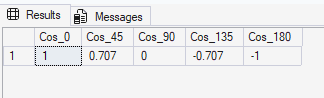
The output shows the expected cosine values for the selected angles. For example, the cosine of 0° equals 1, the cosine of 45° is approximately 0.707, and the cosine of 90° becomes 0 after rounding. These results confirm that converting degrees to radians using the mathematical formula works correctly in SQL Server.
The same calculation can be performed using SQL Server’s RADIANS() function.
SELECT
    ROUND(COS(RADIANS(0.0)), 3)   AS Cos_0,
    ROUND(COS(RADIANS(45.0)), 3)  AS Cos_45,
    ROUND(COS(RADIANS(90.0)), 3)  AS Cos_90,
    ROUND(COS(RADIANS(135.0)), 3) AS Cos_135,
    ROUND(COS(RADIANS(180.0)), 3) AS Cos_180;
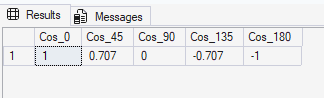
The results are identical to the previous query. This confirms that the RADIANS() function performs the same degree-to-radian conversion internally. Using RADIANS() often makes the query easier to read because the conversion logic is handled directly by SQL Server.
When Precision Becomes Visible
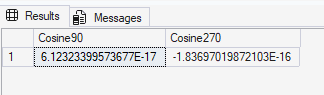
Sometimes developers notice that trigonometric calculations produce values that appear slightly incorrect. For example, mathematically the cosine of 90° should be exactly 0, but SQL Server may return a value that is extremely close to zero instead.
Consider the following query:
SELECT
    COS(RADIANS(90.0))  AS Cosine90,
    COS(RADIANS(270.0)) AS Cosine270;
The output may display extremely small numbers in scientific notation, such as 6.12323399573677E-17 or -1.83697019872103E-16.
In practical applications, applying rounding usually resolves this issue.
SELECT
    ROUND(COS(RADIANS(90.0)), 5)  AS Cosine90,
    ROUND(COS(RADIANS(270.0)), 5) AS Cosine270;
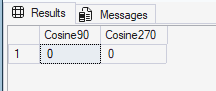
Applying the ROUND() function removes the tiny floating-point differences that appear in the previous query. After rounding, the cosine values for 90° and 270° appear as 0, which aligns with the expected mathematical results and produces cleaner output for reporting or analysis.
How Data Types Affect Trigonometric Calculations
Another subtle issue appears when integer values are passed to conversion functions such as RADIANS().
Consider the following query:
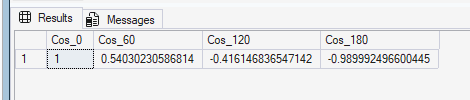
SELECT
    COS(RADIANS(0))   AS Cos_0,
    COS(RADIANS(60))  AS Cos_60,
    COS(RADIANS(120)) AS Cos_120,
    COS(RADIANS(180)) AS Cos_180;
Although this query runs successfully, the results may not match the expected cosine values for these angles. This occurs because the behavior of the RADIANS() function depends on the data type of the input value. When integers are supplied, SQL Server evaluates the expression differently compared to decimal inputs.
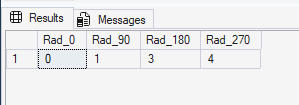
To illustrate this difference, we can inspect the output of the RADIANS() function directly.
Examining the Output of RADIANS()
Using decimal values
SELECT
    RADIANS(0.0)   AS Rad_0,
    RADIANS(90.0)  AS Rad_90,
    RADIANS(180.0) AS Rad_180,
    RADIANS(270.0) AS Rad_270;
When decimal values are used, SQL Server returns accurate floating-point radian values. For example, 90 degrees converts to approximately 1.570796 radians, which is the correct mathematical value. Using decimal inputs ensures that trigonometric calculations maintain proper precision.

Using integer values
SELECT
    RADIANS(0)   AS Rad_0,
    RADIANS(90)  AS Rad_90,
    RADIANS(180) AS Rad_180,
    RADIANS(270) AS Rad_270;
When integer values are supplied as input, SQL Server may perform the calculation using integer data types before converting the result to a floating-point value. This can lead to loss of precision during the conversion process. For this reason, it is generally recommended to use decimal or floating-point values when performing trigonometric calculations.
A Practical Scenario
Imagine a table storing directional measurements in degrees—for example, sensor readings from navigation equipment.
CREATE TABLE SensorAngles
(
    ReadingID INT IDENTITY PRIMARY KEY,
    AngleDegrees DECIMAL(6,2)
);
Sample data might look like this:
INSERT INTO SensorAngles (AngleDegrees)
VALUES
(0.0),
(90.0),
(180.0),
(270.0);
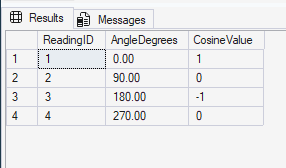
We can calculate the cosine of each measurement like this:
SELECT
    ReadingID,
    AngleDegrees,
    ROUND(COS(RADIANS(AngleDegrees)), 4) AS CosineValue
FROM SensorAngles;
This query calculates the cosine value for each angle stored in the SensorAngles table. Because the angle column is defined as a decimal data type and the results are rounded, the output produces clean and predictable values for common angles such as 0°, 90°, 180°, and 270°.
These examples illustrate how important factors such as angle conversion, floating-point precision, and input data types can influence the results of trigonometric calculations in SQL Server.
Best Practices for Using Trigonometric Functions in T-SQL
To reduce the likelihood of confusing results when working with trigonometric calculations in SQL Server, consider the following guidelines.
Use decimal values for angles
Passing floating-point values into conversion functions ensures that calculations maintain the correct precision.
Example:
RADIANS(45.0)
instead of
RADIANS(45)
Round results when presenting data. Floating-point precision can produce extremely small numbers close to zero. Applying ROUND() helps present cleaner results.
Be aware of floating-point behavior. Tiny rounding differences are normal in mathematical computations involving trigonometric functions. Test calculations with known values, and when writing mathematical queries, verify your results using angles where the expected trigonometric value is well known (for example 0°, 90°, or 180°).
Conclusion
SQL Server’s trigonometric functions provide a convenient way to perform mathematical calculations directly within T-SQL queries. However, developers should remain aware of how floating-point arithmetic and data types influence the results of these calculations.
Unexpected values often appear when angles are not converted correctly or when floating-point precision reveals tiny rounding differences. By consistently using decimal inputs, rounding output values where appropriate, and understanding how SQL Server evaluates mathematical expressions, developers can avoid misleading results and build more reliable calculations.
With these simple practices in place, trigonometric functions can be used confidently in analytical queries, scientific calculations, and data processing tasks.
