
2026-02-09
493 reads
2026-02-09
493 reads

With SQL Server 2012 Microsoft introduced the AlwaysOn Availability Group feature, and since then many changes and improvements have been made. This article is an update to another article, and will cover the prerequisites and steps for installing AlwaysOn in your SQL Server 2019 environment. Prerequisites Before implementing your AlwaysOn Availability Group (AG), make sure […]
2025-12-24 (first published: 2025-11-25)
1,152 reads

Knowing the usage from all workloads is definitely better than focusing on only the primary or a single secondary. But what if I want to make more informed decisions, incorporating row counts, size, and index columns into this output?
2025-10-27
Spotting synchronization disconnects between a primary and a secondary data center in a distributed availability group configuration can be hard, so here are valuable tools to help you with it
2025-10-10
1,306 reads

Synchronous replicas in SQL Server Availability Groups promise no data loss, but they don’t promise zero delay; under heavy load they can still fall behind. This article shows how to measure and track that hidden replication delay using SQL Server performance counters, so you can see how well your system keeps up during IO‑intensive operations and plan maintenance more safely.
2025-09-17
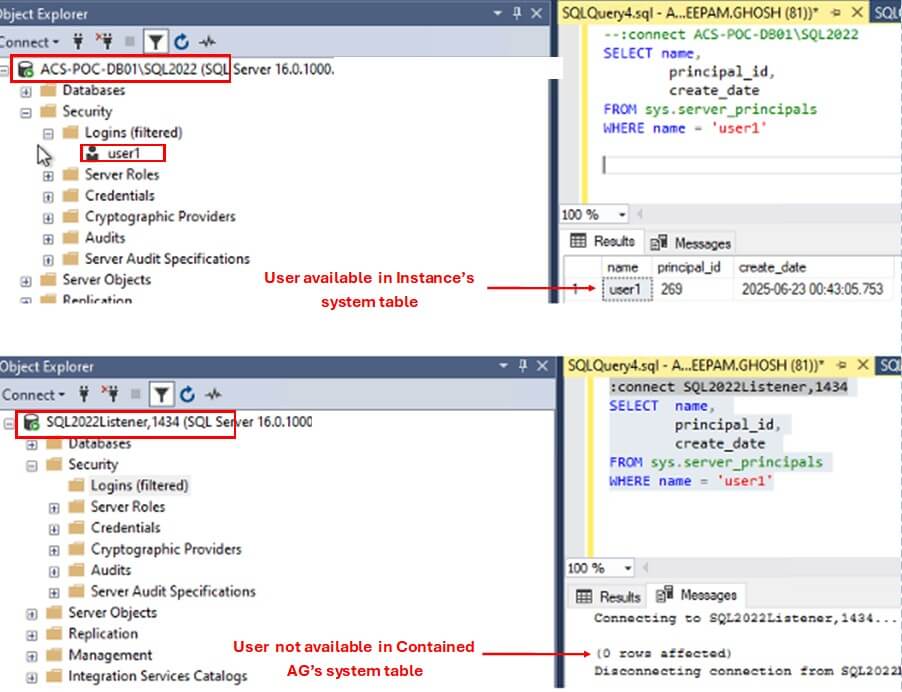
SQL Server 2022 introduced a new feature called Contained Availability Groups. It allows the Database Administrators to effectively manage the Server Level objects, such as Logins, SQL Agent jobs, etc. in an HA environment. In today's article, we will learn about this new feature of SQL Server. The Challenge of Managing Server Objects in Availability […]
2025-08-20
9,443 reads
A customer has a database that is already set up in a SQL Server Availability Group. Since this database hosts sensitive data, there is a need to encrypt the primary and all secondary replicas of the data. In this article, we will walk through how this can be done.
2025-08-13
This article describes the process to create a read-scale cross-platform SQL Server Availability Group where the primary is Linux and the secondary is Windows.
2025-07-23
370 reads
This article shows the final step of an availability group creation, specifically for a distributed clusterless one.
2025-07-14
4,587 reads
2025-05-05
448 reads
By HeyMo0sh
One of the biggest challenges I’ve faced in cloud operations is maintaining clear visibility...
By Steve Jones
I come to Heathrow often. Today is likely somewhere close to 60 trips to...
By Brian Kelley
If your organization is spending money, then meaningful results are a must. Pen testing...
Comments posted to this topic are about the item Restoring On Top II
Comments posted to this topic are about the item SQL Art 2: St Patrick’s...
Comments posted to this topic are about the item Breaking Down Your Work
I have a database, DNRTest, that has a number of tables and other objects in it. The other day, I was trying to mock up a test and ran this code on the same server:
-- run yesterday
CREATE DATABASE DNRTest2
GO
USE DNRTest2
GO
CREATE TABLE NewTable (id INT)
GO
Today, I realize that I need a copy of DNRTest for another mockup, and I run this:
-- run today
USE Master
BACKUP DATABASE DNRTest TO DISK = 'dnrtest.bak'
GO
RESTORE DATABASE DNRTest2 FROM DISK = 'dnrtest.bak' WITH REPLACE
What happens? See possible answers