Alter LDF File Max Size
-
Hi,
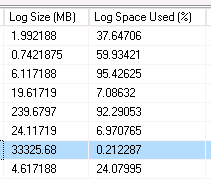
The product I support does a FULL backup nightly as well as log backup every hour. The ldf file is coming out as 33gb, but only ~.21% used space. I'd like to drop the max size of this ldf as 33gb is much too large and it causing issues with out server's disaster recovery backups.
I was able to get the ldf file down in size to 1gb but the next time the log backup ran, it went right back up to 33. What is the correct approach to get this file down to 1gb and for it to not revert back to 33gb?
Highlighted row is the database in question.

Thanks,
Jennifer - jstites - Monday, October 9, 2017 1:02 PM
The log file is used during index rebuilds and reorganizes. That could be the reason or you could have code that has many-to-many joins which is a fancy name for accidental cross joins. You need to determine what is causing the log file growth and fix it before doing any additional shrinks.
--Jeff Moden
RBAR is pronounced "ree-bar" and is a "Modenism" for Row-By-Agonizing-Row.
First step towards the paradigm shift of writing Set Based code:
________Stop thinking about what you want to do to a ROW... think, instead, of what you want to do to a COLUMN.Change is inevitable... Change for the better is not.
Helpful Links:
How to post code problems
How to Post Performance Problems
Create a Tally Function (fnTally) -
you can get some information about growths by looking at the default trace:
--history
DECLARE @path NVARCHAR(260);
SELECT @path = REVERSE(SUBSTRING(REVERSE([path]), CHARINDEX('\', REVERSE([path])), 260)) + N'log.trc'
 FROM  sys.traces
 WHERE is_default = 1;
SELECT td.DatabaseName, td.Filename, te.name AS Event, (IntegerData*8)/1024 AS Change_MB, td.StartTime, td.EndTime,
td.LoginName, td.HostName, td.ApplicationName, td.spid, td.ClientProcessID, td.IsSystem, td.SqlHandle, td.TextData
FROM sys.fn_trace_gettable(@path, DEFAULT) td
INNER JOIN sys.trace_events te ON td.EventClass = te.trace_event_id
WHERE td.EventClass = 93 --Log File autogrowth
ORDER BY td.StartTime;
This should help narrow down when and who is growing the log file in question. -
Hi Chris,
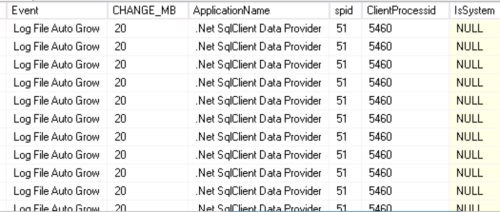
Thanks for the handy query. Can you tell me what it means that the majority of my data is coming from .Net SqlClient Data Provider? Does this mean I have issues with my indexes?
From Query:
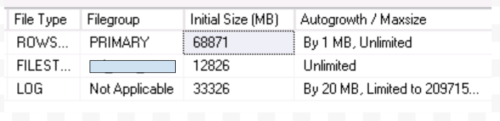
From DB properties:
Thanks,
Jennifer -
I'd first have to say that your growth setting is very much too small. It's building a ton of VLFs (virtual log files) and that will make restores in an emergency situation a whole lot slower than they need to be.
Since the autogrowth was caused mostly by the same SPID, I have to say that's it quite likely that you have 1 piece of code out there that has the problem of many-to-many joins and it needs to be found and fixed.
--Jeff Moden
RBAR is pronounced "ree-bar" and is a "Modenism" for Row-By-Agonizing-Row.
First step towards the paradigm shift of writing Set Based code:
________Stop thinking about what you want to do to a ROW... think, instead, of what you want to do to a COLUMN.Change is inevitable... Change for the better is not.
Helpful Links:
How to post code problems
How to Post Performance Problems
Create a Tally Function (fnTally) -
Thanks for your help again. I was able to trace the problem back to a process we run by using the time stamps from the query you gave and our internal logs. I will investigate further to fix the problem. I appreciate your suggestions for how to improve the process.
Thanks
Jennifer - jstites - Monday, October 9, 2017 4:54 PM
for the rows that say ApplicationName = ".Net SqlClient Data Provider" that just means the application that is connecting to the database was written in a .Net language such as C#, it's a generic connection name. I'd focus more at the time and other columns to help determine what was running.
- Chris Harshman - Tuesday, October 10, 2017 10:12 AM
To add to what Chris stated above, it's also an important clue as to what to look for and where. It's telling you that the code is coming from outside the server and probably from front-end code. Since it's got such a horrible effect on things, I'd also strongly suspect that it's code produced by some ORM... probably Entity Framework or (worse) Linq2SQL.
--Jeff Moden
RBAR is pronounced "ree-bar" and is a "Modenism" for Row-By-Agonizing-Row.
First step towards the paradigm shift of writing Set Based code:
________Stop thinking about what you want to do to a ROW... think, instead, of what you want to do to a COLUMN.Change is inevitable... Change for the better is not.
Helpful Links:
How to post code problems
How to Post Performance Problems
Create a Tally Function (fnTally) -
Chris, decided to play with your code a bit:
WITH LogPath AS (
SELECT
  [path] = LEFT([path], LEN([path]) - (CHARINDEX('\', REVERSE([path])) - 1)) + N'log.trc'
FROM
  [sys].[traces]
WHERE
  [is_default] = 1
)
SELECT
  .[DatabaseName]
  , .[Filename]
  , [Event] = [te].[name]
  , [Change_MB] = ([IntegerData] * 8) / 1024
  , .[StartTime]
  , .[EndTime]
  , .[LoginName]
  , .[HostName]
  , .[ApplicationName]
  , .[spid]
  , .[ClientProcessID]
  , .[IsSystem]
  , .[SqlHandle]
  , .[TextData]
FROM
  [sys].[fn_trace_gettable]((SELECT [path] FROM [LogPath]), DEFAULT)
  INNER JOIN [sys].[trace_events] [te]
    ON .[EventClass] = [te].[trace_event_id]
WHERE
  .[EventClass] = 93 --Log File autogrowth
ORDER BY
.[StartTime]; - Lynn Pettis - Tuesday, October 10, 2017 10:48 AM
cool, I didn't know IntegerData had something useful in it 😉
- Chris Harshman - Tuesday, October 10, 2017 11:39 AM
That is straight from your code. I modified how you get the path for the default trace.
Viewing 11 posts - 1 through 11 (of 11 total)
You must be logged in to reply to this topic. Login to reply