

Introduction
We mostly get inclined to use/introduce MongoDB for JSON storing/processing in our database system and Elasticsearch for searching operations in JSON data. However, what we often tend to overlook is that in reality, PostgreSQL can actually act as both NoSQL store and a powerful search engine too. It also comes with ACID guarantees, transactions, joins and fewer moving parts.
Scope
In this article, we will see how to build:
- JSON document store
- full-text search engine
- fuzzy search system
- using ranking, filtering and performance tuning
For the entire scope of this article, we will be using only PostgreSQL.
Use Case Understanding
To proceed further, we need to first understand the use case we will be referring to in this article and prepare our environment accordingly. We will try to model a product catalog where attributes are dynamic. As we mentioned, since we will be using JSON structure here, a typical product catalog's JSON representation would look something like as mentioned below.
Assume that the store sells different kinds of smartphones and stores their information in brief details in their system (i.e., database).
{
  "id": "P1001",
  "name": "iPhone 15 Pro",
  "category": "mobile",
  "price": 129999,
  "brand": "Apple",
  "specs": {
    "ram": "8GB",
    "storage": "256GB",
    "camera": "48MP"
  },
  "tags": ["smartphone", "ios", "5g"]
}
This kind of product catalog structure is hard to model with traditional rigid PostgreSQL tables. So we will be using the JSONB data type column to accommodate the entire product catalog JSON representation in the same column.
Table Design
Next, we will try to create a table design which will help us store the information of different product catalogs into our database. We need the following in our table primarily to move on:
- product_id: which can be a randomly generated UUID to identify each product catalog entry uniquely,
- data: which will contain the JSON representation of the product catalog,
- created_at: which will store the timestamp of when this product catalog was registered into the system
Accordingly, we can come up with the following table creation query:
CREATE TABLE products (
    product_id UUID PRIMARY KEY DEFAULT gen_random_uuid(),
    data JSONB NOT NULL,
    created_at TIMESTAMP DEFAULT now()
);
Next, let's add a constraint or as we say, a safety check. This is optional though. But this is a good to have just to make sure that every product catalog JSON entered into the system comes with the "name" attribute in it. A product is not relevant if it doesn't have a name. So to add the constraint, all we need to make sure is that in the data column, we have an attribute as "name". To add the constraint logic, we can make use of the ? operator which is used with JSONB columns in PostgreSQL. The ? operator checks for if the node exists in the JSON data or not. So, jsonb_column ? 'key' means that the JSON value in the jsonb_column would be looked upon to check the existence of the node 'key'. If true, the data is persisted, else it would be rejected.
The constraint can be accordingly created using the following query:
ALTER TABLE products
ADD CONSTRAINT product_has_name
CHECK (data ? 'name');
Data Population
Next, we will populate some sample data into the table. We will insert 2 records into the products table to make sure that we have the required data to conduct the next steps and understand things better. To populate data into the table, we can make use of the following query:
INSERT INTO products (data) VALUES
('{
  "id": "P1001",
  "name": "iPhone 15 Pro",
  "category": "mobile",
  "price": 129999,
  "brand": "Apple",
  "specs": {"ram":"8GB","storage":"256GB"},
  "tags": ["ios","5g"]
}'),

('{
  "id": "P1002",
  "name": "Samsung Galaxy S24",
  "category": "mobile",
  "price": 89999,
  "brand": "Samsung",
  "specs": {"ram":"12GB","storage":"256GB"},
  "tags": ["android","5g"]
}');
Once the above query is run, we should see 2 records in our products table:

Data Validation
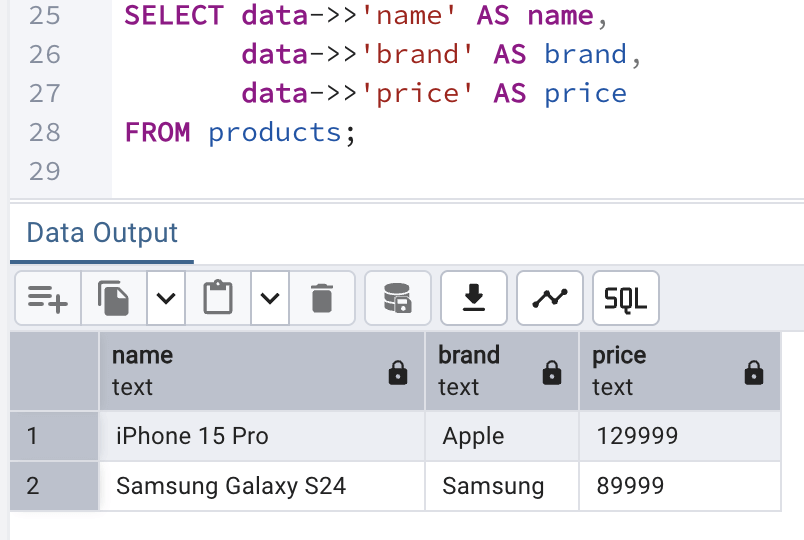
Now, we will validate once the data we entered into the database. We could have done that as shown above, but we can also do it in a better way where we can extract the name, brand and price from the data column of each record and show them in the output. To do so, we can make use of the following query:
SELECT data->>'name' AS name,
       data->>'brand' AS brand,
       data->>'price' AS price
FROM products;
The output looks like:
JSON Queries (in NoSQL style)
Now, we will see how we can use PostgreSQL like a document database where we can filter and query semi-structured data without rigid schemas, just like say MongoDB.
Filter by attribute
We can filter records by checking if the data contains specific key value pair. @> is a JSON containment operator. It checks for does this JSON contains the key/value pair. Just for comparison, this is equivalent to the following expression in MongoDB:
db.products.find({ brand: "Apple" })?To filter by attribute, we can have the following query:
SELECT *
FROM products
WHERE data @> '{"brand": "Apple"}';
Once the above query in run on the editor window, we can see that only 1 record gets qualified:
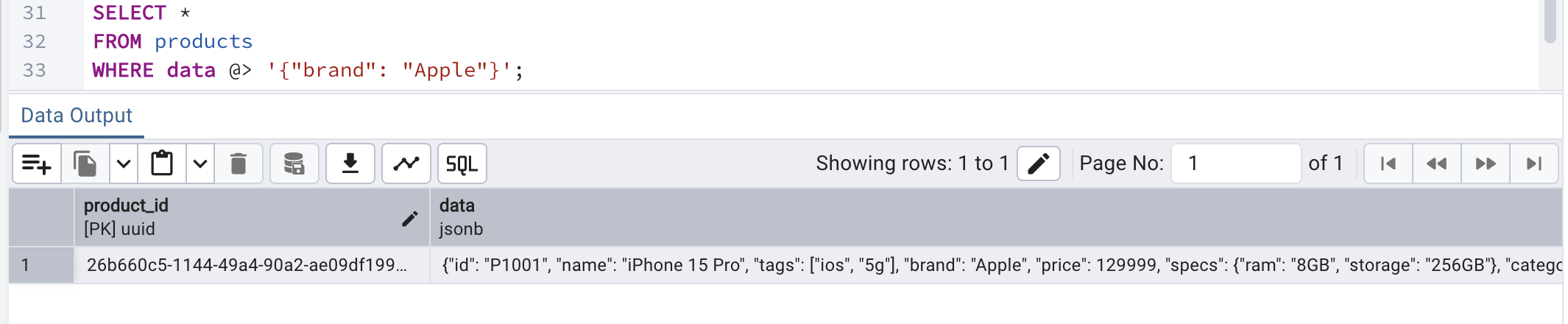
This way we can query documents directly without extracting columns first.
Nested attribute query
A NoSQL database shines at nested data query. However, PostgreSQL can shine as well. Nested data are those documents where a JSON attribute holds another JSON structured data inside it. In our product catalog sample data we just inserted earlier, nested data can be seen against "specs" where another JSON structure has been provided as a value against it.
To understand the query below to extract nested attribute from the JSON. This works as follows:
- -> navigates JSON objects
- ->> extracts text
This way we can query deeply nested structures, too.
SELECT *
FROM products
WHERE data->'specs'->>'ram' = '8GB';
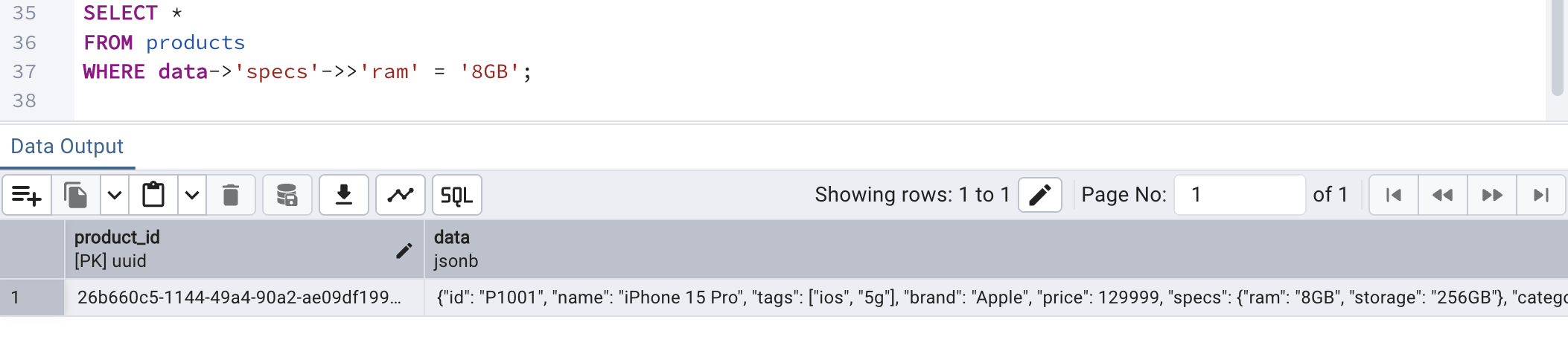
By running the above query, we can see the following output:
Array contains
What if we need to check for if a JSON array or object contains a key/value pair? In that case, we can make use of the following query. In this query,
- ? - this operator checks for if the JSON array or object contains a key/value pair
- the data JSON column has an attribute called tags which contains an array of String values
SELECT *
FROM products
WHERE data->'tags' ? '5g';
Running the above query should fetch both the records since both the products are having 5g as their tags:
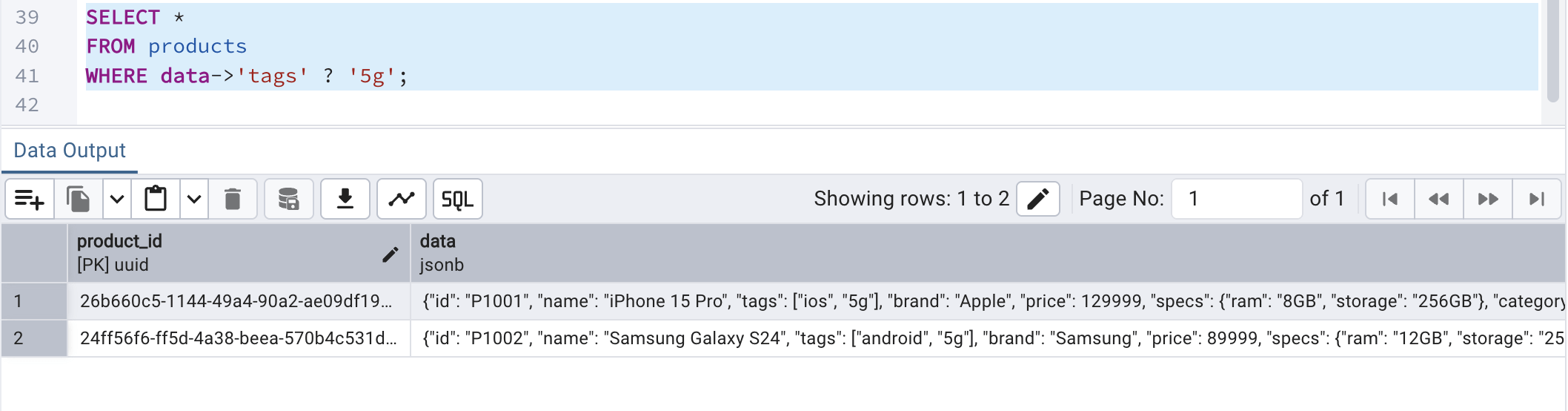
This ensures that PostgreSQL handles arrays inside JSON with full index support.
Index JSON For Speed
To make JSON queries faster and performance boosted, it is advised to create index on JSONB data column. Otherwise, JSON queries does full table scans which would impact the performance. GIN (Generalized Inverted Index) is a special PostgreSQL index type designed to efficiently search inside composite values like JSONB, arrays, and full-text data. Instead of indexing entire rows as single values, it indexes individual keys and elements within those values, making internal lookups much faster. We are using a GIN on the data JSONB column because the column stores structured JSON content that we frequently search inside (by keys or key–value pairs). A regular B-Tree index cannot efficiently index nested or composite JSON data, but GIN can index individual elements within the JSON document. The jsonb_path_ops option makes the index more compact and optimized specifically for containment queries like @>, improving lookup performance. This significantly speeds up read queries that filter based on JSON content, especially on large tables. The trade-off is slightly slower inserts and updates, but much faster search performance.
With GIN and jsonb_path_ops, PostgreSQL builds an inverted index of keys & values. This is what makes PostgreSQL production-grade NoSQL.
To achieve this, we can use the following query on the products table to have the index created:
CREATE INDEX idx_products_json
ON products USING GIN (data jsonb_path_ops);
Full-text Search Engine
Our next objective is to take this one step further by turning PostgreSQL into a search engine (like Elasticsearch).
Generated search column
A full-text search engine allows us to search large amounts of text intelligently by understanding words, not just matching exact strings. It can break text into tokens (words), ignore common words (like “the” or “and”), and even match related word forms (like “run” and “running”). In PostgreSQL, this is typically done using to_tsvector to convert text into a searchable format and indexing it with a GIN index for fast lookups.
By creating a GIN index on the generated tsvector (which we will do in the next part), PostgreSQL stores each word from the text separately in an inverted index structure. This allows the database to quickly find rows containing specific words without scanning the entire table. When a user searches using to_tsquery, PostgreSQL efficiently matches the query terms against the indexed tokens. This combination effectively turns the database into a lightweight full-text search engine, enabling fast and scalable text search directly within PostgreSQL.
To do this, we will make use of the following query provided, which:
- converts text into search tokens
- removes stop words
- normalizes words
- also auto-updates when the JSON content changes
To achieve this, we can use the following query:
ALTER TABLE products
ADD COLUMN search_vector tsvector GENERATED ALWAYS AS (
    to_tsvector('english',
        coalesce(data->>'name','') || ' ' ||
        coalesce(data->>'brand','') || ' ' ||
        coalesce(data->>'category','')
    )
) STORED;
This will be our search index inside the PostgreSQL.
Indexing the search vector
Once the search vector is created above, we must index the same for faster querying and performance boost. To achieve the same, we can run the following query to have an index on the search vector created above:
CREATE INDEX idx_products_search
ON products USING GIN (search_vector);
This index being put against the search vector will result in search within milliseconds even for millions of records.
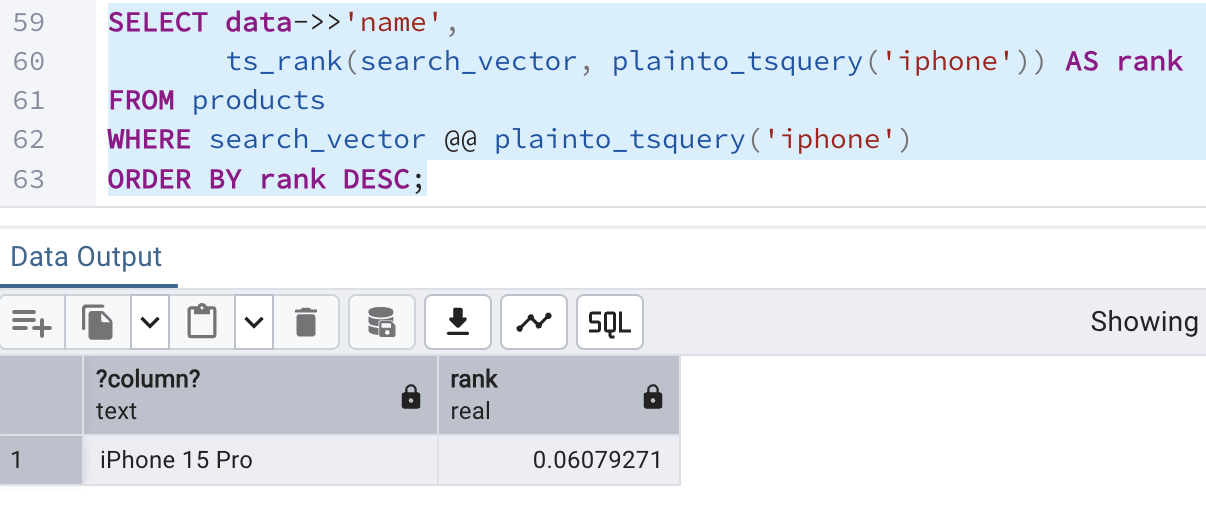
Ranked search
To order results by the best match method (just like the way Google search works), we can make use of the following query,
- a full-text search query in PostgreSQL that finds products matching the word iphone and ranks them by relevance.
- data ->> 'name' : It extracts the name field from the JSON structure in the column data
- plainto_tsquery('iphone') : Converts the plain word 'iphone' into a full-text search query
- search_vector : A tsvector column that stores index searchable text (e.g., product name, description, tags)
- search_vector @@ plainto_tsquery('iphone') : Only returns the rows whose search_vector matches the word "iphone"
- ts_rank(search_vector, plainto_tsquery('iphone')) AS rank : Calculates a relevance score for each matching record
- ORDER BY rank DESC : Sorts the result set in a way so that the most relevant record appears at the first
The query for ranked search is:
SELECT data->>'name',
       ts_rank(search_vector, plainto_tsquery('iphone')) AS rank
FROM products
WHERE search_vector @@ plainto_tsquery('iphone')
ORDER BY rank DESC;
Running the above query in the editor window shows the following result:
Fuzzy Search
This is the most interesting part of the article as often during searching, we might come across typos or partial similarities. In such cases, fuzzy search is very helpful. To achieve this, we will take the help of trigram-based text search and similarity matching by enabliong the extension: pg_trgm.
A trigram is a group of 3 consecutive characters. For example: for the word 'iphone', the trigrams can be -> 'iph', 'pho', 'hon', 'one'
The SQL command to do the same is:
CREATE EXTENSION pg_trgm;
Uses of trigram
A trigram allows us to:
- perform fuzzy search (typos, or partial matches)
- do similarity scoring
- search faster like/regex searches using proper indexing (GIN)
Once the extension is enabled, we will create a fast fuzzy search index on the product catalog JSON data against the attribute: name. This will help us do a trigram matching on the product name.
Understanding the index creation query:
- idx_name_trgm : The index name
- products : The table name on which index is to be applied
- using GIN : Uses a GIN index (great for text search)
- (data->>'name') : Extracts the name value from the JSON column
- gin_trgm_ops : Uses trigram operator class from pg_trgm
We can use the following query to create an index:
CREATE INDEX idx_name_trgm
ON products USING GIN ((data->>'name') gin_trgm_ops);
Fuzzy search in action
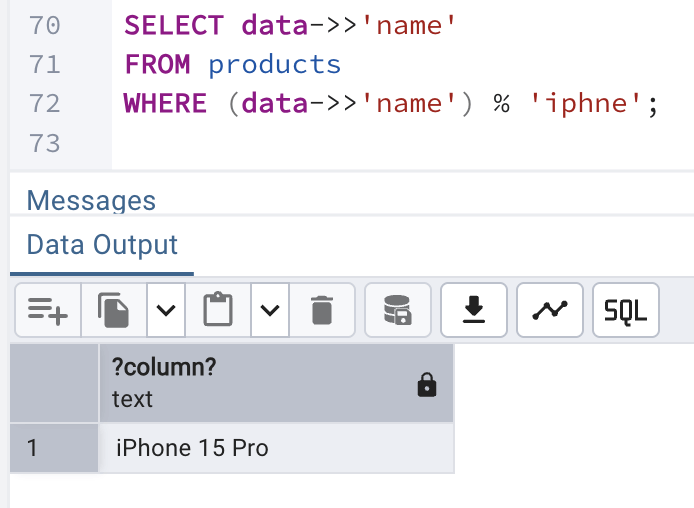
Next, we will do a typo search to find product with product name as 'iphne' which has a spelling mistake in it and see how this can be used to find the best matching record in the products table.
To do the same, we will use the following query:
- % : stands for similarity operator
- finds the closest match of iphne as iphone
SELECT data->>'name'
FROM products
WHERE data->>'name' % 'iphne';
which will generate a similar output:
Combined Searching and Filtering
Finally, we will wrap out article by applying all the things we learnt into one place to perform:
- Full-text search
- JSON filtering
- ranking score
and find out the qualifying records from our products table.
Note: To do this in Elasticsearch, it would require multiple systems while here in PostgreSQL, it is done in one engine itself.
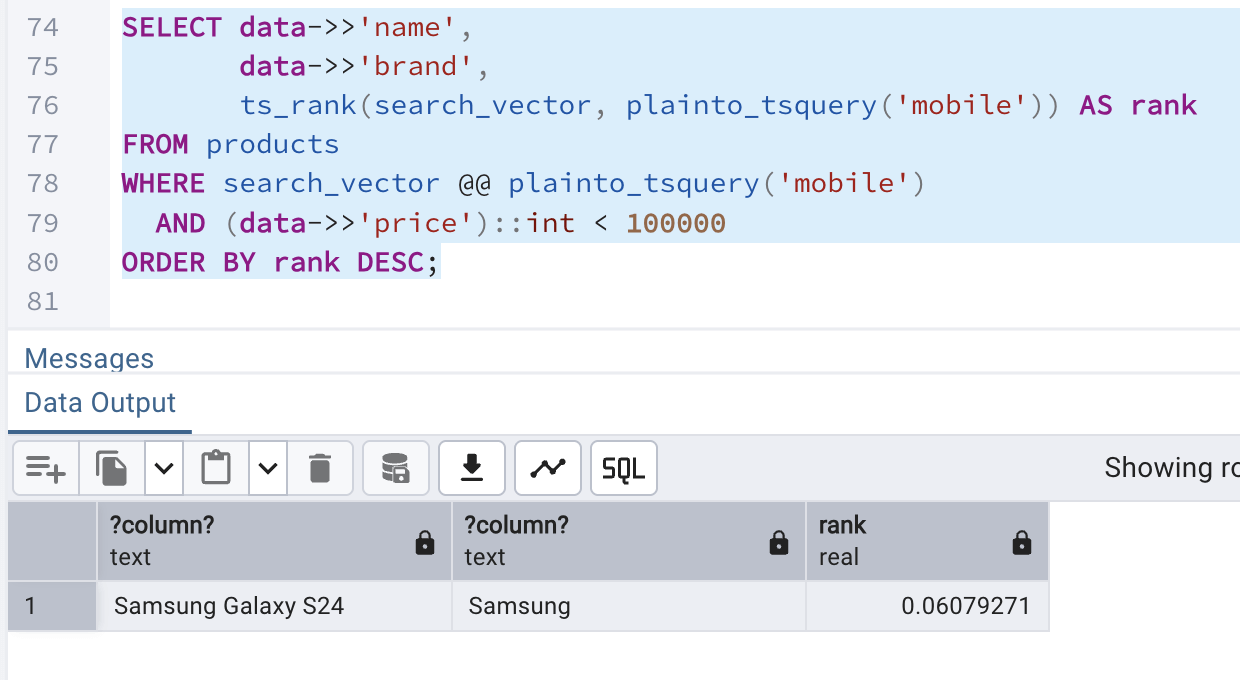
The query we can use for the combined search and filtering is:
- data->>'name', data->>'brand' ? reads product name & brand from JSON
- plainto_tsquery('mobile') ? converts the word mobile into a search query
- search_vector @@ ... ? filters rows that match mobile
- ts_rank(...) AS rank ? scores how relevant each row is
- (data->>'price')::int < 100000 ? keeps only products under 100000
- ORDER BY rank DESC ? shows most relevant results first.
SELECT data->>'name',
       data->>'brand',
       ts_rank(search_vector, plainto_tsquery('mobile')) AS rank
FROM products
WHERE search_vector @@ plainto_tsquery('mobile')
  AND (data->>'price')::int < 100000
ORDER BY rank DESC;
The above query yields the following output:
Conclusion
PostgreSQL should no longer be considered to be limited to just a relational database. With the support and proper use of GIN, full-text search and trigram feature, it becomes:
- an outstanding document store
- a great, reliable and fast search engine