Last time we turned SQL Server into a Christmas tree.
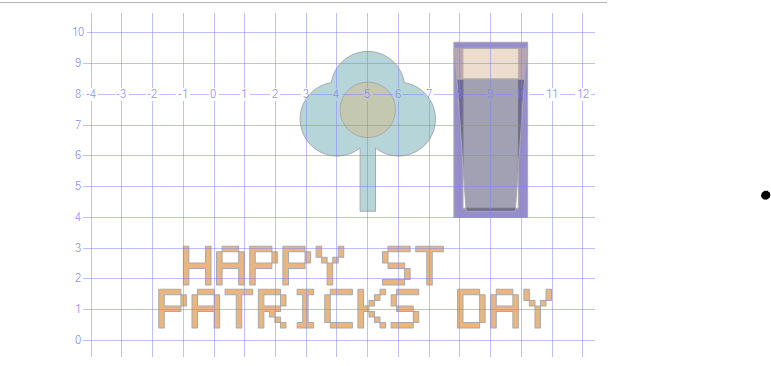
Every year around St Patrick's Day I find myself doing something I can't fully justify. This year that thing was using SQL Server's spatial viewer to draw a shamrock and a pint of Guinness. Hope you have a happy St Patrick's Day and a few Guinness. Preferably not while writing geometry.
What you’ll get
- A shamrock built from circles and a rectangle
- A pint glass built from polygons
- ‘HAPPY ST PATRICKS DAY’ in a chunky 5x7 pixel font
- A small hack to bully SSMS into putting the layers in the right order
Run it
- Open SSMS
- Paste the script below into a new query window
- Execute
- In the results grid, click the
shapecell and open the Spatial Results tab
If you do not see Spatial Results, enable it in SSMS options.
The Script
USE tempdb;
GO

DROP TABLE IF EXISTS #stPatrick;
CREATE TABLE #stPatrick (shape geometry, colour varchar(20));

--------------------------------------------------------------------------------
-- 1) SHAMROCK
--------------------------------------------------------------------------------

INSERT INTO #stPatrick(shape, colour) VALUES
(geometry::Point(5.0, 8.2, 0).STBuffer(1.2).MakeValid(), 'darkgreen'),
(geometry::Point(4.0, 7.2, 0).STBuffer(1.2).MakeValid(), 'darkgreen'),
(geometry::Point(6.0, 7.2, 0).STBuffer(1.2).MakeValid(), 'darkgreen'),
(geometry::Point(5.0, 7.5, 0).STBuffer(0.9).MakeValid(), 'green'),
(geometry::STGeomFromText('POLYGON((4.75 4.2, 5.25 4.2, 5.25 6.8, 4.75 6.8, 4.75 4.2))', 0).MakeValid(), 'darkgreen'),
-- Dummy shape off-screen to absorb slot 4 (purple) — keeps it away from real shapes
(geometry::Point(-3, 5, 0).STBuffer(0.01).MakeValid(), 'dummy');

--------------------------------------------------------------------------------
-- 2) PIXEL FONT
--------------------------------------------------------------------------------

DECLARE @Scale decimal(6,2) = 0.18;
DECLARE @Step decimal(6,2) = (5 * @Scale) + @Scale;

DECLARE @Line1 nvarchar(60) = N'HAPPY ST';
DECLARE @Line2 nvarchar(60) = N'PATRICKS DAY';

DECLARE @X1 decimal(6,2) = -1.0, @Y1 decimal(6,2) = 1.8;
DECLARE @X2 decimal(6,2) = -1.8, @Y2 decimal(6,2) = 0.4;

DECLARE @Font TABLE (ch nchar(1), r tinyint, c tinyint);

INSERT @Font VALUES
-- H
(N'H',0,0),(N'H',0,4),(N'H',1,0),(N'H',1,4),(N'H',2,0),(N'H',2,4),
(N'H',3,0),(N'H',3,1),(N'H',3,2),(N'H',3,3),(N'H',3,4),
(N'H',4,0),(N'H',4,4),(N'H',5,0),(N'H',5,4),(N'H',6,0),(N'H',6,4),
-- A
(N'A',0,1),(N'A',0,2),(N'A',0,3),(N'A',1,0),(N'A',1,4),
(N'A',2,0),(N'A',2,4),(N'A',3,0),(N'A',3,1),(N'A',3,2),(N'A',3,3),(N'A',3,4),
(N'A',4,0),(N'A',4,4),(N'A',5,0),(N'A',5,4),(N'A',6,0),(N'A',6,4),
-- P
(N'P',0,0),(N'P',0,1),(N'P',0,2),(N'P',0,3),
(N'P',1,0),(N'P',1,4),(N'P',2,0),(N'P',2,4),
(N'P',3,0),(N'P',3,1),(N'P',3,2),(N'P',3,3),
(N'P',4,0),(N'P',5,0),(N'P',6,0),
-- Y
(N'Y',0,0),(N'Y',0,4),(N'Y',1,0),(N'Y',1,4),(N'Y',2,1),(N'Y',2,3),
(N'Y',3,2),(N'Y',4,2),(N'Y',5,2),(N'Y',6,2),
-- S
(N'S',0,1),(N'S',0,2),(N'S',0,3),(N'S',0,4),
(N'S',1,0),(N'S',2,0),
(N'S',3,1),(N'S',3,2),(N'S',3,3),
(N'S',4,4),(N'S',5,4),
(N'S',6,0),(N'S',6,1),(N'S',6,2),(N'S',6,3),
-- T
(N'T',0,0),(N'T',0,1),(N'T',0,2),(N'T',0,3),(N'T',0,4),
(N'T',1,2),(N'T',2,2),(N'T',3,2),(N'T',4,2),(N'T',5,2),(N'T',6,2),
-- R
(N'R',0,0),(N'R',0,1),(N'R',0,2),(N'R',0,3),
(N'R',1,0),(N'R',1,4),(N'R',2,0),(N'R',2,4),
(N'R',3,0),(N'R',3,1),(N'R',3,2),(N'R',3,3),
(N'R',4,0),(N'R',4,2),(N'R',5,0),(N'R',5,3),(N'R',6,0),(N'R',6,4),
-- I
(N'I',0,1),(N'I',0,2),(N'I',0,3),
(N'I',1,2),(N'I',2,2),(N'I',3,2),(N'I',4,2),(N'I',5,2),
(N'I',6,1),(N'I',6,2),(N'I',6,3),
-- C
(N'C',0,1),(N'C',0,2),(N'C',0,3),(N'C',0,4),
(N'C',1,0),(N'C',2,0),(N'C',3,0),(N'C',4,0),(N'C',5,0),
(N'C',6,1),(N'C',6,2),(N'C',6,3),(N'C',6,4),
-- K
(N'K',0,0),(N'K',0,4),(N'K',1,0),(N'K',1,3),
(N'K',2,0),(N'K',2,2),(N'K',3,0),(N'K',3,1),
(N'K',4,0),(N'K',4,2),(N'K',5,0),(N'K',5,3),(N'K',6,0),(N'K',6,4),
-- D
(N'D',0,0),(N'D',0,1),(N'D',0,2),(N'D',0,3),
(N'D',1,0),(N'D',1,4),(N'D',2,0),(N'D',2,4),
(N'D',3,0),(N'D',3,4),(N'D',4,0),(N'D',4,4),
(N'D',5,0),(N'D',5,4),(N'D',6,0),(N'D',6,1),(N'D',6,2),(N'D',6,3),
-- N
(N'N',0,0),(N'N',0,4),(N'N',1,0),(N'N',1,1),(N'N',1,4),
(N'N',2,0),(N'N',2,2),(N'N',2,4),(N'N',3,0),(N'N',3,3),(N'N',3,4),
(N'N',4,0),(N'N',4,4),(N'N',5,0),(N'N',5,4),(N'N',6,0),(N'N',6,4),
-- E
(N'E',0,0),(N'E',0,1),(N'E',0,2),(N'E',0,3),(N'E',0,4),
(N'E',1,0),(N'E',2,0),
(N'E',3,0),(N'E',3,1),(N'E',3,2),(N'E',3,3),
(N'E',4,0),(N'E',5,0),
(N'E',6,0),(N'E',6,1),(N'E',6,2),(N'E',6,3),(N'E',6,4);

DECLARE @i int, @len int, @ch nchar(1);

-- Line 1
SET @i = 1; SET @len = LEN(@Line1);
WHILE @i <= @len
BEGIN
SET @ch = SUBSTRING(@Line1, @i, 1);
IF @ch <> N' '
BEGIN
INSERT INTO #stPatrick(shape, colour)
SELECT geometry::STGeomFromText(
CONCAT('POLYGON((',
CAST(ROUND(@X1+((@i-1)*@Step)+(c *@Scale),3) AS varchar(12)),' ',
CAST(ROUND(@Y1+((6-r) *@Scale),3) AS varchar(12)),',',
CAST(ROUND(@X1+((@i-1)*@Step)+((c+1)*@Scale),3) AS varchar(12)),' ',
CAST(ROUND(@Y1+((6-r) *@Scale),3) AS varchar(12)),',',
CAST(ROUND(@X1+((@i-1)*@Step)+((c+1)*@Scale),3) AS varchar(12)),' ',
CAST(ROUND(@Y1+((6-r+1)*@Scale),3) AS varchar(12)),',',
CAST(ROUND(@X1+((@i-1)*@Step)+(c *@Scale),3) AS varchar(12)),' ',
CAST(ROUND(@Y1+((6-r+1)*@Scale),3) AS varchar(12)),',',
CAST(ROUND(@X1+((@i-1)*@Step)+(c *@Scale),3) AS varchar(12)),' ',
CAST(ROUND(@Y1+((6-r) *@Scale),3) AS varchar(12)),
'))'), 0).MakeValid(),
'gold'
FROM @Font WHERE ch = @ch;
END
SET @i += 1;
END

-- Line 2
SET @i = 1; SET @len = LEN(@Line2);
WHILE @i <= @len
BEGIN
SET @ch = SUBSTRING(@Line2, @i, 1);
IF @ch <> N' '
BEGIN
INSERT INTO #stPatrick(shape, colour)
SELECT geometry::STGeomFromText(
CONCAT('POLYGON((',
CAST(ROUND(@X2+((@i-1)*@Step)+(c *@Scale),3) AS varchar(12)),' ',
CAST(ROUND(@Y2+((6-r) *@Scale),3) AS varchar(12)),',',
CAST(ROUND(@X2+((@i-1)*@Step)+((c+1)*@Scale),3) AS varchar(12)),' ',
CAST(ROUND(@Y2+((6-r) *@Scale),3) AS varchar(12)),',',
CAST(ROUND(@X2+((@i-1)*@Step)+((c+1)*@Scale),3) AS varchar(12)),' ',
CAST(ROUND(@Y2+((6-r+1)*@Scale),3) AS varchar(12)),',',
CAST(ROUND(@X2+((@i-1)*@Step)+(c *@Scale),3) AS varchar(12)),' ',
CAST(ROUND(@Y2+((6-r+1)*@Scale),3) AS varchar(12)),',',
CAST(ROUND(@X2+((@i-1)*@Step)+(c *@Scale),3) AS varchar(12)),' ',
CAST(ROUND(@Y2+((6-r) *@Scale),3) AS varchar(12)),
'))'), 0).MakeValid(),
'gold'
FROM @Font WHERE ch = @ch;
END
SET @i += 1;
END

--------------------------------------------------------------------------------
-- 2b) PINT OF GUINNESS
--------------------------------------------------------------------------------

INSERT INTO #stPatrick(shape, colour) VALUES
-- Dark stout body
(geometry::STGeomFromText('POLYGON((8.2 4.2, 9.8 4.2, 10.1 8.5, 7.9 8.5, 8.2 4.2))', 0).MakeValid(), 'black'),
-- Creamy head
(geometry::STGeomFromText('POLYGON((7.9 8.5, 10.1 8.5, 10.2 9.5, 7.8 9.5, 7.9 8.5))', 0).MakeValid(), 'white'),
-- Glass outline left
(geometry::STGeomFromText('POLYGON((7.8 4.0, 8.1 4.0, 8.1 9.6, 7.8 9.6, 7.8 4.0))', 0).MakeValid(), 'lightgray'),
-- Glass outline right
(geometry::STGeomFromText('POLYGON((9.9 4.0, 10.2 4.0, 10.2 9.6, 9.9 9.6, 9.9 4.0))', 0).MakeValid(), 'lightgray'),
-- Glass bottom
(geometry::STGeomFromText('POLYGON((7.8 4.0, 10.2 4.0, 10.2 4.3, 7.8 4.3, 7.8 4.0))', 0).MakeValid(), 'lightgray'),
-- Glass top rim
(geometry::STGeomFromText('POLYGON((7.8 9.5, 10.2 9.5, 10.2 9.7, 7.8 9.7, 7.8 9.5))', 0).MakeValid(), 'lightgray');

--------------------------------------------------------------------------------
-- 4) Output — slot order carefully controlled
-- Slot 4 (purple) absorbed by dummy shape off-screen
--------------------------------------------------------------------------------

SELECT colour, geometry::UnionAggregate(shape) AS shape
FROM #stPatrick
WHERE shape IS NOT NULL
AND shape.STIsValid() = 1
GROUP BY colour
ORDER BY CASE colour
WHEN 'darkgreen' THEN 1 -- slot 1 (teal) ? shamrock
WHEN 'gold' THEN 2 -- slot 2 (orange) ? text
WHEN 'lightgray' THEN 3 -- slot 3 (beige) ? glass rim
WHEN 'dummy' THEN 4 -- slot 4 (PURPLE) ? off-screen dummy, never seen
WHEN 'black' THEN 5 -- slot 5 (dark grey) ? pint body ?
WHEN 'white' THEN 6 -- slot 6 (cream) ? pint head ?
WHEN 'green' THEN 7 -- slot 7 (sage) ? shamrock centre
ELSE 8
END;

DROP TABLE #stPatrick;
How it works
Let's describe each of the sections of the result.
Shamrock
Each leaf is just a buffered point: geometry::Point(x, y, 0).STBuffer(r) draws a circle
Three circles make the leaves, a smaller circle makes the centre, and a rectangle becomes the stem. Nature is beautiful.
The text
The 5x7 ‘font’ is a table of pixels. Each letter is just a list of row and column coordinates. The loops stamp small squares to build the message.
This is the part you definitely should not copy into production.
The pint
The stout body and creamy head are polygons stacked on top of each other. The glass outline is a few thin polygons to fake a rim and sides.
It’s not realistic. It’s recognisable, which is the only requirement for a St Patrick’s Day post.
The colour slot hack
SSMS doesn’t colour shapes based on your colour names. It assigns colours by row order in the results. So the ORDER BY CASE forces a consistent layer order, and the off-screen dummy shape exists purely to waste a colour slot you don’t want.
Yes, this is ridiculous. That’s the point.
Remix it in 30 seconds
- Bigger letters: increase
@Scale - Move the caption: adjust
@X1/@Y1and@X2/@Y2 - Bigger shamrock: increase the leaf buffer sizes
If SSMS throws an ‘undefined’ error
SSMS can be dramatic with complex spatial results. If the Spatial Results tab crashes, swap:
geometry::UnionAggregate(shape)
for:
geometry::CollectionAggregate(shape)
Same idea, fewer tantrums.
If it works it should look like this. I ran this in SQL 2022 dev edition