

Overview
In this article we will go over the various in built String functions available in PostgreSQL. PostgreSQL string functions are used primarily for string manipulation.
ASCII(str)
The numeric value of the leftmost character of the string str is returned. 0 is returned if the string passed is empty, NULL is returned if string passed is NULL. Characters with numeric values from 0 to 255 are worked on by ASCII().
Examples:
SELECT ASCII('7');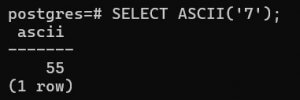
The ASCII code is for numeric 7 is 55.
SELECT ASCII('sunny');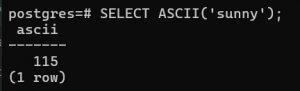
The ASCII code for small 's' is 115.
Use Cases:
The PostgreSQL ASCII() function is simple but very useful in some practical scenarios. Let us consider the following table students which contains the id and name of school students,
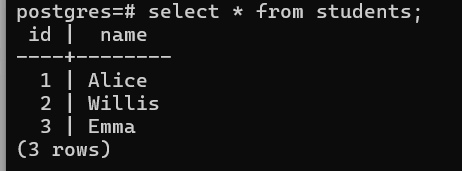
Now there is a need to get the ASCII value of the first letter of each student. We can use the following query to get the result.
SELECT
    name,
    ASCII(name) AS first_letter_ascii
FROM students;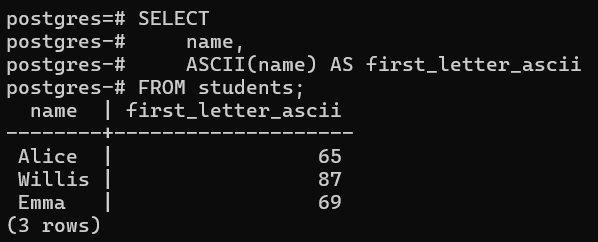
Let us consider another scenario where there is a need to check whether a character is a digit, uppercase letter, lowercase letter, etc.
SELECT
  CASE
    WHEN ASCII(ch) BETWEEN 48 AND 57 THEN 'digit'
    WHEN ASCII(ch) BETWEEN 65 AND 90 THEN 'uppercase letter'
    WHEN ASCII(ch) BETWEEN 97 AND 122 THEN 'lowercase letter'
    ELSE 'other'
  END
FROM (VALUES ('A'), ('7'), ('b'), ('#')) v(ch);
The above SQL block can be used in a stored procedure or a function, depending on the requirement.
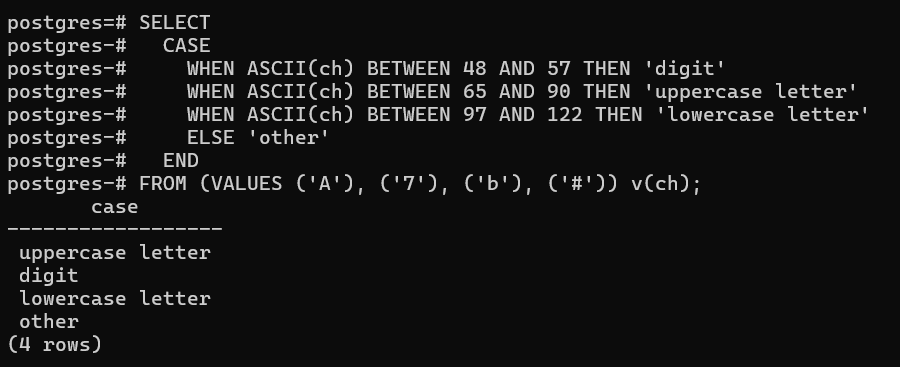
Here we see, the Switch Case is evaluated based on the argument passed. Sequentially all the inputs are evaluated, matched and corresponding case value is returned.
BIT_LENGTH(str)
This function returns the number of bits in the length of the string.
Basic Syntax:
SELECT BIT_LENGTH(text);
Example:
SELECT BIT_LENGTH('sunny');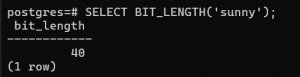
The string 'sunny' has 5 characters in it and 1 char is equal to 8 bits which equates to 40 bits for 5 characters.
Use Case:
Let us again consider our table students which has the following data:
Next, we want to get all names whose bit length is more than 64.
select name from students where BIT_LENGTH(name) > 64;

The query returned no result because the longest word in the table is Willis(6 bytes) whose bit length is equal to 6*8=48 bits. Let us run 1 more query to verify our understanding.
select name from students where BIT_LENGTH(name) > 35;

Only 2 rows were returned because Emma's total bit is 32(4*8) which is less than the given criteria of 35.
CHAR_LENGTH(str)
Works exactly as the previous function BIT_LENGTH() but with a difference that is this function returns the length of the string str in terms of characters in a string and not bits. Also known as CHARACTER_LENGTH().
Basic Syntax:
Select CHAR_LENGTH(text)
Example:
SELECT CHAR_LENGTH('Mukherjee');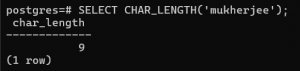
Use Cases:
Considering the same table for explanation.
?select name from students where CHAR_LENGTH(name) > 7;

No result returned because the longest word in the table 'Willis' is 6 characters long.
Next, let us update the condition to >=4 and verify the result.
select name from students where CHAR_LENGTH(name) >= 4;
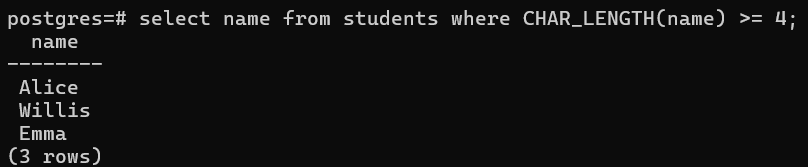
As all three words have are 4 or more characters long, all three are returned in response to our query
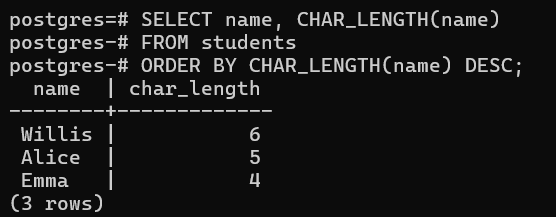
Another very useful could be where there is a need to sort data based on some custom log
SELECT name, CHAR_LENGTH(name)
FROM students
ORDER BY CHAR_LENGTH(name) DESC;
CONCAT(str1,str2,..,strn)
The function returns the string that results from concatenating the arguments. It may accept one or more arguments. If all arguments are non-binary strings, the function produces a non-binary string. If the arguments include any binary strings, the function produces a binary string. The system converts a numeric argument to its equivalent binary string form.
Syntax:
SELECT CONCAT('My', 'name', 'is','John')Example:

Very often used in building full names or display names for users, products.
SELECT
  CONCAT(first_name, ' ', last_name) AS full_name
FROM users;
This function is also used in concatenating mixed data types
SELECT CONCAT('Total: ', total_amount, 'INR');Use Case:
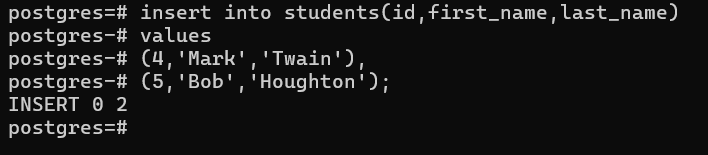
Let us first make some modifications to the table students to explain the Concat function. We will execute couple of DDL statements to rename the existing column name to first_name and add a new column last_name followed by inserting some data.
alter table students rename column name to first_name;
alter table students add column last_name char [50];


insert into students(id,first_name,last_name)
values
(4,'Mark','Twain'),
(5,'Bob','Houghton');
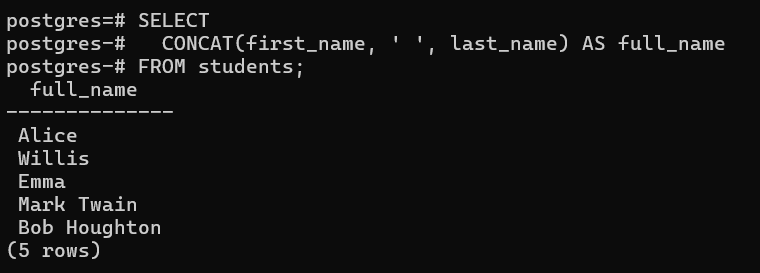
Next, we will use the Concat() to return the concatenated full name from first and last name.
SELECT
CONCAT(first_name, ' ', last_name) AS full_name
FROM students;
LOWER(str)
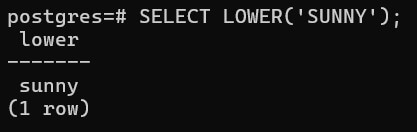
Returns the string by changing all characters to lowercase according to the current character set mapping. It is used for in case-insensitive comparisons, data normalization, and search consistency.
SELECT LOWER('SUNNY');
Very important function often used in case-insensitive searching or comparisons.
SELECT *
FROM users
WHERE LOWER(email) = LOWER('shanto.bhanu@abc.com');
Case conversion for storing data.
UPDATE users
SET username = LOWER(username);
Sorting data
SELECT name
FROM categories
ORDER BY LOWER(name);
Use Case:
Let us one more column called email to the same table to explain this function.
alter table students add column email character varying;

Now let us update the existing data for some of the students by adding their email ids and in the process we will use the LOWER() to convert the input text in lowercase before insert.
postgres=# update students set email=lower('Mark.Twain@gmail.com') where id=4;
postgres=# update students set email=Lower('Aliceinwonderland@gmail.com') where id=1;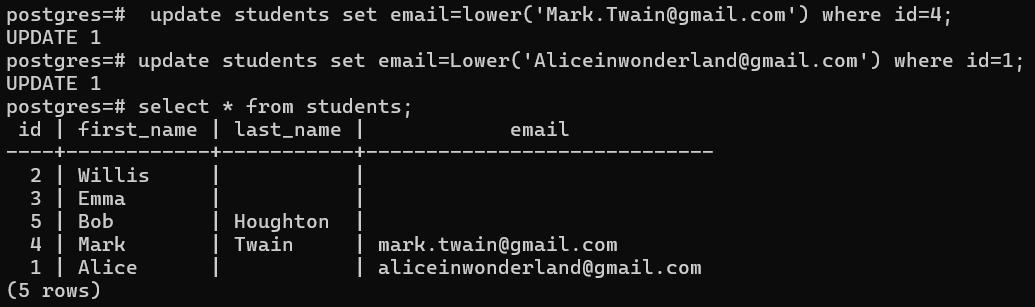
UPPER(str)
Opposite to LOWER, the UPPER() function returns the string by changing all characters to uppercase according to the current character set mapping.
Example:
SELECT UPPER('sunny');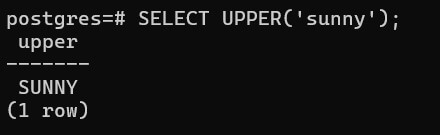
Like LOWER(), it’s widely used for case-insensitive logic, data normalization, and standardized output, but in situations where uppercase is preferred.
An important function used in case-insensitive searching or comparisons.
SELECT *
FROM users
WHERE UPPER(email) = UPPER('shanto.bhanu@abc.com');
Case conversion for storing data.
UPDATE users
SET username = UPPER(username);
Sorting data
SELECT name
FROM categories
ORDER BY UPPER(name);
Use Case:
Let us convert the names into capital case by using the UPPER() function.
update students set first_name=upper('Willis'), last_name=upper('Johnson') where id = 2;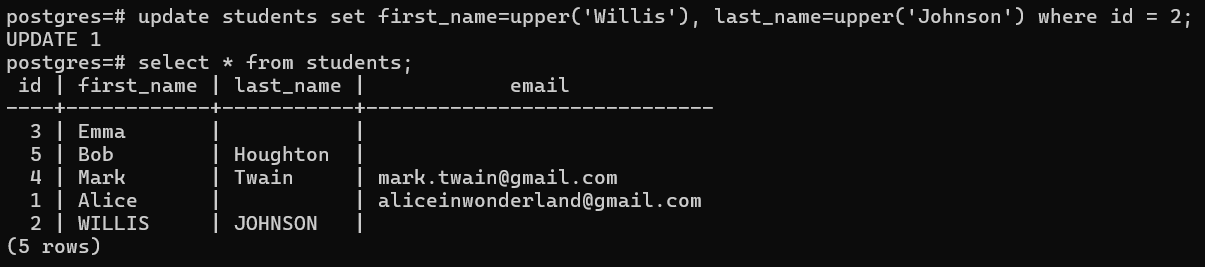
LEFT(str,len)
The function returns a substring starting from the leftmost character to the length specified or NULL if any argument is NULL.
It’s simple, but very practical for prefix extraction, data formatting, and safe truncation.
Basic syntax:
LEFT(text, n) ? substring
Example:
SELECT LEFT('mukherjee', 5);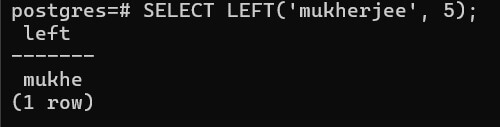
Get meaningful prefixes from texts typically as prefixes or codes.
SELECT
  LEFT(order_number, 3) AS region_code
FROM orders;
For filtering data,
SELECT *
FROM products
WHERE LEFT(prod_name, 2) = 'AB';
Use Case:
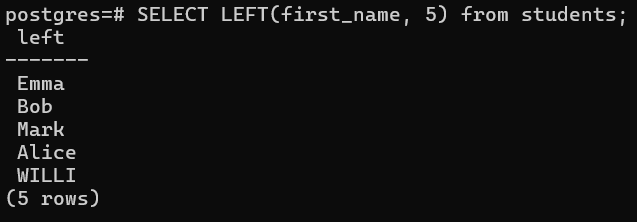
Suppose there is an auto populate dropdown on any field, lets assume it is first_name in this case. To populate the prompt data a query can be run using LEFT() function to extract the first 5 letters of the first_name.
Select LEFT(first_name, 5) from students;
RIGHT(str,len)
The function returns a substring starting from the rightmost character to the length specified or NULL if any argument is NULL.
Example:
SELECT RIGHT('mukherjee', 5);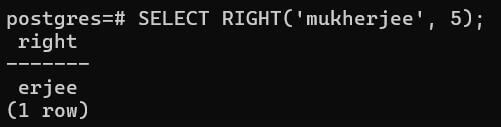
Get meaningful suffixes from texts typically .
SELECT
  RIGHT(order_number, 2) AS year_code
FROM orders;
For validation,
SELECT *
FROM products
WHERE RIGHT(prod_name, 3) <> 'IND';
Use Case:
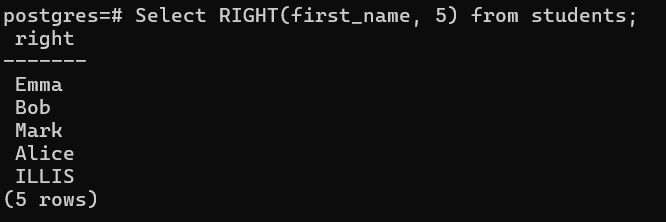
Similar to the LEFT() function, the RIGHT() function is used to extract the last 5 letters of the text.
Select RIGHT(first_name, 5) from students;
Conclusion
This article explains some of the inbuilt String functions available in PostgreSQL that provide a powerful and flexible way to work with text data directly inside your database.