

Introduction
When designing the tables or writing the stored procedures in SQL Server, we get easily tempted to choose the path of least resistance. When deciding how much space to allocate for a text column in a database table which may contain the description of a product, a product name, or an additional comment/remarks, it is very common for us to think to allocate the maximum possible character limit to such text columns. We choose the easy path of least resistance considering that at a later stage, when the application is asked to store large text in this column, it would not throw any truncation error and we don't have to bother much about the data limits being attempted to store here.
While this shortcut safe-proofs our database against string-length errors, it also introduces a massive, hidden tax on our database's memory allocation engine. In this article, we will understand how lazy text-sizing forces SQL Server to hoard server RAM, causing our queries to slow down and starve other processes of critical resources.
Understanding the basic terminologies
To understand how oversized data types can impact our database health, we will first take a quick look at how the database engine manages system memory. To understand the same, we need to be familiar with the following key terminologies:
- VARCHAR(n) and VARCHAR(MAX): VARCHAR(n) typically stores a standard variable-length character (up to 8,000 bytes) directly inside the table's main data pages. VARCHAR(MAX), on the other hand, is a Large Object (LOB) data type designed to hold up to 2 Gigabytes of text. Since VARCHAR(MAX) can contain a massive volume of data, SQL Server treats its storage and memory allocations completely differently than VARCHAR(n) for which it knows the size of the data it can store.
- Memory Grant: It determines the amount of physical RAM our SQL Server allocates to a query right before it is executed. The SQL Server assigns this memory specifically to handle operational workspace tasks like sorting (using the ORDER BY clause) or grouping (using the GROUP BY clause) on our data.
- Workspace Memory: It is the actual scratchpad RAM used to process the records mid-flight. If our query has a small memory grant, it can use very little scratchpad RAM. However, if the query requests a massive memory grant, then that memory is locked down and cannot be used by any other user on the server.
- Spill to TempDB: If our SQL Server underestimates how much memory a query needs to execute in actuality and somehow the data overflows the assigned memory grant, it drops the excess data onto disk inside the sys.tempdb in the system database. This highly slows performance because our disk storage is thousands of times slower than RAM.
- Dynamic Management View (or DMV): DMV refers to those built-in system tables inside our SQL Server that track real-time server health, performance statistics, and memory allocations. They actually act like an internal activity monitor or our SQL Server's task manager.
Set Up the Environment
Now, let's build a clean, isolated database schema to see this behavior firsthand. We will create two tables that look identical on the surface, but have vastly different column size configurations underneath. In these two tables, we will have similar columns with same name and datatype but one table will have VARCHAR columns with fixed size mentioned while the other will have set to MAX limit.
To create the tables, we can run the following scripts in our local database query executor. First, we will create the lazy table which will slow down our performance since this table will have VARCHAR columns set to MAX limit. We will create a table mirroring the structure above, but using lazy VARCHAR(MAX) assignments. This will help us to simulate a database environment where maximum sizing is used as a safety shortcut thereby impacting system performance.
CREATE TABLE LazyData (
    ItemID INT IDENTITY(1,1) PRIMARY KEY,
    ItemName VARCHAR(MAX) NOT NULL,
    CategoryCode VARCHAR(MAX) NOT NULL,
    SystemStatus VARCHAR(MAX) NOT NULL
);
Next, we will create the clean table which will have exactly same columns with similar data types but with their size mentioned (instead of setting it to MAX limit). We will create a table using proper, intentional column sizing guidelines. We know that a product name or category code will never need to be more than a few hundred characters and hence instead of MAX we are limiting the character count.
CREATE TABLE CleanData (
    ItemID INT IDENTITY(1,1) PRIMARY KEY,
    ItemName VARCHAR(150) NOT NULL,
    CategoryCode VARCHAR(50) NOT NULL,
    SystemStatus VARCHAR(25) NOT NULL
);
Next, let's inject around 20,000 identical rows into both the tables. This will ensure that the physical volume of text stored in both the database tables is exactly the same. Accordingly, when we do a performance comparison, this should hold true that we tested on similar table structure layout with similar data volume. To inject bulk records into both tables, we can make use of the following query.
WITH DataGenerator AS (
    SELECT 1 AS RowNum
    UNION ALL
    SELECT RowNum + 1 FROM DataGenerator WHERE RowNum < 20000
)
INSERT INTO CleanData (ItemName, CategoryCode, SystemStatus)
SELECT
    'Widget_Model_Number_' + CAST(RowNum AS VARCHAR(10)),
    'CAT-' + CAST((RowNum % 10) AS VARCHAR(5)),
    'ACTIVE'
FROM DataGenerator
OPTION (MAXRECURSION 0);

-- Copy the exact same rows into the lazy data schema
INSERT INTO LazyData (ItemName, CategoryCode, SystemStatus)
SELECT ItemName, CategoryCode, SystemStatus
FROM CleanData;
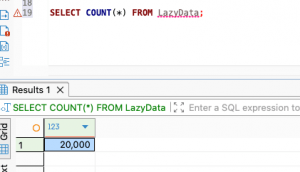
To validate our local setup, we can run the following query to validate the same.
SELECT COUNT(*) FROM LazyData;
Performing an Operation on the Lazy Table
Now that we have our local database setup, we will run a simple query in the lazy table where we have declared all the VARCHAR columns to their MAX limit. We will force a sorting operation on the text columns which are declared as VARCHAR(MAX). To do so, we can make use of the following query.
SELECT ItemName, CategoryCode
FROM LazyData
ORDER BY CategoryCode, ItemName;
Once we run the above query in our query editor, we can see the result set returned to us as query output. Next, we need to check what happened behind the scenes while SQL Server executed this query. We need to check the maximum memory and least memory that was granted for this query execution. To check the same, we can run the following query in the same query editor.
The sys.dm_exec_query_stats is a DMV that acts like a history logbook for all our query execution plans. It accumulates the performance metrics for every query running on our database instance until the server restarts or the cache clears. The max_grant_kb and last_grant_kb are the tracking metrics that record the historical memory footprints. Even though the memory has been handed back to our system (Windows/Mac/Linux), the SQL Server still remembers exactly how much RAM it allocated to this query the last time when it ran.
SELECT TOP 1
    st.text AS QueryText,
    qs.execution_count AS ExecutionCount,
    -- Convert the max memory ever used by this plan from KB to MB
    (qs.max_grant_kb) / 1024.0 AS MaxGrantedMemory_MB,
    (qs.last_grant_kb) / 1024.0 AS LastGrantedMemory_MB
FROM sys.dm_exec_query_stats qs
CROSS APPLY sys.dm_exec_sql_text(qs.sql_handle) st
WHERE st.text LIKE '%FROM LazyData%'
ORDER BY qs.last_execution_time DESC;
Once we run the above query, we can see a similar output:
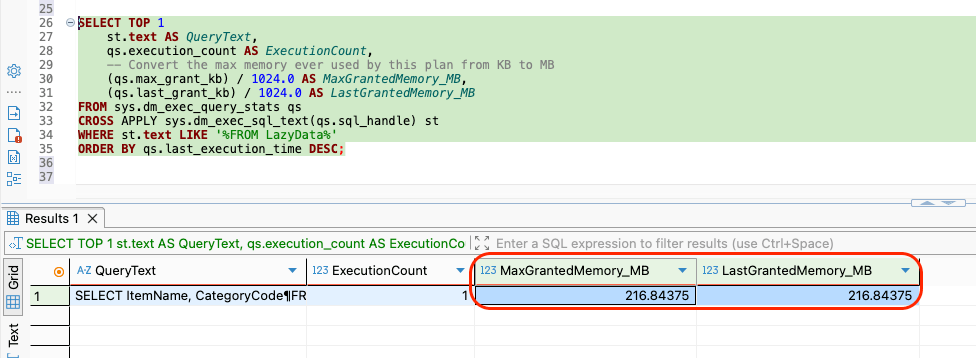
So, for the above query which ran on the lazy data table with a ORDER BY clause on the VARCHAR columns whose length was set to MAX, the query requested for a 216MB of RAM usage.
Performing an Operation on the Clean Table
Next, we will perform the exact same operation on the clean data table where the VARCHAR columns are pre-defined with specific size limit. To do so, we can use of the following query. This query will query the well-configured clean data table and force a sorting operation on the text columns which are VARCHAR columns with pre-defined text length set to them. This query execution will help us capture how much workspace memory our SQL Server this time allocates for right-sized data fields.
SELECT ItemName, CategoryCode
FROM CleanData
ORDER BY CategoryCode, ItemName;
Once the above query is run in our query editor, we should get the resultant records returned in the query output. However, we are now interested to check the performance metrics and if there is any notable improvement in the memory allocation. To do so, just like earlier, we can make use of the following query where we are looking for the CleanData table this time in the DMV.
SELECT TOP 1
    st.text AS QueryText,
    qs.execution_count AS ExecutionCount,
    -- Convert the max memory ever used by this plan from KB to MB
    (qs.max_grant_kb) / 1024.0 AS MaxGrantedMemory_MB,
    (qs.last_grant_kb) / 1024.0 AS LastGrantedMemory_MB
FROM sys.dm_exec_query_stats qs
CROSS APPLY sys.dm_exec_sql_text(qs.sql_handle) st
WHERE st.text LIKE '%FROM CleanData%'
ORDER BY qs.last_execution_time DESC;
Once the above query is run, we should see the following output:
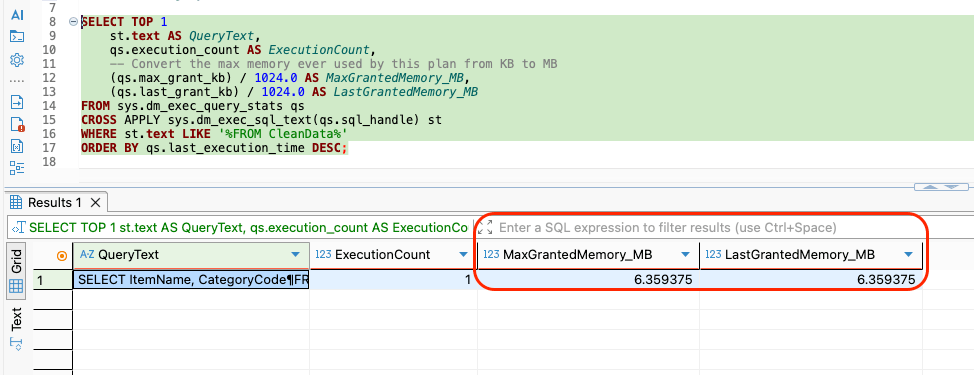
If we see the above performance metrics snippet, we can see that this time our SQL Server realizes that the rows are narrow (since they have the text limits prescribed) and thus allocates a tiny 6 Megabytes slice of RAM to complete the sort, and cleans up instantly.
Conclusion
When SQL Server estimates how much memory (or RAM) should be granted to give to a query that requires a sort or a hash match, it cannot inspect every row in advance to see how long the text actually is in those columns. Instead, the SQL Server looks at our database table configuration and assumes that our columns will probably be filled upto 50% of their maximum capacity. Depending on this assumption, it determines how much memory (or RAM) should be allocated for the query to be executed.
- For a VARCHAR(150) column, our SQL Server assumes the row will be 50% filled up, containing 75 bytes of data.
- For a VARCHAR(MAX) column, our SQL Server cannot guess if we are storing 10 characters or 10,000,000 characters in this column as the size has been set to MAX. By default, it treats a MAX column as if it contains a large string payload thereby allocating a fixed, outsized memory estimate per row irrespective of how small or big the data content in this column is.
This becomes the main reason for large memory grants for query execution in database tables which contains VARCHAR columns set to MAX limit. So, if a column holds data bounded by business rules, such as Postal Codes (which can have at most 10-15 chars), Email Addresses (which can have at most 150-254 chars), or Product SKUs (which can have at most 30 chars), we should explicitly declare them as VARCHAR(n) where n is the largest number of characters it can store.
We should use VARCHAR(MAX) only when a field genuinely requires uncontrolled text blocks, such as system error logs, or user description feedback text fields which may be typically exceeding 8,000 characters. Keeping our columns appropriately sized ensures that our data estimates stay highly accurate for SQL Server. This also helps the SQL Server to construct lean, lightning-fast execution maps that share our local development system's or our production server's hardware resources effectively.