

This series has examined several changes to the T-SQL language in SQL Server 2025. We've previously discussed some of the generic functions, the fuzzy string matching, and in the last article we looked at JSON_OBJECTAGG, which constructs a JSON object from key:value pairs across rows. Now we turn to its companion function, JSON_ARRAYAGG, which builds a JSON array instead.
If you haven't read the previous article, you may want to familiarize yourself with these related JSON functions from past versions as well:
- ISJSON
- JSON_ARRAY
- JSON_MODIFY
- JSON_OBJECT
- JSON_PATH_EXISTS
- JSON_QUERY
- JSON_VALUE
- OPENJSON
This is part of a series on how the T-SQL language is evolving in SQL Server 2025. Note: Some of these changes are already available in the various Azure SQL products.
Objects vs Arrays
Before looking at the function, let's examine what a JSON array is: it's a value that contains a list of other objects. In the previous article we built objects, which are documents wrapped in braces, where every value has a named key. An array is different. It uses brackets, [], and holds an ordered list of values with no keys attached.
As an example, we might have this JSON document, where we have a key of "team" and a value.
{ "team":"Cowboys"}In an array, we have multiple values, so we could still have a key of "team", but the value is an array of multiple values. Note the brackets enclosing the array.
{ "team": ["Cowboys", "Eagles", "Giants", "Commands"]}This is a simple explanation, but arrays are like arrays in other programming languages, where multiple values are assigned to one handle.
JSON_ARRAYAGG
JSON_ARRAYAGG is designed to collect a column or expression from multiple rows and assemble them into a single JSON array. Like JSON_OBJECTAGG it returns nvarchar(max) by default, or the native JSON type if you include the RETURNING JSON clause. The syntax is:
JSON_ARRAYAGG( value_expression [ORDER BY <column_list>] [json_null_clause] [RETURNING JSON] )
Notice a few things compared to JSON_OBJECTAGG. First, there's no key — you're just supplying the values that go into the array. Second, there's an optional ORDER BY clause right inside the function call, which lets you control the sequence of elements in the output. JSON_OBJECTAGG doesn't have this because JSON objects are inherently unordered. The json_null_clause options are the same two as before:
- ABSENT ON NULL – if the value is NULL, the element is omitted from the array. This is the default for JSON_ARRAYAGG.
- NULL ON NULL – if the value is NULL, a JSON null is included in the array.
Note that the defaults are flipped from JSON_OBJECTAGG, where NULL ON NULL was the default. Worth keeping in mind if you're moving between the two functions.
Let's look at some examples of how this works.
Constructing an Array from Values
The simplest case is passing in scalar values directly. Here I'll build an array from a set of literal strings:
SELECT JSON_ARRAYAGG(c1)
FROM (VALUES ('c'), ('b'), ('a')) AS t(c1);
GO
This gives me a JSON array with the three values in row-arrival order:
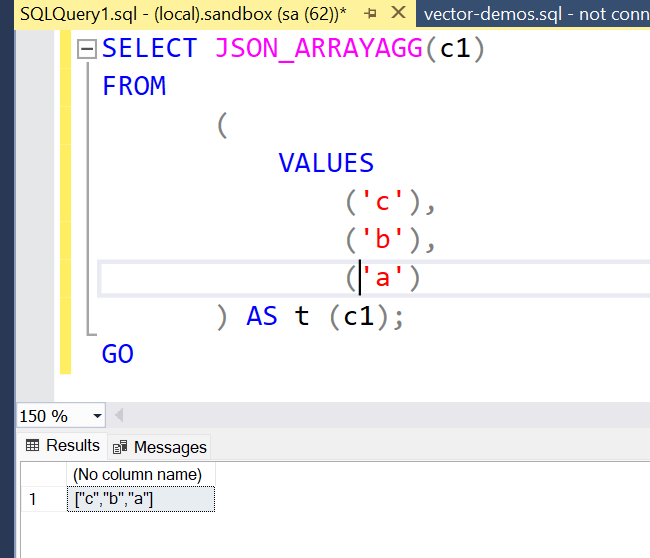
If I want a guaranteed order, I add an ORDER BY inside the function call:
SELECT   JSON_ARRAYAGG(c1 ORDER BY c1                       )
FROM ( VALUES
                 ('c'),
                 ('b'),
                 ('a')
     ) AS t (c1);
GO
That ORDER BY is scoped entirely to the aggregation — it doesn't change the row order of your outer query, just the element order inside the array. You can see this below in the results:
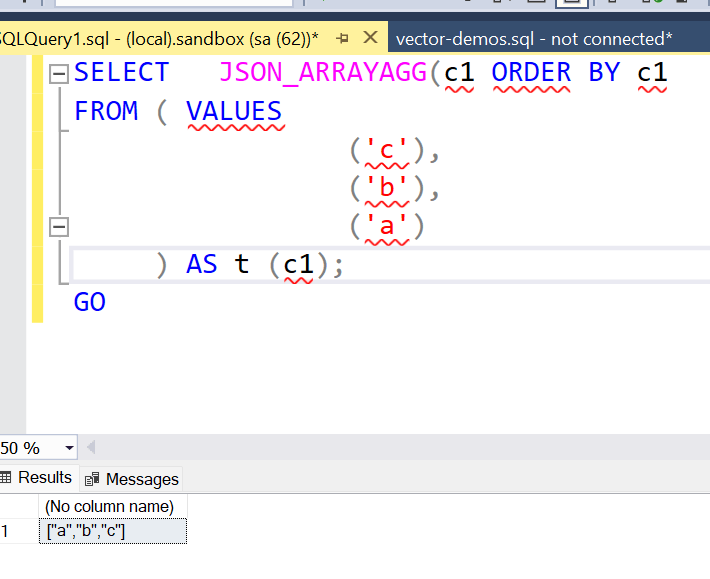
What if I pass in a NULL? The default behavior is ABSENT ON NULL, so the NULL element simply disappears. I'll change the "a" to a NULL in this query.
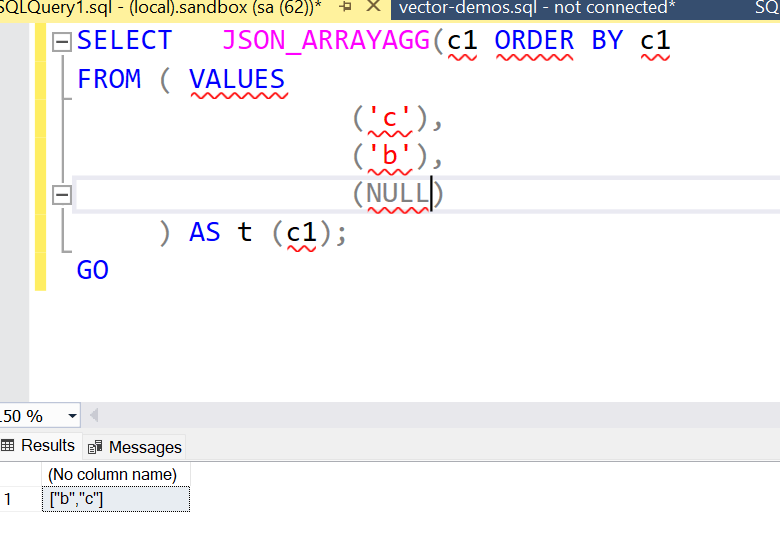
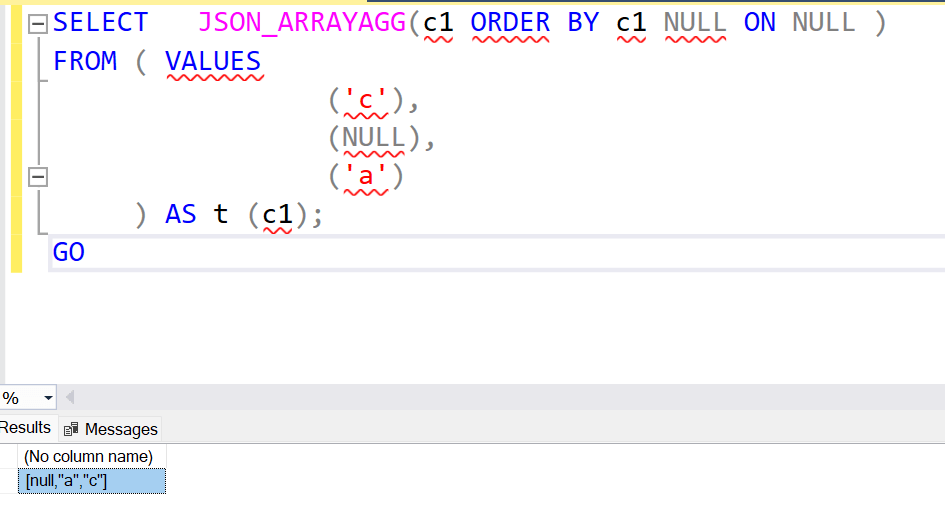
If I explicitly ask for NULL ON NULL, the NULL becomes a JSON null value in the array instead. Here is the code, with the extra claude.
SELECT   JSON_ARRAYAGG(c1 ORDER BY c1 NULL ON NULL )
FROM ( VALUES
                 ('c'),
                 ('b'),
                 (NULL)
     ) AS t (c1);
GO
The results returned show the NULL, which is first in the ordering.
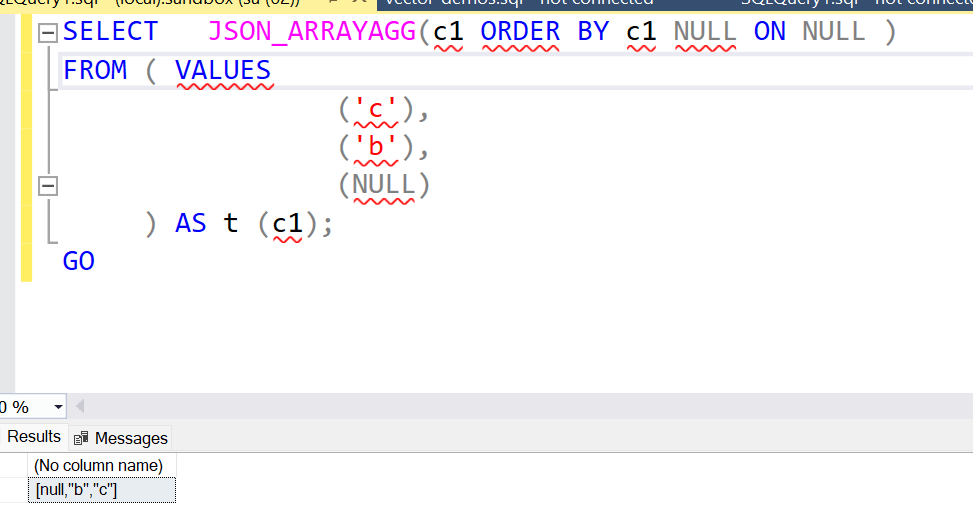
If I move the NULL to a different place, I see slightly different results. I'll add the "a" back and replace "b" with a NULL. As you can see, the NULL is still first in the ordering.
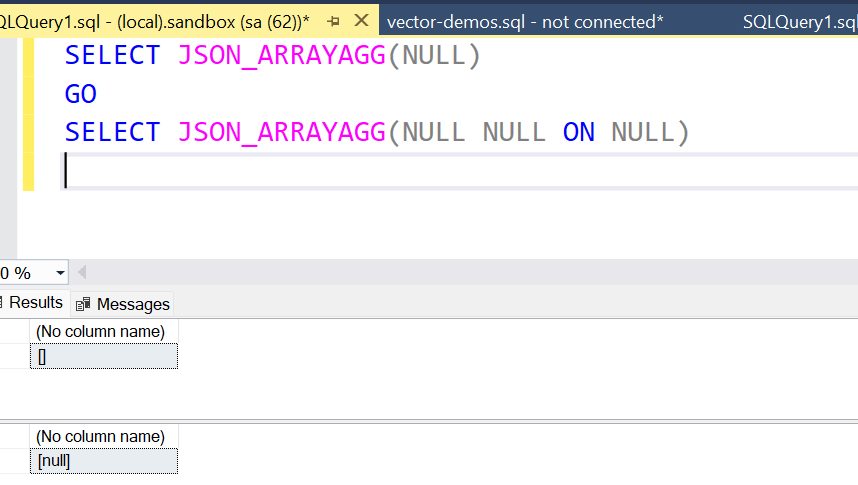
There's one edge case worth knowing: if you pass NULL as the entire value expression, you get back an empty set. Unless you set the NULL ON NULL clause. You can see this below.
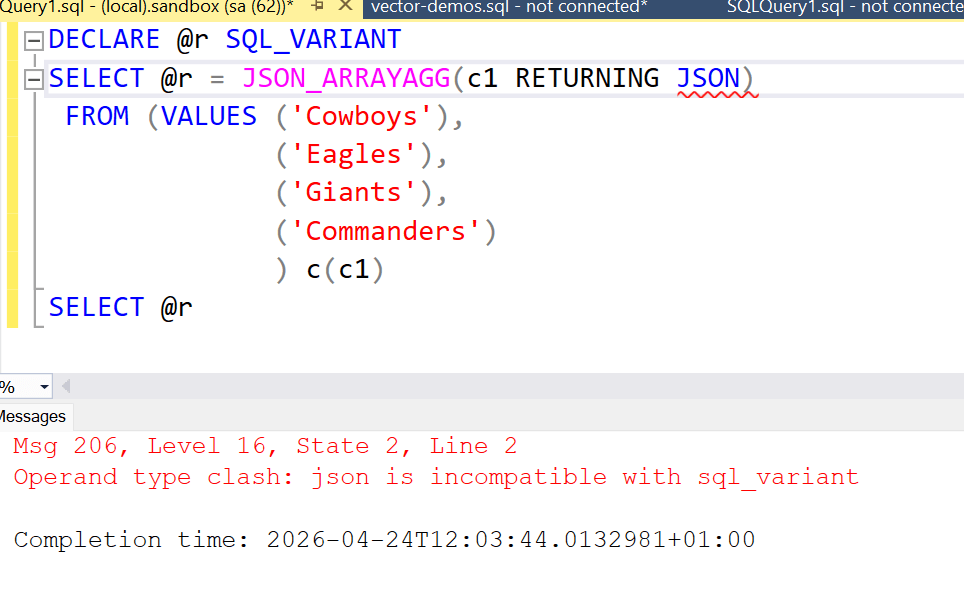
I can also check the return type the same way we did with JSON_OBJECTAGG, by assigning the result to a sql_variant and watch the error message confirm nvarchar(max). And with RETURNING JSON added, the error message changes to show the JSON type instead.
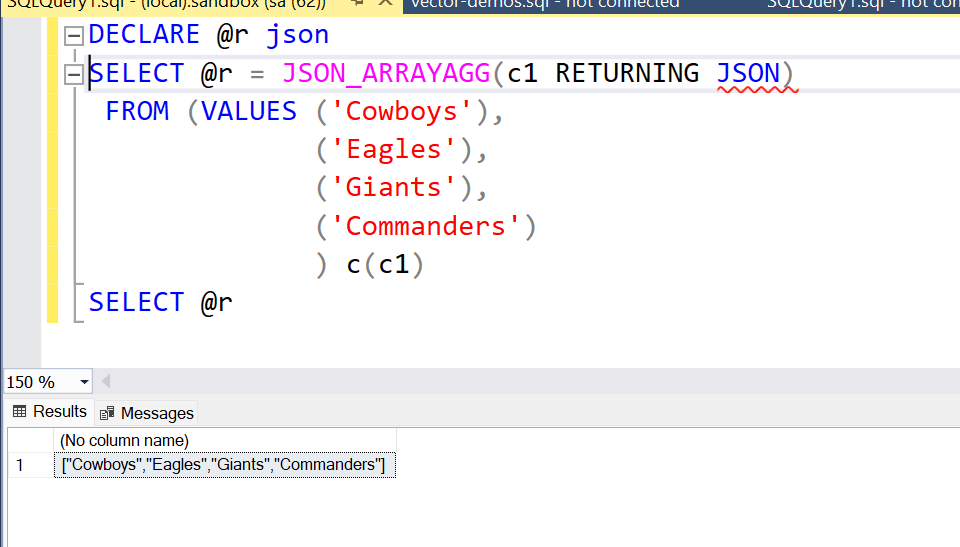
Of course, a JSON data type works.
Creating an Array from a Table
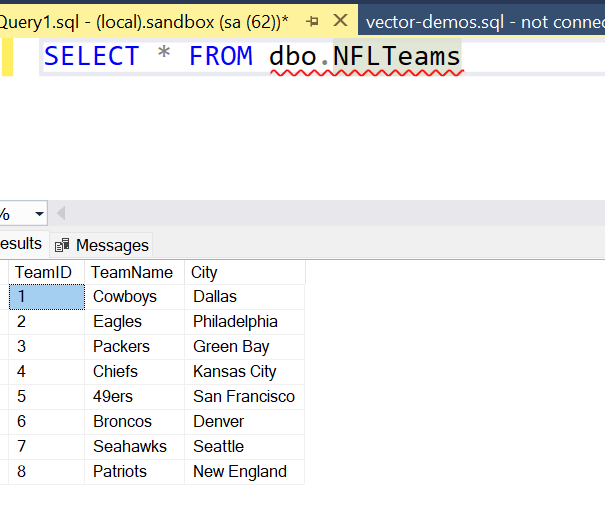
The more practical use is pulling values from real table data. I'll reuse the NFL teams table from the previous article on JSON_OBJECTAGG:
CREATE TABLE dbo.NFLTeams
(
    TeamID INT IDENTITY(1, 1) PRIMARY KEY,
    TeamName VARCHAR(50) NOT NULL,
    City VARCHAR(50) NOT NULL
);

INSERT INTO dbo.NFLTeams
(
    TeamName,
    City
)
VALUES
('Cowboys', 'Dallas'),
('Eagles', 'Philadelphia'),
('Packers', 'Green Bay'),
('Chiefs', 'Kansas City'),
('49ers', 'San Francisco'),
('Broncos', 'Denver'),
('Seahawks', 'Seattle'),
('Patriots', 'New England');
Here is the data.
Now I can use JSON_ARRAYAGG to pull just the city names into a single array:
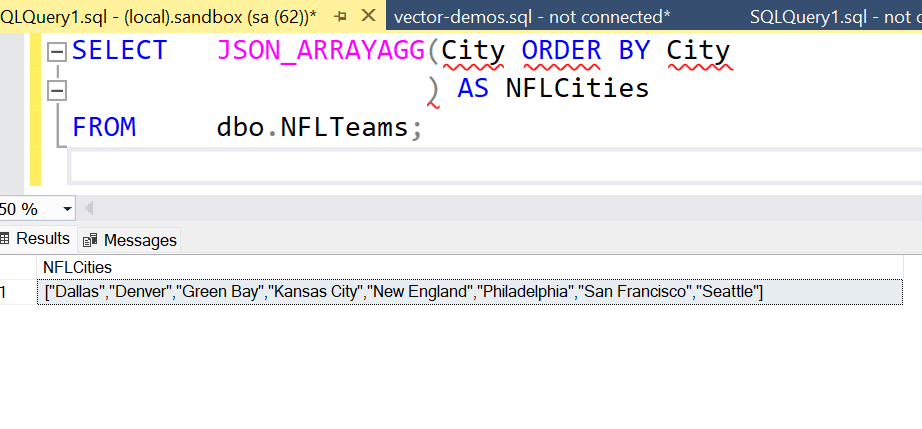
SELECT   JSON_ARRAYAGG(City ORDER BY City
                      ) AS NFLCities
FROM     dbo.NFLTeams;
The results give me all the cities sorted alphabetically in one JSON array because of the ORDER BY inside the function.
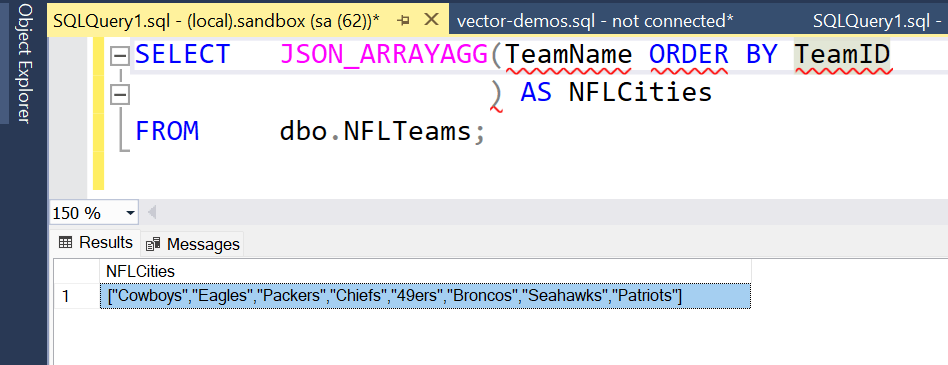
What if I want team names instead? I can swap the column and add an ORDER BY on TeamID to preserve insertion order. The ORDER BY does not have to be on the data being used in the aggregation. Notice the teams are not in order alphabetically.
What about numeric values? If I use TeamID as the value expression, I get a proper JSON number in the array without quoting, just the integers. I've ordered by the name, so the results aren't in the correct order:
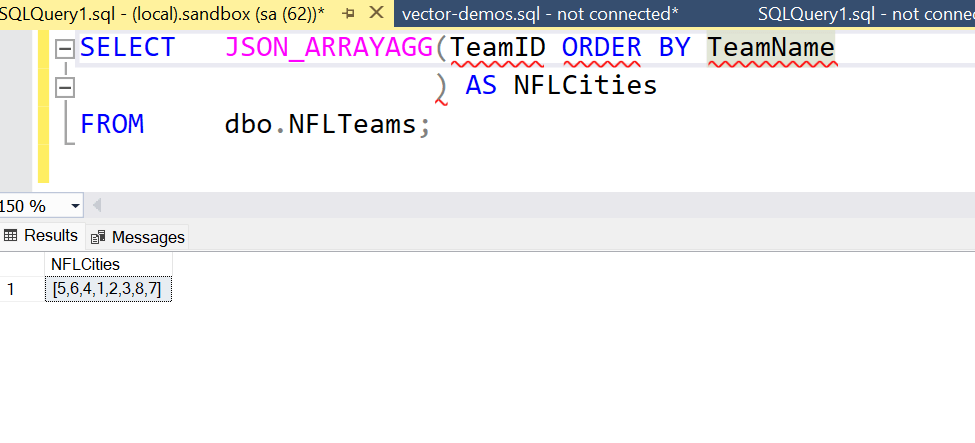
This is different from JSON_OBJECTAGG, where the key always had to be a string. Here, the value can be whatever type the column is.
Grouping Arrays by a Key
Where JSON_ARRAYAGG really earns its keep is in GROUP BY queries, where you want one JSON array per group. Here I'll add a Conference column to the table (again using Prompt AI to generate the data) and then produce one array of team names per conference:
ALTER TABLE dbo.NFLTeams ADD Conference VARCHAR(10) NULL;
GO
UPDATE dbo.NFLTeams
SET Conference = CASE TeamName
                     WHEN 'Cowboys'  THEN 'NFC'
                     WHEN 'Eagles'   THEN 'NFC'
                     WHEN 'Packers'  THEN 'NFC'
                     WHEN 'Seahawks' THEN 'NFC'
                     WHEN 'Chiefs'   THEN 'AFC'
                     WHEN '49ers'    THEN 'NFC'
                     WHEN 'Broncos'  THEN 'AFC'
                     WHEN 'Patriots' THEN 'AFC'
                 END;
GO

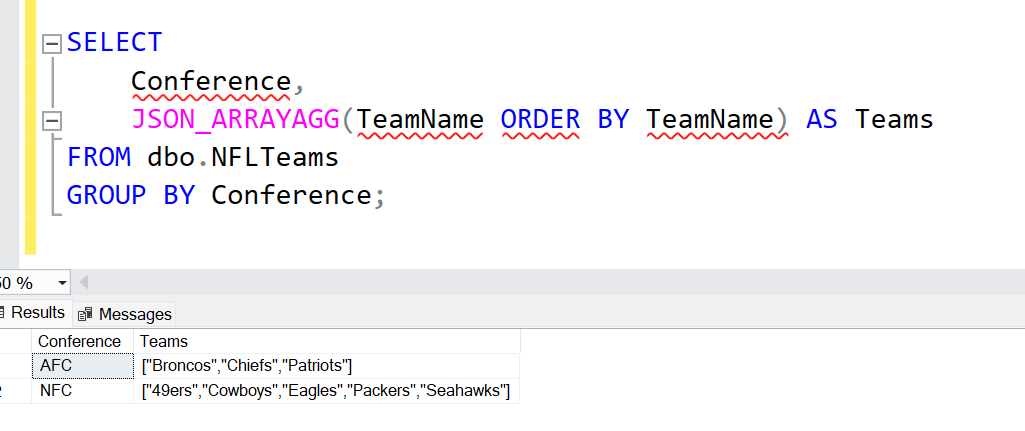
SELECT
    Conference,
    JSON_ARRAYAGG(TeamName ORDER BY TeamName) AS Teams
FROM dbo.NFLTeams
GROUP BY Conference;
Each conference row now carries a JSON array of the teams that belong to it. This is a pattern that works very well when returning parent-child data to an application without the overhead of multiple round trips. This is an aggregate, so the GROUP BY is needed and used to split the teams.
Working with Longer Text
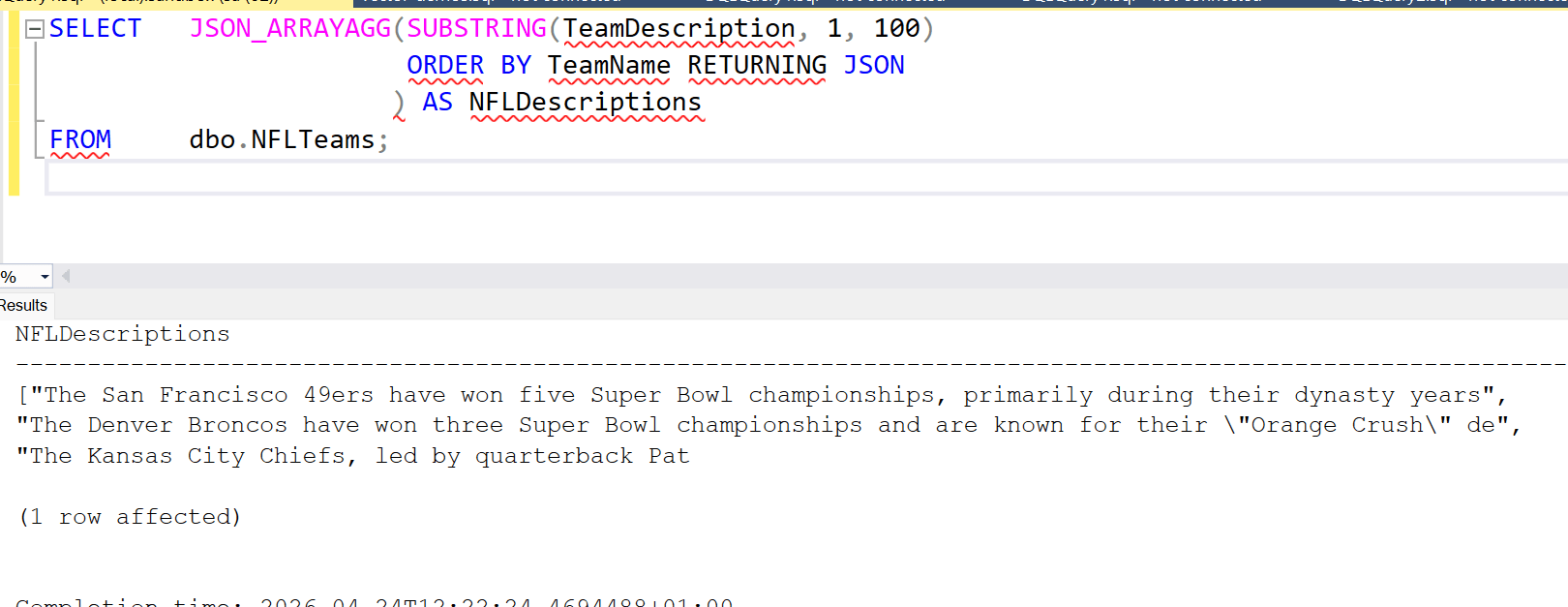
I'll add the TeamDescription column from the previous article and try aggregating a substring of those descriptions into an array. The function handles escaping automatically, just as JSON_OBJECTAGG did:
SELECT JSON_ARRAYAGG(SUBSTRING(TeamDescription, 1, 100)
                     ORDER BY TeamName RETURNING JSON) AS NFLDescriptions
FROM dbo.NFLTeams;
When I click the result and open the document, I can see that double quotes inside the description text have been escaped properly, keeping the JSON valid. The second element has the quotes escaped and I've formatted the results to be easier to read.
Datetime Values
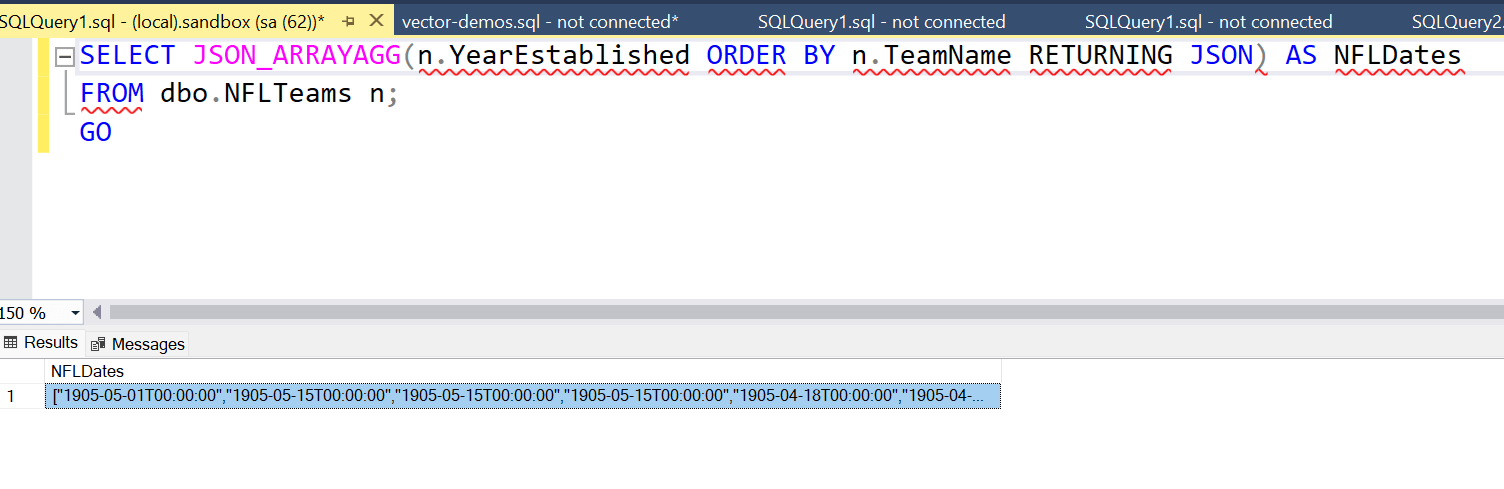
I'll add the YearEstablishedDateTime column from the previous article and aggregate it the same way:
SELECT JSON_ARRAYAGG(n.YearEstablishedDateTime ORDER BY n.TeamName RETURNING JSON) AS NFLDates
FROM dbo.NFLTeams n;
GO
Just like JSON_OBJECTAGG, the function returns proper ISO 8601 datetime values that will parse cleanly on the client side.
Summary
In this article we've looked at the second of the two new JSON functions in SQL Server 2025. JSON_ARRAYAGG collects values from multiple rows and packs them into a JSON array. It's a natural companion to JSON_OBJECTAGG. You can use the object version when you need named key:value pairs and the array version when you just need an ordered list of values. The built-in ORDER BY clause is a particularly handy addition, giving you control over element sequence that was never straightforward with FOR JSON PATH.
There are now many JSON functions in SQL Server and they are useful in different situations when your application is storing or returning JSON data. Between JSON_OBJECTAGG and JSON_ARRAYAGG, you have a clean, native way to serialize relational data into JSON without string manipulation or workarounds.


