

He's Not Risen, But My Query Has: Easter Eggs in Pure T-SQL
A sequel nobody asked for, featuring mathematics, existential dread, and a tiny invisible polygon that has now appeared in two consecutive holiday scripts. It started, as all my worst ideas do, with a reasonable question: Could I draw Easter eggs in SQL Server Management Studio?
The correct answer is, Why would you ever do that?
The answer I gave myself was, Absolutely yes, and I should start immediately.
My wife asked what I was doing. I said, Geometry. She nodded slowly and left the room. This is what nineteen years of marriage to a database lead looks like.
Why Though
If you missed my St Patrick's Day article, in which I drew a shamrock and a pint of Guinness using nothing but T-SQL spatial types, first of all, it is still available if you would like to question my priorities alongside everyone else. Second, the short version is this: SQL Server's geometry data type, combined with SSMS's Spatial Results viewer, can render shapes on screen.
It was designed for geographic information systems. Mapping. Urban planning. Important things.
I used it to draw Easter eggs.
I regret nothing.
The Egg Problem
A circle in T-SQL is easy. You buffer a point and walk away feeling smug:
geometry::Point(5.0, 5.0, 0).STBuffer(1.2)
An egg, however, is not a circle. An egg is taller than it is wide. It has gravitas. It has presence. What I needed was an ellipse, and SQL Server's spatial library does not provide one. What it does provide is polygons, trigonometric functions, and the quiet judgement of everyone who can see my screen.
The solution was to approximate an ellipse as a 32-point polygon using a WHILE loop and parametric equations:
WHILE @i <= 32
BEGIN
    SET @angle = @i * 2 * PI() / 32;
    SET @pts = @pts
        + CAST(ROUND(@cx + @rx * COS(@angle), 4) AS varchar(20)) + ' '
        + CAST(ROUND(@cy + @ry * SIN(@angle), 4) AS varchar(20));
    IF @i < 32 SET @pts = @pts + ',';
    SET @i += 1;
END
Set @ry bigger than @rx and you get a tall oval. Set them equal and you get a circle. Set them both to zero and you get an error message, followed by a moment of quiet reflection.
This is GCSE trigonometry applied to holiday card design in an enterprise database product. My maths teacher would be both proud and deeply concerned.
Egg Stripes: Surprisingly Elegant
Plain oval eggs are fine. Striped eggs are better. This is where SQL Server's spatial library accidentally becomes impressive. STIntersection() returns only the overlapping area between two shapes. So, to draw a horizontal stripe across an egg, you create a wide, thin rectangle and intersect it with the egg polygon. The result clips perfectly to the egg's curved edge:
geometry::STGeomFromText('POLYGON((4.0 5.0, 6.0 5.0, 6.0 5.45, 4.0 5.45, 4.0 5.0))', 0)
    .STIntersection(eggPolygon)
This is a genuinely powerful geospatial operation, normally used for things like calculating which flood zones overlap with residential areas. I used it to put a stripe on a cartoon egg. The SQL Server engineering team spent years building this functionality. I want them to know I appreciate it.
The Return of the Dummy Shape
If you read the St Patrick's Day article, you will remember my arch-nemesis: Slot 4.
SSMS's spatial viewer assigns colours from a fixed eight-colour palette based purely on the order rows are returned. You cannot configure this. You cannot override it. You cannot negotiate with it over a cup of tea. Slot 4 is purple. It has always been purple. It will always be purple. Somewhere deep in the SSMS source code, there is a hard-coded colour value that has ruined more of my evenings than I care to admit.
The solution, discovered last time after what I can only describe as the five stages of grief played out entirely in a query window, is the dummy shape:
(geometry::Point(-3, 5, 0).STBuffer(0.01).MakeValid(), 'dummy')
A point so small it is practically a philosophical concept. Positioned just off the edge of the visible canvas. Its entire purpose in life is to sit in Slot 4 and be purple so that nothing else has to be. It is tiny. It is invisible. It is the most important shape in the script.
I have started to feel a strange affection for it.
The dummy shape has now appeared in two consecutive holiday SQL scripts. At this point, it is basically a recurring character. I am considering giving it a name.
The Grass
Every Easter scene needs grass. In spatial terms, this is just a wide, flat rectangle near the bottom of the canvas with small triangles poking up from the top edge like tufts:
(geometry::STGeomFromText('POLYGON((-2 2.8, 12 2.8, 12 3.4, -2 3.4, -2 2.8))', 0), 'grass'),
(geometry::STGeomFromText('POLYGON((0.0 3.4, 0.3 3.4, 0.15 3.9, 0.0 3.4))', 0), 'grass'),
It does not look like real grass. It looks like a green rectangle with triangles on it. But real grass would require a fractal noise algorithm, and I had already spent four hours on eggs. There are limits.
The Pixel Font: Now a Legacy System
The pixel font from the St Patrick's Day script returns, largely unchanged, because it works, and I am not touching something that works. Each letter is a grid of (row, column) coordinates in a table variable, rendered by a WHILE loop that stamps tiny polygon squares across the canvas.
The font table now officially contains enough letters to spell most seasonal greetings, and at least one mild expletive. It has a test suite. I ran it manually once. It has documentation. These articles. It is, against all reasonable expectations, becoming a thing.
I did not plan to build a pixel font library in T-SQL. Nobody plans to build a pixel font library in T-SQL. And yet, here we are.
The Final Slot Map
After careful wrangling, threats, and the now-traditional dummy sacrifice, the colour assignments landed like this:
| Slot | SSMS Colour | Used For |
|---|---|---|
| 1 | Teal | Left egg |
| 2 | Orange | Centre egg + all text |
| 3 | Blue/mid | Right egg |
| 4 | PURPLE | The Dummy. Gone. Invisible. It knew what it signed up for. |
| 5 | Dark grey | Egg stripes |
| 6 | Cream/beige | Egg highlights |
| 7 | Sage green | Grass |
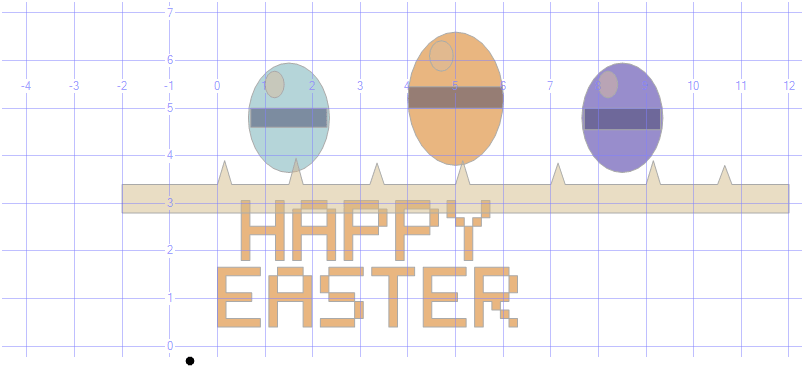
Is it a masterpiece? No. Does it look like three colourful ovals on a green strip with pixel text underneath, produced entirely by a spatial geometry aggregation query in an enterprise database product that costs thousands of pounds per core licence?
Reader, it absolutely does.
Lessons Learned, Again
- SQL Server has SIN(), COS(), and PI() built in. This means drawing ellipses is technically possible. It does not mean drawing ellipses are advisable. I drew the ellipses.
- STIntersection() is one of the most elegant functions in SQL Server. It deserves better than Easter egg stripes. It got Easter egg stripes.
- The dummy shape is a permanent fixture now. If you are writing SQL spatial art and you are not starting with a dummy shape at (-3, 5), you are going to have a bad time.
- A pixel font table variable is now a reusable asset in my personal codebase. I have genuinely typed that sentence.
- My wife has stopped asking what I am doing. This is either a sign of trust or resignation. I prefer not to investigate which.
What's Next
Fourth of July fireworks rendered as cascading STBuffer explosions? A Halloween pumpkin? A Christmas tree with baubles as buffered points, a star as a five-point polygon, and presents underneath as an assortment of carefully positioned rectangles?
I have a problem, and I am leaning into it at full speed.
If It Works, It Will End Up Like This
Go on, then. Execute it, click the Spatial Results tab, and if everything has gone to plan, you should see three striped Easter eggs sitting on a strip of grass with HAPPY EASTER in pixel font underneath.
How fun is that? A fully festive Easter scene, built entirely in T-SQL, visible inside SQL Server Management Studio with zero external tools, zero images, and zero dignity.
Tested and working in SQL Server 2025.
This Is Part 3. We Need To Talk About That.
Yes. Part 3.
For those keeping score at home, we have now done St Patrick's Day, Easter, and somewhere in a drawer I have notes for a Christmas tree. This started as a one-off joke and has quietly become a series. A series of holiday greeting cards written in a query language.
Whether you call it SQL ('ess-queue-ell') or SEQUEL ('see-kwul'), and I'm not getting into that argument here because I have enough enemies already, the fact remains that neither pronunciation was ever supposed to end a sentence with, '...and then I drew some Easter eggs with it.'
Yet here we are. Part 3. The franchise nobody greenlit, but nobody stopped either.
If you have made it this far through all three articles, I want you to know two things:
- You are my kind of person.
- You should probably go outside.
See you at Christmas. ?? Oh wait, I did that, so maybe if I can get New Year working, or change it to the Fourth of July for all my American friends and cousins, see you then, if not before 🙂
Happy Easter to all SQL Server developers everywhere. May your queries return fast, your foreign keys never orphan, and may slot 4 remain purple and harmless somewhere off the edge of your canvas, where it can't hurt anyone.
The Code
USE tempdb;
GO

DROP TABLE IF EXISTS #easter;
CREATE TABLE #easter (shape geometry, colour varchar(20));

--------------------------------------------------------------------------------
-- SLOT MAP (SSMS 8-colour palette)
-- Slot 1 = teal ? egg1
-- Slot 2 = orange ? egg2 / text
-- Slot 3 = blue/mid ? egg3
-- Slot 4 = PURPLE ? dummy (off-screen, sacrificed as always!)
-- Slot 5 = dark grey ? egg stripes / detail
-- Slot 6 = beige/cream? egg highlight
-- Slot 7 = sage green ? grass
-- Slot 8 = grey/green ? egg4
--------------------------------------------------------------------------------

--------------------------------------------------------------------------------
-- 1) DUMMY — absorbs slot 4 (purple) off-screen
--------------------------------------------------------------------------------

INSERT INTO #easter(shape, colour) VALUES
(geometry::Point(-3, 5, 0).STBuffer(0.01).MakeValid(), 'dummy');

--------------------------------------------------------------------------------
-- 2) GRASS — simple ground strip
--------------------------------------------------------------------------------

INSERT INTO #easter(shape, colour) VALUES
(geometry::STGeomFromText('POLYGON((-2 2.8, 12 2.8, 12 3.4, -2 3.4, -2 2.8))', 0).MakeValid(), 'grass'),
-- Grass tufts
(geometry::STGeomFromText('POLYGON((0.0 3.4, 0.3 3.4, 0.15 3.9, 0.0 3.4))', 0).MakeValid(), 'grass'),
(geometry::STGeomFromText('POLYGON((1.5 3.4, 1.8 3.4, 1.65 3.95, 1.5 3.4))', 0).MakeValid(), 'grass'),
(geometry::STGeomFromText('POLYGON((3.2 3.4, 3.5 3.4, 3.35 3.85, 3.2 3.4))', 0).MakeValid(), 'grass'),
(geometry::STGeomFromText('POLYGON((5.0 3.4, 5.3 3.4, 5.15 3.9, 5.0 3.4))', 0).MakeValid(), 'grass'),
(geometry::STGeomFromText('POLYGON((7.0 3.4, 7.3 3.4, 7.15 3.85, 7.0 3.4))', 0).MakeValid(), 'grass'),
(geometry::STGeomFromText('POLYGON((9.0 3.4, 9.3 3.4, 9.15 3.9, 9.0 3.4))', 0).MakeValid(), 'grass'),
(geometry::STGeomFromText('POLYGON((10.5 3.4, 10.8 3.4, 10.65 3.8, 10.5 3.4))', 0).MakeValid(), 'grass');

--------------------------------------------------------------------------------
-- 3) EASTER EGGS
-- Eggs are built as a buffered point (circle) squashed into an oval
-- using a POLYGON approximation of an ellipse
--------------------------------------------------------------------------------

-- Helper: approximate ellipse as 32-point polygon
-- Egg 1 — left egg (teal, slot 1)
DECLARE @cx float, @cy float, @rx float, @ry float;
DECLARE @pts nvarchar(max), @i int, @angle float;

-- Egg 1
SET @cx=1.5; SET @cy=4.8; SET @rx=0.85; SET @ry=1.15;
SET @i=0; SET @pts='';
WHILE @i <= 32
BEGIN
SET @angle = @i * 2 * PI() / 32;
SET @pts = @pts + CAST(ROUND(@cx + @rx*COS(@angle),4) AS varchar(20))
+ ' ' + CAST(ROUND(@cy + @ry*SIN(@angle),4) AS varchar(20));
IF @i < 32 SET @pts = @pts + ',';
SET @i += 1;
END
INSERT INTO #easter(shape,colour)
VALUES(geometry::STGeomFromText('POLYGON(('+@pts+'))',0).MakeValid(),'egg1');

-- Egg 1 stripe
INSERT INTO #easter(shape,colour) VALUES
(geometry::STGeomFromText('POLYGON((0.7 4.6, 2.3 4.6, 2.3 5.0, 0.7 5.0, 0.7 4.6))',0)
.STIntersection(geometry::STGeomFromText('POLYGON(('+@pts+'))',0)).MakeValid(),'stripe');

-- Egg 2 — centre egg, taller (orange, slot 2)
SET @cx=5.0; SET @cy=5.2; SET @rx=1.0; SET @ry=1.4;
SET @i=0; SET @pts='';
WHILE @i <= 32
BEGIN
SET @angle = @i * 2 * PI() / 32;
SET @pts = @pts + CAST(ROUND(@cx + @rx*COS(@angle),4) AS varchar(20))
+ ' ' + CAST(ROUND(@cy + @ry*SIN(@angle),4) AS varchar(20));
IF @i < 32 SET @pts = @pts + ',';
SET @i += 1;
END
INSERT INTO #easter(shape,colour)
VALUES(geometry::STGeomFromText('POLYGON(('+@pts+'))',0).MakeValid(),'egg2');

-- Egg 2 stripe
INSERT INTO #easter(shape,colour) VALUES
(geometry::STGeomFromText('POLYGON((4.0 5.0, 6.0 5.0, 6.0 5.45, 4.0 5.45, 4.0 5.0))',0)
.STIntersection(geometry::STGeomFromText('POLYGON(('+@pts+'))',0)).MakeValid(),'stripe');

-- Egg 3 — right egg (blue/mid, slot 3)
SET @cx=8.5; SET @cy=4.8; SET @rx=0.85; SET @ry=1.15;
SET @i=0; SET @pts='';
WHILE @i <= 32
BEGIN
SET @angle = @i * 2 * PI() / 32;
SET @pts = @pts + CAST(ROUND(@cx + @rx*COS(@angle),4) AS varchar(20))
+ ' ' + CAST(ROUND(@cy + @ry*SIN(@angle),4) AS varchar(20));
IF @i < 32 SET @pts = @pts + ',';
SET @i += 1;
END
INSERT INTO #easter(shape,colour)
VALUES(geometry::STGeomFromText('POLYGON(('+@pts+'))',0).MakeValid(),'egg3');

-- Egg 3 stripe
INSERT INTO #easter(shape,colour) VALUES
(geometry::STGeomFromText('POLYGON((7.7 4.55, 9.3 4.55, 9.3 5.0, 7.7 5.0, 7.7 4.55))',0)
.STIntersection(geometry::STGeomFromText('POLYGON(('+@pts+'))',0)).MakeValid(),'stripe');

-- Egg highlight (small bright oval top of each egg — slot 6 cream)
SET @cx=1.2; SET @cy=5.5; SET @rx=0.2; SET @ry=0.28;
SET @i=0; SET @pts='';
WHILE @i <= 16
BEGIN
SET @angle = @i * 2 * PI() / 16;
SET @pts = @pts + CAST(ROUND(@cx + @rx*COS(@angle),4) AS varchar(20))
+ ' ' + CAST(ROUND(@cy + @ry*SIN(@angle),4) AS varchar(20));
IF @i < 16 SET @pts = @pts + ',';
SET @i += 1;
END
INSERT INTO #easter(shape,colour)
VALUES(geometry::STGeomFromText('POLYGON(('+@pts+'))',0).MakeValid(),'highlight');

SET @cx=4.7; SET @cy=6.1; SET @rx=0.25; SET @ry=0.32;
SET @i=0; SET @pts='';
WHILE @i <= 16
BEGIN
SET @angle = @i * 2 * PI() / 16;
SET @pts = @pts + CAST(ROUND(@cx + @rx*COS(@angle),4) AS varchar(20))
+ ' ' + CAST(ROUND(@cy + @ry*SIN(@angle),4) AS varchar(20));
IF @i < 16 SET @pts = @pts + ',';
SET @i += 1;
END
INSERT INTO #easter(shape,colour)
VALUES(geometry::STGeomFromText('POLYGON(('+@pts+'))',0).MakeValid(),'highlight');

SET @cx=8.2; SET @cy=5.5; SET @rx=0.2; SET @ry=0.28;
SET @i=0; SET @pts='';
WHILE @i <= 16
BEGIN
SET @angle = @i * 2 * PI() / 16;
SET @pts = @pts + CAST(ROUND(@cx + @rx*COS(@angle),4) AS varchar(20))
+ ' ' + CAST(ROUND(@cy + @ry*SIN(@angle),4) AS varchar(20));
IF @i < 16 SET @pts = @pts + ',';
SET @i += 1;
END
INSERT INTO #easter(shape,colour)
VALUES(geometry::STGeomFromText('POLYGON(('+@pts+'))',0).MakeValid(),'highlight');

--------------------------------------------------------------------------------
-- 4) PIXEL FONT — HAPPY EASTER
--------------------------------------------------------------------------------

DECLARE @Scale decimal(6,2) = 0.18;
DECLARE @Step decimal(6,2) = (5 * @Scale) + @Scale;
DECLARE @Line1 nvarchar(60) = N'HAPPY';
DECLARE @Line2 nvarchar(60) = N'EASTER';
DECLARE @X1 decimal(6,2) = 0.5, @Y1 decimal(6,2) = 1.8;
DECLARE @X2 decimal(6,2) = 0.0, @Y2 decimal(6,2) = 0.4;

DECLARE @Font TABLE (ch nchar(1), r tinyint, c tinyint);
INSERT @Font VALUES
-- H
(N'H',0,0),(N'H',0,4),(N'H',1,0),(N'H',1,4),(N'H',2,0),(N'H',2,4),
(N'H',3,0),(N'H',3,1),(N'H',3,2),(N'H',3,3),(N'H',3,4),
(N'H',4,0),(N'H',4,4),(N'H',5,0),(N'H',5,4),(N'H',6,0),(N'H',6,4),
-- A
(N'A',0,1),(N'A',0,2),(N'A',0,3),(N'A',1,0),(N'A',1,4),
(N'A',2,0),(N'A',2,4),(N'A',3,0),(N'A',3,1),(N'A',3,2),(N'A',3,3),(N'A',3,4),
(N'A',4,0),(N'A',4,4),(N'A',5,0),(N'A',5,4),(N'A',6,0),(N'A',6,4),
-- P
(N'P',0,0),(N'P',0,1),(N'P',0,2),(N'P',0,3),
(N'P',1,0),(N'P',1,4),(N'P',2,0),(N'P',2,4),
(N'P',3,0),(N'P',3,1),(N'P',3,2),(N'P',3,3),
(N'P',4,0),(N'P',5,0),(N'P',6,0),
-- Y
(N'Y',0,0),(N'Y',0,4),(N'Y',1,0),(N'Y',1,4),(N'Y',2,1),(N'Y',2,3),
(N'Y',3,2),(N'Y',4,2),(N'Y',5,2),(N'Y',6,2),
-- E
(N'E',0,0),(N'E',0,1),(N'E',0,2),(N'E',0,3),(N'E',0,4),
(N'E',1,0),(N'E',2,0),
(N'E',3,0),(N'E',3,1),(N'E',3,2),(N'E',3,3),
(N'E',4,0),(N'E',5,0),
(N'E',6,0),(N'E',6,1),(N'E',6,2),(N'E',6,3),(N'E',6,4),
-- S
(N'S',0,1),(N'S',0,2),(N'S',0,3),(N'S',0,4),
(N'S',1,0),(N'S',2,0),
(N'S',3,1),(N'S',3,2),(N'S',3,3),
(N'S',4,4),(N'S',5,4),
(N'S',6,0),(N'S',6,1),(N'S',6,2),(N'S',6,3),
-- T
(N'T',0,0),(N'T',0,1),(N'T',0,2),(N'T',0,3),(N'T',0,4),
(N'T',1,2),(N'T',2,2),(N'T',3,2),(N'T',4,2),(N'T',5,2),(N'T',6,2),
-- R
(N'R',0,0),(N'R',0,1),(N'R',0,2),(N'R',0,3),
(N'R',1,0),(N'R',1,4),(N'R',2,0),(N'R',2,4),
(N'R',3,0),(N'R',3,1),(N'R',3,2),(N'R',3,3),
(N'R',4,0),(N'R',4,2),(N'R',5,0),(N'R',5,3),(N'R',6,0),(N'R',6,4);

DECLARE @ch nchar(1), @len int;
SET @i=1; SET @len=LEN(@Line1);
WHILE @i<=@len
BEGIN
SET @ch=SUBSTRING(@Line1,@i,1);
IF @ch<>N' '
BEGIN
INSERT INTO #easter(shape,colour)
SELECT geometry::STGeomFromText(
CONCAT('POLYGON((',
CAST(ROUND(@X1+((@i-1)*@Step)+(c *@Scale),3) AS varchar(12)),' ',
CAST(ROUND(@Y1+((6-r) *@Scale),3) AS varchar(12)),',',
CAST(ROUND(@X1+((@i-1)*@Step)+((c+1)*@Scale),3) AS varchar(12)),' ',
CAST(ROUND(@Y1+((6-r) *@Scale),3) AS varchar(12)),',',
CAST(ROUND(@X1+((@i-1)*@Step)+((c+1)*@Scale),3) AS varchar(12)),' ',
CAST(ROUND(@Y1+((6-r+1)*@Scale),3) AS varchar(12)),',',
CAST(ROUND(@X1+((@i-1)*@Step)+(c *@Scale),3) AS varchar(12)),' ',
CAST(ROUND(@Y1+((6-r+1)*@Scale),3) AS varchar(12)),',',
CAST(ROUND(@X1+((@i-1)*@Step)+(c *@Scale),3) AS varchar(12)),' ',
CAST(ROUND(@Y1+((6-r) *@Scale),3) AS varchar(12)),
'))'),0).MakeValid(),'egg2' -- orange slot for text
FROM @Font WHERE ch=@ch;
END
SET @i+=1;
END

SET @i=1; SET @len=LEN(@Line2);
WHILE @i<=@len
BEGIN
SET @ch=SUBSTRING(@Line2,@i,1);
IF @ch<>N' '
BEGIN
INSERT INTO #easter(shape,colour)
SELECT geometry::STGeomFromText(
CONCAT('POLYGON((',
CAST(ROUND(@X2+((@i-1)*@Step)+(c *@Scale),3) AS varchar(12)),' ',
CAST(ROUND(@Y2+((6-r) *@Scale),3) AS varchar(12)),',',
CAST(ROUND(@X2+((@i-1)*@Step)+((c+1)*@Scale),3) AS varchar(12)),' ',
CAST(ROUND(@Y2+((6-r) *@Scale),3) AS varchar(12)),',',
CAST(ROUND(@X2+((@i-1)*@Step)+((c+1)*@Scale),3) AS varchar(12)),' ',
CAST(ROUND(@Y2+((6-r+1)*@Scale),3) AS varchar(12)),',',
CAST(ROUND(@X2+((@i-1)*@Step)+(c *@Scale),3) AS varchar(12)),' ',
CAST(ROUND(@Y2+((6-r+1)*@Scale),3) AS varchar(12)),',',
CAST(ROUND(@X2+((@i-1)*@Step)+(c *@Scale),3) AS varchar(12)),' ',
CAST(ROUND(@Y2+((6-r) *@Scale),3) AS varchar(12)),
'))'),0).MakeValid(),'egg2'
FROM @Font WHERE ch=@ch;
END
SET @i+=1;
END

--------------------------------------------------------------------------------
-- 5) OUTPUT — slot order controlled, dummy absorbs purple slot 4
--------------------------------------------------------------------------------

SELECT colour, geometry::UnionAggregate(shape) AS shape
FROM #easter
WHERE shape IS NOT NULL
AND shape.STIsValid() = 1
GROUP BY colour
ORDER BY CASE colour
WHEN 'egg1' THEN 1 -- slot 1 (teal) ? left egg
WHEN 'egg2' THEN 2 -- slot 2 (orange) ? centre egg + text
WHEN 'egg3' THEN 3 -- slot 3 (blue) ? right egg
WHEN 'dummy' THEN 4 -- slot 4 (PURPLE) ? sacrificed off-screen
WHEN 'stripe' THEN 5 -- slot 5 (dark grey) ? egg stripes
WHEN 'highlight' THEN 6 -- slot 6 (cream) ? egg highlights
WHEN 'grass' THEN 7 -- slot 7 (sage green) ? grass
ELSE 8
END;

DROP TABLE #easter; 