

Introduction
Modern applications increasingly rely on semi-structured and schema-flexible data, commonly stored as JSON. While PostgreSQL provides strong support for JSON and JSONB data types, performance can become a concern when applications need low-latency sorting, ranking, and complex filtering across large JSON-heavy datasets. This is where OpenSearch complements PostgreSQL.
Using PostgreSQL together with OpenSearch allows us to retain transactional integrity and relational guarantees while offloading search-heavy and sort-intensive workloads to a system designed specifically for that purpose. In this article, we will examine why sorting and filtering on nested JSON fields can become expensive in PostgreSQL, and how OpenSearch can be used to index denormalized data for faster search, sorting, and filtering.
Limitations of Sorting JSON Data in PostgreSQL Alone
PostgreSQL's JSONB is powerful but sorting large datasets based on nested JSON fields has challenges. Let us understand each of them in brief details.
Expression-based sorting is CPU-heavy
Sorting on JSON field typically looks like this query:
SELECT
    id,
    payload
FROM
    tasks
ORDER BY
    (payload->>'priority')::int DESC;
PostgreSQL must compute the order by expression for each row in the result set. It performs the following steps repeatedly for every row of data:
- Read the payload JSON/JSONB column
- Execute ->> operator (extract key from JSON)
- Convert the value to text
- Cast text to integer
- Use the result in the sorting algorithm
So, for N number of rows, PostgreSQL performs this entire pipeline N times. Even with appropriate indexes, PostgreSQL often cannot fully optimize these sorts at scale.
GIN Indexes Don’t Help Sorting
Let us consider the same query above with the assumption that we have GIN index created on the column: payload.
-- GIN index on JSONB column in the table
CREATE INDEX idx_payload_gin ON tasks USING GIN (payload);

-- Query for sorting the data
SELECT id, payload
FROM tasks
ORDER BY (payload->>'priority')::int DESC;
A GIN index stores an inverted index of JSON keys/values, i.e., row IDs. It is useful for searching JSON fields but when it comes to sorting, PostgreSQL must extract priority from every JSON value for every row, cast it to an integer and sort the rows in the memory. GIN cannot help because it does not maintain ordered values.
Role of OpenSearch
OpenSearch is a distributed search and analytics engine built for faster sorting, full-text searching capabilities, aggregations and real-time analytics. We will look into these in details as we see how Opensearch works with data in PostgreSQL.
Article Roadmap
Before we begin the implementation, it is useful to understand how the article is structured. We will first create a small PostgreSQL dataset that uses JSONB fields, then look at the limitations of sorting and joining on nested JSON values in PostgreSQL. After that, we will set up OpenSearch locally, define an index mapping for a flattened document model, and load data from PostgreSQL into OpenSearch using a Python script. Finally, we will run search, sorting, and filtering examples in OpenSearch to see how this approach improves query efficiency for JSON-heavy application data.
Pre-requisites
- PostgreSQL and PGAdmin installed locally
- Python 3+ installed locally
- Docker desktop/Rancher desktop installed locally
- Postman installed locally and basic knowledge of working with Postman or curl commands
Design and Populate PostgreSQL Schema
To start off with the article, we need to have PostgreSQL tables in place. In our article, we will assume that we are dealing with the database of a retailer which stores data of the manufacturer of their products being sold, the products being sold and also the orders being placed. For the same, we need to have 3 tables: each for product, order and manufacturer. Accordingly, the database schema can be created this way:
Create a table for manufacturer information:
CREATE TABLE manufacturer (
    manufacturer_id TEXT PRIMARY KEY,
    manufacturer_name TEXT NOT NULL
);
Create a table for product information:
CREATE TABLE product (
    product_id TEXT PRIMARY KEY,
    product_value JSONB NOT NULL
);
Create a table for order information:
CREATE TABLE orders (
    order_id TEXT PRIMARY KEY,
    order_value JSONB NOT NULL,
    created_at TIMESTAMP DEFAULT getdate()
);
Once the table creation is complete, we need to fill in some dummy data into it so that we can use it for our sorting, filtering and searching operation purposes.
Populate the manufacturer information:
INSERT INTO manufacturer VALUES
('m-apple', 'Apple'),
('m-samsung', 'Samsung'),
('m-oneplus', 'OnePlus');
Populate the product information:
INSERT INTO product VALUES
('p-iphone-6',  '{"name":"iPhone 6","manufacturer":{"value":"m-apple"}}'),
('p-iphone-15', '{"name":"iPhone 15","manufacturer":{"value":"m-apple"}}'),
('p-galaxy-s25','{"name":"Galaxy S25","manufacturer":{"value":"m-samsung"}}'),
('p-oneplus-12','{"name":"OnePlus 12","manufacturer":{"value":"m-oneplus"}}');
Populate the order information:
INSERT INTO orders VALUES
('o-1001','{"product":{"value":"p-iphone-6"}}', getdate()),
('o-1002','{"product":{"value":"p-galaxy-s25"}}', getdate()),
('o-1003','{"product":{"value":"p-oneplus-12"}}', getdate()),
('o-1004','{"product":{"value":"p-iphone-15"}}', getdate());
Now that we have the data populated, we can start with the traditional sorting method.
Why PostgreSQL Native Query Performs Poorly
Let us understand this with a use case. Suppose that we need to list all the order id in a particular order so that the manufacturer name of the orders for different products are sorted in the ascending order. So, if there were 2 orders, one for an iphone manufactured by Apple and one for Galaxy S25 manufactured by Samsung, then iphone order id should be displayed first followed by the Galaxy S25 order id.
Now, to have this result achieved, we have to join product, manufacturer and order tables together by respective id extracted from the JSON data of each joining table. The query would look similar to this:
SELECT
    o.order_id,
    m.manufacturer_name
FROM orders o
JOIN product p
  ON o.order_value->'product'->>'value' = p.product_id
JOIN manufacturer m
  ON p.product_value->'manufacturer'->>'value' = m.manufacturer_id
ORDER BY m.manufacturer_name ASC;
This query, when run in query editor generates the appropriate result:
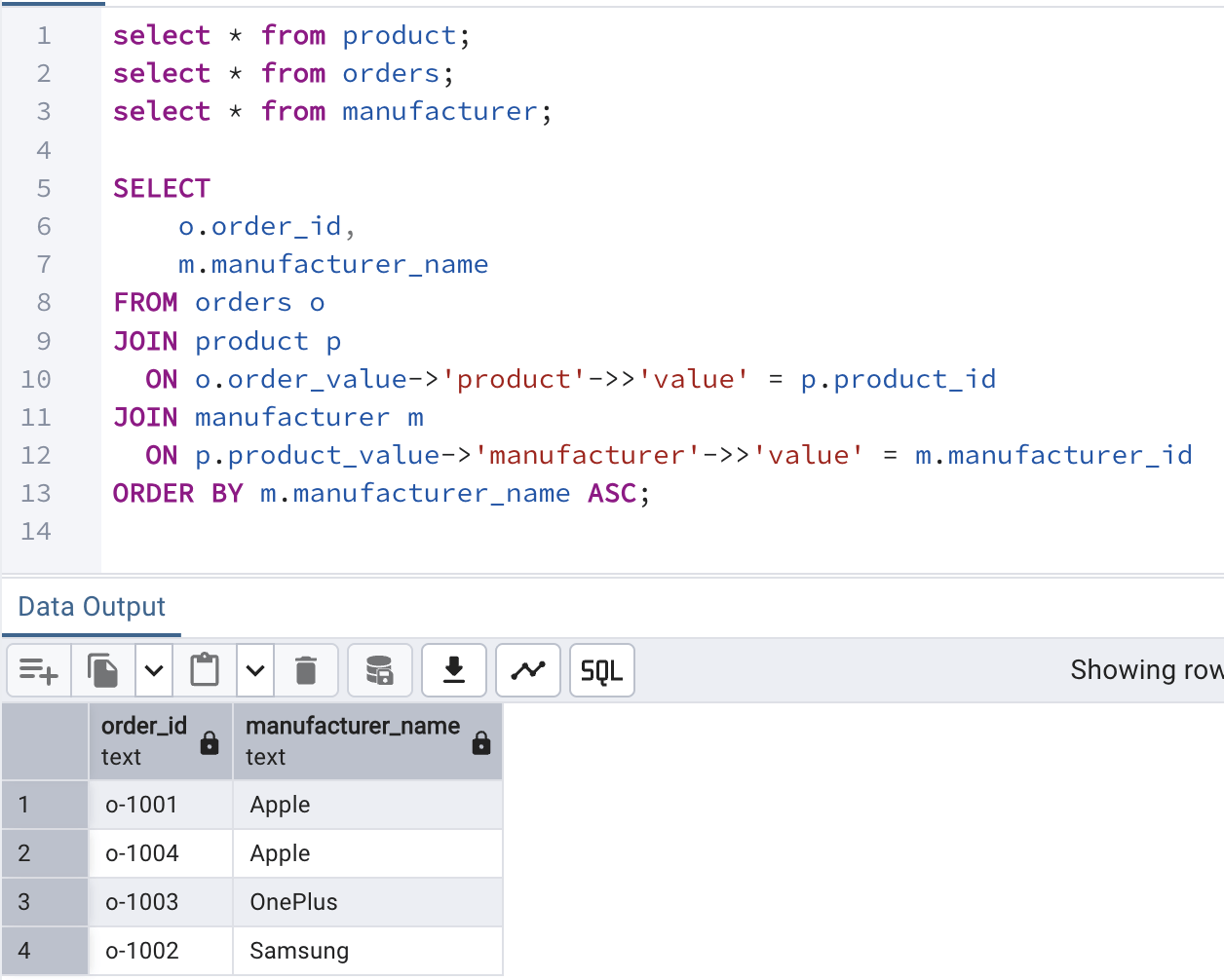
However, there are multiple problems with writing such queries in a real-time scenario:
- JSON extraction in JOINs - The query performs JSON extraction (->, ->>) inside the JOIN conditions. This forces PostgreSQL to parse JSON for each row during joins, which is CPU-intensive and slows down the operation.
- Sorting after JOINs - The ORDER BY is executed only after all JOINs are completed. This means PostgreSQL must first build the entire joined dataset and then sort it, making the operation expensive.
- Limited index usage - Because values are extracted from JSON in the join conditions, normal indexes on the underlying columns cannot be effectively used unless specific expression indexes exist.
- Pagination becomes expensive - When pagination (LIMIT/OFFSET) is applied, PostgreSQL still has to perform the joins and sorting before returning the requested page, increasing the cost significantly.
- Query plan complexity increases with data size - As the dataset grows, the number of rows processed in joins and sorting increases rapidly, causing the execution plan to become heavier and performance to degrade.
To address all the above issues and resolve them, Opensearch comes into the picture.
Installing OpenSearch locally (For beginners)
In case any of us are using Opensearch for the first time, we need to set it up locally to have an instance of Opensearch running locally in our system. Before we begin with installation, we must know how would Opensearch help us in this scenario by optimizing our search/sorting/filtering operations? To understand it in simple words, Opensearch will denormalize everything needed for search and sort into ONE document. We will soon get to learn what is a document in Opensearch when we start working with PostgreSQL data in Opensearch.
For now, we will begin with the Opensearch installtion locally. To install locally, we will use docker (or rancher) to do the same. We will run the following command to pull the opensearch project with specific version specified and run it locally to expose ports: 9200 and 9600 locally:
docker run -d \
  --name opensearch \
  -p 9200:9200 -p 9600:9600 \
  -e "discovery.type=single-node" \
  -e "plugins.security.disabled=true" \
  opensearchproject/opensearch:2.11.0
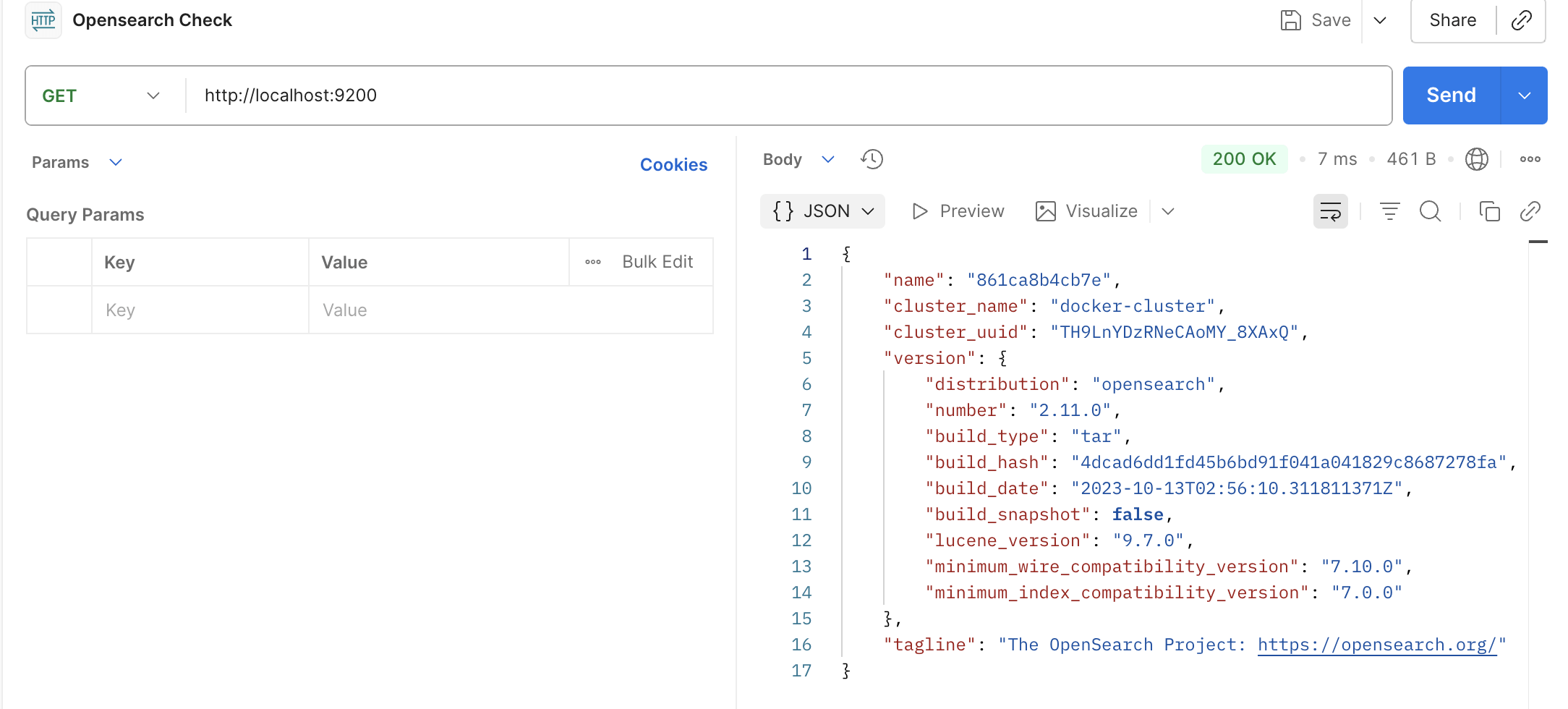
Once the installation is complete and the opensearch is running locally, use the following curl command in postman to check the output:
curl http://localhost:9200
Once we hit the above URL, we should see the following output in our Postman. The response on the right half clearly shows that the OpenSearch is up and running in port 9200 locally.
Opensearch Index Design and Mapping Creation
Opensearch works faster because it stores data at it's end in a flattened structure. Let us understand this better. We can see that we have product, manufacturer and order tables. The product table JSON data has mapping to manufacturer and order table JSON data has mapping to product. But opensearch will store the same data not as separate entities but as a single JSON structure with order product and manufacturer details mentioned in a single JSON per order.
Just few minutes back, we talked about document in Opensearch. This flattened structure of data storing per order record is considered as a document in Opensearch. Based on the schema we have in place, a document in Opensearch would look like as attached below.
Every document has a order id, the product information as per the order and the manufacturer information as per the product orders as a part of this order. The document should actually contain all the information needed to be retrieved or used in filtering or sorting conditions. So, the order, product and manufacturer information which is spread across 3 different tables are collectively brought into a single JSON structure which is self sufficient and has all the information needed to perform any sorting/filtering on the data. The document structure is to be created manually as per the requirement by the user.
So, we will have one document per order and this flattened document per order makes it much easier for Opensearch to sort/filter.
{
  "orderId": "o-1001",
  "product": {
    "id": "p-iphone-6",
    "name": "iPhone 6"
  },
  "manufacturer": {
    "id": "m-apple",
    "name": "Apple"
  },
  "createdAt": "2025-01-10T10:00:00Z"
}
Index design
Once the document structure is finalized by us based on our requirement, we can proceed for index mapping. The strcuture of the document we expect to have stored in OpenSearch is usually referred as index in OpenSearch. We can compare index in OpenSearch to a table in database and document in OpenSearch to a row in database.
Index mapping in OpenSearch defines how our JSON fields are stored, indexed, and typed (e.g., keyword, text, integer, date). We need it because it:
- enables fast sorting and filtering (no runtime JSON parsing)
- prevents wrong data types (e.g., sorting numbers as strings)
- improves query performance and memory usage
- controls search behavior (full-text vs exact match)
In short, index mapping tells OpenSearch how to understand our JSON data so that it can search and sort it efficiently.
Index creation
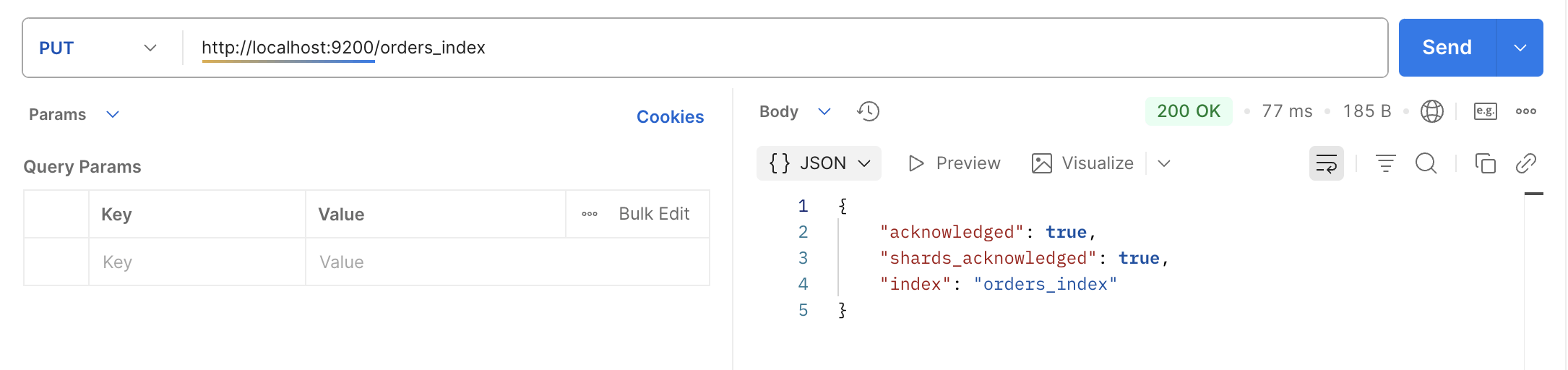
To create the index, we need to use PUT endpoint of OpenSearch and send the index mapping information to be registered at the OpenSearch end for future operations.
Below is the curl command we can use from our Postman to create an index mapping.
- The curl command sends an HTTP PUT request to an OpenSearch server at http://localhost:9200.
- It creates a new index named orders_index.
- The header tells OpenSearch that the request body is in JSON format.
- The -d section contains the index mapping, which defines how fields will be stored and indexed.
- orderId is defined as keyword, meaning it is stored for exact match queries.
- createdAt is defined as a date field, allowing date-based queries and sorting.
- product is a nested object containing:
- id ? keyword
- name ? text (optimized for full-text search).
- manufacturer is another object containing:
- id ? keyword
- name ? keyword (for exact matching and sorting).
This mapping ensures that OpenSearch indexes the data efficiently for searching, filtering, and aggregations.
curl -X PUT http://localhost:9200/orders_index \
-H "Content-Type: application/json" \
-d '{
  "mappings": {
    "properties": {
      "orderId": { "type": "keyword" },
      "createdAt": { "type": "date" },

      "product": {
        "properties": {
          "id": { "type": "keyword" },
          "name": { "type": "text" }
        }
      },

      "manufacturer": {
        "properties": {
          "id": { "type": "keyword" },
          "name": { "type": "keyword" }
        }
      }
    }
  }
}'
Once the above curl command is executed, we should see a similar output acknowledging the same. The response confirms that orders_index is created successfully.
Install Python Dependencies
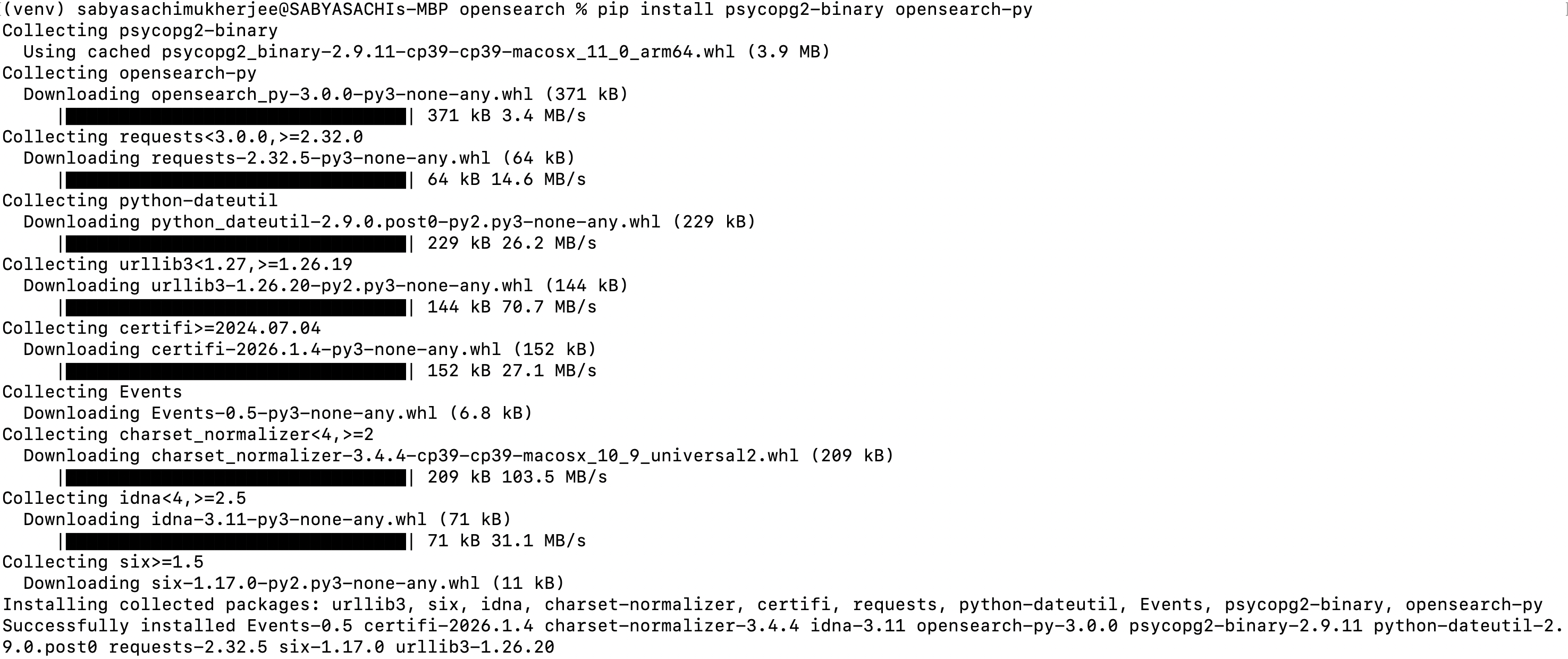
Now that we have the schema from PostgeSQL side ready and also the index from OpenSearch side ready, all we need to do is to populate OpenSearch with the records available in PostgreSQL as documents via a Python script. To do so, we need few dependencies to be installed on our system so that Python can use the necessary libraries to access PostgreSQL and OpenSearch altogether. To do the same, we have to install the following python dependencies using the command (run from terminal):
pip install psycopg2-binary opensearch-py
Once you run the above command and the installation is successful, you should see a similar output in your terminal:
Once the installation is complete, we can move on to creating our first python script to insert document into OpenSearch by extracting records from PostgreSQL.
Python Script to Index Data
Now, we will write a short python script which will access our local PostgreSQL database and run the static PostgreSQL join query (we saw earlier which had demerits) and populate data into OpenSearch as documents. This will be a script which in real time will be run periodically or via en event. For our understanding, we will assume that we run this script once to have the records from our database to be persisted as documents into OpenSearch.
The following script helps us achieve the same by populating documents into OpenSearch index by referring to PostgreSQL database. Broadly, it does the following. This Python script uses psycopg2 to connect to a PostgreSQL database and opensearch-py to interact with an OpenSearch cluster. It establishes a connection to the PostgreSQL database and the OpenSearch server running on localhost. The script then executes a SQL query that joins the orders, product, and manufacturer tables while extracting required values from JSON fields in the database. After executing the query, it iterates through the result set, converting each row into a structured nested JSON document containing order, product, and manufacturer details. Finally, each document is indexed into the orders_index in OpenSearch, allowing the data to be stored in a search-optimized format for faster querying, filtering, and sorting.
import psycopg2
from opensearchpy import OpenSearch

pg_conn = psycopg2.connect(
    dbname="demo",
    user="postgres",
    password="postgres",
    host="localhost",
    port=5432
)

os_client = OpenSearch(
    hosts=[{"host": "localhost", "port": 9200}],
    use_ssl=False
)

sql = """
SELECT
  o.order_id,
  o.created_at,
  p.product_id,
  p.product_value->>'name' AS product_name,
  m.manufacturer_id,
  m.manufacturer_name
FROM orders o
JOIN product p
  ON o.order_value->'product'->>'value' = p.product_id
JOIN manufacturer m
  ON p.product_value->'manufacturer'->>'value' = m.manufacturer_id
"""

cur = pg_conn.cursor()
cur.execute(sql)

for row in cur.fetchall():
    doc = {
        "orderId": row[0],
        "createdAt": row[1].isoformat(),
        "product": {
            "id": row[2],
            "name": row[3]
        },
        "manufacturer": {
            "id": row[4],
            "name": row[5]
        }
    }

    os_client.index(index="orders_index", body=doc)
Once the above script is run, we can see that it executes successfully. Since we do not have any print statements, it just executes and completes.
Operations using Opensearch (via python script)
To check if the data has been loaded as documents in the OpenSearch, we can run the following command from the Postman. This curl command sends an HTTP GET request to an OpenSearch server running at localhost:9200 to search documents in the orders_index. The request includes a JSON body with a match_all query, which instructs OpenSearch to return all documents stored in the index. The Content-Type: application/json header specifies that the request body is JSON. As a result, OpenSearch responds with all indexed order documents along with their metadata and relevance details.
curl --location --request GET 'http://localhost:9200/orders_index/_search' \
--header 'Content-Type: application/json' \
--data '{
    "query": {
        "match_all": {}
    }
}'
The response in the Postman should look similar to this:
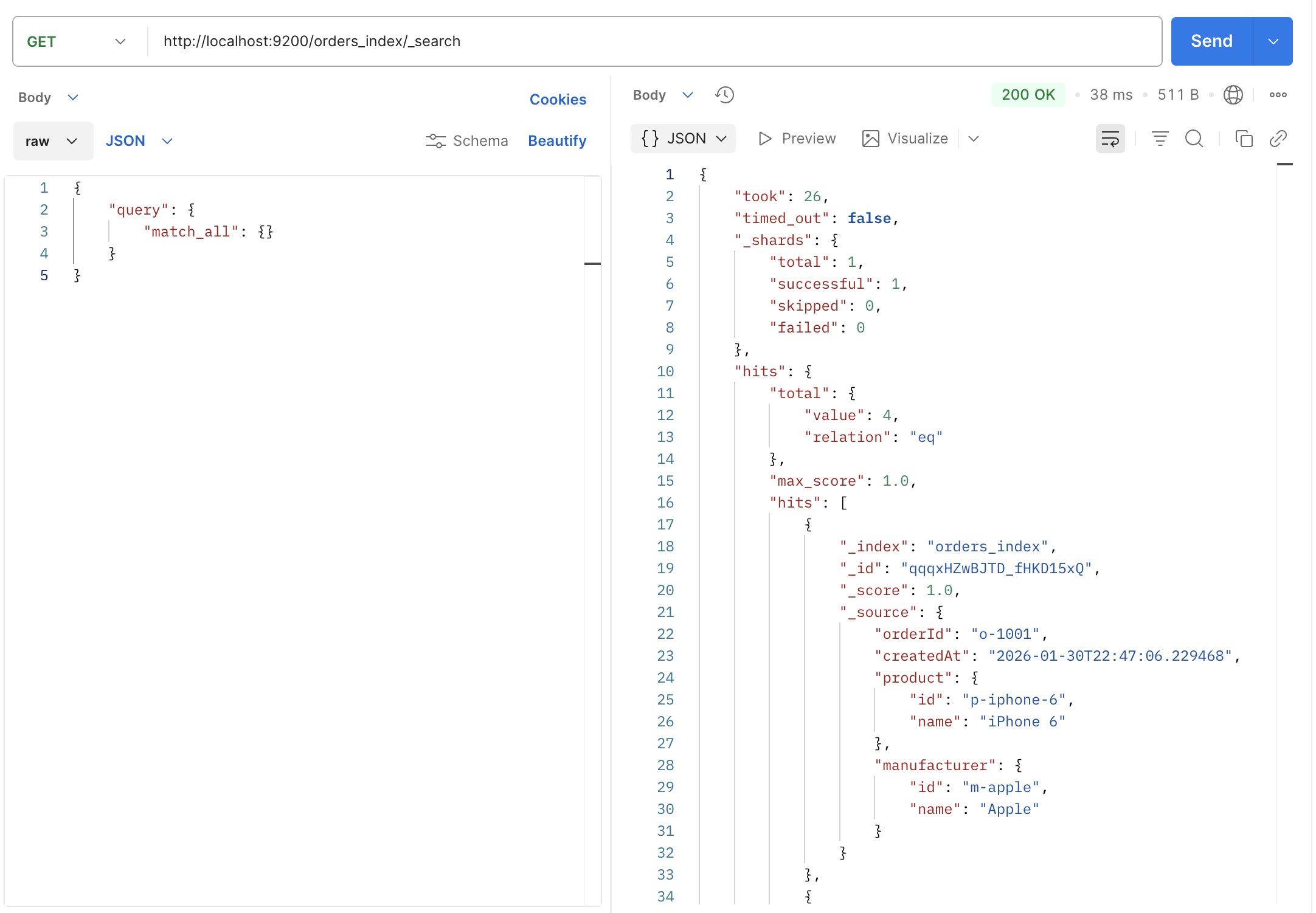
Clearly we can see that 4 documents have been stored into the OpenSearch index names: orders_index.
We can also search in OpenSearch using a python script as shown below.
- Connects to an OpenSearch cluster.
- Runs a match_all query to fetch all documents from orders_index.
- Iterates over the search results.
- Prints each document’s stored JSON (_source).
from opensearchpy import OpenSearch

INDEX_NAME = "orders_index"

client = OpenSearch(
    hosts=[{"host": "localhost", "port": 9200}],
    use_ssl=False,
    verify_certs=False
)

query = {
    "query": {
        "match_all": {}
    }
}

response = client.search(index=INDEX_NAME, body=query)

for hit in response["hits"]["hits"]:
    print(hit["_source"])
The script when run in terminal shows the following output:

We can also sort the result by manufacturer name. If we remember, while designing the index, we kept few attribute types as keyword. One of those was manufacturer name. So, we can use the manufacturer name as a keyword to sort the data in ascending/descending order. The below python scripts help us to sort the data based on manufacturer name:
- Connects to OpenSearch.
- Searches all documents in orders_index.
- Sorts results by manufacturer.name in ascending order.
- Prints each sorted document’s JSON content.
from opensearchpy import OpenSearch

INDEX_NAME = "orders_index"

client = OpenSearch(
    hosts=[{"host": "localhost", "port": 9200}],
    use_ssl=False,
    verify_certs=False
)

query = {
    "query": {"match_all": {}},
    "sort": [
        {"manufacturer.name": {"order": "asc"}}
    ]
}

response = client.search(index=INDEX_NAME, body=query)

for hit in response["hits"]["hits"]:
    print(hit["_source"])
Once the script is run, it generates the following output:

Finally, it might also be needed to filter the resultset based on user choice. For example, what if we want to see only those data whose manufacturer is Apple. In that case, we can make use of the OpenSearch filter condition to filter data. We can use the following python script to have the data filtered appropriately:
- Connects to OpenSearch.
- Runs a filtered search on
orders_index. - Returns only documents where
manufacturer.nameis Apple. - Prints the matching documents’ JSON data.
from opensearchpy import OpenSearch

INDEX_NAME = "orders_index"

client = OpenSearch(
    hosts=[{"host": "localhost", "port": 9200}],
    use_ssl=False,
    verify_certs=False
)

query = {
    "query": {
        "bool": {
            "filter": [
                {"term": {"manufacturer.name": "Apple"}}
            ]
        }
    }
}

response = client.search(index=INDEX_NAME, body=query)

for hit in response["hits"]["hits"]:
    print(hit["_source"])
Once the above python script is run, we can see the following output:

Conclusion
We have finally learnt on how we can make use of OpenSearch to sort and filter result set faster and efficiently with JSON data.
While PostgreSQL still remains:
- Source of truth,
- Transactional integrity,
- Referential consistency
OpenSearch handles the operations like:
- Search,
- Sorting,
- Filtering,
- Pagination
In simple words, when the sort key lives several JSON-based joins away, SQL can prove to be the wrong execution engine. Pre-joining data into a search index turns a multi-second query into a millisecond operation in such scenarios.