

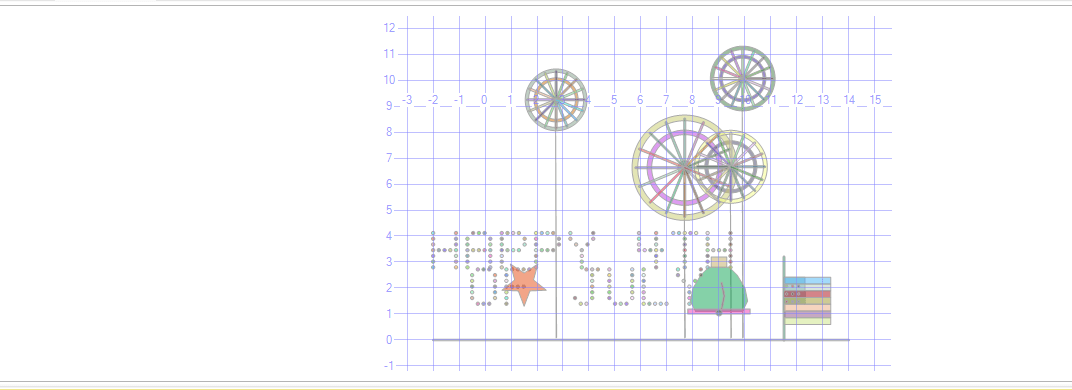
Fireworks, a Liberty Bell, a five-point star, and a SQL Server spatial geometry engine that point-blank refused to produce red, white and blue.
Let me be upfront about something. I am British. We do not really celebrate the 4th of July. Technically speaking, it is the anniversary of a family argument that got spectacularly out of hand. A spat between King George III and a chap called Washington that somehow escalated from a disagreement about tax to an entirely new country. A bit of an overreaction, if you ask me, but I appreciate the commitment.
The way I see it, it was less a revolution and more a very long-running cousin dispute. Two branches of the same family tree, both British at heart, falling out over something that would have been sorted over a cup of tea or in this heat a nice cold beer, if anyone had just sat down and talked about it properly.
But here we are, two hundred and fifty years later, and honestly? We are absolutely fine with each other. More than fine. Brothers, really. And with the FIFA World Cup currently being hosted in the United States, there has never been a better moment for a British DBA to raise a glass, or a query window, and say: happy 4th of July, America. We are glad you are still here. Even if you did spell "colour" wrong.
This article is my small act of solidarity. A peace offering rendered entirely in T-SQL spatial geometry.
The Plan
Regular readers of this series will know I have form for this sort of thing. Shamrocks. Easter eggs. A Christmas tree. A blocking visualiser. The pixel font engine is now practically a legacy system.
For the 4th of July I wanted fireworks, a five-point star, and a Liberty Bell. Classic Americana. Achievable in spatial geometry. What could go wrong?
The Fireworks
The fireworks use the same buffered geometry approach from earlier articles. Each burst is built from a core, a ring, an outer halo, rays, and a trail.
The core is a small buffered point at the centre. The ring is created using STDifference between two concentric circles, giving that hollow burst halo effect. The outer halo is a second, larger ring for extra drama. The rays are buffered LINESTRING shapes radiating outward using COS and SIN at evenly spaced angles. The trails are thin vertical lines rising from the ground to just below each burst centre.
This time I pushed it to six bursts with sixteen rays each, which gives a much more satisfying explosion effect. The positions are randomised using NEWID() and CHECKSUM so every run looks slightly different. No two 4th of July celebrations are the same. Just like the actual ones.
DECLARE @Fireworks int = 6;
DECLARE @Rays      int = 16;
 The rays use a CTE of angles and a CROSS JOIN to stamp all of them in a single insert: ;WITH Angles AS
(
    SELECT TOP (@Rays)
    ROW_NUMBER() OVER (ORDER BY (SELECT NULL)) - 1 AS k
    FROM sys.all_objects
)
INSERT INTO #scene(shape, colour)
SELECT
    geometry::STGeomFromText(
        CONCAT('LINESTRING(',
            STR(c.x,32,10),' ',STR(c.y,32,10),',',
            STR(c.x + COS(a.k*(2.0*PI()/@Rays))*(c.r*1.3),32,10),' ',
            STR(c.y + SIN(a.k*(2.0*PI()/@Rays))*(c.r*1.3),32,10),
        ')'), 0
    ).STBuffer(0.04).MakeValid(), 'red'
FROM #centers c
CROSS JOIN Angles a;
This is, I want to be clear, a completely legitimate use of trigonometry in an enterprise database product.
The Five-Point Star
A five-point star is a ten-point polygon alternating between an outer radius and an inner radius. The parametric approach walks around 360 degrees in ten steps, placing outer points at even positions and inner points at odd ones:
WHILE @sp < 10
BEGIN
    SET @spAngle = (@sp * PI() / 5.0) - (PI() / 2.0);
    IF @sp % 2 = 0
        -- outer point
    ELSE
        -- inner point
    SET @sp += 1;
END
The - (PI() / 2.0) offset rotates the star so it points upward rather than sideways, which matters. A sideways star looks like it has had an accident.
The Liberty Bell
The Liberty Bell is built from five shapes. An octagonal bell body using eight coordinate pairs to approximate the curved silhouette. A yoke rectangle sitting on top representing the mounting bracket. A wider flat base at the bottom. A buffered LINESTRING with a slight zigzag for the crack, because the Liberty Bell famously has a crack in it and leaving it out felt historically irresponsible. And a small buffered point at the bottom for the clapper.
-- The famous crack
INSERT INTO #scene(shape, colour)
VALUES (geometry::STGeomFromText(CONCAT('LINESTRING(',
    @bx+0.1,' ',@by+0.2,', ',
    @bx+0.2,' ',@by+0.7,', ',
    @bx+0.1,' ',@by+1.2,
')'), 0).STBuffer(0.03).MakeValid(), 'red');
Does it look exactly like the Liberty Bell? It does not. It looks like a slightly squashed pentagon wearing a hat. But it has a crack in it and a clapper and I am calling it the Liberty Bell and nobody can stop me.
The Flag.
I tried. I genuinely tried.
The American flag needs red, white and blue. SSMS's spatial viewer has eight fixed colour slots it assigns sequentially regardless of what you name them. Slot 1 is teal. Slot 2 is orange. Slot 3 is purple. At no point in the palette does it produce anything you could reasonably call red, white and blue at the same time.
I spent a considerable amount of time trying to engineer the slot order to land the right colours on the right shapes. I used a dummy shape to absorb the purple slot. I renamed things. I shuffled the ORDER BY. The flag came out green and grey. Then purple and beige. Then, memorably, a shade I can only describe as "disappointed."
The Liberty Bell will have to carry the patriotic weight as the flag is not good I am sorry if you can look at the code and figure out the colours then let me know if you fix it in the comments. Given that it already has a structural crack, it is used to bearing more than it should.
About That Crack
The real Liberty Bell cracked sometime around 1846. Nobody is entirely sure why. Various theories exist including metal fatigue, a hairline fracture from the original casting, and aggressive ringing during George Washington's birthday celebrations.
The SQL version cracked because STDifference occasionally produces invalid geometry when two circles are very close in radius, which is arguably a more dignified explanation.
A Note on the World Cup
The FIFA World Cup is currently being hosted across the United States, which feels like another moment of transatlantic goodwill worth acknowledging. Football, and yes I am calling it football, being played on American soil is the kind of thing that would have baffled King George and Washington equally, which I find quietly satisfying.
It is great to see the USA off to a strong start, winning both of their opening games. As for England, at the time of writing we have just beaten Croatia 4-2, which is the kind of scoreline that makes a British DBA cautiously optimistic while simultaneously bracing for disappointment out of habit. We have been here before.
The Pixel Font Returns
HAPPY 4TH and OF JULY are rendered using the pixel font engine that has now appeared in every article in this series. Each letter is a table variable of row and column coordinates stamped as small buffered points across the canvas.
The font table now covers H, A, P, Y, 4, T, O, F, J, U, L and E. It is becoming comprehensive enough to render most short seasonal greetings and several mildly rude words, though I will be keeping the latter for personal use only.
The complete script is below the next section.
A Final Word
Happy 4th of July, America.
Two hundred and fifty years on, the family disagreement is well and truly behind us. You kept the continent, we kept the spelling of aluminium, and on balance that seems fair. The World Cup is on your soil, the Liberty Bell is in your code, and somewhere in an SSMS Spatial Results tab a slightly wobbly five-point star is pointing upward in your honour.
Brothers. Always were, really.
This is part of an ongoing series of holiday SQL spatial art articles. Previous entries cover St. Patrick's Day, Easter and Christmas. The author accepts no responsibility for what this series has become.
The Full Script
The complete script is below. Run it, switch to the Spatial Results tab, and you should see six fireworks bursting across the upper half of the canvas, HAPPY 4TH and OF JULY in pixel text below, a five-point star to the left, and the Liberty Bell in all its cracked glory to the right.
It is not quite Times Square. But for a British DBA working in T-SQL on a Sunday afternoon, I think it captures the spirit reasonably well.
Tested on SQL Server 2025. The Liberty Bell has been on American soil since 1753 and is holding up better than the flag attempt.

USE tempdb;
GO

DROP TABLE IF EXISTS #scene;
DROP TABLE IF EXISTS #centers;

CREATE TABLE #scene (shape geometry, colour varchar(20));
CREATE TABLE #centers
(
id int identity(1,1) primary key,
x float not null,
y float not null,
r float not null
);

DECLARE @Fireworks int = 4; -- more fireworks
DECLARE @Rays int = 16; -- more rays per burst = more dramatic

-- Ground
INSERT INTO #scene(shape, colour)
VALUES (geometry::STGeomFromText('LINESTRING(-2 0, 14 0)', 0).STBuffer(0.03), 'white');

-- Burst centers
INSERT INTO #centers(x,y,r)
SELECT TOP (@Fireworks)
(ABS(CHECKSUM(NEWID())) / 2147483647.0) * 12.0 + 0.0,
(ABS(CHECKSUM(NEWID())) / 2147483647.0) * 5.0 + 6.5,
(ABS(CHECKSUM(NEWID())) / 2147483647.0) * 0.9 + 0.8
FROM sys.all_objects;

-- Core — red, bigger
INSERT INTO #scene(shape, colour)
SELECT geometry::Point(x, y, 0).STBuffer(r * 0.18).MakeValid(), 'red'
FROM #centers;

-- Ring — blue, wider band
INSERT INTO #scene(shape, colour)
SELECT geometry::Point(x, y, 0).STBuffer(r)
.STDifference(geometry::Point(x, y, 0).STBuffer(r * 0.88))
.MakeValid(), 'blue'
FROM #centers
WHERE geometry::Point(x, y, 0).STBuffer(r)
.STDifference(geometry::Point(x, y, 0).STBuffer(r * 0.88))
.MakeValid().STIsValid() = 1;

-- Outer ring — red, second halo
INSERT INTO #scene(shape, colour)
SELECT geometry::Point(x, y, 0).STBuffer(r * 1.4)
.STDifference(geometry::Point(x, y, 0).STBuffer(r * 1.25))
.MakeValid(), 'red'
FROM #centers
WHERE geometry::Point(x, y, 0).STBuffer(r * 1.4)
.STDifference(geometry::Point(x, y, 0).STBuffer(r * 1.25))
.MakeValid().STIsValid() = 1;

-- Rays — red
;WITH Angles AS
(
SELECT TOP (@Rays)
ROW_NUMBER() OVER (ORDER BY (SELECT NULL)) - 1 AS k
FROM sys.all_objects
)
INSERT INTO #scene(shape, colour)
SELECT
geometry::STGeomFromText(
CONCAT(
'LINESTRING(',
STR(c.x, 32, 10), ' ', STR(c.y, 32, 10), ',',
STR(c.x + COS((a.k * (2.0*PI() / @Rays))) * (c.r * 1.3), 32, 10), ' ',
STR(c.y + SIN((a.k * (2.0*PI() / @Rays))) * (c.r * 1.3), 32, 10),
')'
), 0
).STBuffer(0.04).MakeValid(), 'red'
FROM #centers c
CROSS JOIN Angles a;

-- Trails — blue
INSERT INTO #scene(shape, colour)
SELECT
geometry::STGeomFromText(
CONCAT(
'LINESTRING(',
STR(x, 32, 10), ' 0.1,',
STR(x, 32, 10), ' ', STR(y - (r * 0.4), 32, 10),
')'
), 0
).STBuffer(0.02).MakeValid(), 'blue'
FROM #centers
WHERE y - (r * 0.4) > 0.5;

--------------------------------------------------------------------------------
-- Text: HAPPY 4TH / OF JULY
--------------------------------------------------------------------------------

DECLARE @Scale decimal(10,4) = 0.22;
DECLARE @Dot decimal(10,4) = @Scale * 0.30;
DECLARE @Gap decimal(10,4) = @Scale;
DECLARE @Step decimal(10,4) = (5 * @Scale) + @Gap;
DECLARE @Line1 nvarchar(50) = N'HAPPY 4TH';
DECLARE @Line2 nvarchar(50) = N'OF JULY';
DECLARE @X1 decimal(10,4) = -2.0, @Y1 decimal(10,4) = 2.8;
DECLARE @X2 decimal(10,4) = -0.5, @Y2 decimal(10,4) = 1.4;

DECLARE @Font TABLE (ch nchar(1), r tinyint, c tinyint);
INSERT @Font VALUES
(N'H',0,0),(N'H',0,4),(N'H',1,0),(N'H',1,4),(N'H',2,0),(N'H',2,4),(N'H',3,0),(N'H',3,1),(N'H',3,2),(N'H',3,3),(N'H',3,4),(N'H',4,0),(N'H',4,4),(N'H',5,0),(N'H',5,4),(N'H',6,0),(N'H',6,4),
(N'A',0,1),(N'A',0,2),(N'A',0,3),(N'A',1,0),(N'A',1,4),(N'A',2,0),(N'A',2,4),(N'A',3,0),(N'A',3,1),(N'A',3,2),(N'A',3,3),(N'A',3,4),(N'A',4,0),(N'A',4,4),(N'A',5,0),(N'A',5,4),(N'A',6,0),(N'A',6,4),
(N'P',0,0),(N'P',0,1),(N'P',0,2),(N'P',0,3),(N'P',1,0),(N'P',1,4),(N'P',2,0),(N'P',2,4),(N'P',3,0),(N'P',3,1),(N'P',3,2),(N'P',3,3),(N'P',4,0),(N'P',5,0),(N'P',6,0),
(N'Y',0,0),(N'Y',0,4),(N'Y',1,0),(N'Y',1,4),(N'Y',2,1),(N'Y',2,3),(N'Y',3,2),(N'Y',4,2),(N'Y',5,2),(N'Y',6,2),
(N'4',0,0),(N'4',0,3),(N'4',1,0),(N'4',1,3),(N'4',2,0),(N'4',2,3),(N'4',3,0),(N'4',3,1),(N'4',3,2),(N'4',3,3),(N'4',3,4),(N'4',4,3),(N'4',5,3),(N'4',6,3),
(N'T',0,0),(N'T',0,1),(N'T',0,2),(N'T',0,3),(N'T',0,4),(N'T',1,2),(N'T',2,2),(N'T',3,2),(N'T',4,2),(N'T',5,2),(N'T',6,2),
(N'O',0,1),(N'O',0,2),(N'O',0,3),(N'O',1,0),(N'O',1,4),(N'O',2,0),(N'O',2,4),(N'O',3,0),(N'O',3,4),(N'O',4,0),(N'O',4,4),(N'O',5,0),(N'O',5,4),(N'O',6,1),(N'O',6,2),(N'O',6,3),
(N'F',0,0),(N'F',0,1),(N'F',0,2),(N'F',0,3),(N'F',0,4),(N'F',1,0),(N'F',2,0),(N'F',3,0),(N'F',3,1),(N'F',3,2),(N'F',3,3),(N'F',4,0),(N'F',5,0),(N'F',6,0),
(N'J',0,2),(N'J',0,3),(N'J',0,4),(N'J',1,3),(N'J',2,3),(N'J',3,3),(N'J',4,3),(N'J',5,0),(N'J',5,3),(N'J',6,1),(N'J',6,2),
(N'U',0,0),(N'U',0,4),(N'U',1,0),(N'U',1,4),(N'U',2,0),(N'U',2,4),(N'U',3,0),(N'U',3,4),(N'U',4,0),(N'U',4,4),(N'U',5,0),(N'U',5,4),(N'U',6,1),(N'U',6,2),(N'U',6,3),
(N'L',0,0),(N'L',1,0),(N'L',2,0),(N'L',3,0),(N'L',4,0),(N'L',5,0),(N'L',6,0),(N'L',6,1),(N'L',6,2),(N'L',6,3),(N'L',6,4),
(N'E',0,0),(N'E',0,1),(N'E',0,2),(N'E',0,3),(N'E',0,4),(N'E',1,0),(N'E',2,0),(N'E',3,0),(N'E',3,1),(N'E',3,2),(N'E',3,3),(N'E',4,0),(N'E',5,0),(N'E',6,0),(N'E',6,1),(N'E',6,2),(N'E',6,3),(N'E',6,4);

DECLARE @i int, @len int, @ch nchar(1);

-- Line 1: HAPPY 4TH — red
SET @i = 1; SET @len = LEN(@Line1);
WHILE @i <= @len
BEGIN
SET @ch = SUBSTRING(@Line1, @i, 1);
IF @ch <> N' '
INSERT INTO #scene(shape, colour)
SELECT geometry::Point(
CONVERT(float, @X1 + ((@i-1) * @Step) + (c * @Scale)),
CONVERT(float, @Y1 + ((6-r) * @Scale)), 0
).STBuffer(CONVERT(float, @Dot)).MakeValid(), 'red'
FROM @Font WHERE ch = @ch;
SET @i += 1;
END

-- Line 2: OF JULY — blue
SET @i = 1; SET @len = LEN(@Line2);
WHILE @i <= @len
BEGIN
SET @ch = SUBSTRING(@Line2, @i, 1);
IF @ch <> N' '
INSERT INTO #scene(shape, colour)
SELECT geometry::Point(
CONVERT(float, @X2 + ((@i-1) * @Step) + (c * @Scale)),
CONVERT(float, @Y2 + ((6-r) * @Scale)), 0
).STBuffer(CONVERT(float, @Dot)).MakeValid(), 'blue'
FROM @Font WHERE ch = @ch;
SET @i += 1;
END

--------------------------------------------------------------------------------
-- 5-POINT STAR
-- Built using parametric coordinates alternating outer/inner radius points
--------------------------------------------------------------------------------

DECLARE @starX float = 1.5; -- left of centre
DECLARE @starY float = 2.2; -- above text
DECLARE @starRo float = 0.9;
DECLARE @starRi float = 0.38;
DECLARE @starPts nvarchar(max) = '';
DECLARE @sp int = 0;
DECLARE @spAngle float;

WHILE @sp < 10 -- 5 outer + 5 inner points
BEGIN
SET @spAngle = (@sp * PI() / 5.0) - (PI() / 2.0); -- start pointing up
IF @sp % 2 = 0
SET @starPts = @starPts + CAST(ROUND(@starX + @starRo * COS(@spAngle), 6) AS varchar(20))
+ ' ' + CAST(ROUND(@starY + @starRo * SIN(@spAngle), 6) AS varchar(20));
ELSE
SET @starPts = @starPts + CAST(ROUND(@starX + @starRi * COS(@spAngle), 6) AS varchar(20))
+ ' ' + CAST(ROUND(@starY + @starRi * SIN(@spAngle), 6) AS varchar(20));
IF @sp < 9 SET @starPts = @starPts + ',';
SET @sp += 1;
END

-- Close the polygon by repeating first point
DECLARE @firstPt varchar(40);
SET @spAngle = -PI() / 2.0;
SET @firstPt = CAST(ROUND(@starX + @starRo * COS(@spAngle), 6) AS varchar(20))
+ ' ' + CAST(ROUND(@starY + @starRo * SIN(@spAngle), 6) AS varchar(20));

INSERT INTO #scene(shape, colour)
VALUES (geometry::STGeomFromText(
'POLYGON((' + @starPts + ',' + @firstPt + '))', 0
).MakeValid(), 'red');

--------------------------------------------------------------------------------
-- LIBERTY BELL
-- Simple silhouette using polygons — bell body, yoke, crack, base
--------------------------------------------------------------------------------

DECLARE @bx float = 9.0; -- bell centre X — right side
DECLARE @by float = 1.0; -- bell base Y

-- Bell body (wide rounded trapezoid approximation using octagon)
DECLARE @bellPts nvarchar(max);
SET @bellPts =
CAST(@bx-0.9 AS varchar(10)) + ' ' + CAST(@by+0.1 AS varchar(10)) + ',' +
CAST(@bx-1.1 AS varchar(10)) + ' ' + CAST(@by+0.5 AS varchar(10)) + ',' +
CAST(@bx-1.0 AS varchar(10)) + ' ' + CAST(@by+1.0 AS varchar(10)) + ',' +
CAST(@bx-0.7 AS varchar(10)) + ' ' + CAST(@by+1.5 AS varchar(10)) + ',' +
CAST(@bx-0.4 AS varchar(10)) + ' ' + CAST(@by+1.8 AS varchar(10)) + ',' +
CAST(@bx+0.4 AS varchar(10)) + ' ' + CAST(@by+1.8 AS varchar(10)) + ',' +
CAST(@bx+0.7 AS varchar(10)) + ' ' + CAST(@by+1.5 AS varchar(10)) + ',' +
CAST(@bx+1.0 AS varchar(10)) + ' ' + CAST(@by+1.0 AS varchar(10)) + ',' +
CAST(@bx+1.1 AS varchar(10)) + ' ' + CAST(@by+0.5 AS varchar(10)) + ',' +
CAST(@bx+0.9 AS varchar(10)) + ' ' + CAST(@by+0.1 AS varchar(10)) + ',' +
CAST(@bx-0.9 AS varchar(10)) + ' ' + CAST(@by+0.1 AS varchar(10));

INSERT INTO #scene(shape, colour)
VALUES (geometry::STGeomFromText('POLYGON((' + @bellPts + '))', 0).MakeValid(), 'blue');

-- Yoke (top bracket)
INSERT INTO #scene(shape, colour)
VALUES (geometry::STGeomFromText(CONCAT('POLYGON((',
@bx-0.3, ' ', @by+1.8, ', ',
@bx+0.3, ' ', @by+1.8, ', ',
@bx+0.3, ' ', @by+2.2, ', ',
@bx-0.3, ' ', @by+2.2, ', ',
@bx-0.3, ' ', @by+1.8,
'))'), 0).MakeValid(), 'blue');

-- Bell base
INSERT INTO #scene(shape, colour)
VALUES (geometry::STGeomFromText(CONCAT('POLYGON((',
@bx-1.2, ' ', @by, ', ',
@bx+1.2, ' ', @by, ', ',
@bx+1.2, ' ', @by+0.2, ', ',
@bx-1.2, ' ', @by+0.2, ', ',
@bx-1.2, ' ', @by,
'))'), 0).MakeValid(), 'blue');

-- Crack (thin red line down the bell)
INSERT INTO #scene(shape, colour)
VALUES (geometry::STGeomFromText(CONCAT('LINESTRING(',
@bx+0.1, ' ', @by+0.2, ', ',
@bx+0.2, ' ', @by+0.7, ', ',
@bx+0.1, ' ', @by+1.2,
')'), 0).STBuffer(0.03).MakeValid(), 'red');

-- Clapper
INSERT INTO #scene(shape, colour)
VALUES (geometry::Point(@bx, @by+0.05, 0).STBuffer(0.12).MakeValid(), 'red');

--------------------------------------------------------------------------------
-- American flag removed — keeping it red white and blue with stars and bell!
--------------------------------------------------------------------------------

-- Flagpole — blue
INSERT INTO #scene(shape, colour)
VALUES (geometry::STGeomFromText('LINESTRING(11.5 0.0, 11.5 3.2)', 0).STBuffer(0.04).MakeValid(), 'blue');

DECLARE @fx float = 11.5;
DECLARE @fw float = 1.8;
DECLARE @fby float = 0.6;
DECLARE @fsh float = 0.26;
DECLARE @fs int = 0;

-- Stripes: even = red, odd = blue (no white — keeps only 2 colour slots)
WHILE @fs < 7
BEGIN
IF @fs % 2 = 0
INSERT INTO #scene(shape, colour) VALUES
(geometry::STGeomFromText(CONCAT('POLYGON((',
@fx, ' ', @fby+(@fs*@fsh), ', ',
@fx+@fw, ' ', @fby+(@fs*@fsh), ', ',
@fx+@fw, ' ', @fby+(@fs*@fsh)+@fsh, ', ',
@fx, ' ', @fby+(@fs*@fsh)+@fsh, ', ',
@fx, ' ', @fby+(@fs*@fsh),
'))'), 0).MakeValid(), 'red');
ELSE
INSERT INTO #scene(shape, colour) VALUES
(geometry::STGeomFromText(CONCAT('POLYGON((',
@fx, ' ', @fby+(@fs*@fsh), ', ',
@fx+@fw, ' ', @fby+(@fs*@fsh), ', ',
@fx+@fw, ' ', @fby+(@fs*@fsh)+@fsh, ', ',
@fx, ' ', @fby+(@fs*@fsh)+@fsh, ', ',
@fx, ' ', @fby+(@fs*@fsh),
'))'), 0).MakeValid(), 'blue'); -- odd stripes = blue
SET @fs += 1;
END

-- Canton — blue
DECLARE @cw float = @fw * 0.45;
DECLARE @cah float = @fsh * 4;
DECLARE @cby float = @fby + (@fsh * 3);

INSERT INTO #scene(shape, colour) VALUES
(geometry::STGeomFromText(CONCAT('POLYGON((',
@fx, ' ', @cby, ', ',
@fx+@cw, ' ', @cby, ', ',
@fx+@cw, ' ', @cby+@cah, ', ',
@fx, ' ', @cby+@cah, ', ',
@fx, ' ', @cby,
'))'), 0).MakeValid(), 'blue');

-- Stars — red
DECLARE @sr int = 0, @sc int = 0;
WHILE @sr < 3
BEGIN
SET @sc = 0;
WHILE @sc < 3
BEGIN
INSERT INTO #scene(shape, colour) VALUES
(geometry::Point(
@fx + 0.1 + (@sc * (@cw / 3.5)),
@cby + 0.1 + (@sr * (@cah / 3.5)), 0
).STBuffer(0.05).MakeValid(), 'red');
SET @sc += 1;
END
SET @sr += 1;
END

--------------------------------------------------------------------------------
-- Slot map (SSMS palette):
-- Slot 1 = teal ? blue (canton, odd stripes, rings, trails, pole, text line 2)
-- Slot 2 = orange ? red (red stripes, stars, cores, rays, text line 1)
--------------------------------------------------------------------------------

SELECT colour, shape.MakeValid() AS shape
FROM #scene
WHERE shape IS NOT NULL
AND shape.STIsValid() = 1
ORDER BY CASE colour
WHEN 'blue' THEN 1
WHEN 'red' THEN 2
ELSE 3
END;

DROP TABLE IF EXISTS #scene;
DROP TABLE IF EXISTS #centers;
