

Introduction
In a database, tables keep growing continuously due to repeated insertions. It might occur that many data which are old or irrelevant is not needed to be persisted into the table anymore. Old records, expired sessions, soft-deleted rows, audit logs, and orphaned data accumulate over time and slowly degrade performance. Manual cleanup can lead us to erroneous scenarios and is also hard to audit, and often forgotten to be run on time.
If we try to understand the same with an example, let us consider that we store application logs into a logging table. Now, all the application logs will keep getting appended into the table which will make the volume of data in this table huge. However, in most cases, application logs older than 90 days (approx. 3 months) would not be needed anymore. So, if we have a data cleanup strategy here, we can actually keep the table light weight and clean of any unnecessary data.
Objective
In this article, we will slowly build a python script to clean up old and unnecessary data from the database using python scripts for PostgreSQL. We will cover:
- What data should be cleaned and why
- Safe cleanup strategies
- Transaction-aware Python scripts
- Performance and safety best practices
Why database clean up is necessary
If the database tables are not cleaned up from time to time, we may run into any of the following problems:
- Slower queries due to table and index bloating
- Increased storage costs
- Longer backups and restores
- Autovacuum struggling to keep up
- Compliance issues (retaining data longer than allowed)
Let's take a look into what kind of data can be accepted for clean up with some examples:
- Time based data (for ex. older than 90 days)
- These data are typically such data which are too old and is not needed any more. For example, suppose an application stores all the logs in an app_logs table. Now, all logs older than 90 days may not be needed to be retained any more and can be deleted. Such data qualify as time based data.
- Soft deleted data (for ex. data against which is_deleted column is marked as true)
- These data are typically those which are marked as not needed any more and can be removed right away. For example, there is a table called users where all the registered users are enlisted. Now, if a user deletes their account/unsubscribes, then the column against that user entry is saved as deleted=true. Such records can be deleted since they have deleted their account. These data need no specific time delay for them to be qualified for clean up.
- Orphan records (for ex. child records with no parent records, or as we say, dangling records)
- These records are those which somehow are not linked to any parent record. For example, there are 2 tables called teacher and department. Now, every department has atleast one teacher assigned to it. In case, there is any record in department table without any teacher assigned to it, it means that the department is no longer relevant and can be removed since it is not taught anymore.
- Temporary data (for ex. session records or cache records which was created temporarily and is not needed anymore)
- These are those data which are to be stored for very short time and can be deleted right after. For example, we are storing session information in a table called sessions table. Now, a session might be valid for max 15 minutes after which it should be timed out mandating the user to create a new session again. So, such session table data can be cleaned up after 15 minutes. This is also a time based data but since this is for a very short duration, we can also call this as temporary data as this stays for a very short duration and can be cleaned up very soon.
- Failed transactions (for ex. records which failed were stored/logged into a table which later got reprocessed but has not been removed from this table)
- Those records which were stored for some review later and now has been processed and won't be needed any more. For example, suppose we have a table called successful_transactions where successfully processed payment transaction details are stored and also a table called failed_transactions where records which fail duirng processing are stored. The records from failed_transactions table will be picked up again and processed later on during next run and if successful, they will be inserted inton successful_transactions table. In such case, the failed transactions which got reprocessed yet remains on the failed_transactions table. Such records can be cleaned up as soon as they got processed in the next run.
These are just a few examples to help you understand how in different ways can we identify records which qualify for clean up time to time in our database.
Clean up strategy
Before we write any delete script, we should define some rules or create a strategy to make sure that we have the intended results. We can broadly categorize these into 2 different rules: retention rules and safety rules.
Now, by rules, we want to emphasize on the importance of having these before we start our cleanup operation. These rules are basically a plan that helps us to ensure that the correct data is identified for clean up and they are deleted in the right order and right way. The identification of the correct data will be discussed in the retention rules and the execution will be discussed in the safety rules.
Let us understand with an example here. For example, we are dealing with the database of an online shopping portal where orders are being placed, payments are being made. Users are logging into the portal, placing orders, making payments. The application is also catching all logs in the database. Assuming that the organization does not needs to have any logs older than 90 days and any order older than 7 years and any session information older than 24 hours, we can have a retention rule planned as follows:
- Delete all orders older than 7 years.
- In the orders table, identify all orders which were placed more than 7 years ago
- Delete all session information older than 24 hours.
- In the session table, identify all sessions created before 24 hours
- Delete all log information older than 90 days.
- In the app_logs table, identify all log entries which were captured older than 90 days
This is just an illustration to help you understand how we decide on identifying data that needs to be cleaned up based on the retention policy/requirements.
Once the clean up data has been identified, we also need to have a safety rule plan in place to ensure that we have proper plans to rollback and ensure that we have proper logs of this entire cleanup process to address any future discrepancies. A typical safety rule should look something like this:
- Try to delete in batches. This way huge records won't be deleted at once and will ensure that we don't face table lock issues
- Try to keep a support for dry-run. This way we can take a look into what will happen actually when we run in in production mode
- Definitely use transactions so that any issues faced while execution will ensure proper rollback rather than partial commits
- Try to ensure having proper logs while running the automation cleanup tool so that all that's happening is captured in details
Again, the above is for illustration purposes so that we know before we begin what steps we need to take to ensure we don't run into errors and still if we do, how can we recover from there.
PostgreSQL clean up design approach
We will be taking the following approach for PostgreSQL database clean up:
- Connect to the database
- Identify the stale rows
- Dry-run or Delete the rows
- Commit the transaction
- Log and Exit
Each of these steps if covered below.
Python setup
Before we start with the creation of the automation script, let us frist prepare our environment for the development. We need to have the following python library installed:
pip install psycopg2-binary python-dotenv
Let's understand why these libraries are needed:
- psycopg2 -> To connect to PostgreSQL database driver
- dotenv -> Secure credential loading
- logging -> Audit trail capture
We will create a simple python project in the following folder structure. Here, cleanup-tool is our basic folder where we will be keeping 2 files - .env file which will store the basic configuration information in a centralized place so that it is easy to maintain later. The other file is cleanup.py which is the python script which will contain the code for automating the database cleanup.
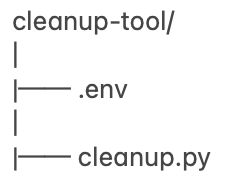
In case you've some other folder structure in mind, you can proceed accordingly but ensure that our cleanup.py and .env file lies on the same hierarchy. In case you create different folder structure, make sure to refer the files accordingly using proper folder structure.
Next, we will start with creating the .env file first. Inside the file, we will have the following contents:
DB_HOST=localhost
DB_PORT=5432
DB_NAME=localdb
DB_USER=sabyasachimukherjee
DB_PASSWORD=
Make sure to update the credential values with your own relevant data. This .env file will be used to establish connection with the local PostgreSQL database later.
Next, we will create the actual python script to clean up the database (named it as cleanup.py for us). We will look into the code explanation first and then use the code snippet to proceed further.
Explanation
First, we will understand the libraries being imported and their use:
- psycopg2 - Establish PostgreSQL database connection
- os - Read environment variables
- logging - Structured logs and audit trailing
- argparse - Read CLI arguments
- datetime - Calculate retention cutoff
- dotenv - Load .env file configuration
Next, we will try to load the configuration values from the .env file using the load_dotenv() method:
- Loads the .env file entries
- Injects the variables into os.environ
Next, in the get_connection() method, we are trying to create the database connection using the configuration values:
- Creates a PostgreSQL connection
- Uses entries as per .env file
- Gives a centralized DB access by making connection reusable across other scripts too
Next, the count_old_logs() method will help us count the number of entries which qualify as old logs as per our retention policy:
- This helps in counting the old records and creating a cutoff date.
- If today is December 16 and retention_days is 90 days, then cutoff values is September 17.
- This code gives a visibility or a sneak peek before actual delete happens.
- It is very useful when running the script in dry run mode.
- It helps the user to validate the retention logic, if it's getting calculated properly or not.
Next, in the delete_old_logs method, we are running with default set to dry-run mode. The methods looks like this:
- This is the batched delete logic where records are deleted in batches
- Parameters are as follows:
- conn - Database connection
- retention_days - Number of days data needs to be retained
- batch_sixe - Rows per transaction
- dry_run - Safety flag
- Deletes data in small chunks
- We are using LIMIT here to avoid deleteing all data at once and thereby eliminating chances of table lock
- ORDER BY created_at is being used to delete the oldest data first
- RETURNING id is being used to know how many rows were deleted
- For dry_run mode, DELETE is executed but the transaction is rolled back
- Its hows the impact of the delete in real time but actually doesn't contributes for the impact
- No data is deleted in actual
- For no-dry-run mode, this is real delete mode where data is deleted
- The transaction is committed
- The program moves on to the next batch
The Code
Following is the python code snippet which automates data clean up depending on the retention policy:
#!/usr/bin/env python3

import psycopg2
import os
import logging
import argparse
from datetime import datetime, timedelta
from dotenv import load_dotenv

# --------------------------------------------------
# Load environment variables
# --------------------------------------------------
load_dotenv()

# --------------------------------------------------
# Logging configuration
# --------------------------------------------------
logging.basicConfig(
    level=logging.INFO,
    format="%(asctime)s [%(levelname)s] %(message)s"
)

# --------------------------------------------------
# Database connection
# --------------------------------------------------
def get_connection():
    return psycopg2.connect(
        host=os.getenv("DB_HOST"),
        port=os.getenv("DB_PORT"),
        dbname=os.getenv("DB_NAME"),
        user=os.getenv("DB_USER"),
        password=os.getenv("DB_PASSWORD"),
    )

# --------------------------------------------------
# Count old records (dry-run visibility)
# --------------------------------------------------
def count_old_logs(conn, retention_days):
    cutoff = datetime.utcnow() - timedelta(days=retention_days)
    with conn.cursor() as cur:
        cur.execute(
            "SELECT COUNT(*) FROM app_logs WHERE created_at < %s",
            (cutoff,)
        )
        return cur.fetchone()[0]

# --------------------------------------------------
# Batched delete function
# --------------------------------------------------
def delete_old_logs(
    conn,
    retention_days=90,
    batch_size=1000,
    dry_run=True
):
    cutoff = datetime.utcnow() - timedelta(days=retention_days)
    total_deleted = 0

    while True:
        with conn.cursor() as cur:
            cur.execute("""
                DELETE FROM app_logs
                WHERE id IN (
                    SELECT id
                    FROM app_logs
                    WHERE created_at < %s
                    ORDER BY created_at
                    LIMIT %s
                )
                RETURNING id;
            """, (cutoff, batch_size))

            rows = cur.fetchall()
            batch_count = len(rows)

        if batch_count == 0:
            break

        total_deleted += batch_count

        if dry_run:
            conn.rollback()
            logging.info(
                "DRY-RUN: Would delete %d rows (batch)",
                batch_count
            )
            break
        else:
            conn.commit()
            logging.info(
                "Deleted %d rows (batch)",
                batch_count
            )

    logging.info(
        "Cleanup finished. Total rows affected: %d",
        total_deleted
    )

# --------------------------------------------------
# Argument parser
# --------------------------------------------------
def parse_args():
    parser = argparse.ArgumentParser(
        description="Cleanup old application logs"
    )

    parser.add_argument(
        "--retention-days",
        type=int,
        default=90,
        help="Delete logs older than N days (default: 90)"
    )

    parser.add_argument(
        "--batch-size",
        type=int,
        default=500,
        help="Number of rows deleted per batch (default: 500)"
    )

    parser.add_argument(
        "--dry-run",
        action="store_true",
        default=True,
        help="Run in dry-run mode (default)"
    )

    parser.add_argument(
        "--no-dry-run",
        dest="dry_run",
        action="store_false",
        help="Actually delete records"
    )

    return parser.parse_args()

# --------------------------------------------------
# Main runner
# --------------------------------------------------
def main():
    args = parse_args()

    logging.info(
        "Starting cleanup | retention_days=%d | batch_size=%d | dry_run=%s",
        args.retention_days,
        args.batch_size,
        args.dry_run
    )

    conn = get_connection()

    try:
        count = count_old_logs(conn, args.retention_days)
        logging.info(
            "Found %d log records older than %d days",
            count,
            args.retention_days
        )

        delete_old_logs(
            conn,
            retention_days=args.retention_days,
            batch_size=args.batch_size,
            dry_run=args.dry_run
        )

    finally:
        conn.close()
        logging.info("Database connection closed")

# --------------------------------------------------
if __name__ == "__main__":
    main()
Data Creation
Before we proceed with running the script, it is obvious that we need to complete a set of data to archive. To do this, we will create a table first and then insert data into it. To create the table, we will use the following script:
DROP TABLE IF EXISTS app_logs;

CREATE TABLE app_logs (
    id          BIGSERIAL PRIMARY KEY,
    message     TEXT NOT NULL,
    created_at  TIMESTAMP NOT NULL DEFAULT NOW()
);
Next, we will add few necessary indices to make sure that the search operation on the table is not performance impacted:
CREATE INDEX idx_app_logs_created_at
ON app_logs (created_at);
Next, we will insert multiple records to qualify for different conditions when we try to clean up the database:
INSERT INTO app_logs (message, created_at) VALUES
('Log 180 days old', NOW() - INTERVAL '180 days'),
('Log 150 days old', NOW() - INTERVAL '150 days'),
('Log 120 days old', NOW() - INTERVAL '120 days'),
('Log 95 days old',  NOW() - INTERVAL '95 days'),
('Log 90 days old',  NOW() - INTERVAL '90 days'),
('Log 60 days old',  NOW() - INTERVAL '60 days'),
('Log 30 days old',  NOW() - INTERVAL '30 days'),
('Log 7 days old',   NOW() - INTERVAL '7 days'),
('Log 1 day old',    NOW() - INTERVAL '1 day'),
('Log today',        NOW());
We can also insert multiple bulk data for heavy testing using the following script (optional):
INSERT INTO app_logs (message, created_at)
SELECT
    'Auto log ' || g,
    NOW() - (g || ' days')::INTERVAL
FROM generate_series(1, 365) AS g;
Now, after we have done all this, we will first test the data in database using PGAdmin:
SELECT*
FROM app_logs
WHERE created_at < NOW() - INTERVAL '90 days';
You should see a following output:
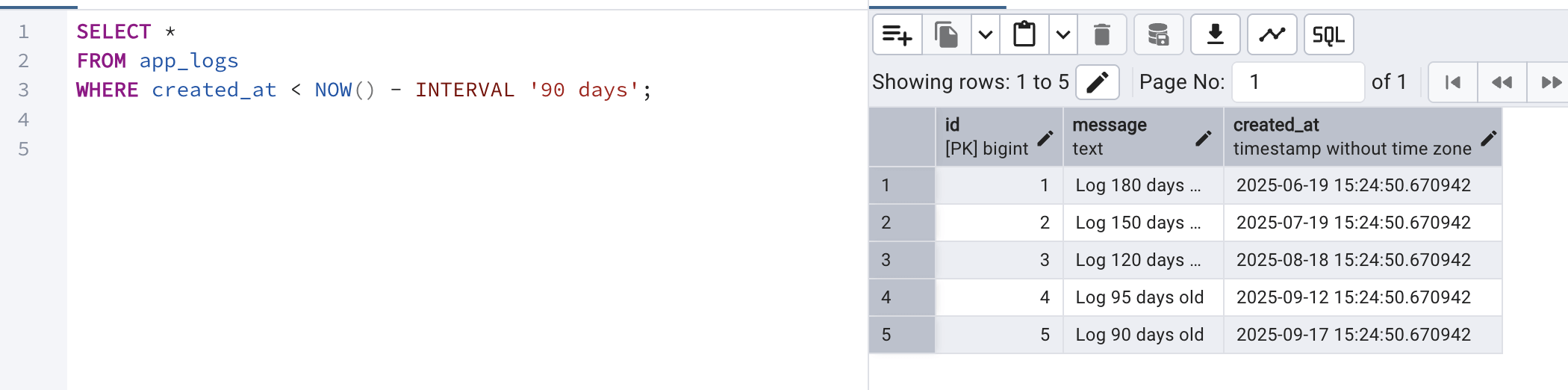
Now, these 5 records are beyond the retention policy and should ideally be deleted by our script (if run in no-dry-run mode).
Note: However, when we run the script, only 4 records will be identified but not the last record since that falls on the boundary condition. Remember, we want to delete data which are older than 90 days.
Execution of the Script
To execute the automated script, just run the following command from the location where you have the cleanup script saved:
python cleanup.py
Once we run the above command, we should see the following logs in the terminal:
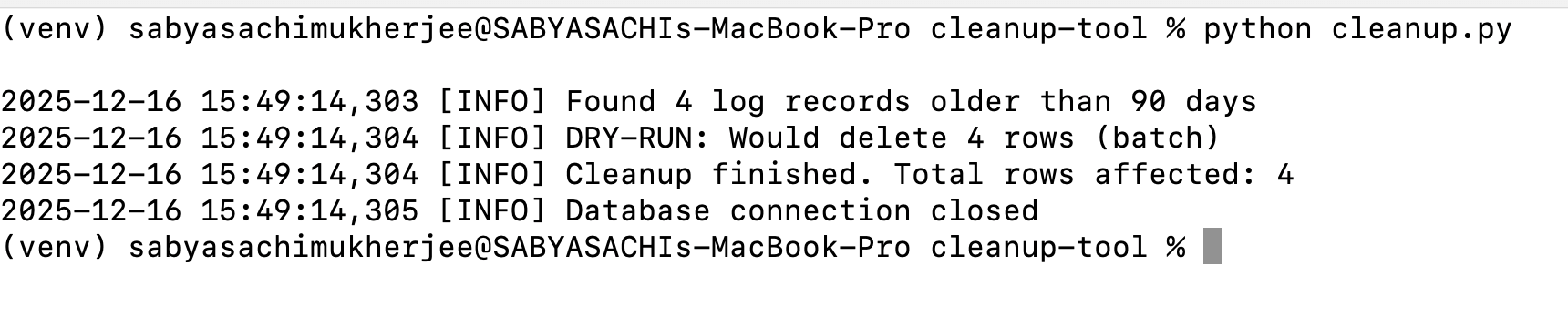
Note that in the above command, we didn't mention about the dry-run condition and the script defaulted to dry-run to make sure that permanent delete does not happens by mistake. If we head over to PGAdmin and again run the above query, we should see the same output.
Next, we will try to run in dry-run mode but see if we can identify logs older than 95 days (in case we need to clean up database with custom date range). For the same, we need to run the following command with necessary arguments:
python cleanup.py --retention-days 95 --batch-size 2 --dry-run
So, we are mentioning the retention_days here to 95 and batch-size to 3 and running in dry-run mode.

So if you take a close look at the above script output, you can see that total records identified were 3 but since the batch size was down to 2, only 2 records will be deleted in each batch (if run in no-dry-run mode). This is how we can ensure that we don't run into database lock issues.
Finally, if we want to run the above command in production mode (no-dry-run mode), then we can run the following command:
python cleanup.py --retention-days 95 --batch-size 2 --no-dry-run
Next, if we check the logs, we can see the following output:

If you take a look at the logs above, you can see that 2 batches have run, the first with 2 rows deleted and the next with 1 row deleted.
Safety measures
- Always use proper logging to make sure that logs are captured for records being identified for deletion
- Keep the default run mode to dry-run mode
- Make sure to use index on the table which needs to be cleaned up so that searching during deletion is faster
- Try to run the script at night hours (when expected load is pretty low)
- Always try using batching method to prevent database locks
Conclusion
We finally learnt on the importance of database cleanup and how we can do it very efficiently using automation script (in python). We also walked through different precautionary measures we should take to make sure that appropriate data is identified and cleaned up.