Forum Replies Created
Viewing 15 posts - 3,256 through 3,270 (of 13,879 total)
-
Reply To: Script multiple queries
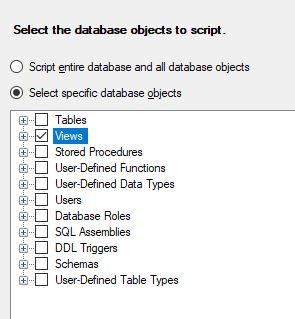
Right-click on the database in SSMS Object Explorer.
Select Tasks/Generate Scripts
Select Views and follow the prompts.

-
Reply To: Script multiple queries
Jackie Lowery wrote:Is it possible to script multiple queries? I need to transfer about 30 queries from one server to another w/o copying the entire database. I was hoping i wouldn't...
-
Reply To: SSIS 2016 Script task runs but file not created
Are you using SQL Agent job to do this?
If so, it's likely that the SQL Agent user does not have the necessary rights to create the file.
Or, if the file...
-
Reply To: insert into permanent table using cte
Note also that it is good practice to
a) Explicitly name the columns you are INSERTing to
b) Avoid SELECT * (unless the number of columns and their names has no effect...
-
Reply To: insert into permanent table using cte
You have stated your requirement, but what is your question? What have you tried and what were the results?
-
Reply To: SSIS 2008 - Failed to lock variable Error (Oh, I fixed it)
ajeetkv164 wrote:Hi All,
I was facing same issue but now resolved it , please follow the given link below for this issue in details.
https://stackoverflow.com/a/58361448/11954782
Thanks
Ajeet Verma
You just responded to a six-year-old post...
-
Reply To: A bit of mathematics...
Something like this (untested, because you did not provide DDL etc)?
WITH Sums
AS (SELECT Revenue = SUM([Money In])
,Outgoings... -
Reply To: transactions(Try, commit and rollback)
Deleting your post after others have taken the time to respond, and not even thanking them, is rather rude in my opinion.
So here is a copy of the original, as...
-
Reply To: How to return lowest level parts from BOM
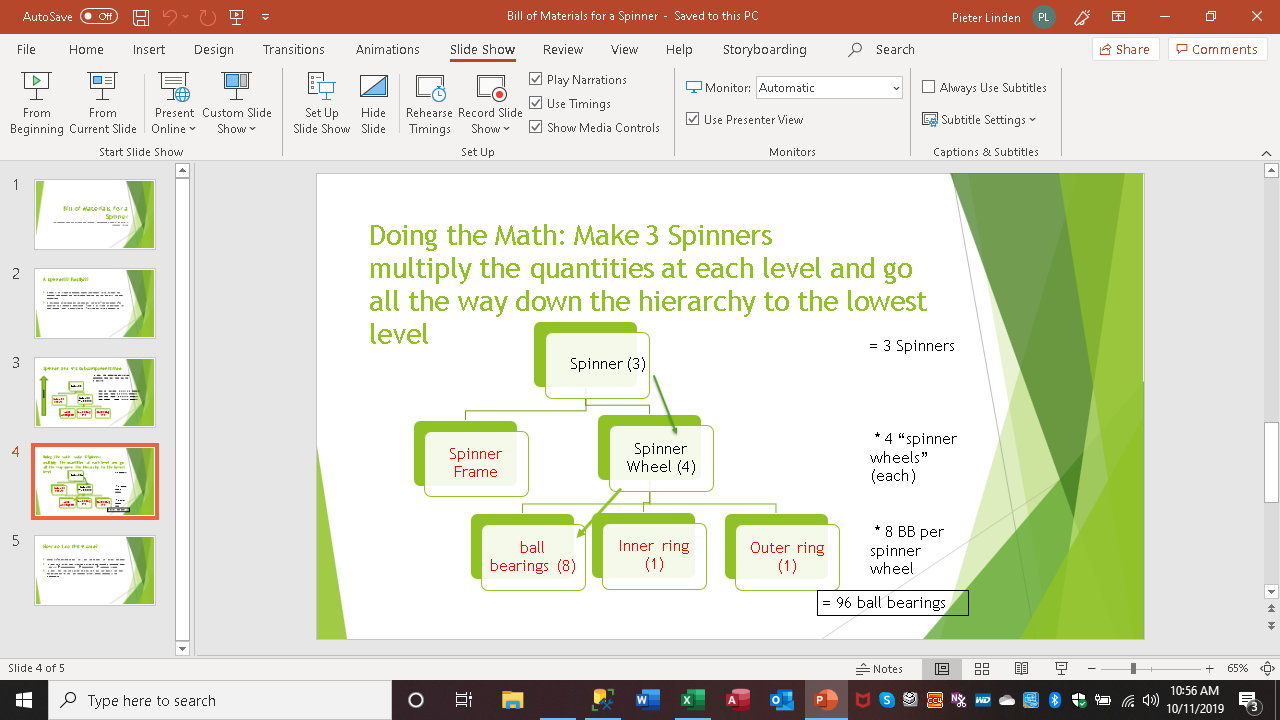
Here's an in-line version of that image.
-
Reply To: How to return lowest level parts from BOM
pietlinden wrote:Jeff,
(and Steve, who's kinda busy this week) and anybody else... for grins, I did a PPT of this so I could see the hierarchy and understand what's going on...
-
Reply To: SSIS job error - Exit code - 1073741819
Are you able to open the All Executions report & check the logs there?
-
Reply To: Defer connection verification in SSIS
Your approach seems more cumbersome than necessary. There's rarely any need to hard-code environment-specific parameters - just configure them to pick up the values of SSISDB environment variables.
-
Reply To: Using SELECT LEFT and WHERE IN in the same SELECT Statement.
Jeffrey Williams wrote:WHERE LEFT(AKey, 3) IN ('AAA', 'BBB', 'CCC', 'DDD', 'EEE', 'GGG', 'JJJ') AND LEN(AKey) = 9AFAIK, Scott's solution is the better one, because LIKE 'AAA%' is potentially...
-
Reply To: How to randomly select 10% of the rows from a table
SQL_Hunt wrote:thanks, Phil. Can I use random () to rewrite the same query?
Please post the link to the T-SQL random() function that you intend to use.
-
Reply To: How to randomly select 10% of the rows from a table
Use NEWID() to force randomness.
SELECT TOP (10) PERCENT
       *
FROM sys.columns
ORDER BY NEWID();
Viewing 15 posts - 3,256 through 3,270 (of 13,879 total)