Two queries work until compared with EXCEPT statement
-
I've got multiple databases on 2 SQL 2019 CU32 servers , all using the same schema and code base. The only difference in patch levels is Test has the July Security Update and Prod has the March one. There's a Table Valued function that fails on one database only and only on prod. Of the 2 databases I'm specifically testing, one is on 110 (SQL 2012) compatibility and the code works, the other is on 150 (SQL 2019) and the code fails, although this only started recently. However the database in 110 mode is set to this mode because the client gets the same problem on this database if it's set to 150 mode, but no problem in 110 mode.
The function has two almost identical select queries linked with an EXCEPT statement as per the code below (obfuscated but correct). Both queries call string splitter functions based on the one written by Jeff Moden and taken from this article: http://www.sqlservercentral.com/articles/Tally+Table/72993/ These are essentially the same, the one generates a list of included conditions and the other a list of excluded conditions.
When I run the individual select statements, they both work as expected for all parameters tested and on both databases. However, when I run them together, with the EXCEPT it errors. I've tried various fixes including using CTEs - it still fails, Temp Tables and Table Variables, both of which work, as does replacing the EXCEPT with a LEFT JOIN and testing for NULLs on the right side of the join.
The error returned is below, note that the string handling is only being done in the call to the string splitter functions which don't return errors when run separately: fn_StringIncludes(@String) and fn_StringExcludes(@String).
Msg 537, Level 16, State 2, Line 8
Invalid length parameter passed to the LEFT or SUBSTRING function.
The code is:
DECLARE
    @Client VARCHAR(10) = 'Acme',
    @String VARCHAR(MAX) = 'AC*';

SELECT DISTINCT Acc_Id, Acc_Code
FROM Accounts a
INNER JOIN Clients c on a.Prime_Client_Id = c.C_ID
INNER JOIN fn_StringIncludes(@String) S ON
a.Acc_Code = S.Match
OR a.Acc_Code LIKE S.Pattern
OR a.Acc_Code BETWEEN S.LowerBound AND S.UpperBound
WHERE c.Client = @Client
EXCEPT
SELECT Acc_Id, Acc_Code
FROM Accounts a
INNER JOIN Clients c on a.Prime_Client_Id = c.C_ID
INNER JOIN fn_StringExcludes(@String) S ON
a.Acc_Code = S.Match
OR a.Acc_Code LIKE S.Pattern
OR a.Acc_Code BETWEEN S.LowerBound AND S.UpperBound
WHERE c.Client = @Client
It looks like the optimizer is causing an issue in the string splitter, but only when the two select statements are linked with the EXCEPT.
I've not seen any indication this is a known bug or that there's a fix for it. My work around's solve the problem, but this looks like a bug in the optimizer. with an upgrade in the planning I'm wondering if I'll see the same issue on 2025.
Leo
Nothing in life is ever so complicated that with a little work it can't be made more complicated. -
I get those when SQL Server for some reason shuffles where it's gonna check on substring due a query plan change
Like it gets alle the data first, tries the substring, fails before it could filter the invalid data out with where
-
I'm aware that older versions of the optimizer had a issue where they were filtering some data after logic that was causing queries to fail, but I haven't see it in SQL 2016. As I recall, this sequencing of the logic has been resoved.
Putting that aside, the substring function is just taking the string 'AC*' and essentially returning 'AC%'. Or if I was using multiple parameters in the string it would take 'AC*,!AS*' and return 'AC%' as in included value and 'AS%' as an excluded option. There are no other filters and the string function works when called without the EXCEPT.
Leo
Nothing in life is ever so complicated that with a little work it can't be made more complicated. - Leo.Miller wrote:
I'm aware that older versions of the optimizer had a issue where they were filtering some data after logic that was causing queries to fail, but I haven't see it in SQL 2016. As I recall, this sequencing of the logic has been resoved. Putting that aside, the substring function is just taking the string 'AC*' and essentially returning 'AC%'. Or if I was using multiple parameters in the string it would take 'AC*,!AS*' and return 'AC%' as in included value and 'AS%' as an excluded option. There are no other filters and the string function works when called without the EXCEPT.
That's a lot to unpack. The wildcard treatment as described seems incorrect just based on intuition. Maybe it's ok but it doesn't seem that way without proof. Imo the reason there haven't been more replies to this topic has to do with the inclusion of a UDF without providing its definition. Without seeing the code and an example it's hard to be certain about anything. We need a specific example to analyze the code points of the string manipulations. Then we could see both sides of the EXCEPT
Aus dem Paradies, das Cantor uns geschaffen, soll uns niemand vertreiben können
-
CREATE TABLE Customers (
CustomerID INT PRIMARY KEY,
CustomerName NVARCHAR(50)
);

INSERT INTO Customers (CustomerID, CustomerName)
VALUES
(1, 'ACME Corp'),
(2, 'AC Solutions'),
(3, 'AS Technologies'),
(4, 'Global AC Systems'),
(5, 'ASIA Services'),
(6, 'Universal Corp');


CREATE FUNCTION dbo.FilterCustomers (@FilterString NVARCHAR(200))
RETURNS TABLE
AS
RETURN
(
WITH Tokens AS (
SELECT value AS Token
FROM STRING_SPLIT(@FilterString, ',')
)
SELECT c.CustomerID, c.CustomerName
FROM Customers c
WHERE EXISTS (
SELECT 1
FROM Tokens t
WHERE LEFT(t.Token,1) <> '!'
AND c.CustomerName LIKE REPLACE(t.Token,'*','%')
)
AND NOT EXISTS (
SELECT 1
FROM Tokens t
WHERE LEFT(t.Token,1) = '!'
AND c.CustomerName LIKE REPLACE(SUBSTRING(t.Token,2,LEN(t.Token)),'*','%')
)
);


SELECT *
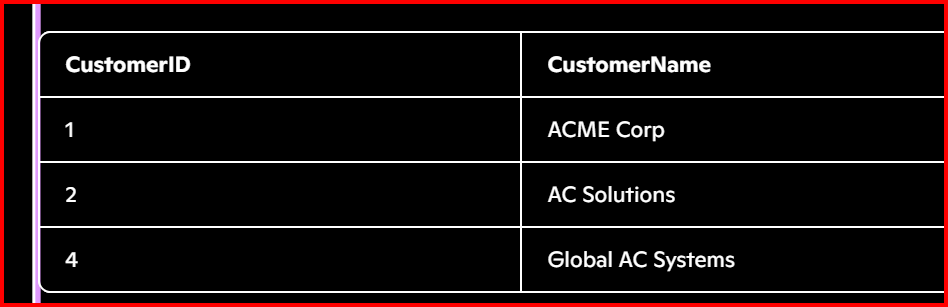
FROM dbo.FilterCustomers('AC*,!AS*');
Viewing 5 posts - 1 through 5 (of 5 total)
You must be logged in to reply to this topic. Login to reply